
Ọrọ Iṣaaju
O ṣeun fun riraasing the Memorex MX-SBDA220 32-inch Bluetooth Dolby Atmos Soundbar. This soundbar is designed to enhance your home audio experience with immersive Dolby Atmos sound, delivering powerful and clear audio for movies, music, and gaming. This manual provides essential information for setting up, operating, and maintaining your new soundbar. Please read it thoroughly before use and retain it for future reference.
Awọn Itọsọna Aabo pataki
- Read all instructions before operating the soundbar.
- Jeki iwe afọwọkọ yii fun itọkasi ọjọ iwaju.
- Maṣe lo ohun elo yii nitosi omi.
- Mọ pẹlu asọ gbigbẹ nikan.
- Ma ṣe dina eyikeyi awọn ṣiṣi atẹgun. Fi sori ẹrọ ni ibamu pẹlu awọn ilana ti olupese.
- Maṣe fi sori ẹrọ nitosi awọn orisun ooru gẹgẹbi awọn imooru, awọn iforukọsilẹ ooru, awọn adiro, tabi awọn ohun elo miiran (pẹlu ampliifiers) ti o gbe ooru jade.
- Dabobo okun agbara lati ma rin lori tabi pin, ni pataki ni awọn pilogi, awọn ohun elo irọrun, ati aaye nibiti wọn ti jade kuro ninu ohun elo naa.
- Lo awọn asomọ/awọn ẹya ara ẹrọ ti olupese pato.
- Yọọ ohun elo yi nigba iji manamana tabi nigba lilo fun igba pipẹ.
- Tọkasi gbogbo iṣẹ si awọn oṣiṣẹ iṣẹ ti o peye. Iṣẹ nilo nigbati ohun elo ba ti bajẹ ni ọna eyikeyi, gẹgẹbi okun ipese agbara tabi plug ti bajẹ, omi ti ta silẹ tabi awọn nkan ti ṣubu sinu ẹrọ, ohun elo naa ti farahan si ojo tabi ọrinrin, ko ṣiṣẹ deede. , tabi ti lọ silẹ.
Ohun ti o wa ninu Apoti
Carefully unpack your soundbar and ensure all items are present:
- Memorex MX-SBDA220 Soundbar
- Isakoṣo latọna jijin
- Okun agbara
- Quick Bẹrẹ Itọsọna

Image: The Memorex MX-SBDA220 soundbar displayed with various connection cables including Optical, HDMI, and USB, alongside the Bluetooth logo, illustrating the multiple connectivity options.
Ọja Pariview
Iwaju View
Aworan: A taara iwaju view of the Memorex MX-SBDA220 soundbar, highlighting its sleek design, front speaker grille, and the two circular top-firing speakers for Dolby Atmos effects.
Awọn iṣakoso Igbimọ Ẹgbẹ

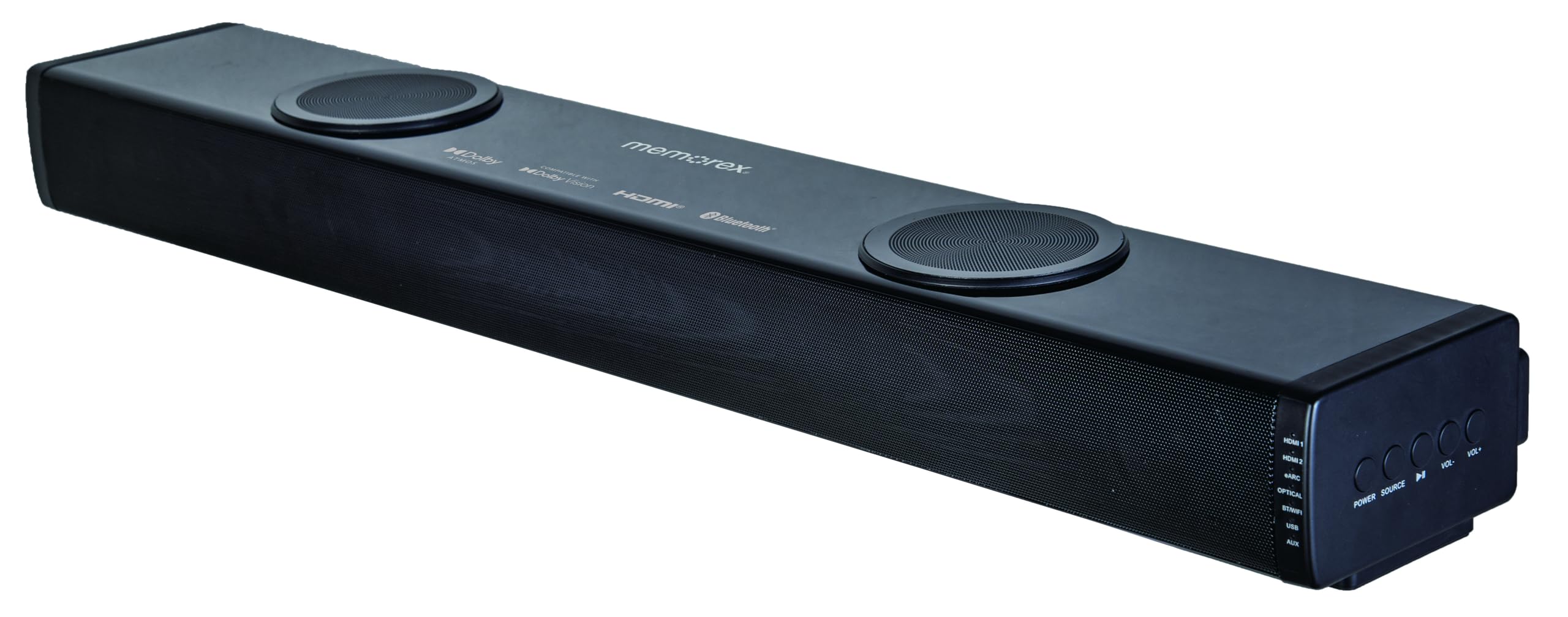
Aworan: Angled view of the Memorex MX-SBDA220 soundbar, revealing the control panel on the right side. Buttons for Power, Source selection, Play/Pause, Volume Down, and Volume Up are visible, along with input indicators.
Isakoṣo latọna jijin

Image: The Memorex MX-SBDA220 soundbar shown with its full-function remote control positioned above it. The remote features buttons for power, input selection, sound modes, volume, bass, and treble adjustments.
Eto Itọsọna
1. Ti ara Placement
Place the soundbar on a stable, flat surface directly in front of your television. Ensure there are no obstructions blocking the front or top-firing speakers for optimal sound delivery, especially for Dolby Atmos effects.
2. Connecting to Your TV/Devices
The MX-SBDA220 offers multiple connectivity options:
- HDMI ARC (Ikanni Pada Ohùn): For the best audio quality and control, connect an HDMI cable from the soundbar's HDMI ARC output to your TV's HDMI ARC input. This allows your TV remote to control the soundbar's volume.
- Iṣawọle Opitika: Connect an optical cable from the soundbar's OPTICAL input to your TV's optical digital audio output.
- HDMI IN (x2): Connect external devices like Blu-ray players or gaming consoles to the soundbar's HDMI IN ports. Then, connect the soundbar's HDMI ARC output to your TV's HDMI ARC input.
- Bluetooth: For wireless audio streaming from smartphones or tablets, select the Bluetooth input on the soundbar and pair your device.
- Ẹrọ USB: Fi okun USB sii pẹlu ohun files sinu ibudo USB fun ṣiṣiṣẹsẹhin taara.
- Iṣawọle AUX: Use a 3.5mm audio cable to connect devices with an analog audio output to the soundbar's AUX input.
3. Asopọ agbara
Connect the provided power cable to the soundbar's power input and then plug it into a wall outlet. The soundbar will enter standby mode.
Awọn ilana Iṣiṣẹ
Titan / Paa
Tẹ awọn AGBARA bọ́tìnì lórí ọ̀pá ohùn tàbí ìṣàkóso láti tan tàbí pa ẹ̀rọ náà.
Aṣayan titẹ sii
Tẹ awọn ORISUN button on the soundbar or the corresponding input button (HDMI1, HDMI2, eARC, OPT, BT, USB, AUX) on the remote control to switch between audio sources. The LED display will indicate the active input.
Iṣakoso iwọn didun
Tẹ VOL+ or VOL- awọn bọtini lori ọpa ohun tabi iṣakoso latọna jijin lati ṣatunṣe iwọn didun oluwa.
Awọn ipo Ohun
The soundbar features 5 optimized sound modes. Press the corresponding button on the remote control to select:
- Fiimu: Enhances cinematic audio with dynamic range.
- Orin: Ó ń mú kí ohùn dára síi fún ṣíṣeré orin.
- Oru: Din awọn ibiti o ni agbara fun gbigbọ idakẹjẹ, apẹrẹ fun alẹ alẹ viewing.
- Ohùn: Enhances vocal clarity for dialogue-heavy content.
- Ere: Ó fúnni ní ìrírí ohùn tó wúni lórí fún eré.
Bass ati Treble Atunṣe
Lo awọn BASS+ / BASS- ati TÍBÉLÌ+ buttons on the remote control to fine-tune the low and high frequencies to your preference.
Asopọ Bluetooth
- Yan awọn BT input on the soundbar. The LED display will flash, indicating pairing mode.
- On your mobile device, enable Bluetooth and search for "MX-SBDA220".
- Select the soundbar to pair. Once connected, the LED display will stop flashing.
USB Sisisẹsẹhin
Insert a USB flash drive into the USB port. The soundbar will automatically switch to USB input and begin playing compatible audio files. Use the remote control for playback functions (Play/Pause, Skip Track).
Itoju ati Itọju
- Ninu: Lo asọ ti o rọ, ti o gbẹ lati nu dada ti ọpa ohun. Maṣe lo awọn olutọpa olomi tabi awọn sprays aerosol.
- Afẹfẹ: Rii daju pe awọn šiši fentilesonu ko ni idinamọ lati ṣe idiwọ igbona.
- Ibi ipamọ: Tí o bá ń fi ohun èlò orin pamọ́ fún ìgbà pípẹ́, yọ ọ́ kúrò nínú ẹ̀rọ agbára kí o sì tọ́jú rẹ̀ sí ibi tí ó tutù tí ó sì gbẹ.
- Yago fun Ọrinrin: Keep the soundbar away from water, rain, and excessive humidity.
Laasigbotitusita Itọsọna
| Isoro | Owun to le Solusan |
|---|---|
| Ko si agbara |
|
| Ko si ohun |
|
| Isakoṣo latọna jijin ko ṣiṣẹ |
|
| Awọn oran sisopọ Bluetooth |
|
Imọ ni pato
| Ẹya ara ẹrọ | Sipesifikesonu |
|---|---|
| Nọmba awoṣe | MX-SBDA220 |
| Agbọrọsọ Iru | Atmospheric (Dolby Atmos 2.0.2CH) |
| Lapapọ Agbara Ijade | 100 Watts (20W x 2 front + 30W x 2 top) |
| Asopọmọra Technology | Bluetooth 5.0, HDMI (ARC x1, IN x2), Optical, USB, AUX |
| Bluetooth Ibiti | Titi de awọn mita 10 (33 ẹsẹ) |
| Awọn iwọn Ọja (D x W x H) | 5.93" x 8.1" x 37.57" (isunmọ) |
| Iwọn Nkan | 2.2 iwon |
| Awọn irinše to wa | Soundbar, Remote Control, Power Cable, Quick Start Guide |
| UPC | 838689000208 |
Alaye atilẹyin ọja
Memorex products are manufactured to the highest quality standards. For specific warranty details, including coverage period and terms, please refer to the warranty card included with your product or visit the official Memorex webojula. Tọju iwe-ẹri rira rẹ bi ẹri rira fun eyikeyi awọn ibeere atilẹyin ọja.
Onibara Support
If you encounter any issues or have questions regarding your Memorex MX-SBDA220 Soundbar that are not covered in this manual, please contact Memorex customer support. Contact information can typically be found on the official Memorex webojú-òpó wẹ́ẹ̀bù tàbí nínú Ìtọ́sọ́nà Ìbẹ̀rẹ̀ Kíákíá tí a pèsè pẹ̀lú ọjà rẹ.