
1. Ifihan
Thank you for choosing the HOU iPad Keyboard Case. This manual provides detailed instructions for setting up, operating, and maintaining your new keyboard case. Designed for enhanced productivity and protection, this accessory transforms your iPad into a versatile workstation.
2. Ibamu
This keyboard case is designed to be compatible with specific iPad models. Please verify your iPad's model number to ensure proper fit and functionality.
How to Check Your iPad Model:
- Lọ si Eto lori iPad rẹ.
- Tẹ ni kia kia Gbogboogbo, lẹhinna Nipa.
- Wa awọn Nọmba awoṣe. It typically starts with 'A' followed by four digits (e.g., A2602).
- Alternatively, the model number is printed in tiny text on the back case of your iPad.
Awọn awoṣe iPad ibaramu:
- iPad 9th Generation 10.2 inch 2021 (Model Numbers: A2602/A2603/A2604/A2605)
- iPad 8th Generation 10.2 inch 2020 (Model Numbers: A2270/A2428/A2429/A2430)
- iPad 7th Generation 10.2 inch 2019 (Model Numbers: A2200/A2197/A2198)
- iPad Air 3 (10.5 inch)
- iPad Pro 10.5 inch 2017

3. Key Awọn ẹya ara ẹrọ
The HOU iPad Keyboard Case offers a range of features designed to enhance your iPad experience:
- Silent & Responsive Typing: Equipped with premium silicone-coated scissor switches for quiet, comfortable, and efficient typing.
- Apẹrẹ oofa ti a le yọ kuro: The keyboard can be easily detached from the case, allowing for flexible use in tablet mode or laptop mode.
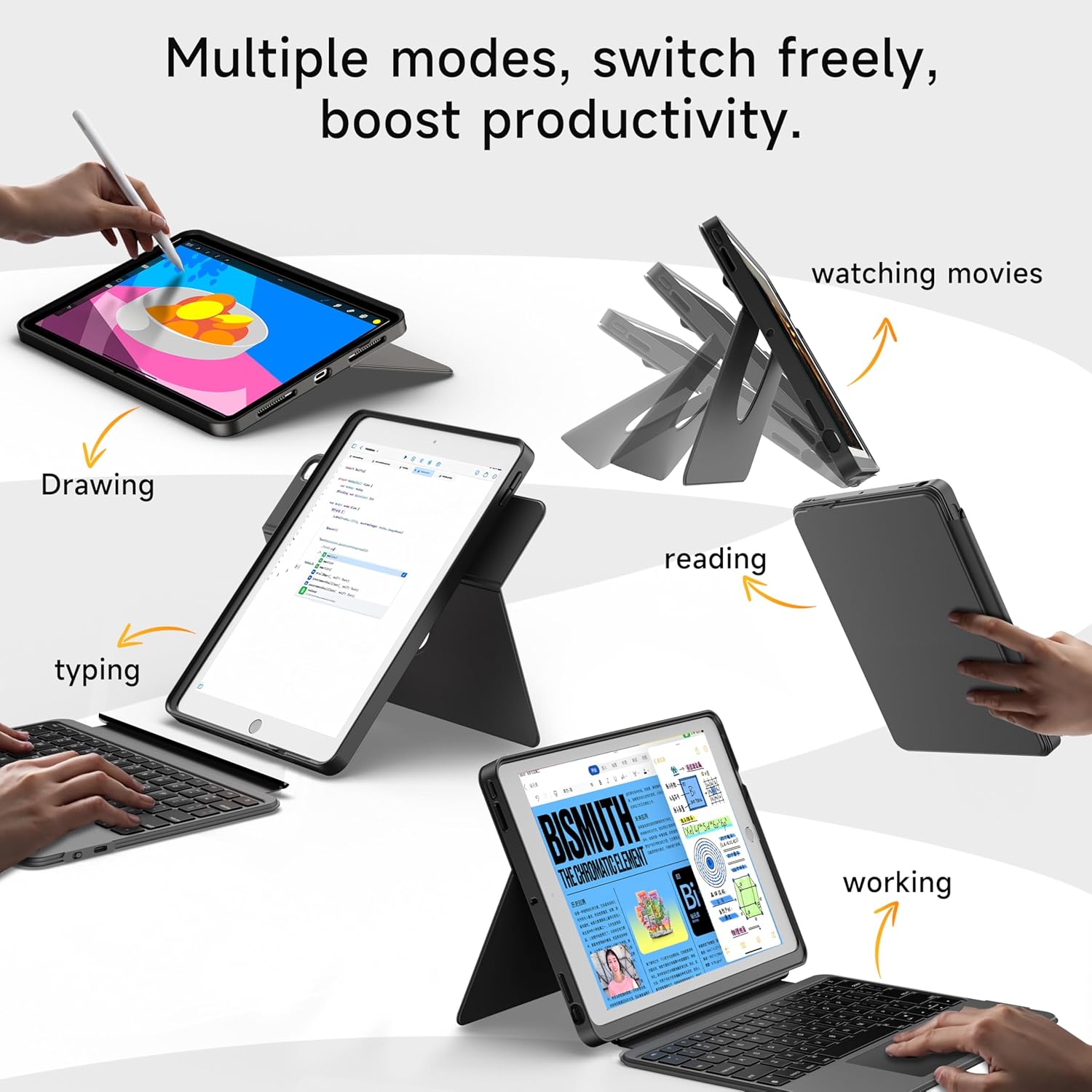
- 360° Rotating Stand with Adjustable Angles: Provides versatile viewing angles, supporting both portrait and landscape orientations for various activities like reading, watching, or presenting.
- 7-Color Backlit Keyboard: Features adjustable 7-color backlighting for typing in low-light conditions, with customizable brightness levels.
- Ààbò Ìpele Ológun: The shockproof silicone case offers 360° protection against drops and spills.
- Secure Apple Pencil Storage: Includes an elastic strap to securely hold your Apple Pencil.
- Pàdì Ìfọwọ́wọ́pọ̀: A large multi-touch touchpad supports iOS gestures for precise navigation.
- Igbesi aye batiri gigun: The keyboard features a 500mAh battery, providing up to 50 hours of use with backlighting off, or 4-6 hours with backlighting on.

4. Awọn ilana iṣeto
4.1. Ngba agbara si Keyboard
Before first use, ensure the keyboard is fully charged.
- Wa ibudo gbigba agbara USB-C ni ẹgbẹ ti keyboard naa.
- Connect the provided USB-C cable to the keyboard and a compatible power adapter (not included).
- The LED indicator will turn red during charging and turn off when fully charged. A 2-hour charge provides weeks of use.

4.2. Sisopọ Bluetooth
Follow these steps to connect your keyboard to your iPad via Bluetooth:
- Ensure the keyboard is charged and turn it on using the power switch.
- Lori iPad rẹ, lọ si Eto > Bluetooth.
- Tẹ mọlẹ FN + CONTROL + R keys on the keyboard for 3 seconds to enter pairing mode. The Bluetooth indicator light on the keyboard will flash.
- On your iPad, select "HOU Keyboard" from the list of available devices.
- Once paired, the Bluetooth indicator light on the keyboard will turn off.
5. Awọn ilana Iṣiṣẹ
5.1. Lilo Bọtini
The keyboard provides a full QWERTY layout with dedicated iOS command keys for efficient workflow.
- Awọn ọna abuja Access one-tap shortcuts for screen brightness, media playback, volume control, Lock, Home, and Emoji functions.
- Titẹ: Enjoy a comfortable and quiet typing experience for documents, emails, and more.

5.2. Siṣàtúnṣe Backlight
The keyboard features 7-color backlighting with adjustable brightness.
- Yi Awọ: Tẹ FN + Light Bulb icon to cycle through the 7 available colors.
- Ṣatunṣe Imọlẹ: Tẹ FN + Up Ọfà or FN + Ọfà isalẹ láti mú kí ìmọ́lẹ̀ ẹ̀yìn pọ̀ sí i tàbí dínkù.
5.3. Using the Touchpad
The large multi-touch touchpad supports various iOS gestures for intuitive navigation:
- Fọwọba ika ẹyọkan: Click/Select.
- Two Fingers Swipe: Yi lọ si oke/isalẹ/osi/ọtun.
- Three Fingers Swipe Up: Lọ si Iboju ile.
- Three Fingers Swipe Down: View Iṣakoso ile-iṣẹ.
- Pinch In/Out: Sun sinu/sita.
5.4. Utilizing the 360° Rotating Stand
The integrated stand allows for flexible viewawọn aṣayan igbaradi:
- Ipo ala-ilẹ: Ideal for watching videos, presentations, or typing.
- Ipo Aworan: Perfect for reading documents, browsing social media, or video calls.
- Titẹ Ti o le ṣatunṣe: Tilt the screen from 90° (typing) to 170° (movie nights) for optimal comfort.


6. Itọju
To ensure the longevity and optimal performance of your HOU iPad Keyboard Case, follow these maintenance guidelines:
- Ninu: Lo asọ, damp asọ lati mu ese si isalẹ awọn ode ti awọn nla ati keyboard. Yago fun awọn kemikali lile tabi awọn ohun elo abrasive.
- Ibi ipamọ: When not in use, keep the keyboard case closed to protect the screen and keyboard. Store in a cool, dry place away from extreme temperatures.
- Yago fun Olomi: While the case offers some protection, avoid direct exposure to liquids to prevent damage to the electronic components.
7. Laasigbotitusita
If you encounter any issues with your HOU iPad Keyboard Case, refer to the following common solutions:
- Keyboard Not Connecting via Bluetooth:
- Rí i dájú pé keyboard ti gba agbára dáadáa àti pé ó ti ń ṣiṣẹ́.
- Turn off and on your iPad's Bluetooth, then try pairing again.
- Make sure your iPad's operating system is iOS 15.3 or later.
- Keyboard Ko Dahun:
- Check the keyboard's battery level. Recharge if necessary.
- Tun asopọ Bluetooth pọ.
- Imọlẹ ẹhin Ko Ṣiṣẹ:
- Rii daju pe keyboard ti wa ni titan.
- Tẹ FN + Light Bulb icon to activate or change backlight settings.
- Touchpad Lag or Unresponsiveness:
- Ensure the keyboard battery is not critically low.
- Restart the Bluetooth connection on your iPad.
8. Awọn alaye ọja
| Ẹya ara ẹrọ | Ẹ̀kúnrẹ́rẹ́ |
|---|---|
| Brand | HOU |
| Nọmba awoṣe | B0DTKBTV4H |
| Awọn ẹrọ ibaramu | iPad 9th/8th/7th Gen 10.2", iPad Air 3, iPad Pro 10.5" 2017 |
| Asopọmọra Technology | Bluetooth |
| Apejuwe Keyboard | Ergonomic, Ultra-Silent Keys, X-shaped high-rebound keys |
| Pataki Awọn ẹya ara ẹrọ | Backlit (7-Color), Detachable Case, Hotkeys and Media Keys, Portable, Trackpad, 360° Rotating Stand, Apple Pencil Holder |
| Agbara Batiri | 500mAh (Lithium) |
| Igbesi aye batiri | Up to 50 hours (backlight off), 4-6 hours (backlight on) |
| Gbigba agbara Port | USB-C |
| Ohun elo | Silicone (Shockproof, Military-Grade Protection) |
| Iwọn Nkan | 1.34 poun (isunmọ 608g) |
| Awọn irinše to wa | Keyboard, Case, USB-C Charging Cable |
9. Atilẹyin ọja ati Onibara Support
Your HOU iPad Keyboard Case is backed by a comprehensive warranty and dedicated customer support.
- 1-Year Replacement Guarantee: Enjoy peace of mind with a 1-year replacement warranty covering manufacturing defects.
- Ilana Agbapada 30-ọjọ: If you are not completely satisfied with your purchase, you may return it within 30 days for a full refund.
- 24/7 atilẹyin alabara: For any questions, concerns, or assistance, please contact our customer support team available 24 hours a day, 7 days a week.