
1. Ọja Ipariview
The Sorbus LED Light Display Shelf is a vertical 5-tier wall-mounted unit designed for displaying decor items, vanity essentials, or collectibles. It features integrated LED lighting and two convenient hooks for additional storage.
Awọn ẹya pataki:
- Multi-Tier Storage: Five square shelves provide ampaaye fun orisirisi awọn ohun kan.
- Imọlẹ LED ti a ṣepọ: Features multiple light modes including cool, warm, and orange tones, with adjustable brightness.
- Built-in Hooks: Two hooks are included for hanging accessories like towels, jewelry, or headphones.
- Ikole ti o tọ: Made from sturdy engineered wood for lasting use.
- Fifi sori Rọrun: Designed for wall-mounting with minimal assembly required.

Image 1.1: The Sorbus LED Light Display Shelf in black, showcasing its vertical 5-tier design with illuminated LED lights.
2. Awọn Ilana Aabo pataki
WARNING: Read and follow all assembly instructions carefully to ensure safe installation. Do not overload shelves beyond their weight limit. Keep electrical components dry and away from heat sources. Unplug the unit when not in use or when performing maintenance. Do not attempt to repair or modify the electrical components yourself. Always use the provided remote or wire toggle to control the LED lights.
3. Package Awọn akoonu
Jọwọ rii daju pe gbogbo awọn paati wa ṣaaju ki o to bẹrẹ apejọ:
- Sorbus LED Light Display Shelf Unit
- LED Light Strips (pre-installed)
- Isakoṣo latọna jijin
- Wire Toggle Switch
- Adapter agbara
- Ohun elo iṣagbesori (awọn skru, awọn ìdákọró)
- Apejọ Ilana Afowoyi
4. Eto ati fifi sori
4.1 Ṣaaju ki o to bẹrẹ
Ensure you have the necessary tools for wall mounting (e.g., drill, screwdriver, level, measuring tape). Choose a suitable location on a sturdy wall, considering the shelf's dimensions and desired display area.
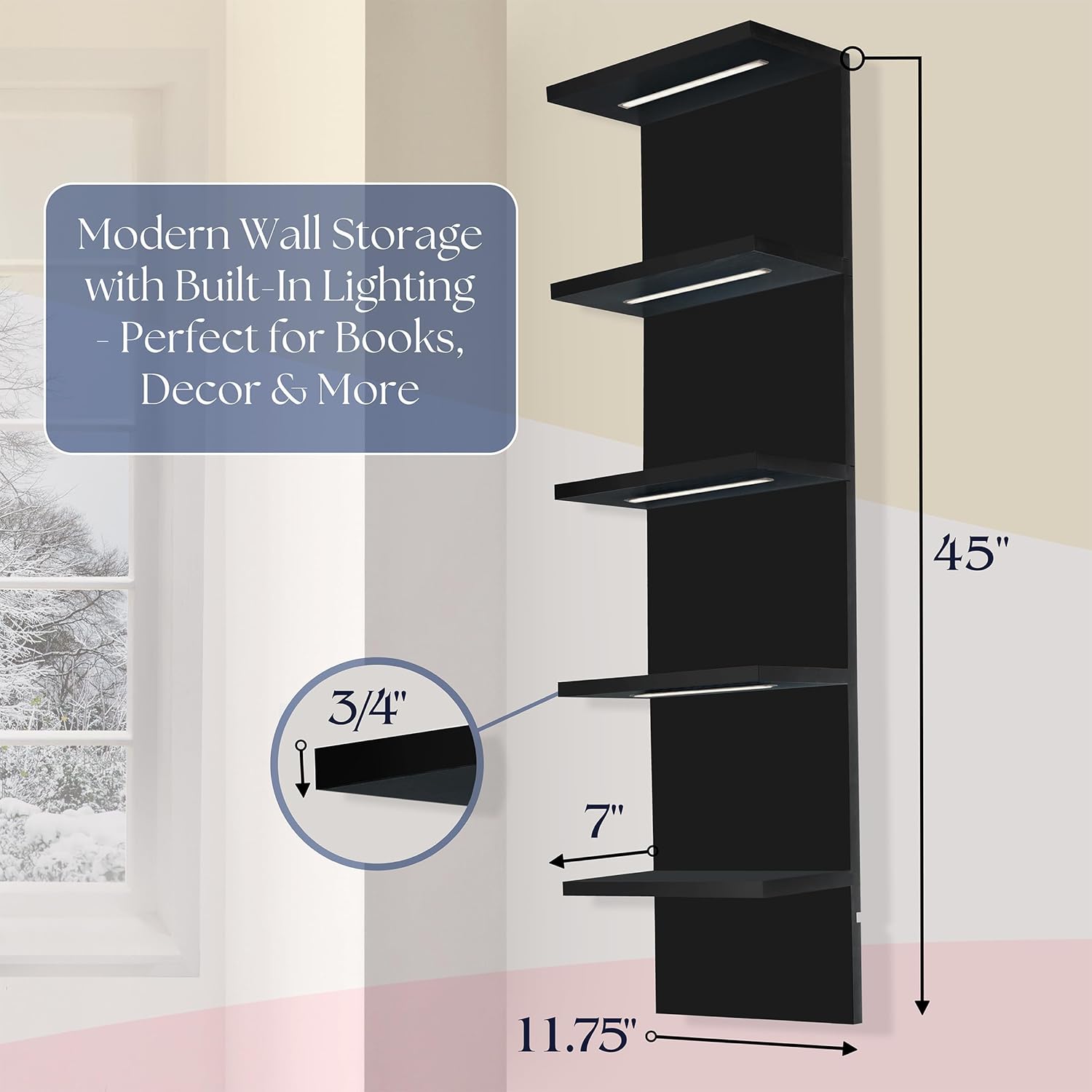
Image 4.1: Product dimensions for planning installation. The shelf measures 45 inches in height, 7 inches in width, and 11.75 inches in depth.
4.2 Mounting the Shelf
- Ṣọra gbogbo awọn paati ati rii daju lodi si atokọ akoonu package.
- Refer to the detailed assembly instructions included in your package for specific steps on attaching the shelves to the main board, if required.
- Mark the desired mounting points on your wall using a pencil and a level to ensure straight alignment.
- Drill pilot holes at the marked locations, suitable for the provided wall anchors. Insert the wall anchors.
- Align the shelf's mounting holes with the installed anchors and secure the shelf to the wall using the provided screws. Ensure it is firmly attached and stable.
- Connect the LED light power adapter to the shelf and then to a power outlet.

Aworan 4.2: Example of the display shelf installed in a living room setting.

Image 4.3: The display shelf used as a vanity organizer in a bathroom or bedroom.
5. Awọn ilana Iṣiṣẹ
5.1 Ṣíṣàkóso Àwọn Ìmọ́lẹ̀ LED
The integrated LED lights can be controlled using either the included remote control or the inline wire toggle switch.
5.2 Lilo isakoṣo latọna jijin
Point the remote control directly at the shelf's receiver. The remote allows you to:
- Turn the lights ON/OFF.
- Switch between multiple light modes (e.g., Cool White, Warm Tones, Amber).
- Adjust the brightness (dimming modes).
- Set a timer for automatic shut-off (e.g., 1H, 2H, 3H, 4H).

Image 5.1: The remote control for the LED lights, illustrating various functions including color and brightness adjustments.
5.3 Using the Wire Toggle Switch
The inline wire toggle switch provides basic control for the LED lights, typically allowing you to cycle through modes or turn the lights on/off.
6. Itọju
6.1 Ninu
To clean the shelf, wipe surfaces with a soft, dry cloth. For stubborn marks, a slightly damp cloth can be used, followed by immediate drying. Avoid using abrasive cleaners, harsh chemicals, or excessive moisture, as these can damage the finish and electrical components.
6.2 Itọju Gbogbogbo
- Ensure the shelf is not exposed to direct sunlight or extreme temperature changes, which can affect the material.
- Periodically check the mounting hardware to ensure the shelf remains securely attached to the wall.
- Unplug the power adapter from the wall outlet when the shelf is not in use for extended periods or during cleaning.
7. Laasigbotitusita
Awọn imọlẹ LED 7.1 Ko Ṣiṣẹ
- Ko si Agbara: Check that the power adapter is securely plugged into both the shelf and a working electrical outlet.
- Awọn oran Iṣakoso Latọna jijin: Ensure the remote control's battery is functional and that there is a clear line of sight between the remote and the shelf's receiver.
- Wire Toggle: If using the wire toggle, ensure it is not damaged and is properly connected.
7.2 Shelf Instability
- Iṣagbesori: Verify that the shelf is securely mounted to the wall using all provided hardware and that the wall anchors are appropriate for your wall type.
- Apọju: Ensure the shelves are not overloaded beyond their recommended weight capacity. Distribute weight evenly.
8. Awọn pato
| Nọmba awoṣe | WD-5TVL-BLK |
| Ohun elo | Onigi Igi |
| Iṣagbesori Iru | Ògiri Ògiri |
| Nọmba ti selifu | 5 |
| Pataki Ẹya | Floating, Integrated LED Lighting |
| Awọn iwọn Ọja (L x W x H) | 45 inches x 7 inches x 12 inches |
| Àwọ̀ | Dudu |
| Iwọn Nkan | 7.95 kilo |
| Apejọ ti a beere | Bẹẹni |
9. Atilẹyin ọja ati Onibara Support
For detailed warranty information, product registration, or technical assistance, please refer to the documentation included with your purchase or visit the official Sorbus website. You may also contact Sorbus customer service directly for support.
Fun iranlọwọ siwaju sii, jọwọ ṣabẹwo: Sorbus Brand Store on Amazon