
1. Ọja Ipariview
The Fanvil V60P is a professional IP phone designed for business communication. It features a color display, programmable keys, and Power over Ethernet (PoE) support for simplified installation and operation. This manual provides essential information for setting up, operating, and maintaining your device.
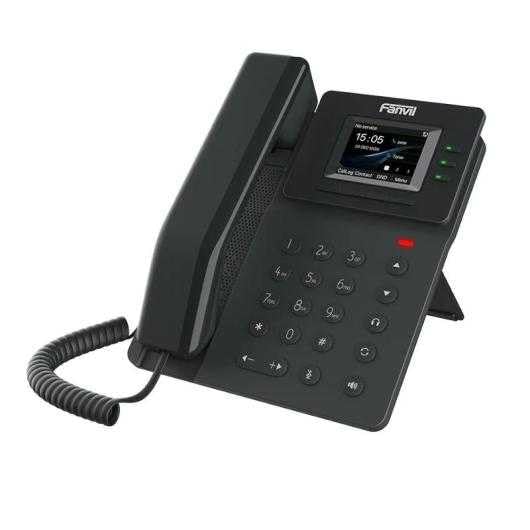
Figure 1: Fanvil V60P Professional IP Phone. This image shows the black IP phone with its handset, color display, and numeric keypad. The display shows "15:05" and menu options.
2. Eto ati fifi sori
2.1 Package Awọn akoonu
Before installation, verify that all items are present in the package:
- Fanvil V60P IP Phone unit
- Foonu alagbeka ati okùn onirin
- okun àjọlò
- Duro
- Itọsọna fifi sori yarayara (ti o ba wa pẹlu)
2.2 ti ara Asopọ
- So Iduro naa: Securely attach the desk stand to the back of the phone unit.
- So foonu pọ: Plug one end of the coiled cord into the handset and the other end into the handset port on the phone base.
- Connect to Network and Power (PoE):
- So ọkan opin ti awọn àjọlò USB si awọn LAN ibudo lori foonu.
- Connect the other end of the Ethernet cable to a Power over Ethernet (PoE) enabled switch or injector. The phone will power on automatically.
- Sopọ si PC (Aṣayan): If you need to connect a computer through the phone, connect an Ethernet cable from your PC to the PC ibudo lori foonu.
Note: If PoE is not available, a separate power adapter (not included) may be required. Refer to the product specifications for compatible power adapter details.
3. Awọn ilana Iṣiṣẹ
3.1 Ipilẹ Ipe Awọn iṣẹ
- Npe Ipe:
- Gbé foonu alagbeka náà tàbí kí o tẹ bọ́tìnì Agbọrọsọ.
- Tẹ nọmba ti o fẹ nipa lilo bọtini foonu.
- Tẹ awọn Kiakia soft key or wait for the automatic dialing timeout.
- Ndahun ipe kan:
- Gbe foonu soke.
- Alternatively, press the Speakerphone button or the Idahun bọtini rirọ.
- Pari ipe kan: Dá foonu náà dúró tàbí kí o tẹ bọ́tìnnì Agbọrọsọ.
3.2 Using Programmable DSS Keys
The Fanvil V60P features 6 programmable DSS (Direct Station Select) keys. These keys can be configured for various functions such as speed dial, line keys, busy lamp field (BLF), or other custom features as defined by your system administrator.
- To use a programmed DSS key, simply press the corresponding button.
- Configuration of DSS keys is typically done via the phone's web interface or your IP PBX system.
3.3 Local Phonebook
The phone supports a local phonebook with up to 1000 entries.
- Wọle si iwe foonu nipasẹ Itọsọna or Awọn olubasọrọ bọtini asọ lori ifihan.
- Use the navigation keys to browse entries.
- Select an entry and press the Kiakia bọtini asọ lati bẹrẹ ipe kan.
3.4 Ìpàdé Ohùn
The V60P supports local 6-party audio conferencing.
- Establish a call with the first participant.
- Tẹ awọn Conf soft key. The first participant will be put on hold.
- Dial the number of the second participant and establish the call.
- Tẹ awọn Conf soft key again to merge all participants into a conference.
- Repeat steps 2-4 to add more participants, up to a total of 6.
4. Itọju
4.1 Ninu ẹrọ naa
To maintain the appearance and functionality of your Fanvil V60P IP Phone (made of plastic material), follow these cleaning guidelines:
- Disconnect the phone from its power source (PoE) before cleaning.
- Lo asọ, die-die damp, lint-free cloth to wipe the surfaces.
- Yẹra fún lílo àwọn kẹ́míkà líle, àwọn ohun ìfọmọ́ra abrasive, tàbí àwọn ohun olómi, nítorí pé àwọn wọ̀nyí lè ba ike àti ìfihàn jẹ́.
- Má ṣe fọ́n àwọn ohun ìfọṣọ sí orí fóònù tààrà.
4.2 famuwia imudojuiwọn
Firmware updates may be released periodically to improve performance, add features, or fix bugs. Consult your IT administrator or Fanvil's official webojú-òpó wẹ́ẹ̀bù fún ìwífún lórí àwọn àtúnṣe tó wà àti àwọn ìtọ́ni fún fífi sori ẹrọ.
5. Laasigbotitusita
This section addresses common issues you might encounter with your Fanvil V60P IP Phone.
| Isoro | Owun to le Fa | Ojutu |
|---|---|---|
| Foonu ko ṣiṣẹ. | Ko si Poe asopọ tabi mẹhẹ àjọlò USB. | Ensure the Ethernet cable is securely connected to the LAN port and a PoE-enabled switch/injector. Verify the PoE source is active. |
| Ko si ohun orin ipe. | SIP registration failure or network issue. | Check network connectivity. Verify SIP account settings with your IT administrator. Restart the phone. |
| Ko le ṣe/gba awọn ipe wọle. | Network issues, incorrect SIP configuration, or firewall blocking. | Confirm network connection. Check SIP registration status on the phone's display. Contact your IT administrator for network and SIP configuration verification. |
| Didara ohun afetigbọ. | Network congestion or faulty handset/speaker. | Check network bandwidth and latency. Try using a different handset or speaker mode. If the issue persists, contact support. |
6. Awọn pato
| Ẹya ara ẹrọ | Ẹ̀kúnrẹ́rẹ́ |
|---|---|
| Awoṣe | V60P |
| Eto | Lainos |
| Ifihan | 2.4-inch, 320 x 240 Color Screen |
| Awọn bọtini DSS | 6 Awọn bọtini Eto Eto |
| SIP Lines | 4 |
| Local Phonebook | 1000 awọn titẹ sii |
| Aimudani | Foonu ti a firanṣẹ |
| Apejọ ohun | 6-party Local Conference |
| Wideband Codecs | G.722, Opus |
| Narrowband Codecs | G.711, G.723.1, G.726, G.729, G.729A, G.729B, G.729AB, iLBC |
| DARA | Bẹẹni |
| Awọn ibudo nẹtiwọki | 2 x 10/100 Mbps Ethernet Ports |
| EHS Support | Bẹẹni |
| IPv6 atilẹyin | Bẹẹni |
| Ohun elo | Ṣiṣu |
| Awọn iwọn (LxWxH) | 15 x 200 x 15 cm |
| Iwọn | 600 giramu |
| ID olupe | Bẹẹni |
| Olona-ila isẹ | Bẹẹni |
| Conference Call Functionality | Support Multiple Conferences |
| Standby Duration (if applicable) | wakati meji 10 |
7. Atilẹyin ọja ati Support
7.1 Atilẹyin ọja
The Fanvil V60P IP Phone comes with a Atilẹyin ọdun mẹta lodi si awọn abawọn iṣelọpọ. Atilẹyin ọja yi ni wiwa awọn abawọn ninu awọn ohun elo ati iṣẹ ṣiṣe labẹ lilo deede. Jọwọ ṣe idaduro ẹri rira rẹ fun awọn iṣeduro atilẹyin ọja.
7.2 Imọ Support
For technical assistance, troubleshooting beyond this manual, or warranty inquiries, please contact your reseller or Fanvil's official customer support channels. You may need to provide your product model (V60P) and serial number.