
1. Awọn ilana aabo
Máa kíyèsí àwọn ìlànà ààbò pàtàkì nígbà gbogbo nígbà tí o bá ń lo àwọn irinṣẹ́ iná mànàmáná láti dín ewu iná, ìkọlù iná mànàmáná àti ìpalára ara ẹni kù. Ka gbogbo ìlànà kí o tó lo irinṣẹ́ yìí.
- Aabo Agbegbe Iṣẹ: Jẹ ki agbegbe iṣẹ jẹ mimọ ati itanna daradara. Awọn agbegbe idamu tabi awọn agbegbe dudu n pe awọn ijamba. Ma ṣe ṣiṣẹ awọn irinṣẹ agbara ni awọn bugbamu bugbamu, gẹgẹbi niwaju awọn olomi ina, gaasi, tabi eruku.
- Aabo Itanna: Awọn pilogi irinṣẹ agbara gbọdọ baramu iṣan. Maṣe yi plug naa pada ni ọna eyikeyi. Maṣe ṣe ilokulo okun naa. Maṣe lo okun fun gbigbe, fifa tabi yọọ ohun elo agbara. Jeki okun kuro lati ooru, epo, eti to mu, tabi awọn ẹya gbigbe.
- Aabo ti ara ẹni: Always wear eye protection. Use hearing protection when operating for extended periods. Wear a dust mask if operations create dust. Dress properly. Do not wear loose clothing or jewelry. Keep hair and clothing away from moving parts.
- Lilo ati Itọju: Maṣe fi agbara mu ohun elo agbara. Lo ohun elo agbara ti o pe fun ohun elo rẹ. Ge asopọ plug lati orisun agbara ṣaaju ṣiṣe eyikeyi awọn atunṣe, yiyipada awọn ẹya ẹrọ, tabi titoju awọn irinṣẹ agbara.
- Itọju: Maintain power tools. Check for misalignment or binding of moving parts, breakage of parts, and any other condition that may affect the power tool's operation. If damaged, have the power tool repaired before use.
2. Ọja Ipariview
The CAARLA HGS28E Electric Die Grinder is a robust tool designed for precision grinding, carving, and polishing tasks on various metal surfaces. It features a powerful 500W motor and a durable construction for reliable performance.

Figure 2.1: CAARLA HGS28E Electric Die Grinder and included accessories (wrenches, carbon brushes, nuts).
2.1 irinše
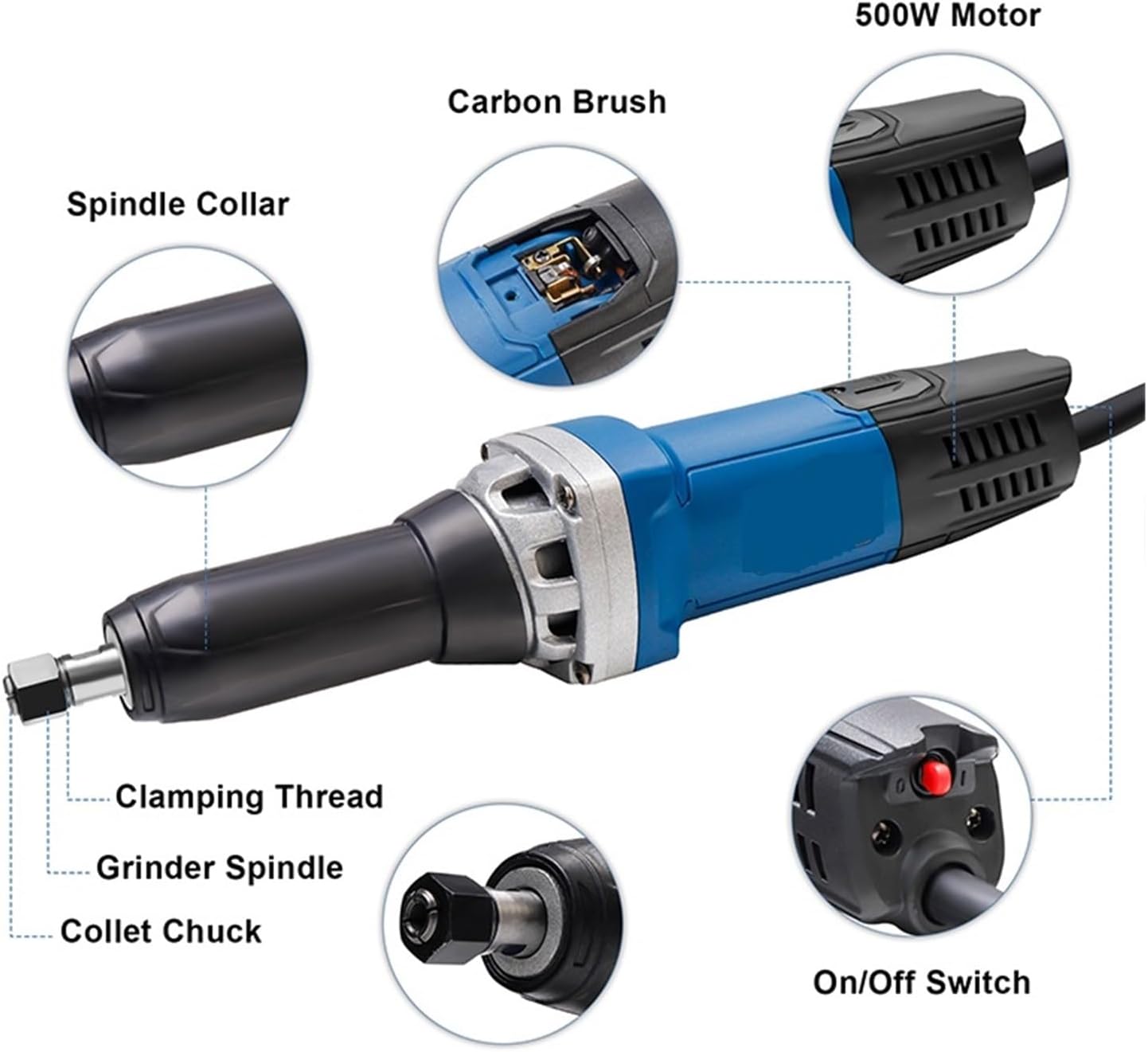
Figure 2.2: Key components of the HGS28E Die Grinder, including the Spindle Collar, Carbon Brush access, 500W Motor, On/Off Switch, Collet Chuck, Grinder Spindle, and Clamping Thread.
- Spindle Collar: Secures the collet chuck assembly.
- Wiwọle Fẹlẹ Erogba: Allows for easy inspection and replacement of carbon brushes.
- 500W Mọto: Provides powerful rotation for grinding and polishing.
- Tan/Pa Yipada: Ṣe iṣakoso agbara si ọpa.
- Kọllet Chuck: Holds various grinding bits and accessories.
- Grinder Spindle: The rotating shaft that drives the collet chuck.
- Clamping Thread: Used to tighten and secure the collet chuck.
3. Eto
3.1 Ṣiṣii silẹ
- Carefully remove the die grinder and all accessories from the packaging.
- Inspect the tool for any signs of damage that may have occurred during shipping. Do not operate if damaged.
- Verify that all listed components are present: die grinder unit, two wrenches, and two spare carbon brushes.
3.2 Asopọmọra Awọn ẹya ẹrọ
- Ensure the die grinder is unplugged from the power source.
- Loosen the collet chuck nut using the provided wrenches.
- Insert the desired grinding bit or accessory into the collet chuck. Ensure the shank is fully seated.
- Tighten the collet chuck nut firmly with the wrenches to secure the accessory. Do not overtighten.
3.3 Asopọ agbara
- Confirm that the power supply matches the tool's rated voltage (220V, 50Hz).
- Pulọọgi okun agbara sinu iṣan itanna to dara.
4. Isẹ
Before starting, ensure all safety precautions are followed and the work piece is securely clamped.
4.1 Titan / Pa a
- To turn on the die grinder, press the On/Off switch located on the tool body.
- To turn off the die grinder, release or press the On/Off switch again, depending on its type (toggle or momentary).
- Allow the tool to reach full speed before making contact with the workpiece.
4.2 Grinding and Polishing Techniques
- Apply light, consistent pressure. Excessive force can damage the tool or workpiece and reduce efficiency.
- Move the tool smoothly across the surface to ensure even material removal and a consistent finish.
- For detailed work, use smaller bits and maintain a steady hand.
- Regularly check the condition of the grinding bit and replace it if it becomes dull or damaged.
5. Itọju
Regular maintenance ensures the longevity and optimal performance of your die grinder. Always unplug the tool before performing any maintenance.
5.1 Ninu
- After each use, clean the tool with a dry cloth to remove dust and debris.
- Use compressed air to clear ventilation openings and prevent dust buildup inside the motor housing.
- Maṣe lo awọn kemikali lile tabi awọn afọmọ abrasive.
5.2 Erogba fẹlẹ Rirọpo
Carbon brushes are wear items and will need periodic replacement. The tool may show reduced power or intermittent operation when brushes are worn.

Figure 5.1: Location for carbon brush installation on the HGS28E Die Grinder.
- Unplug the die grinder from the power source.
- Wa awọn ideri fẹlẹ erogba ni awọn ẹgbẹ ti ile-iṣẹ mọto (wo Aworan 5.1).
- Lo screwdriver lati yọ awọn ideri fẹlẹ erogba kuro.
- Fi pẹ̀lẹ́pẹ̀lẹ́ fa àwọn búrọ́ọ̀ṣì erogba àtijọ́ náà jáde.
- Fi awọn gbọnnu erogba tuntun sii, ni idaniloju pe wọn wa ni iṣalaye deede.
- Rọpo awọn ideri fẹlẹ erogba ki o si mu wọn le daradara.
6. Laasigbotitusita
| Isoro | Owun to le Fa | Ojutu |
|---|---|---|
| Irinṣẹ ko bẹrẹ. | Ko si ipese agbara. Faulty On/Off switch. Wọ awọn gbọnnu erogba. | Ṣayẹwo ibudo agbara ati okun. Kan si oṣiṣẹ iṣẹ ti o peye. Replace carbon brushes (see Section 5.2). |
| Agbara ti o dinku tabi iṣẹ lainidii. | Wọ awọn gbọnnu erogba. Gbigbona pupọ. Loose awọn isopọ. | Rọpo erogba gbọnnu. Gba ọpa laaye lati tutu. Kan si oṣiṣẹ iṣẹ ti o peye. |
| Gbigbọn ti o pọju. | Damaged or unbalanced grinding bit. Loose collet chuck. | Replace grinding bit. Tighten collet chuck nut. |
7. Awọn pato
| Ẹya ara ẹrọ | Ẹ̀kúnrẹ́rẹ́ |
|---|---|
| Nọmba awoṣe | HGS28E |
| Oṣuwọn Voltage | 220V |
| Igbohunsafẹfẹ | 50Hz |
| Ti won won Input Power | 500W |
| Ko si-Fifuye Iyara | 27000 RPM |
| Collet Chuck Diameter | 8MM |
| Iyara Ayipada | Rara |
| Motor Iru | Fẹlẹ |
| Iwọn | 1.9 KGS (4.19 pounds) |
| Lilo | Iṣowo iṣelọpọ |
| Olupese | CAARLA |

Figure 7.1: Illustration of the internal motor construction, highlighting the high-quality copper wire winding for stable and durable performance.
8. Atilẹyin ọja & Atilẹyin
For warranty information, technical support, or service inquiries, please refer to the documentation provided with your purchase or contact CAARLA customer service. Keep your proof of purchase for warranty claims.
For further assistance, please visit the official CAARLA webaaye tabi kan si olupin agbegbe rẹ.