
DOOGEE Tab E3 Pro
DOOGEE Tab E3 Pro Android Tablet User Manual
Model: Tab E3 Pro
1. Ifihan
Welcome to the user manual for your new DOOGEE Tab E3 Pro Android Tablet. This guide provides detailed instructions on how to set up, operate, maintain, and troubleshoot your device. Please read this manual thoroughly to ensure optimal performance and longevity of your tablet.
The DOOGEE Tab E3 Pro is designed for a seamless and powerful user experience, featuring a large display, robust processor, and long-lasting battery, making it ideal for entertainment, productivity, and communication.
2. Package Awọn akoonu
Please check the contents of your package. If any items are missing or damaged, contact your retailer or DOOGEE support.
- DOOGEE Tab E3 Pro Tablet
- USB-C Ngba agbara Cable
- Adapter agbara
- Ohun èlò ìyọkúrò SIM (tí ó bá wúlò)
- Quick Bẹrẹ Itọsọna
- Kaadi atilẹyin ọja
3. Ẹrọ Loriview
Familiarize yourself with the physical components of your DOOGEE Tab E3 Pro.

Nọmba 3.1: Iwaju view of the DOOGEE Tab E3 Pro tablet, showcasing its large 13-inch display with key features like Android 15, Helio G100 processor, Gemini AI, and 11000mAh battery capacity highlighted on the screen.
3.1. Awọn bọtini ati awọn ibudo
- Bọtini agbara: Ó wà ní ẹ̀gbẹ́, a máa ń lò ó láti tan/pa tábìlì tàbí jí/sùn ìbòjú náà.
- Awọn bọtini iwọn didun: Ṣatunṣe iwọn didun ohun.
- Ibudo USB-C: Fun gbigba agbara ati gbigbe data.
- Jack agbekọri 3.5mm: Fun sisopọ awọn agbekọri onirin.
- Iho kaadi SIM/MicroSD: Insert your SIM card for cellular connectivity or a MicroSD card for expandable storage.

Nọmba 3.2: An illustration highlighting the Android 15 operating system, indicating its intelligent, seamless, and secure features, which is the core software of the DOOGEE Tab E3 Pro.
3.2. Awọn kamẹra
- Kamẹra Tẹhin: 13MP main camera for high-quality photos and videos.
- Kamẹra iwaju: Kámẹ́rà 8MP fún àwọn ìpè fídíò àti àwọn selfie.

Nọmba 3.3: A visual representation of the DOOGEE Tab E3 Pro's camera capabilities, showing the 13MP main camera and 8MP front camera, along with example photos taken by the tablet.
4. Ni ibẹrẹ Oṣo
4.1. Ngba agbara si tabulẹti
Before first use, fully charge your tablet. Connect the USB-C cable to the tablet's charging port and the other end to the power adapter. Plug the adapter into a wall outlet.
The DOOGEE Tab E3 Pro features an 11000mAh high-capacity battery with 18W fast charging support for extended usage.
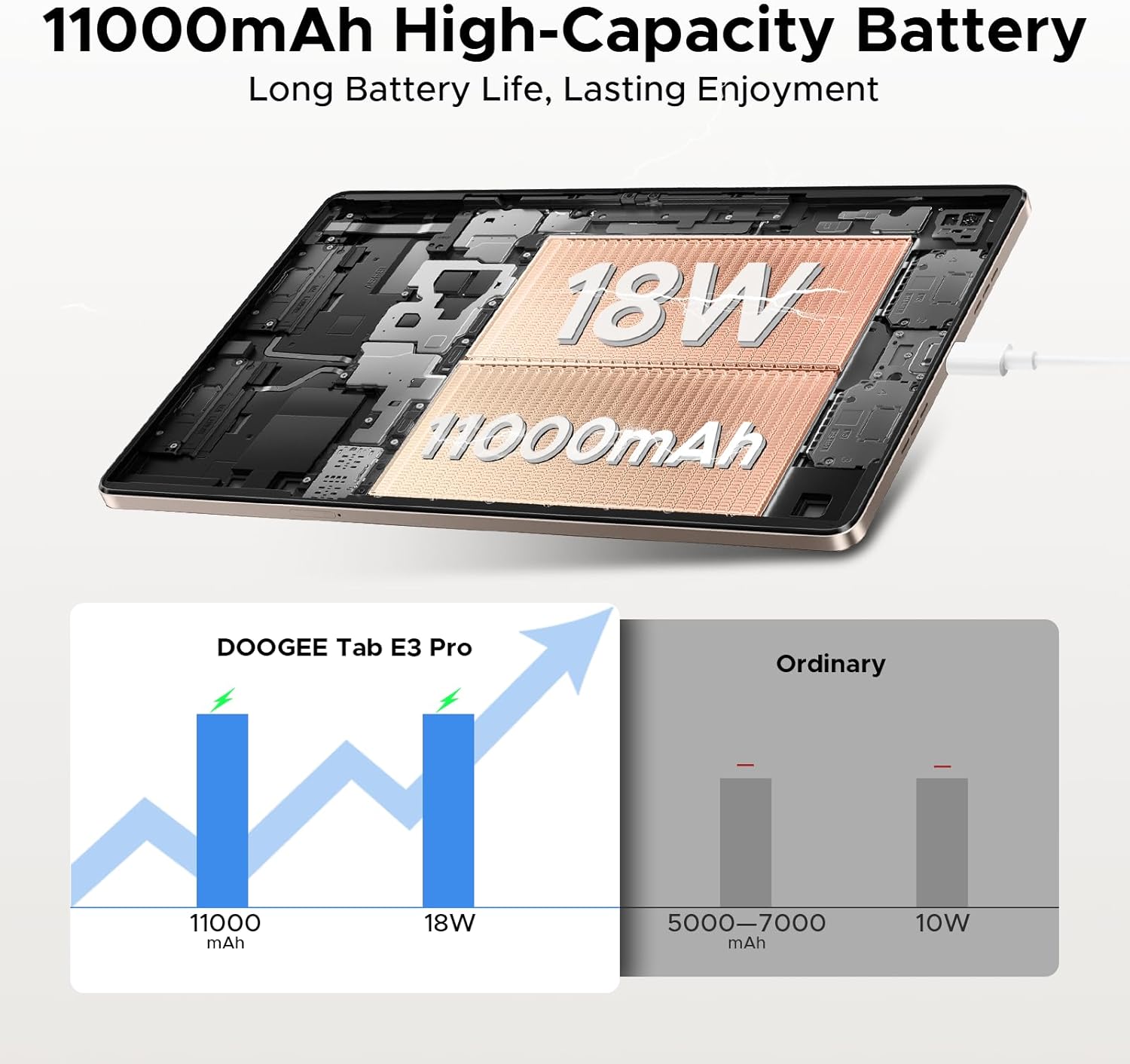
Nọmba 4.1: An illustration demonstrating the 11000mAh high-capacity battery of the DOOGEE Tab E3 Pro, highlighting its long battery life and 18W charging capability compared to ordinary tablets.
4.2. Agbara lori / Paa
- Lati Fi agbara: Press and hold the Power button until the DOOGEE logo appears.
- Lati Paarẹ: Press and hold the Power button until a power menu appears, then select "Power off".
- Lati Tun bẹrẹ: Láti inú àkójọ agbára, yan "Tun bẹ̀rẹ̀".
4.3. Iṣeto ni ibẹrẹ
Lori agbara akọkọ, tabulẹti yoo ṣe itọsọna fun ọ nipasẹ ilana iṣeto akọkọ:
- Yan ede ti o fẹ.
- Sopọ si nẹtiwọki Wi-Fi kan.
- Wọle pẹlu akọọlẹ Google rẹ tabi ṣẹda tuntun kan.
- Set up screen lock (PIN, pattern, password, or facial recognition).
- Review ati ki o gba ofin ati ipo.
5. Ṣiṣẹ rẹ tabulẹti
5.1. Android 15 Awọn ọna System
Your DOOGEE Tab E3 Pro runs on the latest Android 15 system, offering an intelligent, seamless, and secure user experience with enhanced privacy features and improved performance.
5.2. Ifihan ati Visuals
Experience vibrant visuals on the 13-inch FHD+ 90Hz display. With a 1920x1200 resolution, 16:10 aspect ratio, and 84.6% screen-to-body ratio, content comes to life with 16.7 million screen colors.

Nọmba 5.1: A graphic illustrating the 13-inch FHD+ 90Hz display of the DOOGEE Tab E3 Pro, detailing its 1920x1200 resolution, 16:10 aspect ratio, 84.6% screen-to-body ratio, and 16.7 million screen colors.
5.3. Išẹ ati Ibi ipamọ
Powered by the Helio G100 Octa-Core Processor, the tablet delivers boosted speed and efficiency with a 2.2GHz ultimate frequency and 6nm advanced process technology.

Nọmba 5.2: A alaye view of the MediaTek Helio G100 Octa-Core Processor, emphasizing its 2.2GHz ultimate frequency and 6nm advanced process technology, which powers the DOOGEE Tab E3 Pro.
The tablet comes with 8GB of basic RAM, expandable up to 32GB Max RAM, and 256GB of internal ROM, which can be expanded up to 2TB with a TF card (sold separately).
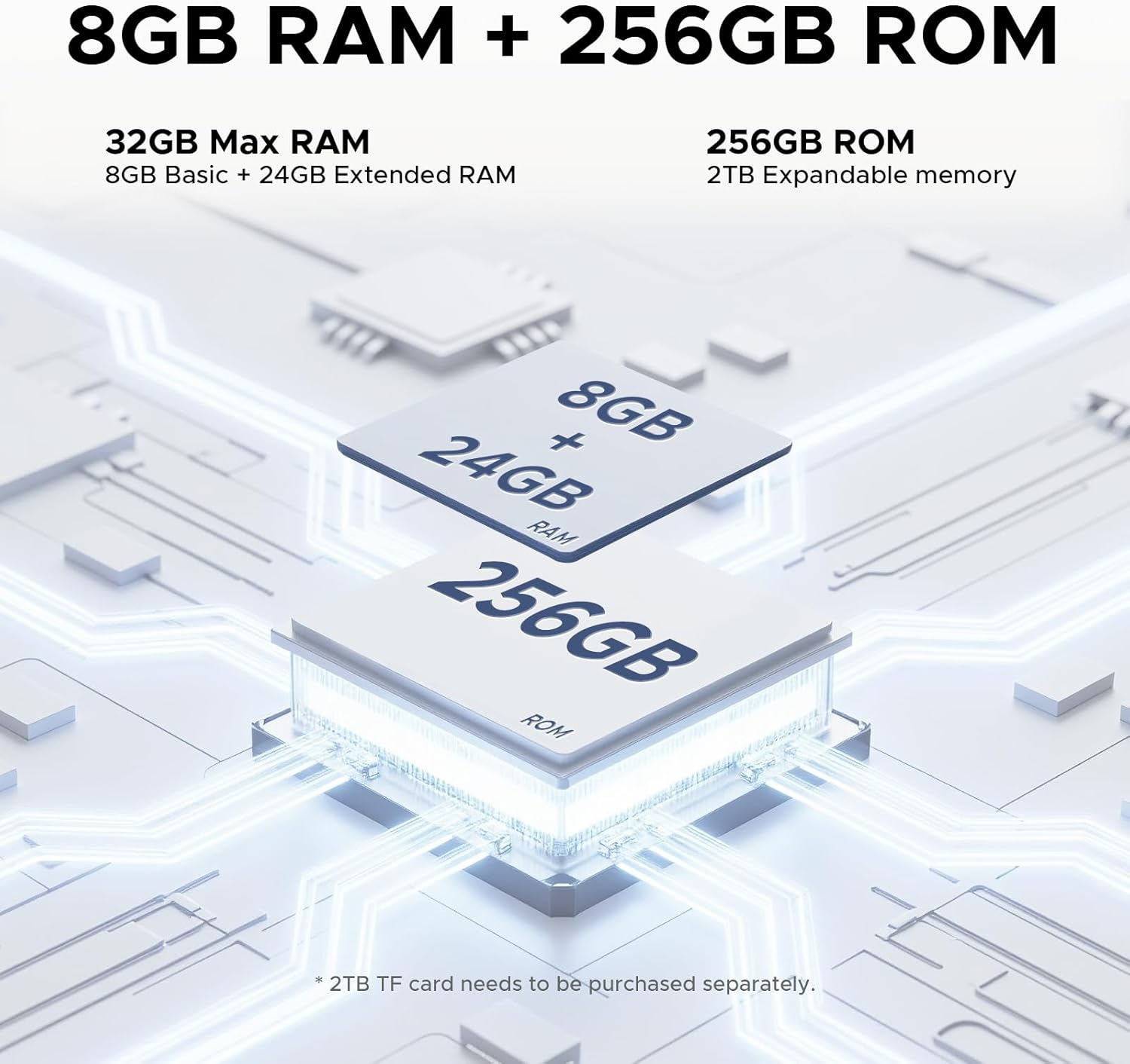
Nọmba 5.3: An illustration detailing the memory configuration of the DOOGEE Tab E3 Pro, showing 8GB Basic RAM + 24GB Extended RAM for a total of 32GB Max RAM, and 256GB ROM with 2TB expandable memory support.
5.4. Built-in Gemini AI
Leverage the built-in Gemini AI for enhanced productivity and convenience. Features include content creation, information retrieval & summarization, image analysis, code development, smart assistant functions, language learning, Gemini Live, and Gemini Deep Research.

Nọmba 5.4: Ifihan aworan atọka kanasing the various functionalities of the Built-in Gemini AI on the DOOGEE Tab E3 Pro, including content creation, information retrieval, image analysis, and smart assistant features.
5.5. Audio Didara
Enjoy premium sound quality with the 1217 BOX Quad Speakers, housed within a stylish and sleek metal case, providing an immersive audio experience.

Nọmba 5.5: An image highlighting the sound quality and aesthetics of the DOOGEE Tab E3 Pro, featuring its Premium 1217 BOX Quad Speakers and stylish metal case.
6. Itọju ati Itọju
- Ninu: Lo asọ ti ko ni lint lati nu iboju ati ara. Yago fun abrasive ose tabi epo.
- Awọn imudojuiwọn sọfitiwia: Ṣayẹwo nigbagbogbo fun ati fi awọn imudojuiwọn eto sori ẹrọ lati rii daju pe tabulẹti rẹ ni awọn ẹya tuntun, awọn abulẹ aabo, ati awọn ilọsiwaju iṣẹ. Lọ si Eto> Eto> Imudojuiwọn eto.
- Itọju Batiri: Avoid extreme temperatures. Do not let the battery fully drain frequently. For long-term storage, charge the battery to about 50%.
- Ibi ipamọ: Keep your tablet in a cool, dry place away from direct sunlight and extreme temperatures.
- Idaabobo: Consider using a protective case and screen protector to prevent scratches and damage.
7. Laasigbotitusita
This section addresses common issues you might encounter with your DOOGEE Tab E3 Pro.
7.1. Tablet Will Not Turn On
- Rii daju pe batiri ti gba agbara. So ṣaja pọ ki o duro fun iṣẹju diẹ ṣaaju ki o to gbiyanju lati tan-an.
- Tẹ bọtini agbara ki o si mu fun o kere ju awọn aaya 10-15 lati fi agbara mu lati tun bẹrẹ.
7.2. Awọn ọrọ Asopọmọra Wi-Fi
- Rii daju pe Wi-Fi ti ṣiṣẹ ninu Eto> Nẹtiwọọki & intanẹẹti> Wi-Fi.
- Tun olulana Wi-Fi rẹ bẹrẹ.
- Gbagbe nẹtiwọọki naa ki o tun sopo mọ nipa titẹ ọrọ igbaniwọle sii.
- Ṣayẹwo boya awọn ẹrọ miiran le sopọ si nẹtiwọki Wi-Fi kanna.
7.3. O lọra Performance
- Pa awọn ohun elo ti ko lo ti nṣiṣẹ ni abẹlẹ.
- Clear cache data for apps that are frequently used (Eto> Awọn ohun elo> [Orukọ Ohun elo]> Ibi ipamọ & kaṣe> Ko kaṣe kuro).
- Rii daju pe o ni aaye ibi-itọju ọfẹ ti o to.
- Tun tabulẹti naa bẹrẹ nigbakugba.
- Ti awọn iṣoro ba tẹsiwaju, ronu atunto ile-iṣẹ kan (Eto> Eto> Awọn aṣayan atunto> Pa gbogbo data rẹ (atunto ile-iṣẹ)). Ikilọ: Eyi yoo nu gbogbo data rẹ lori tabulẹti rẹ. Ṣe afẹyinti data pataki ni akọkọ.
7.4. Apps Crashing or Not Responding
- Fi agbara mu da ohun elo duro (Ètò > Àwọn Ohun èlò > [Orúkọ Ohun èlò] > Fi agbára mú kí a dá dúró).
- Ko kaṣe app ati data kuro.
- Ṣe àtúnṣe sí àpù náà láti Google Play Store.
- Yọọ kuro ki o tun fi ohun elo naa sori ẹrọ.
8. Awọn pato
Detailed technical specifications for the DOOGEE Tab E3 Pro.
| Ẹya ara ẹrọ | Sipesifikesonu |
|---|---|
| Awoṣe | DOOGEE Tab E3 Pro |
| Eto isesise | Android 15 |
| Iwọn Ifihan | 13 inches |
| Ipinnu Ifihan | 1920 x 1200 (FHD+) |
| Oṣuwọn sọtun | 90Hz |
| isise | Helio G100 Octa-Core (2.2GHz) |
| Àgbo | 8GB (expandable up to 32GB Max RAM) |
| Ibi ipamọ inu (ROM) | 256GB |
| Expandable Ibi ipamọ | Up to 2TB (TF card, sold separately) |
| Kamẹra ẹhin | 13 MP |
| Kamẹra iwaju | 8 MP |
| Agbara Batiri | 11000 mAh (Litiumu polima) |
| Gbigba agbara | 18W Yara Ngba agbara |
| Awọn iwọn (LxWxH) | 11.89 x 7.78 x 0.31 inches |
| Iwọn Nkan | 14.7 iwon (418 Giramu) |
| Asopọmọra | Wi-Fi, Bluetooth, Cellular (if applicable) |
| Ohun | 1217 BOX Quad Speakers, 3.5mm Headphone Jack |
9. Atilẹyin ọja ati Support
Your DOOGEE Tab E3 Pro is covered by a limited warranty. Please refer to the warranty card included in your package for specific terms and conditions, including warranty period and coverage details.
For technical support, troubleshooting assistance, or warranty claims, please contact DOOGEE customer service through their official webaaye tabi alaye olubasọrọ ti a pese ninu iwe atilẹyin ọja rẹ.
You can visit the official DOOGEE store on Amazon for more information and support: DOOGEE Amazon Store
Ask a question about this manual
Ask about setup, troubleshooting, compatibility, parts, safety, or missing instructions. Manuals+ will review the question and use this page’s manual context to help answer it.