
Alaye Aabo pataki
Please read this manual carefully before assembly and use. Keep it for future reference.
- Always ensure the desk is properly anchored to the wall or floor to prevent tipping. Use appropriate anchoring hardware for your wall type.
- Do not place heavy objects on the desk that could cause it to tip or become unstable. Distribute weight evenly.
- Exercise caution during assembly to avoid injuries from heavy or sharp components. It is recommended to assemble with two people.
- Pa awọn ọmọde ati awọn ohun ọsin kuro ni agbegbe apejọ.
- Rii daju pe gbogbo awọn skru ati awọn fasteners ti wa ni wiwọ ni aabo ṣaaju lilo. Lorekore ṣayẹwo ki o tun-mu bi o ṣe pataki.
- Do not overload the integrated power outlets. Refer to the specifications for maximum load.
Eto ati Apejọ
This Grandder L-Shaped Gaming Desk (Model E109-40T) requires assembly. The package includes detailed assembly instructions. While all necessary tools are not included, standard household tools may be required.
Package Awọn akoonu
Verify that all components listed in the included assembly guide are present before beginning assembly.
- Desk panels (carbon fiber surface, MDF)
- Irin fireemu irinše
- Atẹle atẹle
- Integrated power strip (2 AC outlets, 1 USB, 1 Type-C)
- Ìlànà ìmọ́lẹ̀ LED pẹ̀lú olùdarí
- Assembly hardware (screws, bolts, etc.)
- Apejọ ilana Afowoyi
Awọn Igbesẹ Apejọ
- Yọọ kuro ki o ṣe idanimọ: Carefully unpack all components and lay them out on a clean, soft surface to prevent scratches. Identify each part using the provided assembly diagram.
- Apejọ fireemu: Assemble the main metal frame according to the instructions. Ensure all connections are secure but do not fully tighten screws until the entire frame is assembled.
- Apẹrẹ Yipada: Decide whether you want the L-shaped corner on the left or right side of the desk. The design is reversible, allowing for flexible placement. Follow the specific instructions for your chosen orientation.
- So awọn panẹli tabili pọ mọ: Secure the carbon fiber desk panels to the assembled frame.
- Fi Iduro Atẹle sori ẹrọ: Attach the monitor stand to the main desk surface.
- Integrate Power Strip: Install the recessed power strip into its designated slot. Connect the power cable.
- Lo Ìlà Ìmọ́lẹ̀ LED: Adhere the LED light strip to the underside of the monitor stand or as indicated in the manual. Connect it to the power source.
- Fi Sẹ́ẹ̀lì Ìpamọ́ Sílẹ̀: Attach the adjustable storage shelf to the side frame. This shelf is also removable.
- Imuduro ipari: Ni kete ti gbogbo awọn paati ba wa ni ipo ati ni ibamu, Mu gbogbo awọn skru ati awọn fasteners mu ni kikun.
- Placement and Anchoring: Position the desk in its desired location. For safety, anchor the desk to a wall using appropriate hardware (not included) to prevent tipping, especially if heavy equipment is placed on it.

Figure 1: Dimensions and reversible design of the Grandder L-shaped gaming desk. The corner section can be installed on either the left or right side.
Awọn ilana Iṣiṣẹ
Agbára Agbára Tí A Ṣẹ̀pọ̀
The desk features a recessed power strip for convenient access to power and charging.
- Awọn iṣan AC: Two 125V/12A AC outlets are provided for powering devices such as monitors, computers, or other peripherals.
- Awọn ibudo USB: One 5V/3A USB-A port and one 5V/3A USB-C port are available for charging smartphones, tablets, and other USB-powered devices.
- Cable Agbara: The integrated power strip is connected via a 1.5m power cable. Plug this cable into a standard wall outlet.
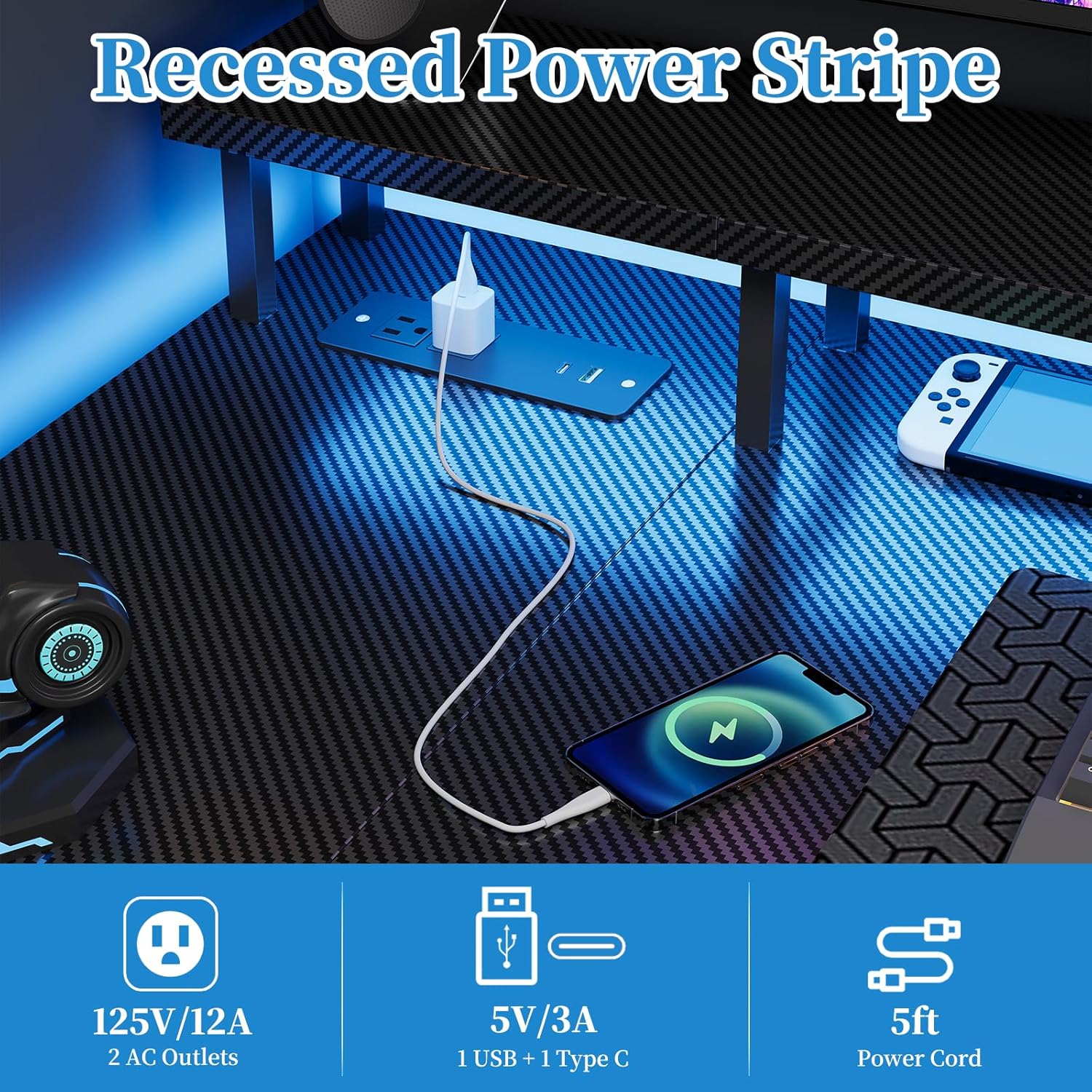
Figure 2: Recessed power strip with AC, USB-A, and USB-C outlets.
LED Light Strip Operation
The desk includes a multi-functional LED light strip to enhance your environment. It is controlled via an inline controller.
- Titan/Apapa: Use the power button on the controller to turn the LED strip on or off.
- Aṣayan awọ: Cycle through various colors using the color selection button. The strip offers 20 color change options.
- Atunse Imọlẹ: Adjust the brightness levels to your preference using the dedicated brightness buttons.
- Iṣakoso iyara: For dynamic lighting modes, adjust the speed of color transitions or effects.
- Predefined Modes: The controller may offer several predefined lighting modes for different atmospheres.

Figure 3: LED light strip with controller for color, brightness, and speed adjustments.
Monitor Stand and Storage Shelf
- Iduro Iduro: The elevated monitor stand promotes ergonomic viewing posture, reducing neck and eye strain. Place your monitor(s) directly on this stand.
- Adjustable Storage Shelf: The side storage shelf can be adjusted or removed to accommodate various items, such as a computer tower, books, or accessories.

Figure 4: Ergonomic design of the monitor stand for improved posture.

Figure 5: Adjustable storage shelf for flexible organization.
Itoju
- Ninu: Pa awọn ipele tabili nu pẹlu asọ, damp cloth. Avoid abrasive cleaners or harsh chemicals that could damage the carbon fiber finish or MDF.
- Awọn ohun mimu: Lokọọkan ṣayẹwo gbogbo awọn skru ati awọn fasteners lati rii daju pe wọn wa ni wiwọ. Tun-mu ti o ba jẹ dandan lati ṣetọju iduroṣinṣin.
- Awọn ohun elo itanna: Ensure the power strip and LED light strip connections are secure. Do not attempt to repair electrical components yourself. If damage occurs, discontinue use and contact customer support.
- Pipin iwuwo: Avoid concentrating heavy loads on one area of the desk. Distribute weight evenly across the surface and shelves.
Laasigbotitusita
Àìdúróṣinṣin lórí tábìlì
- Oro: Awọn tabili wobbles tabi kan lara riru.
- Ojutu:
- Ṣe àyẹ̀wò gbogbo àwọn skru àti bolìtì tí a so pọ̀. Jẹ́ kí àwọn ohun tí ó lè so mọ́ ara wọn di.
- Ensure the desk is on a level surface. Use leveling feet (if included) or shims to stabilize.
- Verify that the desk is properly anchored to the wall if heavy items are placed on it.
Awọn iÿë Agbara Ko Ṣiṣẹ
- Oro: Devices plugged into the AC or USB ports are not receiving power.
- Ojutu:
- Ensure the desk's main power cable is securely plugged into a functional wall outlet.
- Ṣàyẹ̀wò bóyá ihò ìtajà ògiri náà ń ṣiṣẹ́ nípa fífi ẹ̀rọ mìíràn sí i.
- Avoid overloading the power strip. Disconnect some devices to see if power is restored.
- If the issue persists, contact customer support. Do not attempt to disassemble the power strip.
LED Light Strip Not Functioning
- Oro: The LED light strip does not turn on or is not responding to the controller.
- Ojutu:
- Ensure the LED strip is properly connected to its power source and the controller.
- Check if the main power cable for the desk is plugged in.
- Verify that the controller's battery (if applicable) is functional or that it is receiving power.
- Try pressing the power button on the controller firmly.
- Ti ọrọ naa ba wa, kan si atilẹyin alabara.
Awọn pato ọja
| Nọmba awoṣe | E109-40T |
| Brand | Agbalagba |
| Iru | Reversible L-Shaped Gaming Desk |
| Awọn iwọn (L x W x H) | 100 x 50 x 75 cm (main section), 70 x 100 x 75 cm (overall L-shape) |
| Iwọn | 12.8 kilo |
| Àwọ̀ | Carbon Black Aspect |
| Ohun elo | Carbon Fiber Surface, Engineered Wood (MDF) |
| Awọn iṣan Agbara | 2 x AC (125V/12A), 1 x USB-A (5V/3A), 1 x USB-C (5V/3A) |
| Agbara USB Ipari | 1.5 mita |
| Pataki Awọn ẹya ara ẹrọ | Integrated LED Lights, Recessed Power Strip, Monitor Stand, Reversible L-Shape, Adjustable Storage Shelf |
| Apejọ ti a beere | Bẹẹni |
Alaye atilẹyin ọja
The Grandder L-Shaped Gaming Desk (Model E109-40T) comes with a s'aiye atilẹyin ọja. This warranty covers manufacturing defects and material flaws under normal use. It does not cover damage resulting from misuse, accidents, unauthorized modifications, or normal wear and tear.
To make a warranty claim, please retain your proof of purchase and contact Grandder customer support.
Onibara Support
If you have any questions, require assistance with assembly, or encounter any issues with your Grandder L-Shaped Gaming Desk, please do not hesitate to contact our professional customer service team.
Our team is available 24/7 to provide prompt and reliable assistance.
Ibi iwifunni: Please refer to the contact details provided on your purchase receipt or the Grandder official webojula fun awọn julọ soke-si-ọjọ support awọn ikanni.


