
Ọrọ Iṣaaju
Thank you for choosing the UGREEN 12000mAh 100W Fast Charging Power Bank. This device is designed to provide portable, high-speed charging for a wide range of electronic devices, including laptops, smartphones, and tablets. Please read this manual carefully to ensure safe and optimal use of your power bank.
Ọja Pariview
The UGREEN 100W Power Bank features a compact design with a digital display for battery status and charging information. It includes multiple ports for versatile charging options.

Apejuwe aworan: A iwaju view of the UGREEN 12000mAh 100W Fast Charging Power Bank, showcasing its sleek grey design and digital display.

Apejuwe aworan: A sunmọ-soke view of the UGREEN Power Bank's top, highlighting the USB-C (IN/OUT 1) and USB-A (OUT 2) ports, along with the 100W power indicator.

Apejuwe aworan: The UGREEN Power Bank being held, illustrating its compact size and lightweight design, suitable for portability.
Ṣeto
- Idiyele Ibẹrẹ: Before first use, fully charge the power bank. Connect a USB-C cable to the IN/OUT 1 port and connect the other end to a suitable power adapter (not included). The digital display will show the charging progress.
- Ṣayẹwo Ipele Batiri: Ni soki tẹ bọtini agbara lati view awọn ti isiyi batiri ogoruntage lori awọn oni àpapọ.
Awọn ilana Iṣiṣẹ
Gbigba agbara Bank agbara
To recharge your UGREEN Power Bank, connect a USB-C cable to the IN/OUT 1 port. The power bank supports fast charging input, allowing for quick replenishment of its internal battery.
Ngba agbara si Awọn ẹrọ rẹ
- So ẹrọ pọ: Use a compatible charging cable to connect your device to either the USB-C (IN/OUT 1) or USB-A (OUT 2) port on the power bank.
- Bẹrẹ gbigba agbara: The power bank will automatically detect the connected device and begin charging. The digital display will show the output power.
- Gbigba agbara iyara giga: The USB-C port supports up to 100W Power Delivery (PD) for fast charging compatible laptops and other devices.
- Awọn Ẹrọ Ọpọ: You can charge up to two devices simultaneously using both output ports.

Apejuwe aworan: The UGREEN Power Bank simultaneously charging a laptop via USB-C and another device via USB-A, demonstrating its multi-device charging capability.
Kekere Ipo Gbigba agbara lọwọlọwọ
For small devices like smartwatches, Bluetooth earbuds, or fitness trackers that require lower charging currents, activate the low current charging mode:
- Mu ṣiṣẹ: Double-press the power button to enter low current charging mode. An indicator on the display may appear.
- Sopọ: So ẹrọ agbara kekere rẹ pọ mọ banki agbara.
- Muu ṣiṣẹ: Double-press the power button again to exit low current charging mode, or it will automatically turn off after a period of inactivity.
Apejuwe aworan: The UGREEN Power Bank connected to a smartwatch and wireless earbuds, illustrating its low current charging mode for small electronic accessories.
Itoju
- Ninu: Lo aṣọ rírọrùn tí ó gbẹ láti nu ibi ìpamọ́ agbára. Má ṣe lo àwọn ohun ìfọmọ́ omi tàbí aerosols.
- Ibi ipamọ: Tọju banki agbara ni itura, aye gbigbẹ kuro lati orun taara ati awọn iwọn otutu to gaju.
- Itọju Batiri: Láti mú kí batiri pẹ́ sí i, gba agbára bank agbára náà ní kíkún lẹ́ẹ̀kan ní oṣù mẹ́ta tí kò bá sí ní lílò déédéé.
Laasigbotitusita
- Banki Agbara Ko Ngba agbara:
- Ensure the charging cable and power adapter are working correctly.
- Check if the cable is securely connected to the IN/OUT 1 port.
- Ẹrọ Ko Ngba agbara lati Ile-ifowopamọ Agbara:
- Verify the power bank has sufficient charge.
- Ensure the charging cable is compatible with your device and securely connected.
- Gbiyanju ibudo tabi okun ti o yatọ.
- If charging a low-power device, ensure low current charging mode is activated.
- Gbigba agbara lọra:
- Ensure your cable and device support fast charging protocols (e.g., Power Delivery for 100W output).
- Charging multiple devices simultaneously may reduce individual port output.
Awọn pato

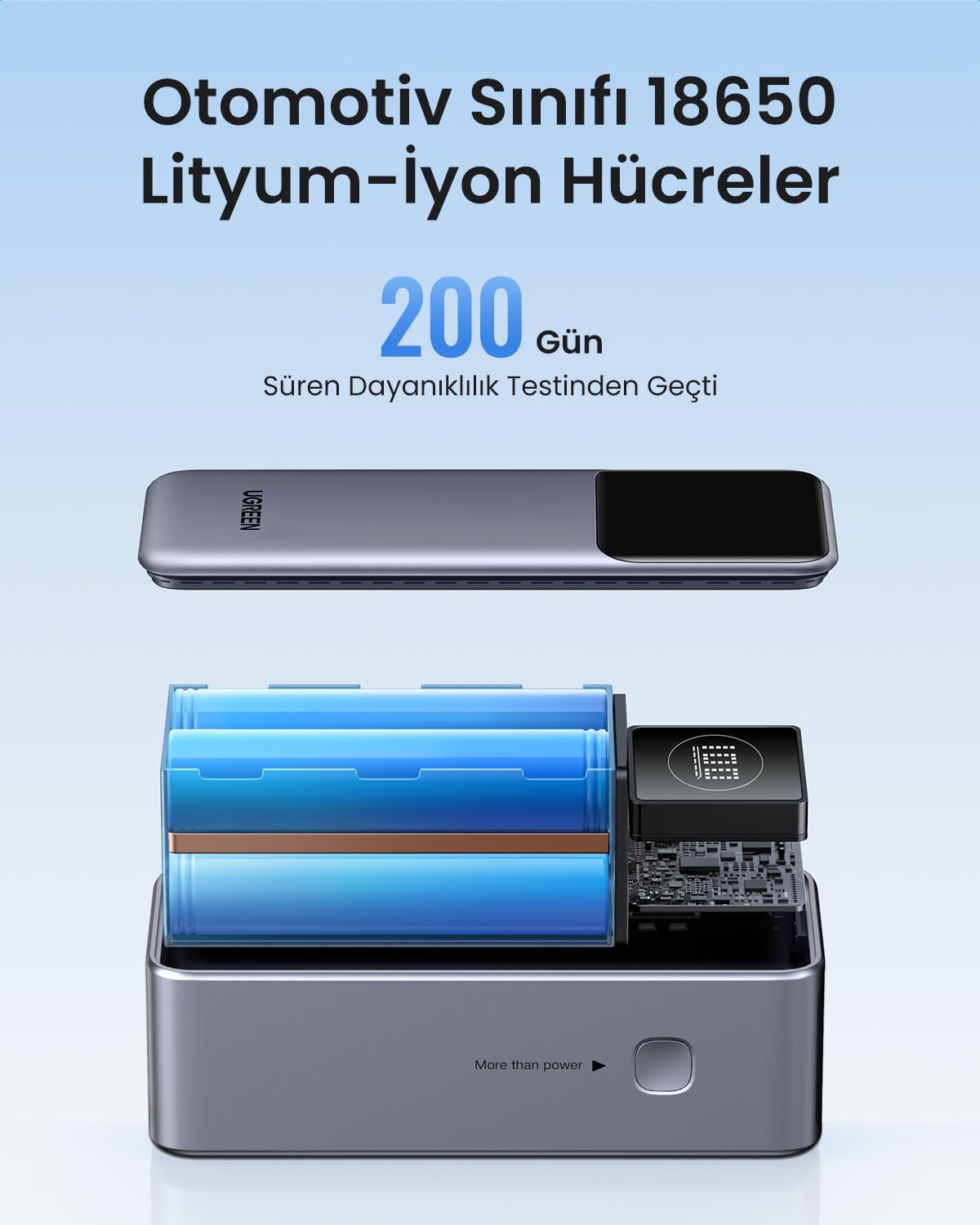
Apejuwe aworan: Ohun exploded view of the UGREEN Power Bank, revealing its internal structure and the automotive-grade 18650 lithium-ion battery cells.
| Ẹya ara ẹrọ | Ẹ̀kúnrẹ́rẹ́ |
|---|---|
| Brand | UGREEN |
| Nọmba awoṣe | 35526B / AFNUGRNW28 |
| Agbara Batiri | 12000mAh |
| Ijade agbara ti o pọju | 100W |
| Nọmba ti Ports | 3 (1x USB-C In/Out, 1x USB-A Out) |
| Batiri Iru | Automotive Grade 18650 Lithium-ion Cells |
| Awọn iwọn | 45.5 x 46 x 115 mm (isunmọ.) |
| Iwọn | 309g (isunmọ) |
Alaye Aabo
- Ma ṣe fi banki agbara han si awọn iwọn otutu to gaju, ina taara tabi ina.
- Yẹra fun sisọ silẹ, puncting, tabi pipinka ẹrọ naa.
- Jeki kuro ni arọwọto awọn ọmọde.
- Ma ṣe lo ti banki agbara ba bajẹ tabi wú.
- Sọ ọja naa ni ifojusọna ni ibamu si awọn ilana agbegbe.
Atilẹyin ọja ati Support
This UGREEN Power Bank comes with a 90-ọjọ atilẹyin ọja lati ọjọ rira, ibora awọn abawọn iṣelọpọ. Jọwọ ṣe idaduro ẹri rira rẹ fun awọn iṣeduro atilẹyin ọja.
For technical support, warranty inquiries, or further assistance, please contact UGREEN customer service through the official UGREEN webaaye tabi awọn ikanni atilẹyin alagbata rẹ.
Osise UGREEN Webojula: www.green.com