
Ọja Pariview
The GOBOULT Y1 Pro Wireless Earbuds are designed to provide a high-quality audio experience with features like extended playtime, clear calling, and low-latency gaming. This manual provides detailed instructions for setting up, operating, and maintaining your earbuds.

Aworan: Afihan akojọpọasing key features of the GOBOULT Y1 Pro Earbuds, including 60 hours playtime, Zen Quad Mic ENC, 45ms low latency gaming, 13mm bass drivers, Type-C fast charging, and Bluetooth 5.3.
Package Awọn akoonu
- GOBOULT Y1 Pro Wireless Earbuds
- Ngba agbara Case
- USB Iru-C Ngba agbara USB
- Awọn iṣu Eti (oriṣiriṣi titobi)
- Eartips (oriṣiriṣi titobi)
- Kaadi atilẹyin ọja
Ṣeto
1. Ngba agbara si Earbuds ati Ọran
Before initial use, ensure both the earbuds and the charging case are fully charged. This optimizes battery life and performance.
- Connect the provided USB Type-C charging cable to the charging port on the case and to a compatible USB power adapter (not included).
- The LED indicator on the charging case will illuminate to show charging status.
- A full charge typically takes a few hours. A quick 10-minute charge can provide approximately 120 minutes of playtime.

Image: The GOBOULT Y1 Pro earbuds and charging case, illustrating the Type-C fast charging capability, where 10 minutes of charge provides 120 minutes of playtime.
2. Ibẹrẹ Ibẹrẹ
Follow these steps to pair your earbuds with your device for the first time:
- Remove any protective film from the charging contacts on the earbuds.
- Place both earbuds into the charging case and close the lid for a few seconds.
- Open the charging case lid. The earbuds will automatically power on and enter pairing mode, indicated by flashing LED lights.
- Lori foonuiyara rẹ tabi ẹrọ Bluetooth miiran ti o ṣiṣẹ, lọ si awọn eto Bluetooth.
- Wa fun awọn ẹrọ ti o wa ki o yan "GOBOULT Y1 Pro"lati akojọ.
- Ni kete ti a ti sopọ, itọka ohun kan yoo jẹrisi isọdọkan aṣeyọri.

Image: A diagram illustrating the initial setup steps, including removing protective film and opening the case, along with a detailed guide to the touch controls for both left and right earbuds.
3. Automatic Reconnection
Lẹ́yìn ìsopọ̀ àkọ́kọ́, àwọn agbekọri náà yóò so pọ̀ mọ́ ẹ̀rọ tí a so pọ̀ kẹ́yìn nígbà tí a bá yọ wọ́n kúrò nínú àpótí ìgbóná, Bluetooth yóò sì ṣiṣẹ́ lórí ẹ̀rọ náà.

Image: GOBOULT Y1 Pro earbuds and charging case, demonstrating Bluetooth 5.3 for stable, efficient, and fast pairing with a connected smartphone.
Awọn ilana Iṣiṣẹ
Titan / Paa
- Agbara Tan: Open the charging case lid. The earbuds will power on automatically. Alternatively, if outside the case, long press the touch area on both earbuds for 3 seconds.
- Agbara Pa: Place both earbuds back into the charging case and close the lid. They will power off automatically. Alternatively, long press the touch area on both earbuds for 5 seconds.
Awọn iṣakoso ifọwọkan
The GOBOULT Y1 Pro earbuds feature intuitive touch controls for managing music, calls, and other functions. Refer to the diagram below and the following list for specific actions:
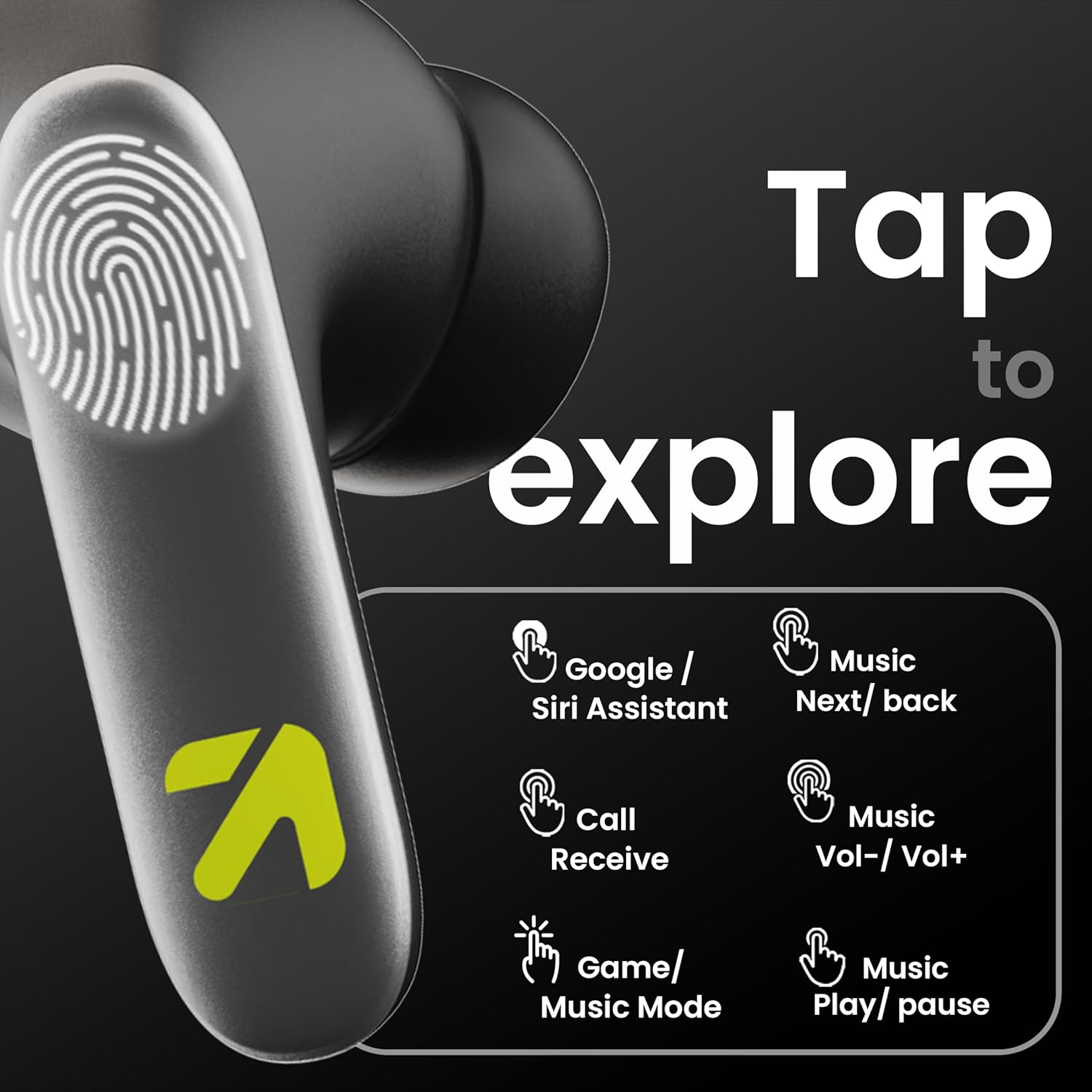
Image: A visual guide to the touch controls on the GOBOULT Y1 Pro earbuds, detailing actions for Google/Siri Assistant, music navigation, call management, volume control, and game/music mode switching.
- Tẹ ẹyọkan (Osi/Ọtun): Mu orin ṣiṣẹ/Daduro, Dahun/Pari ipe.
- Tẹ ni kia kia lẹẹmeji (Agbohun Akọkọ osi): Ti tẹlẹ orin.
- Tẹ ni kia kia lẹẹmeji (Ẹkọ Atẹti ọtun): Next orin.
- Tẹ ni kia kia Meta (Agbohun Akọkọ osi): Iwọn didun isalẹ.
- Tẹ ni kia kia Mẹta (Ẹkọ Agbekọti Ọtun): Iwọn didun Up.
- Long Press (2 seconds, Left/Right): Reject incoming call, Activate Voice Assistant (Google/Siri).
- Four Taps (Left/Right): Activate/Deactivate Gaming Mode.
Ipo ere
For an enhanced gaming experience, activate the ultra-low latency Gaming Mode:
- Muu ṣiṣẹ: Tap the touch area four times on either earbud.
- Pa aṣiṣẹ: Tap the touch area four times again.

Image: GOBOULT Y1 Pro earbuds and charging case, highlighting the 45ms low latency gaming mode for real-time audio synchronization, activated by four taps.
Oluranlọwọ ohun
Quickly access your device's voice assistant (Siri or Google Assistant) for hands-free control:
- Muu ṣiṣẹ: Perform a long tap on the touch area of either earbud.

Image: Illustration showing how to access Siri or Google Assistant with a long tap on the earbud's touch sensor.
Ifagile Noise ayika (ENC)
The GOBOULT Y1 Pro features Zen Quad Mic ENC technology, ensuring crystal-clear calls by effectively filtering out ambient noise from your surroundings.

Image: A diagram explaining how Environmental Noise Cancellation (ENC) works by isolating your voice from environmental noise, ensuring clear communication during calls.
Itoju
Ninu
- Mọ awọn afikọti nigbagbogbo ati apoti gbigba agbara pẹlu asọ ti o gbẹ, asọ ti ko ni lint.
- Ensure the charging contacts on both the earbuds and inside the case are free from dust and debris to maintain proper charging.
- Do not use abrasive cleaners, solvents, or harsh chemicals, as these may damage the product.
Omi Resistance
The GOBOULT Y1 Pro earbuds are rated IPX5 water-resistant. This means they are protected against low-pressure water jets from any direction, making them suitable for workouts and light splashes.
- Ma ṣe tẹ awọn agbekọri naa sinu omi.
- Avoid exposing them to heavy rain or extreme moisture.
- Rii daju pe awọn agbekọri ti gbẹ ṣaaju gbigbe wọn pada si apoti gbigba agbara lati yago fun ibajẹ.

Image: GOBOULT Y1 Pro earbuds with water droplets, illustrating their IPX5 water resistance, providing protection against sweat and splashes.
Laasigbotitusita
If you encounter any issues with your GOBOULT Y1 Pro earbuds, refer to the following common troubleshooting steps:
Àwọn etí ìgbọ́rọ̀ kò sopọ̀ tàbí sopọ̀ mọ́ra
- Ensure both earbuds and the charging case have sufficient battery.
- Turn off Bluetooth on your device, wait 5 seconds, then turn it back on.
- On your device, "Forget" or "Unpair" "GOBOULT Y1 Pro" from the Bluetooth list, then attempt the pairing process again.
- Place both earbuds back into the charging case, close the lid, wait 10 seconds, then open the lid to re-enter pairing mode.
Agbekọri agbekọri kan ṣoṣo ti n ṣiṣẹ
- Rii daju pe awọn agbekọri mejeeji ti gba agbara.
- Gbe awọn agbekọri mejeeji pada sinu apoti gbigba agbara, pa ideri naa, lẹhinna ṣi i lẹẹkansi. Eleyi igba tun-syncs wọn.
- If the issue persists, try resetting the earbuds (refer to the manufacturer's webAaye fun awọn ilana atunṣe pato ti ko ba ṣe alaye nibi).
Dídára ohùn tí kò dára tàbí ohùn tí kò pọ̀ tó
- Ensure the earbuds are properly seated in your ears to create a good seal. Try different sized eartips.
- Nu eyikeyi idoti kuro ninu awọn grilles earbud.
- Check the audio source device's volume and sound settings.
- Sunmọ ẹrọ ti o sopọ lati yago fun kikọlu ifihan.
Awọn ọran gbigba agbara
- Rii daju pe okun gbigba agbara ti sopọ ni aabo si ọran mejeeji ati orisun agbara.
- Try a different USB Type-C charging cable or power adapter.
- Nu awọn olubasọrọ gbigba agbara kuro lori awọn afikọti mejeeji ati inu ọran pẹlu swab owu ti o gbẹ.
Awọn pato
| Ẹya ara ẹrọ | Ẹ̀kúnrẹ́rẹ́ |
|---|---|
| Brand | GOBOULT |
| Orukọ awoṣe | AirBass |
| Ẹya Bluetooth | 5.3 |
| Gbigbe Eti | Ninu Eti |
| Ariwo Iṣakoso | Ifagile Noise ayika (ENC) |
| Audio Driver Iwon | 13 Milimita |
| Total Playtime | Titi di Awọn wakati 60 (pẹlu ọran gbigba agbara) |
| Low Lairi | 45ms (Ipo ere) |
| Gbigba agbara Iru | Iru-C Yara Ngba agbara |
| Omi Resistance | IPX5 |
| Ọna Iṣakoso | Fọwọkan |
| Awọn ẹrọ ibaramu | Foonuiyara, Awọn tabulẹti, Kọǹpútà alágbèéká, Kọǹpútà alágbèéká, Awọn Agbọrọsọ Smart |
| Iwọn Nkan | 50 giramu |
| Ilu isenbale | China |
Alaye atilẹyin ọja
The GOBOULT Y1 Pro Wireless Earbuds are covered by a Atilẹyin ọja Olupese Ọdun 1 lati ọjọ ti o ra.
This warranty covers manufacturing defects. Please retain your proof of purchase for any warranty claims. The warranty does not cover damage caused by misuse, accidents, unauthorized modifications, or normal wear and tear.
Atilẹyin
Fun iranlọwọ siwaju sii, atilẹyin imọ-ẹrọ, tabi awọn ibeere atilẹyin ọja, jọwọ kan si:
- Olupese: Exotic Mile Private Limited, B-67 Wazirpur Industrial Area, New Delhi 110052
- Olukowọle: Exotic Mile Pvt. Ltd. , B67 Wazirpur Industrial Area , New Delhi 110052
- For customer service contact details, please refer to the GOBOULT official webojú òpó tàbí pẹpẹ tí o ti ra ọjà náà.