
1. Ifihan
Welcome to the user manual for your new DOOGEE S200 Plus 5G smartphone. This guide provides essential information to help you set up, operate, maintain, and troubleshoot your device. The DOOGEE S200 Plus is a rugged smartphone designed for durability and high performance, featuring a powerful camera system, long-lasting battery, and advanced connectivity options.

Aworan: Iwaju ati sẹhin view of the DOOGEE S200 Plus 5G smartphone, highlighting its robust design and key specifications like 32GB+512GB memory and 10100mAh battery.
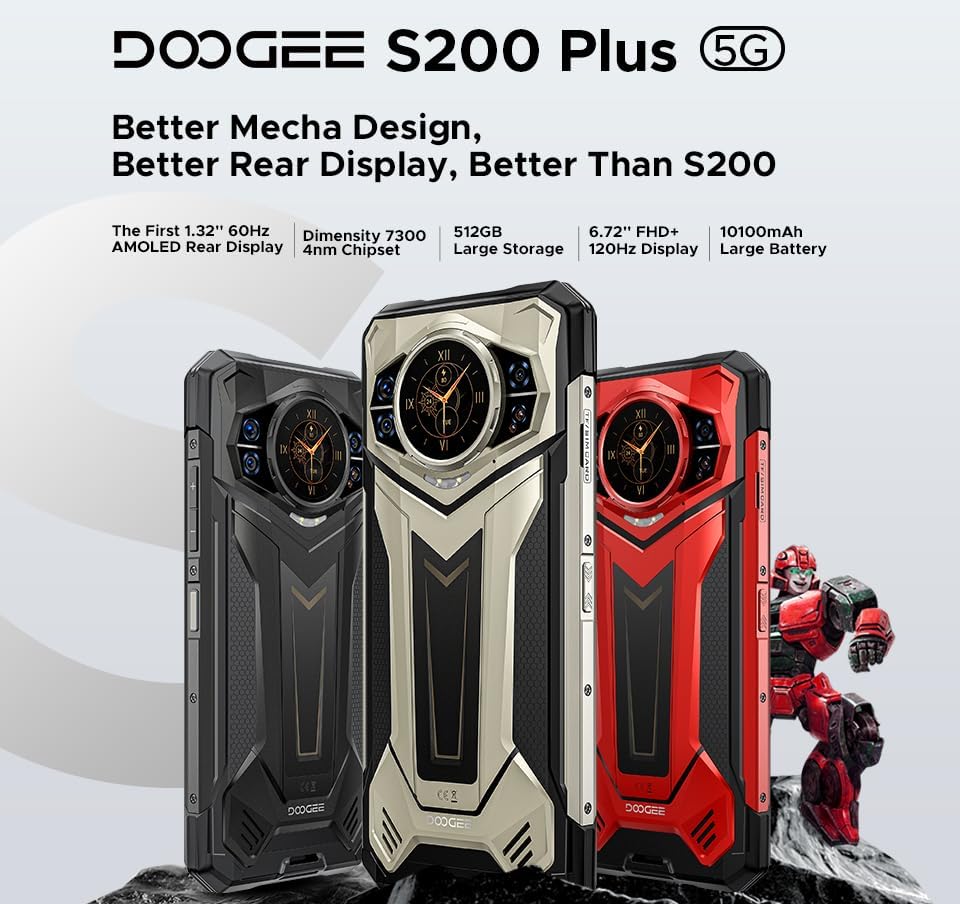
Image: Three color variants of the DOOGEE S200 Plus 5G smartphone, showcasing its "Better Mecha Design" and highlighting features such as the 1.32" AMOLED rear display, Dimensity 7300 chipset, 512GB storage, 6.72" FHD+ 120Hz display, and 10100mAh battery.
2. Key Features at a Glance
The DOOGEE S200 Plus 5G is packed with features designed for demanding environments and high performance:
- Ifihan Meji: 6.72" FHD+ IPS (120Hz) main screen and 1.32" AMOLED (60Hz) rear display.
- Powerful Camera System: 100MP AI Main Camera (EIS+OIS), 20MP Night Vision Camera, 32MP Front Camera, 2MP Macro.
- Iṣe Alagbara: MediaTek Dimensity 7300 5G Octa-Core Processor.
- AmpÌrántí àti Ìpamọ́: 12GB RAM (expandable to 32GB) + 512GB ROM (expandable to 2TB via microSD).
- Massive Battery: 10100mAh with 33W fast charging and 18W OTG reverse charging.
- Agbara Giga Julọ: IP68/IP69K water and dust resistance, MIL-STD-810H certified for shock protection.
- Ilọsiwaju Asopọmọra: Dual SIM 5G, Bluetooth 5.4, WiFi 6E, NFC, GPS (GLONASS/Galileo/Beidou).
- Aabo: Ìtẹ̀wé ìka àti Ṣíṣí ojú.
- Eto isesise: Android 14.

Aworan: A okeerẹ loriview of the DOOGEE S200 Plus 5G's key features, including its dual display, Dimensity 7300 processor, storage, battery, camera specifications, and security features.
3. Eto Itọsọna
3.1. Package Awọn akoonu
Ṣaaju ki o to bẹrẹ, rii daju pe gbogbo awọn nkan wa ninu package rẹ:
- Foonuiyara DOOGEE S200 Plus 5G
- USB Iru-C USB
- Adaparọ agbara (33W)
- SIM Ejector Ọpa
- Afowoyi Olumulo (iwe-ipamọ yii)
- Kaadi atilẹyin ọja
3.2. Fi awọn kaadi SIM ati kaadi MicroSD sii
DOOGEE S200 Plus ṣe atilẹyin fun awọn kaadi SIM meji ati kaadi microSD fun ibi ipamọ ti o le faagun to 2TB.
- Wa atẹ kaadi SIM ni ẹgbẹ foonu naa.
- Fi ohun elo SIM ejector sii sinu iho kekere ti o tẹle atẹ naa ki o tẹ rọra titi ti atẹ naa yoo fi jade.
- Fi awọn kaadi SIM Nano-SIM rẹ ati/tabi kaadi microSD sinu awọn iho ti a yan lori atẹ naa, ki o rii daju pe o tọ itọsọna naa.
- Fi pẹ̀lẹ́pẹ̀lẹ́ tì àwo náà padà sínú fóònù títí tí yóò fi rí bí ara ẹ̀rọ náà ṣe rí.
3.3. Gbigba agbara akọkọ
For optimal battery performance, fully charge your device before first use.
- So okun USB Iru-C pọ si ibudo gbigba agbara ni isalẹ foonu naa.
- So opin keji USB pọ mọ oluyipada agbara.
- Pulọọgi ohun ti nmu badọgba agbara sinu iṣan ogiri kan.
- Àmì ìgbaradì yóò hàn lójú ìbòjú. Jẹ́ kí fóònù náà gba agbára títí yóò fi dé 100%.
3.4. Agbara Lori ati Iṣeto ni ibẹrẹ
Press and hold the Power button (usually on the right side) until the DOOGEE logo appears. Follow the on-screen prompts to complete the initial setup, including language selection, Wi-Fi connection, Google account setup, and security settings.
4. Operating Your DOOGEE S200 Plus
4.1. Main Display (6.72" FHD+ 120Hz)
The primary display offers a smooth and immersive visual experience with its 120Hz refresh rate and FHD+ resolution. It is protected by Corning Gorilla Glass.

Image: The DOOGEE S200 Plus 5G's 120Hz anti-flicker screen, illustrating its 1080*2400 resolution and high refresh rate for enhanced immersion and faster response.
4.2. Multi-functional Rear Display (1.32" AMOLED)
The innovative 1.32-inch AMOLED rear display provides quick access to various functions without needing to activate the main screen.
- Ifiranṣẹ View: Check text messages and app notifications.
- Kalẹnda: View the current month's calendar.
- Camera Shortcut: Conveniently access the camera for quick selfies or photos.
- Iṣakoso Orin: Ṣiṣẹ, sinmi, fo awọn orin.
- Idahun Ipe: Answer calls directly from the rear screen.
- Kompasi: Lo kọmpasi ti a ṣe sinu rẹ fun lilọ kiri ita gbangba.
- Dynamic Dials: Customize with various dynamic watch faces.

Image: Diagram illustrating the multi-functional capabilities of the DOOGEE S200 Plus 5G's rear screen, including message view, calendar, camera shortcut, music control, call answering, and compass.
4.3. Eto kamẹra
The DOOGEE S200 Plus features a versatile camera setup for various photography needs.
- 100MP AI akọkọ kamẹra: Captures sharp images with EIS+OIS for stability.
- Kamera Iran Alẹ́ 20MP: Utilizes Morpho technology for clear images in low-light conditions.
- 32MP Kamẹra iwaju: Optimized for high-quality selfies.
- Kamẹra Makiro 2MP: Fun alaye isunmọ-soke Asokagba.
The phone incorporates AI image processing for enhanced results in various scenarios, including:
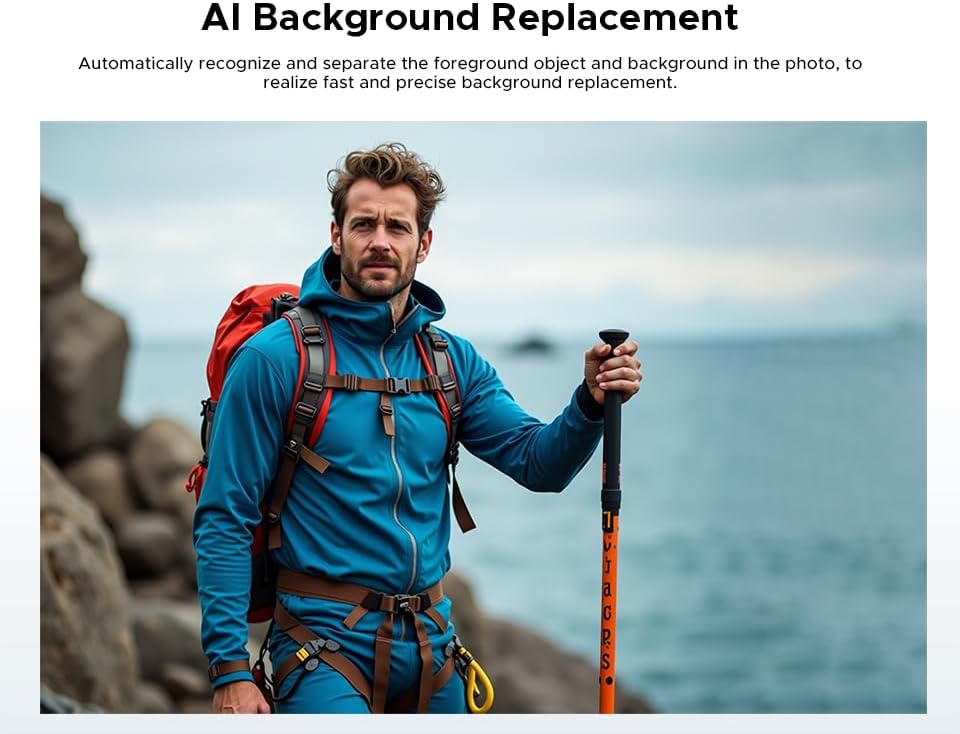
Aworan: Example of AI Background Replacement feature on the DOOGEE S200 Plus 5G, showing how it automatically recognizes and separates foreground objects for precise background changes.

Aworan: Examples of AI Portrait feature on the DOOGEE S200 Plus 5G, demonstrating intelligent image recognition to create personalized portrait photos by blending facial features into AI character models.
4.4. Išẹ ati Ibi ipamọ
Powered by the MediaTek Dimensity 7300 5G processor, the S200 Plus ensures smooth multitasking and efficient performance.

Image: Illustration of the Dimensity D7300 4nm 5G Octa-core Processor, highlighting its boosted performance and reduced power consumption for the DOOGEE S200 Plus 5G.
The device comes with 12GB of base RAM, expandable by an additional 20GB of virtual RAM for a total of 32GB. It includes 512GB of internal storage, which can be further expanded up to 2TB using a microSD card.

Image: Diagram showing the 12GB Basic RAM and 20GB Extended RAM, illustrating how the DOOGEE S200 Plus 5G achieves 32GB of total RAM for seamless daily usage and sustained high performance.
4.5. Batiri ati Ngba agbara
The 10100mAh battery provides extended usage times, with up to 1285 hours of standby, 40 hours of talk time, or 25 hours of video playback.
- Gbigba agbara iyara 33W: Ṣe igbasilẹ ẹrọ ni kiakia.
- Gbigba agbara pada 18W OTG: Allows you to use your phone as a power bank to charge other devices.
4.6. Asopọmọra ati Lilọ kiri
The S200 Plus offers comprehensive connectivity options:
- Dual SIM 5G: Supports full carrier compatibility for high-speed mobile data.
- Bluetooth 5.4: Fun asopọ awọn ẹya ẹrọ alailowaya.
- WiFi 6E: For fast and stable wireless internet.
- NFC: Integrated for Google Pay and other contactless transactions.
- Lilọ kiri: Supports GLONASS, Galileo, Beidou, and GPS for precise location tracking.
4.7. Aabo Awọn ẹya ara ẹrọ
Secure your device with biometric authentication:
- Ṣii silẹ Atẹtẹ ika: Use your fingerprint to quickly and securely unlock your phone.
- Ṣii silẹ oju: Unlock your device using facial recognition.
4.8. Awọn ọna System
The DOOGEE S200 Plus runs on Android 14, providing enhanced security, customization options, and optimized performance.
5. Itọju ati Itọju
To ensure the longevity and optimal performance of your DOOGEE S200 Plus, follow these maintenance guidelines:
- Ninu: Use a soft, lint-free cloth to clean the screen and body. Avoid abrasive materials or harsh chemicals. For stubborn dirt, a slightly damp cloth can be used, ensuring all ports are sealed.
- Awọn ẹya Itọju: The phone is IP68/IP69K rated for water and dust resistance and MIL-STD-810H certified for shock protection. While highly durable, avoid intentional submersion beyond specified depths/durations and extreme impacts to prevent damage. Ensure all port covers are securely closed before exposure to water or dust.
- Awọn imudojuiwọn sọfitiwia: Ṣe àyẹ̀wò déédéé fún àwọn àtúnṣe sọ́fítíwètì kí o sì fi sori ẹ̀rọ rẹ láti rí i dájú pé ẹ̀rọ rẹ ní àwọn àtúnṣe ààbò tuntun àti àwọn àtúnṣe iṣẹ́ tó ń lọ lọ́wọ́.
- Itọju Batiri: Avoid extreme temperatures. While the battery management system is intelligent, try to keep the battery charge between 20% and 80% for long-term health, though full charges are safe.
- Isakoso Ibi ipamọ: Lokọọkan ko ṣe pataki files and apps to maintain optimal performance. Utilize the expandable storage for large media files.
6. Laasigbotitusita
If you encounter issues with your DOOGEE S200 Plus, refer to the following common troubleshooting steps:
- Ẹrọ Ko Dahun: Ti foonu ba di didi tabi di idahun, tẹ mọlẹ Bọtini Agbara fun bii iṣẹju 10-15 lati fi agbara mu tun bẹrẹ.
- Awọn ọran gbigba agbara: Ensure the USB cable and power adapter are securely connected and undamaged. Try a different outlet or charging accessory. Check the charging port for debris.
- Network Connectivity Problems (No Signal/Wi-Fi):
- Yipada Ipo ofurufu tan ati pa.
- Tun foonu bẹrẹ.
- For mobile data, ensure SIM card is correctly inserted and mobile data is enabled in settings.
- For Wi-Fi, forget the network and reconnect, or restart your Wi-Fi router.
- Àwọn ìkọlù àpù/Ìṣiṣẹ́ tó lọ́ra:
- Pa abẹlẹ apps.
- Clear app cache (Settings > Apps > [App Name] > Storage > Clear Cache).
- Rii daju aaye ibi-itọju ọfẹ ti o to.
- Tun ẹrọ naa bẹrẹ.
- Fingerprint/Face Unlock Not Working:
- Ensure your fingers/face are clean and dry.
- Re-register your fingerprints/face in Settings > Security.
- Àtúntò Ilé-iṣẹ́ (Ìgbádùn Ìkẹyìn): If issues persist, you may consider a factory reset. Ìkìlọ̀: Èyí yóò pa gbogbo ìwífún lórí fóònù rẹ rẹ́. Ṣe àtìlẹ́yìn fún àwọn ìwífún pàtàkì kí o tó tẹ̀síwájú. Lọ si Eto> Eto> Awọn aṣayan atunto> Pa gbogbo data rẹ (atunṣe ile-iṣẹ).
7. Awọn pato
Detailed technical specifications for the DOOGEE S200 Plus 5G smartphone:
| Ẹya ara ẹrọ | Sipesifikesonu |
|---|---|
| Brand | DOOGEE |
| Orukọ awoṣe | S200 PLUS |
| Eto isesise | Android 14 |
| Ifihan akọkọ | 6.72 inches FHD+ IPS (2400 x 1080), 120Hz Refresh Rate |
| Afihan Atẹyin | 1.32 inches AMOLED (60Hz) |
| isise | MediaTek Dimensity 7300 5G (4nm Octa-Core, 2.5 GHz) |
| Àgbo | 12GB (a le faagun si 32GB pẹlu Ramu foju) |
| Ibi ipamọ inu | 512GB |
| Expandable Ibi ipamọ | Titi di 2TB nipasẹ kaadi microSD |
| Kamẹra akọkọ | 100 MP AI (EIS+OIS) |
| Oju-ọjọ Kamẹra | 20 MP |
| Kamẹra iwaju | 32 MP |
| Kamẹra Makiro | 2 MP |
| Agbara Batiri | 10100 mAh |
| Gbigba agbara yara | 33W |
| Ngba agbara yiyipada | 18W OTG |
| Cellular Technology | 5G (Dual SIM) |
| Asopọmọra | Bluetooth 5.4, Wi-Fi 6E, NFC |
| Lilọ kiri | GPS, GLONASS, Galileo, Beidou |
| Iduroṣinṣin | IP68 / IP69K, MIL-STD-810H |
| Biometrics | Fingerprint, Face Unlock |
| Awọn iwọn | 17.95 x 8.25 x 1.91 cm (isunmọ.) |
| Batiri Tiwqn | Litiumu-polima |
8. Atilẹyin ọja ati Support
DOOGEE provides a comprehensive warranty and support for your S200 Plus 5G smartphone:
- Atilẹyin ọja: Each DOOGEE outdoor phone purchased from an authorized retailer comes with a full 24-osu atilẹyin ọja.
- Oluranlowo lati tun nkan se: For technical inquiries or hardware defects, please contact DOOGEE's specialized support team. Refer to the warranty card included in your package for contact details or visit the official DOOGEE webojula.
- Awọn imudojuiwọn sọfitiwia: Ensure your device is always up-to-date by regularly checking for and installing official software updates provided by DOOGEE.