
Donner MAMP6
Donner MAMPÌwé Àfọwọ́kọ Olùlò Olùgbà Sítéréó 6
Premium 1000W Peak Power 6 Channel Audio Ampitanna
1. Ọja Ipariview
The Donner MAMP6 is a versatile 6-channel stereo receiver designed to elevate your audio experience. With a peak power output of 1000W (25W × 6 RMS power), it supports up to 6 groups of 12 speakers with impedance ranging from 4 to 16 ohms. This amplifier integrates multiple input modes including Bluetooth 5.3, USB, FM radio, RCA, and digital optical/coaxial interfaces, making it suitable for various home audio setups, karaoke, and theater systems.
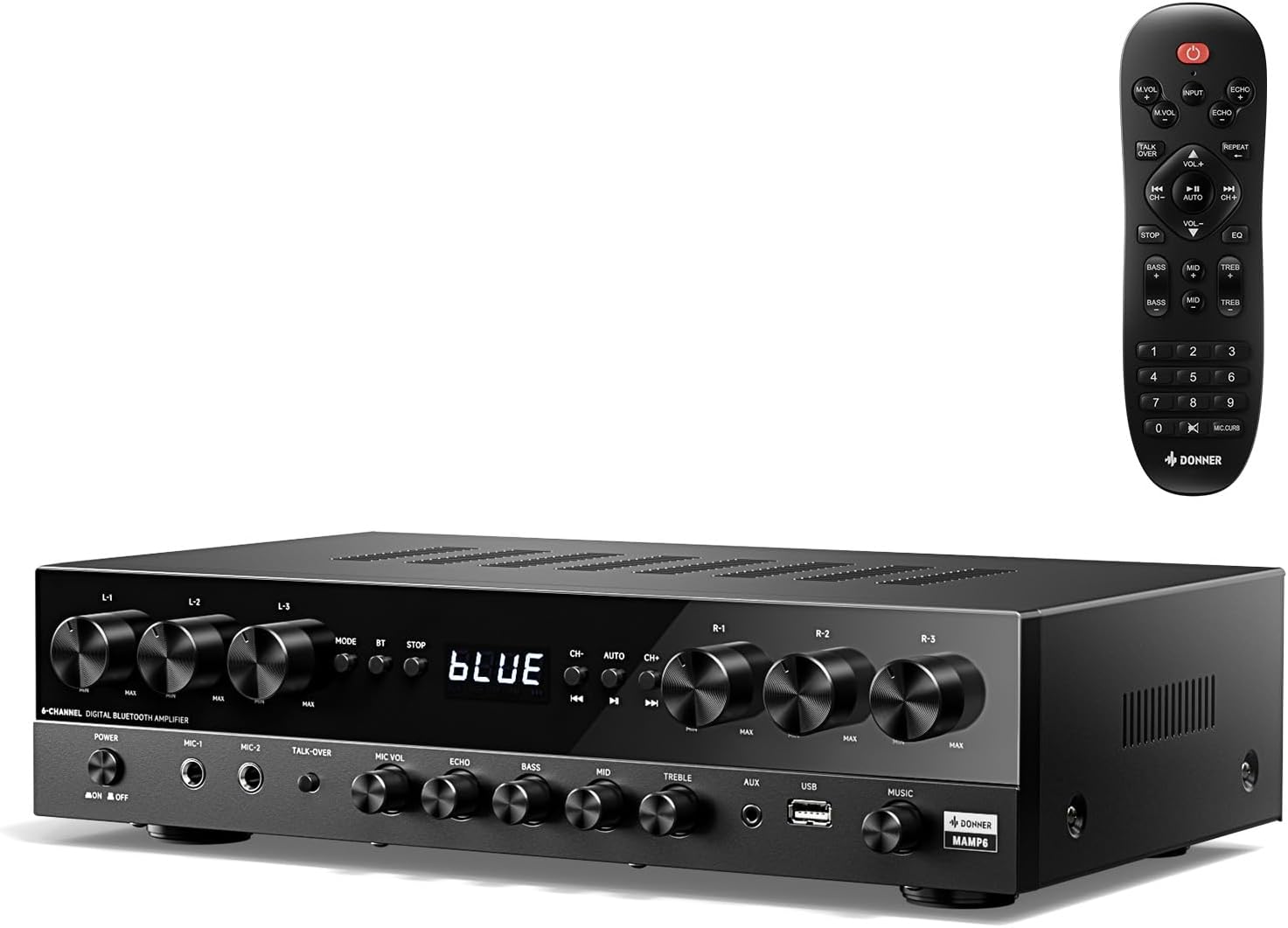
Image: The Donner MAMP6 Stereo Receiver shown with its included remote control. The receiver features a black finish with multiple control knobs and a digital display.
2. Key Awọn ẹya ara ẹrọ
- 1000W Agbara ti o ga julọ: Delivers robust audio performance with 25W × 6 RMS power, supporting up to 6 groups of 12 speakers (4-16 ohms).
- Multifunction Remote Control: An upgraded remote allows control over treble, midrange, bass, echo, and Talkover functions across all input modes.
- Ọ̀pọ̀lọpọ̀ Ìgbéwọlé: Supports Bluetooth 5.3, USB (up to 64 GB), 2 pairs of RCA, 2 mic inputs, AUX IN, FM radio, and digital Optical/Coaxial inputs for broad compatibility.
- Upgraded FM Function: Convenient direct frequency input for quick FM station selection.
- Customized EQ Control: Independent treble, midrange, and bass adjustments available on both the amplifier and remote. Settings are automatically saved for convenience.
- Dual Mic Interfaces: Features two 1/4'' microphone jacks for karaoke and public address, including a Talk Over function to lower background music during speech.

Image: A comparison showing the new multifunction remote control for the Donner MAMP6 versus an older style remote, highlighting enhanced functionality.

Image: The Donner MAMP6 receiver on a wooden surface, illustrating its various connectivity options including FM, USB, AUX, Microphone, CD/DVD, Speakers, Coaxial, and Optical inputs.
3. Eto Itọsọna
3.1 Ṣiṣii silẹ
Ni ifarabalẹ yọ gbogbo awọn paati kuro ninu apoti. Rii daju pe gbogbo awọn nkan ti o wa ni isalẹ wa:
- Donner MAMP6 Olugba Sitẹrio
- Isakoṣo latọna jijin
3.2 Nsopọ Agbọrọsọ
Awọn MAMP6 features 6 independent channels, allowing you to connect up to 12 speakers (6 pairs). Connect your speakers to the corresponding terminals on the rear panel. Ensure correct polarity (+ to + and - to -) for optimal sound quality.

Image: A diagram illustrating the 6-channel audio output of the Donner MAMP6, showing how up to 12 speakers can be connected and controlled by individual volume knobs.
3.3 Nsopọ Awọn orisun ohun
Connect your desired audio sources to the appropriate input jacks on the receiver's front or rear panel.
- Bluetooth: Fun asopọ alailowaya lati awọn fonutologbolori, awọn tabulẹti, tabi awọn kọnputa.
- USB: Insert a USB drive (up to 64 GB) for direct audio playback.
- RCA (Ila/Ila): Use for traditional audio devices like CD/DVD players or older ampalifiers.
- Optical/Coaxial: For digital audio connection from smart TVs or other digital sources.
- AX IN: A 3.5mm jack on the front panel for quick connection of portable devices.
- Awọn igbewọle Gbohungbohun: Two 1/4" jacks for microphones.

Image: A detailed diagram of the Donner MAMP6 front panel, labeling the power switch, microphone inputs, Talk-over, Mic Vol, Echo, Bass, Mid, Treble, AUX, USB, and Music Volume knobs.

Image: A detailed diagram of the Donner MAMP6 back panel, showing connections for FM antenna, digital optical/coaxial, RCA inputs, line out, and the 6-channel speaker outputs.
4. Awọn ilana Iṣiṣẹ
4.1 Agbara Tan / Pa
Tẹ awọn AGBARA bọtini lori iwaju nronu tabi isakoṣo latọna jijin lati tan kuro tabi pa.
4.2 Aṣayan titẹ sii
Lo awọn MODE bọtini lori ni iwaju nronu tabi awọn ÀWỌN Ọ̀RỌ̀ button on the remote to cycle through available input sources (Bluetooth, USB, FM, RCA, Optical, Coaxial, AUX).
4.3 Iṣakoso iwọn didun
Adjust the overall volume using the large ORIN ORIN koko lori ni iwaju nronu tabi awọn VOL +/- buttons on the remote. Individual channel volumes (L1-L3, R1-R3) can be adjusted using their respective knobs on the front panel.
Àtúnṣe EQ 4.4
Ṣe atunṣe ohun rẹ nipa lilo eto Bass, Àárín, ati TREK. knobs on the front panel or the corresponding buttons on the remote control. The system automatically saves your EQ settings.

Image: The Donner MAMP6 receiver and its remote, highlighting the independent Bass, Mid, and Treble controls for customized sound adjustment and memory function.
4.5 Sisopọ Bluetooth
Select the Bluetooth input mode. The display will show "BLUE". On your device, search for "Donner MAMP6" and pair. Once connected, you can stream audio wirelessly.
4.6 USB Sisisẹsẹhin
Fi okun filasi USB sinu USB port on the front panel. The unit will automatically switch to USB mode and begin playing compatible audio files.
4.7 FM Radio isẹ
Select the FM input mode. Use the CH +/- buttons to scan for stations or directly enter the frequency using the numeric keypad on the remote control.

Image: A hand holding the remote control for the Donner MAMP6, demonstrating the ability to quickly select FM frequencies by directly entering numbers.
4.8 Microphone Usage (Karaoke/Talkover)
So awọn gbohungbohun pọ mọ MIC 1 or MIC 2 inputs. Adjust microphone volume with the MIC vol knob and add echo effect with the ECHO knob. Activate SORO LORI to automatically lower background music when speaking into the microphone.

Image: Two individuals singing into microphones, illustrating the karaoke and Talk Over features of the Donner MAMP6 receiver.
5. Itọju ati Itọju
- Ninu: Lo aṣọ rírọrùn tí ó gbẹ láti nu ìta ẹ̀rọ náà. Má ṣe lo àwọn ohun èlò ìfọmọ́ omi tàbí aerosol.
- Afẹfẹ: Ensure adequate ventilation around the receiver. Do not block ventilation openings.
- Ibi: Gbé ẹ̀rọ náà sí orí ilẹ̀ tí ó dúró ṣinṣin, tí ó tẹ́jú, tí ó jìnnà sí oòrùn tààrà, àwọn orísun ooru, àti ọ̀rinrin tí ó pọ̀ jù.
- Okun Agbara: Ṣayẹwo okun agbara nigbagbogbo fun eyikeyi ibajẹ.
6. Laasigbotitusita
| Isoro | Owun to le Fa | Ojutu |
|---|---|---|
| Ko si agbara | Power cord not connected; Power outlet faulty; Unit is off. | Ensure power cord is securely plugged in; Try a different outlet; Press the POWER button. |
| Ko si ohun jade | A ti yan titẹ sii ti ko tọ; Iwọn didun kere ju; Awọn agbọrọsọ ko sopọ mọ daradara; Odi wa ni titan. | Select correct input source; Increase volume; Check speaker connections and polarity; Disable mute. |
| Bluetooth ko sopọ | Receiver not in Bluetooth mode; Device not discoverable; Interference. | Switch receiver to Bluetooth mode; Ensure device's Bluetooth is on and discoverable; Move closer to receiver; Restart both devices. |
| Gbigba FM ti ko dara | Antenna not connected or positioned poorly; Weak signal. | Connect FM antenna securely; Adjust antenna position for better reception; Try manual tuning. |
| Gbohungbohun ko ṣiṣẹ | Microphone not plugged in; MIC VOL too low; Microphone faulty. | Ensure microphone is fully plugged into MIC 1/2; Increase MIC VOL knob; Test with another microphone. |
7. Imọ ni pato
| Ẹya ara ẹrọ | Sipesifikesonu |
|---|---|
| Nọmba awoṣe | MAMP6 |
| Ijade agbara ti o ga julọ | 1000W |
| Ijade Agbara RMS | 25W × 6 Channels |
| Impedance Agbọrọsọ | 4 - 16 ohms |
| Asopọmọra Technology | Bluetooth 5.3, USB, RCA, Optical, Coaxial |
| USB Support | Titi di 64 GB |
| Awọn igbewọle Gbohungbohun | 2 x 1/4'' Jacks |
| Ọja Mefa | 14.96 x 3.86 x 9.76 inches (38 x 9.8 x 24.8 cm) |
| Iwọn Nkan | 11.97 poun (5.44 kg) |
| Àwọ̀ | Dudu |
| Olupese | Donner |
| Ilu isenbale | China |
8. Atilẹyin ọja ati Support
Donner products are designed for reliability and performance. For specific warranty information, please refer to the warranty card included with your product or visit the official Donner website. For technical support, troubleshooting assistance, or service inquiries, please contact Donner customer support through their official channels. Keep your purchase receipt as proof of purchase for warranty claims.
Official Donner Webojula: www.donnerdeal.com
Ask a question about this manual
Ask about setup, troubleshooting, compatibility, parts, safety, or missing instructions. Manuals+ will review the question and use this page’s manual context to help answer it.