
1. Ifihan
Thank you for choosing the OUILA LED Cabinet Lighting with Motion Sensor. This manual provides essential information for the safe and efficient use of your new lighting product. Please read it thoroughly before installation and operation, and retain it for future reference.
This product is a 60cm LED strip light designed for under-cabinet use, featuring a motion sensor, three adjustable color temperatures, and dimmable brightness. It is battery-powered and USB rechargeable, making it suitable for various indoor applications such as kitchens, bathrooms, bedrooms, closets, and bookshelves.
2. Awọn ilana aabo
- Do not expose the light to water or excessive moisture. This product is designed for indoor use only.
- Do not attempt to disassemble, repair, or modify the device. Unauthorized modifications may void the warranty and pose safety risks.
- Jeki ẹrọ naa kuro ni awọn orisun ooru, oorun taara, ati awọn ohun elo ina.
- Use only the provided USB Type-C cable for charging. Ensure the charging voltage ni ibamu (5V).
- Jeki kuro ni arọwọto awọn ọmọde.
- If the product is damaged or malfunctions, discontinue use immediately and contact customer support.
3. Package Awọn akoonu
Jọwọ ṣayẹwo package fun awọn nkan wọnyi:
- OUILA LED Cabinet Light (x2)
- Okun Ngba agbara USB Iru-C (x2)
- Magnetic Adhesive Tape (x2 sets)
- Itọsọna olumulo

Image: Contents of the OUILA LED Cabinet Lighting package, showing two light bars and their respective USB charging cables.
4. Awọn ẹya Ọja
- Sensọ išipopada: Automatically detects motion within 3 meters and a 100-degree range. The light turns off after 20 seconds of no motion to conserve energy.
- 3 Awọn ọna itanna: Choose between Always On, Always Off, and Motion Sensor (Night Detection) modes.
- 3 Awọn iwọn otutu awọ: Adjustable to Warm White (3000K), Neutral Light (4000K), and Cool White (6500K) to suit different environments and preferences.
- Dimmingless Stepless: Adjust brightness from 10% to 100% with a long press. Features a memory function to recall the last brightness setting.
- Batiri gbigba agbara: Built-in 5000mAh polymer lithium battery provides extended use.
- Ngba agbara USB Iru-C: Rọrùn àti kíákíá gbigba agbara.
- Apẹrẹ Tinrin: Slim 9mm aluminum housing for discreet installation.
- Fifi sori Rọrun: Integrated magnets for direct attachment to metal surfaces or use with included adhesive magnetic tape for non-metal surfaces.

Image: Visual representation of the three color temperatures (6500K White, 4000K Natural, 3000K Warm) and the stepless dimming capability of the light.

Image: Illustration of the motion sensor's detection range, showing a 3-meter distance and 100-degree angle, with indicators for light turning on and off based on movement.
5. Eto ati fifi sori
The OUILA LED Cabinet Light offers two installation methods:
Method 1: Direct Magnetic Attachment (for iron surfaces)
The light bar has integrated magnets on its back. Simply attach it directly to any magnetic metal surface, such as a refrigerator or metal cabinet.
Method 2: Adhesive Magnetic Tape (for non-iron surfaces)
- Clean the target surface thoroughly to ensure it is dry and free of dust or grease.
- Peel off the protective film from one side of the adhesive magnetic tape.
- Stick the adhesive side firmly onto the desired installation location.
- Attach the LED cabinet light to the magnetic strip. The built-in magnets in the light will securely hold it in place.

Image: Visual guide demonstrating how to install the light using either direct magnetic attachment to an iron surface or by using the provided super sticky magnetic tape for non-iron surfaces.
6. Isẹ
The light features a control panel with buttons for mode selection, brightness adjustment, and color temperature changes.
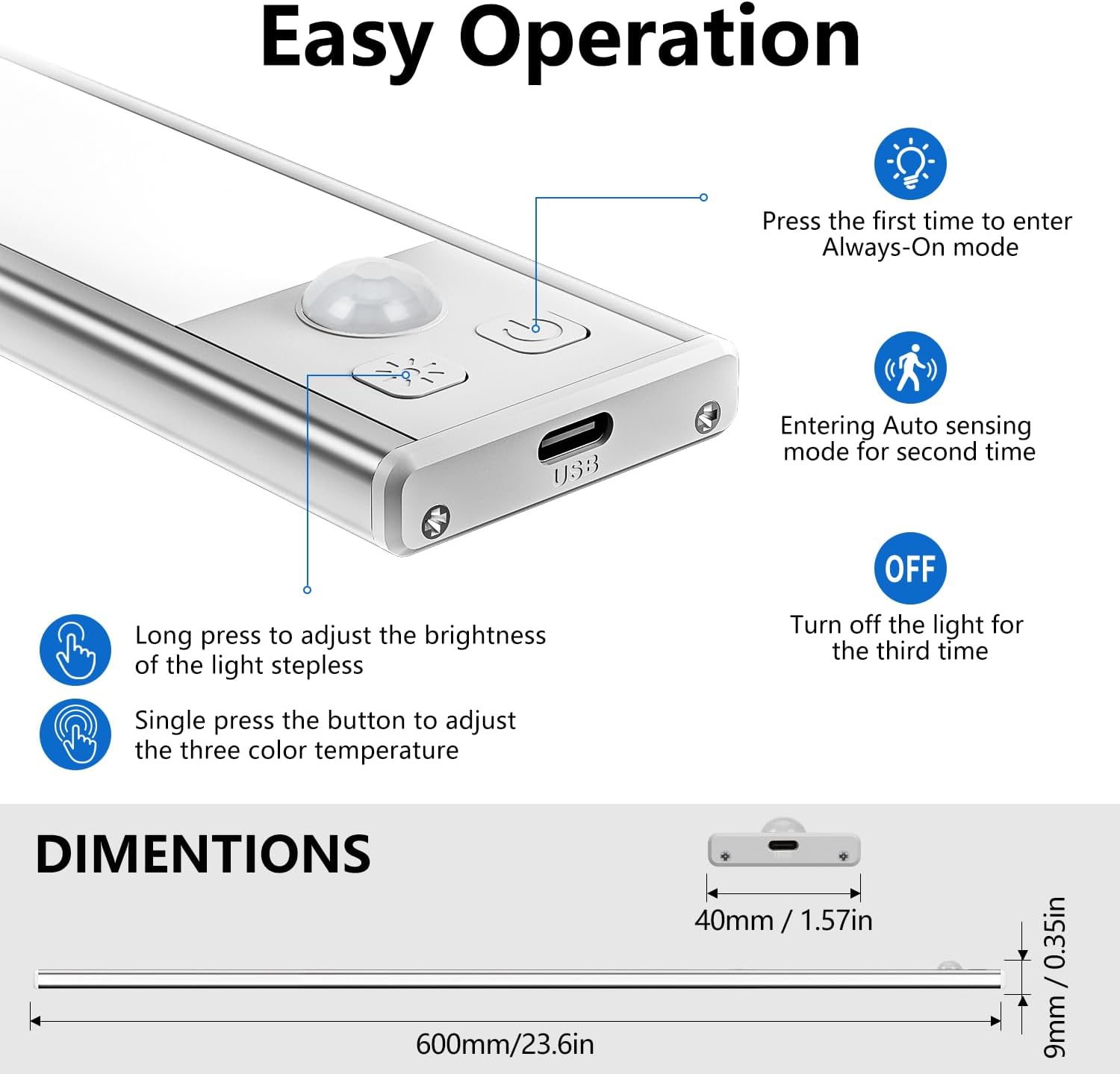
Image: Close-up of the light's control panel, detailing the functions of the buttons for power, mode selection, brightness adjustment, and color temperature changes.
Agbara ati Aṣayan Ipo
- Tẹ akọkọ: Wọle Nigbagbogbo Tan mode. The light will remain on continuously.
- Tẹ keji: Wọle Aifọwọyi oye (Motion Sensor) mode. The light will turn on when motion is detected in darkness and turn off after 20 seconds of no motion.
- Tẹ Kẹta: Turns the light Paa.
Brightness Adjustment (Dimming)
- Long Tẹ: Press and hold the brightness button to adjust the light intensity. The brightness will cycle between 10% and 100%. Release the button when the desired brightness is reached.
- The light has a memory function and will retain the last brightness setting when turned back on.
Awọ Atunṣe iwọn otutu
- Tẹ Nikan: Press the color temperature button to cycle through the three available color temperatures: Warm White (3000K), Neutral Light (4000K), and Cool White (6500K).
7. Gbigba agbara
The OUILA LED Cabinet Light is equipped with a built-in 5000mAh rechargeable battery.
- Connect the provided USB Type-C charging cable to the charging port on the light.
- Plug the other end of the cable into a USB power source (e.g., USB charger, computer, power bank).
- Atọka gbigba agbara: A red light indicates that the device is charging. A green light indicates that the battery is fully charged.
- Gbigba agbara ni kikun maa n gba to wakati mẹta.
- At full brightness, the light can operate for at least 15 hours. Usage time varies depending on brightness settings and mode.
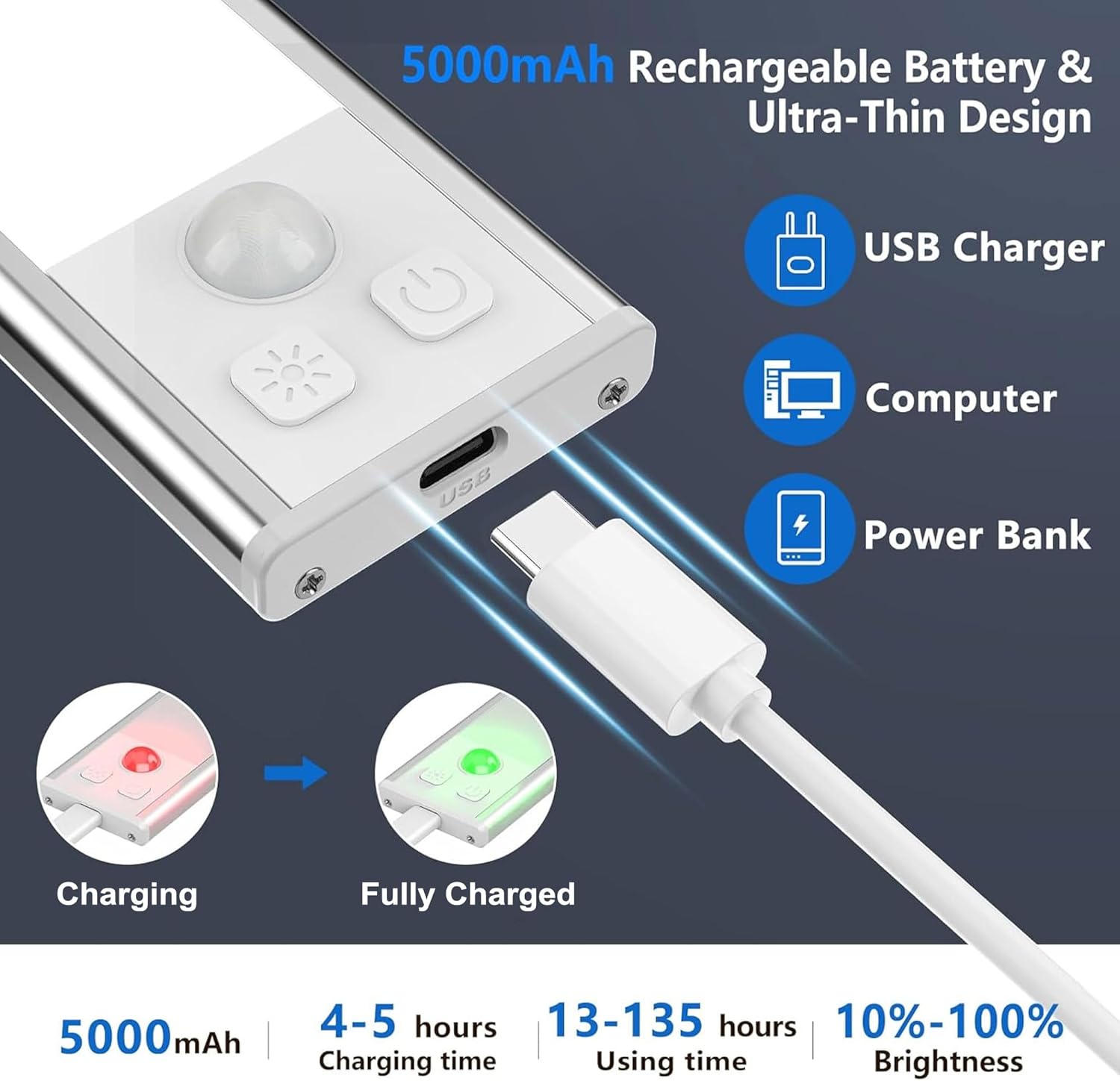
Image: Illustration of the USB-C charging process, showing the charging port, compatible power sources (USB charger, computer, power bank), and the red/green indicator lights for charging status.
8. Itọju
- Clean the light surface with a soft, dry cloth. Do not use abrasive cleaners or solvents.
- Ensure the charging port is free of dust and debris to maintain proper connection.
- Tọ́jú ìmọ́lẹ̀ náà sí ibi tí ó tutù tí ó sì gbẹ nígbà tí a kò bá lò ó fún ìgbà pípẹ́.
9. Laasigbotitusita
Imọlẹ ko tan:
- Check if the battery is charged. Connect to a power source and observe the charging indicator.
- Ensure the light is not in "Always Off" mode. Press the mode button to cycle through modes.
Sensọ išipopada ko ṣiṣẹ:
- Ensure the light is in "Auto Sensing" (Motion Sensor) mode.
- Verify that the ambient light is low enough for the sensor to activate (night detection).
- Ṣayẹwo fun awọn idinamọ dina sensọ.
- Ensure motion is within the 3-meter, 100-degree detection range.
Ina tan tabi di didin lairotẹlẹ:
- Batiri naa le jẹ kekere. Gba agbara si ẹrọ ni kikun.
10. Awọn pato
| Nọmba awoṣe | GLS-C019 |
| Awọn iwọn | 60 x 4 x 0.9 cm |
| Iwọn | 740 g (for the pack of 2) |
| Ohun elo | Aluminiomu |
| Agbara Batiri | 5000 mAh (Polymer Lithium) |
| Akoko gbigba agbara | Isunmọ. wakati meji 4 |
| Akoko Iṣiṣẹ | 15+ hours (at full brightness, varies with settings) |
| Awọn iwọn otutu awọ | 3000K (Warm White), 4000K (Neutral Light), 6500K (Cool White) |
| Ibi sensọ išipopada | 3 meters / 100 degrees |
| Aifọwọyi-Pa Aago | Àáyá 20 (lẹ́yìn tí a kò rí ìṣípo kankan) |
| Orisun agbara | Agbara Batiri |
| inu ile / ita gbangba Lo | Ninu ile |
11. Atilẹyin ọja ati Support
OUILA products are manufactured to high-quality standards. For any questions, technical support, or warranty claims, please contact your retailer or the OUILA customer service team through the platform where you purchased the product. Please have your purchase details and model number (GLS-C019) ready when contacting support.