
1. Ifihan
This manual provides detailed instructions for the Aokeo AK-58i Low Profile Microphone Boom Arm Stand. Please read this manual thoroughly before installation and use to ensure proper function and longevity of your product. This boom arm is designed to provide stable and flexible microphone positioning for various applications such as gaming, podcasting, recording, and streaming.
2. Awọn akoonu Ọja
Daju pe gbogbo awọn paati ti a ṣe akojọ si isalẹ wa ninu package rẹ:
- Microphone Stand (Boom Arm) x1
- Iduro Clamp Ipilẹ x1
- 3/8" to 1/4" Adapter x1
- 3/8" to 5/8" Adapter x1
- Eso x1
- Ilana itọnisọna x1
- Apoti iṣakojọpọ x1
Video: AK-58i Microphone Stand Overview. Yi fidio pese kan gbogboogbo loriview of the AK-58i microphone stand and its components.
Video: Microphone Boom Arm Unboxing. This video demonstrates the unboxing process and shows what comes in the box.
3. Eto ati fifi sori
- So Iduro Clamp: Ṣe aabo tabili clamp base to a sturdy table or desk surface. Ensure the table thickness is less than 7cm (2.75 inches) for proper fit. Tighten the screw firmly to prevent movement.
- Insert the Boom Arm: Insert the main vertical shaft of the boom arm into the hole on the desk clamp base. Use the provided knob to secure it in place.
- Assemble Arm Segments: Connect the two main arm segments by aligning the pins and holes. Tighten the adjustment knobs at each joint to secure the desired position.
- Attach Microphone Adapter: Screw the appropriate adapter (3/8" to 1/4" or 3/8" to 5/8") onto the microphone mounting thread at the end of the boom arm.
- Mount Your Microphone: Carefully screw your microphone or microphone shock mount onto the adapter. Ensure it is securely fastened.
- Iṣakoso USB: Utilize the integrated cable storage channels along the arm to route and secure your microphone cable, reducing clutter and preventing accidental pulling.

Image: Step-by-step installation guide for the Aokeo AK-58i boom arm, showing how to attach the microphone and secure cables.
Video: Microphone Boom Arm Setup. This video provides a quick and easy guide to installing the microphone boom arm.
4. Iṣẹ́ àti Àtúnṣe
The Aokeo AK-58i boom arm offers extensive flexibility for optimal microphone placement:
- Ipo Rọ: Both main arm segments can rotate 360 degrees, allowing for broad horizontal reach.
- Atunse inaro: The arm section holding the microphone can swing up and down 180 degrees, enabling precise vertical positioning.
- Ilana Titiipa: Each joint features a lock/unlock knob. Turn clockwise to lock the arm in position and counter-clockwise to unlock for adjustment.
- Iṣakoso USB: Use the integrated cable clips to keep your microphone cable neatly organized along the arm, preventing tangles and maintaining a clean workspace.
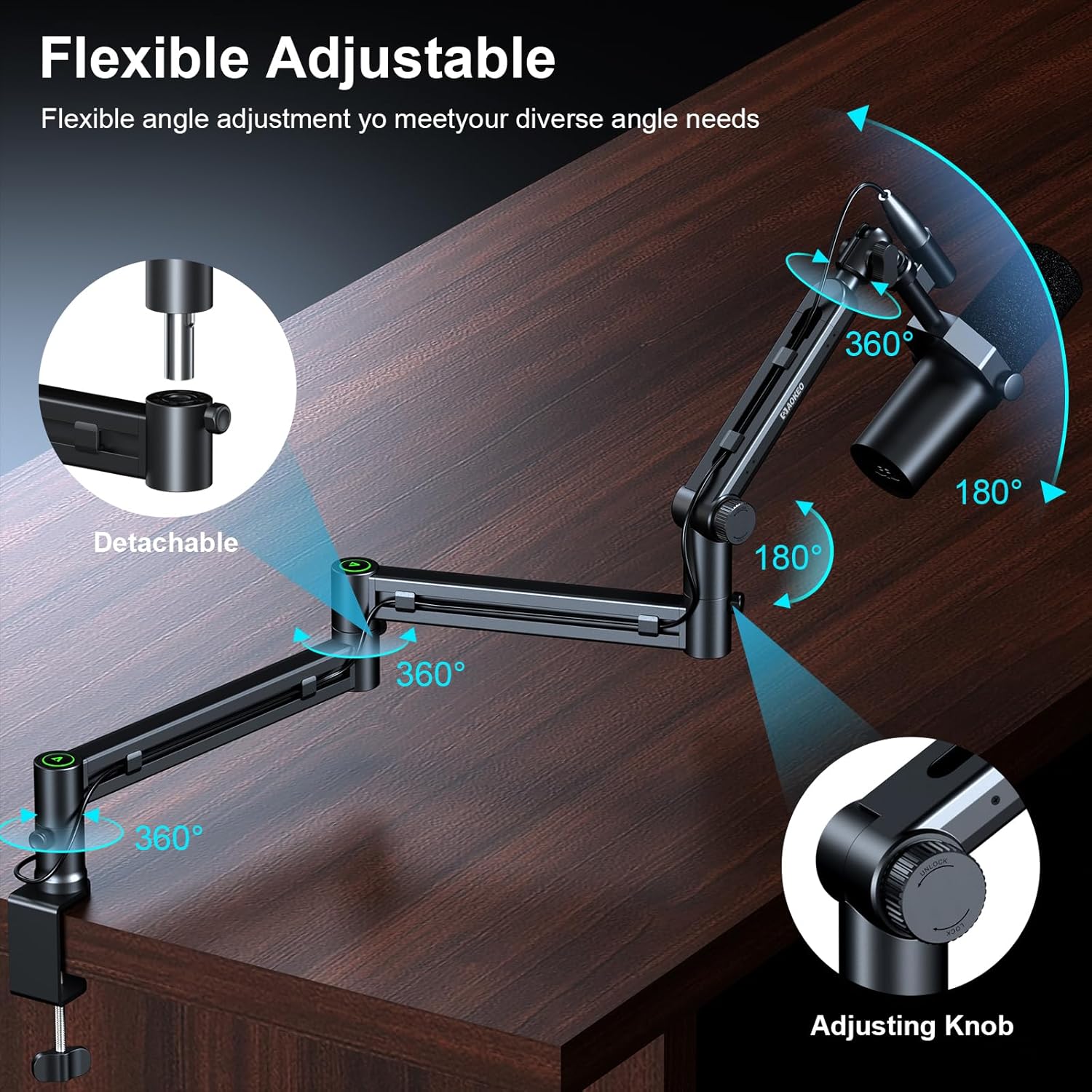
Image: Demonstrates the flexible adjustment capabilities of the Aokeo AK-58i, including 360-degree rotation and 180-degree vertical swing.

Image: Illustrates the integrated cable management system for a tidy desktop setup.
5. Awọn pato
| Ẹya ara ẹrọ | Sipesifikesonu |
|---|---|
| Brand | Akeo |
| Nọmba awoṣe | AK-59 |
| Àwọ̀ | AK-58i (Black) |
| Ohun elo | Irin |
| Ara | Pro kekerefile adijositabulu |
| Ipilẹ Iru | Flat (Desk Clamp) |
| Iṣeduro iwuwo ti o pọju | 2 kilogram (4.4 lbs) |
| O pọju Giga | 30 centimita |
| Mount Thread Sizes | 3/8", 5/8", 1/4" Inches (with included adapters) |
| Compatible Table Thickness | Less than 7cm (2.75 inches) |

Image: Details the load-bearing capacity and key dimensions of the boom arm.

Image: Shows the enhanced desk clamp and its compatibility with various table thicknesses.
6. Itọju
To ensure the longevity and optimal performance of your Aokeo AK-58i Microphone Boom Arm Stand, follow these maintenance guidelines:
- Ninu igbagbogbo: Wipe down the arm and clamp with a soft, dry cloth to remove dust and debris. Avoid abrasive cleaners or solvents that could damage the finish.
- Ṣayẹwo wiwọn: Periodically inspect all screws and knobs, especially the desk clamp and joint tension knobs, to ensure they remain tight. Re-tighten as necessary to maintain stability.
- Lubrication: If any joints become stiff over time, a small amount of silicone-based lubricant can be applied to the pivot points. Avoid over-lubricating.
- Iṣakoso USB: Ensure cables are routed correctly through the cable channels to prevent pinching or excessive strain on the arm or cables.
7. Laasigbotitusita
If you encounter any issues with your Aokeo AK-58i Microphone Boom Arm Stand, refer to the following common troubleshooting steps:
- Arm Sags or Drifts: Ensure all tension knobs at the joints are tightened sufficiently. The arm's maximum load capacity is 2KG; verify your microphone and accessories do not exceed this weight.
- Iduro jẹ Aiduro: Check that the desk clamp is securely fastened to a stable surface and fully tightened. Ensure the table thickness is within the compatible range (less than 7cm).
- Microphone Does Not Fit: Confirm you are using the correct adapter (3/8" to 1/4" or 3/8" to 5/8") for your microphone.
- Difficulty Adjusting Arm: Loosen the tension knobs slightly before attempting to reposition the arm. Re-tighten once the desired position is achieved.
8. Atilẹyin ọja ati Support
This Aokeo AK-58i Microphone Boom Arm Stand comes with a 1-odun atilẹyin ọja. For any questions, technical support, or warranty claims, please contact Aokeo customer service through the retailer where you purchased the product or visit the official Aokeo webojula.