
Ọrọ Iṣaaju
O ṣeun fun riraasing the Sigma 50mm F2 DG Contemporary lens. This manual provides essential information for the safe and effective use of your new lens. Please read it thoroughly before using the product and keep it for future reference.
Awọn iṣọra Aabo
- Do not look at the sun or other strong light sources through the lens, as this can cause permanent vision damage.
- Keep the lens away from direct sunlight when not in use to prevent fire hazards.
- Avoid exposing the lens to extreme temperatures, humidity, or dust.
- Do not attempt to disassemble or modify the lens. Repairs should only be performed by authorized service personnel.
- Jeki kuro ni arọwọto awọn ọmọde.
Package Awọn akoonu
Daju pe gbogbo awọn nkan wa ninu apo rẹ:
- Sigma 50mm F2 DG Contemporary Lens
- Lens Hood (LH633-02S)
- Iwaju lẹnsi fila
- Fọwọsi lẹnsi Fifọ
- Ilana Afowoyi (iwe yii)
Awọn ẹya ara ti awọn lẹnsi
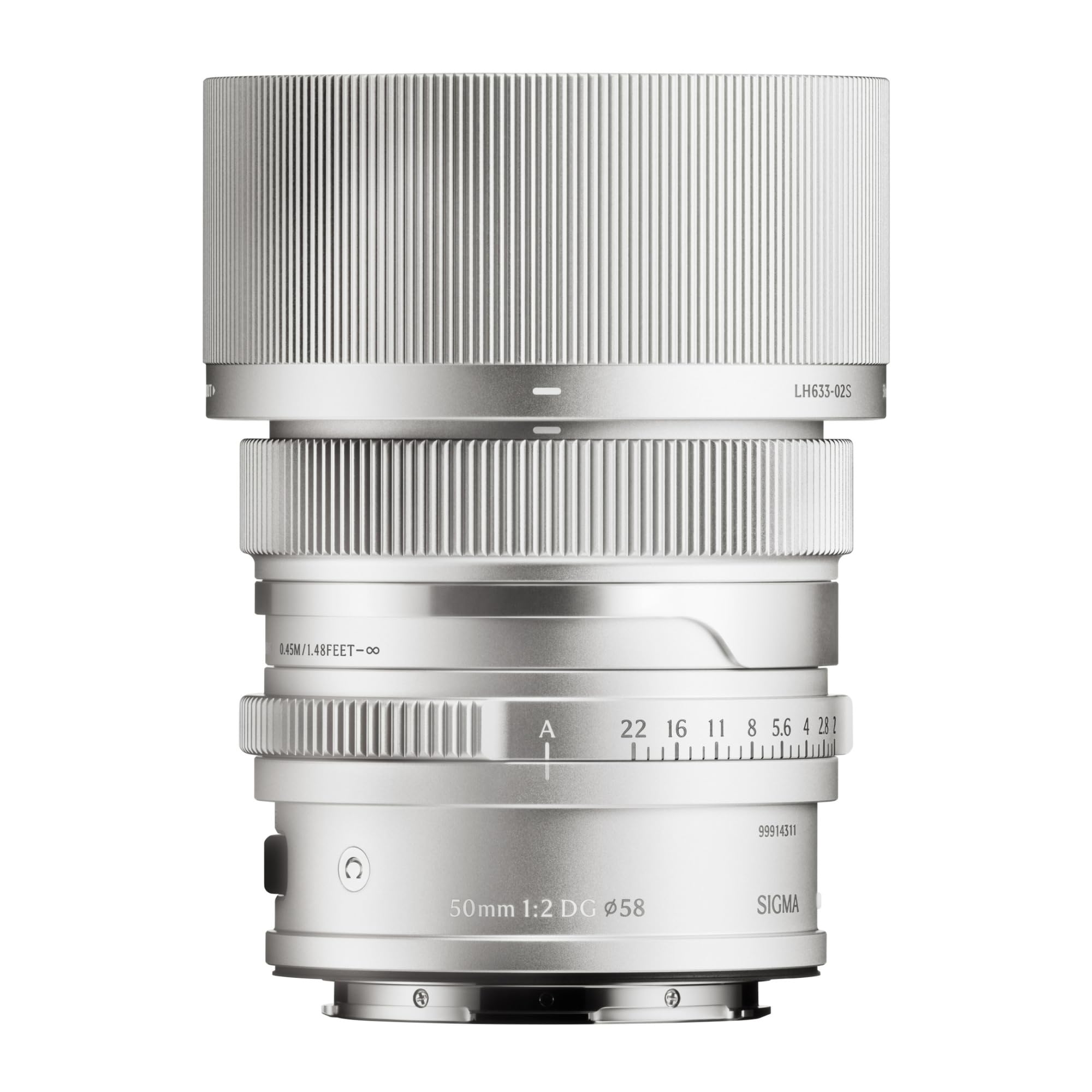
This image displays the Sigma 50mm F2 DG Contemporary lens, a prime lens designed for L-mount cameras. It features a sleek silver finish and a compact design, suitable for various photographic applications.
The Sigma 50mm F2 DG Contemporary lens features several key components:
- Idojukọ Oruka: Ti a lo fun idojukọ ọwọ.
- Oruka Iho: Allows direct control over the lens aperture.
- Oke lẹnsi: Connects the lens to the camera body (L-Mount).
- Lens Hood Attachment Point: Where the dedicated lens hood is secured.

The image shows the LH633-02S lens hood, a cylindrical accessory with a ribbed exterior, designed to attach to the Sigma 50mm F2 DG Contemporary lens. It helps to prevent stray light from entering the lens, reducing flare and ghosting, and offers protection to the front element.
Ṣeto
So awọn lẹnsi
- Rí i dájú pé kámẹ́rà àti lẹ́ńsì náà ti pa.
- Remove the rear lens cap from the lens and the body cap from the camera.
- Align the mounting index on the lens with the mounting index on the camera body.
- Fi lẹnsi sii sinu oke kamẹra ki o yi lọ si ọna aago titi yoo fi tẹ si aaye. Maṣe fi agbara mu lẹnsi naa.
Attaching the Lens Hood (LH633-02S)
- Mu aami pupa pọ si ibori lẹnsi pẹlu aami pupa ni iwaju lẹnsi naa.
- Rotate the lens hood clockwise until it locks securely into position.
- To remove, press the release button on the lens hood and rotate counter-clockwise.
Ṣiṣẹ
Idojukọ
This lens supports both autofocus (AF) and manual focus (MF).
- Idojukọ: Set your camera's focus mode to AF. The lens will automatically focus when the shutter button is half-pressed.
- Idojukọ Afowoyi: Set your camera's focus mode to MF. Rotate the focus ring on the lens to adjust focus manually. Use your camera's focus peaking or magnification features for precise focusing.
Iṣakoso Iho
The lens features an aperture ring for direct control over the aperture setting. You can also control the aperture through your camera body, depending on your camera's settings and mode.
Awọn kamẹra ibaramu
This lens is designed for L-Mount cameras, including models such as Leica SL, Leica TL2, and Leica CL.
Itoju
Ninu awọn lẹnsi
- Use a blower brush to remove dust from the lens surface.
- For smudges or fingerprints, use a clean, soft microfiber cloth specifically designed for optical lenses. Apply a small amount of lens cleaning solution to the cloth, not directly to the lens.
- Má ṣe lo àwọn ohun èlò ìfọ́, àwọn ohun olómi, tàbí àwọn kẹ́míkà líle láti fọ lẹ́ńsì náà.
Ibi ipamọ
- When not in use, attach both the front and rear lens caps.
- Store the lens in a cool, dry place, away from direct sunlight and high humidity.
- If storing for an extended period, consider using a desiccant to prevent mold growth.
Laasigbotitusita
- Awọn lẹnsi ko ṣe idanimọ nipasẹ kamẹra: Ensure the lens is securely attached to the camera body. Power off and restart the camera. Check for any firmware updates for both the lens and camera.
- Aifọwọyi ko ṣiṣẹ: Verify the camera's focus mode is set to AF. Ensure there is sufficient light and contrast in the scene for the autofocus system to operate effectively.
- Awọn aworan ko ṣoro: Check that the lens is properly focused. Ensure the shutter speed is fast enough to prevent camera shake, especially in low light. Clean the lens elements if smudges are present.
- Lens hood difficult to attach/remove: Ensure proper alignment of the red dots. Do not force the hood; it should click into place smoothly.
Awọn pato
| Orukọ awoṣe | 31S969 |
| Ifojusi Gigun | 50mm |
| O pọju Iho | F2 |
| Iboju Kere | F2 |
| Lẹnsi Iru | NOMBA lẹnsi |
| Awọn iṣagbesori ibaramu | Leica L |
| Idojukọ Iru | Idojukọ aifọwọyi |
| Iduroṣinṣin Aworan | Ko si idaduro aworan |
| Omi Resistance Ipele | Ko Omi Resistant |
| Iwọn Nkan | 2 iwon |
Atilẹyin ọja ati Support
Alaye atilẹyin ọja
Ọja yi wa pẹlu kan 9-odun atilẹyin ọja. Please retain your proof of purchase for warranty claims. The warranty covers manufacturing defects under normal use. It does not cover damage caused by misuse, accidents, unauthorized repairs, or normal wear and tear.
Onibara Support
For technical assistance, service, or warranty inquiries, please contact Sigma customer support through their official website or the retailer where you purchased the product. Have your model number (31S969) and proof of purchase ready when contacting support.