
ALONEFIRE SV123
ALONEFIRE SV123 EDC Flashlight User Manual
Model: SV123 | Brand: ALONEFIRE
1. Ifihan
The ALONEFIRE SV123 EDC Flashlight is a versatile and compact illumination tool designed for a wide range of applications. It features a unique three-in-one light source, offering white light, yellow light, and 365nm UV light, making it suitable for various tasks from general illumination to specialized inspections. Its durable aluminum alloy construction and USB-C rechargeable built-in battery ensure reliability and convenience for everyday carry.
2. Alaye Aabo
- Ma ṣe wo taara sinu orisun ina. The intense light can cause temporary vision impairment or eye damage.
- Jeki kuro ni arọwọto awọn ọmọde.
- Do not disassemble the flashlight. This may void the warranty and cause damage.
- Yago fun ṣiṣafihan ina filaṣi si awọn iwọn otutu to gaju tabi imọlẹ orun taara fun awọn akoko pipẹ.
- Ọja yii jẹ ko omi sooro. Avoid contact with water or high humidity.
- Lo okun gbigba agbara USB-C ti a pese nikan tabi iwe-ẹri deede.
3. Package Awọn akoonu
Jọwọ ṣayẹwo package fun awọn nkan wọnyi:
- ALONEFIRE SV123 EDC Flashlight
- USB Charging Cord (USB-A to USB-C)

Image: The ALONEFIRE SV123 EDC Flashlight shown alongside its included USB-C charging cable.
4. Ọja Ipariview
The ALONEFIRE SV123 features a compact design with multiple light sources and a removable focusing tip.

Aworan: A alaye view of the ALONEFIRE SV123 flashlight, highlighting its overall design and the three distinct LED light sources (white, yellow, and UV) at the head.
4.1 Awọn paati bọtini
- Light Head: Contains the white, yellow, and 365nm UV LEDs.
- Bọtini agbara: Located on the side for turning the flashlight on/off and cycling through modes.
- Ibudo Ngba agbara USB-C: Located near the tail cap for convenient recharging.
- Atọka gbigba agbara: LED light near the charging port (Red for charging, Off for fully charged).
- Removable Focusing Tip: A small, conical accessory that can be attached to the light head for a more focused beam.

Image: A diagram illustrating the process of attaching and removing the small focusing tip from the flashlight's head, allowing for adjustment of the light beam.
5. Eto
5.1 Ni ibẹrẹ idiyele
Before first use, it is recommended to fully charge the flashlight. The device comes with a built-in rechargeable battery.
- Wa ibudo gbigba agbara USB-C ni ẹgbẹ ti ina filasi naa.
- Connect the provided USB-C charging cable to the flashlight's port.
- Connect the other end of the USB cable (USB-A) to a compatible USB power source (e.g., wall adapter, computer USB port, power bank).
- The charging indicator light will illuminate pupa nigba gbigba agbara.
- Nígbà tí a bá ti gba agbára tán pátápátá, ìmọ́lẹ̀ ìtọ́ka náà yóò yípadà kuro.
- Charging typically takes 3-4 hours.

Image: The flashlight connected via USB-C, showing the charging indicator light (red for charging, off for fully charged) and estimated charging time (3-4 hours) and battery life (2-3 hours).
6. Awọn ilana Iṣiṣẹ
6.1 Agbara Tan / Pa ati Yipada Ipo
The flashlight features a single button for all operations.
- Lati Tan: Press the power button once. The flashlight will turn on in the last used mode.
- Lati Yi Awọn ipo pada: While the flashlight is on, press the power button repeatedly to cycle through the light modes: White Light → Yellow Light → 365nm UV Light.
- Lati Pa: Tẹ bọtini agbara naa ki o si di i mu fun bii iṣẹju-aaya kan.

Image: A visual representation of the three distinct light sources available on the flashlight: White Light, Yellow Light, and 365nm UV Light, with an inset showing the LED arrangement.
6.2 Using the Focusing Tip
The included focusing tip allows you to concentrate the light beam for more precise illumination.
- To attach, gently push the focusing tip onto the light head until it is securely in place.
- To remove, gently pull the focusing tip off the light head.
7. Applications and Uses
The ALONEFIRE SV123 flashlight is designed for a variety of specialized uses:
7.1 White Light Applications
- General illumination for everyday tasks.
- Observing the clarity and internal characteristics of crystals and gemstones.
- Assessing the authenticity and quality of jade and other translucent materials.

Image: A side-by-side comparison showing an emerald under normal ambient light versus the same emerald illuminated by the flashlight's white light, revealing internal clarity and color variations.
7.2 Yellow Light Applications
- Ideal for inspecting the surface and texture of various rocks and minerals.
- Can highlight subtle details and imperfections that might be less visible under white light.

Image: A comparison showing different rock samples under normal light and then illuminated by the flashlight's yellow light, demonstrating how the yellow light can reveal specific textures and details.
7.3 365nm UV Light Applications
- Detecting pet urine stains on carpets, furniture, and other surfaces.
- Verifying the authenticity of banknotes, passports, and other official documents.
- Identifying mineral and gemstone fluorescence.
- Inspecting for scorpions or other fluorescent organisms.
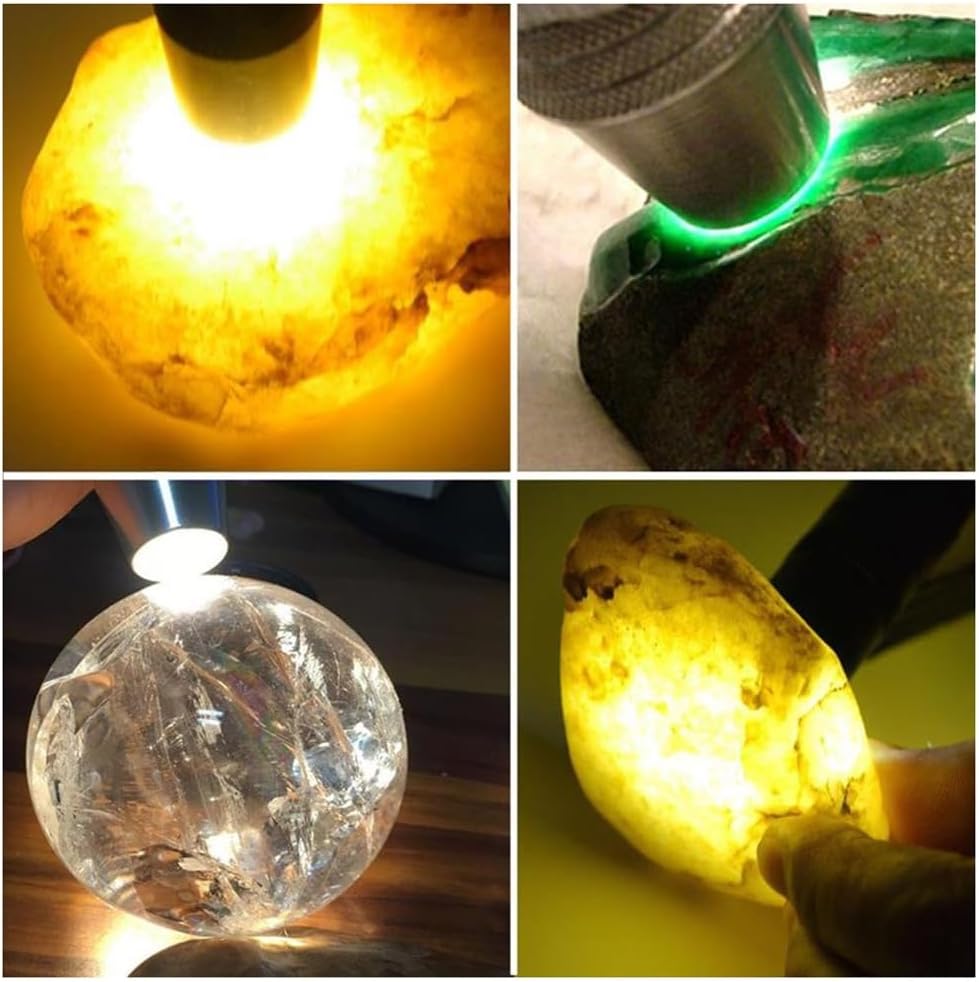
Image: The ALONEFIRE SV123 flashlight emitting a distinct purple 365nm UV light beam onto a surface.

Image: A collage demonstrating the use of 365nm UV light for detecting pet urine on a toilet and observing fluorescence on plants, highlighting its utility in various detection scenarios.
8. Itọju
- Ninu: Nu ara filaṣi nu pẹlu asọ, damp asọ. Ma ṣe lo abrasive ose tabi epo.
- Ibi ipamọ: Store the flashlight in a cool, dry place away from direct sunlight and extreme temperatures. If storing for extended periods, charge the battery every 3-6 months to maintain battery health.
- Itọju Batiri: Avoid fully depleting the battery frequently. Recharge when the light output noticeably dims.
9. Laasigbotitusita
| Isoro | Owun to le Fa | Ojutu |
|---|---|---|
| Ina filaṣi ko tan. | Batiri ti dinku. | Charge the flashlight using the USB-C cable. |
| Ijade ina jẹ baibai. | Batiri kekere. | Saji si flashlight. |
| Ina filaṣi ko gba agbara. | Ngba agbara USB tabi orisun agbara oro. | Ensure the USB-C cable is properly connected. Try a different USB port or power adapter. |
| Cannot switch light modes. | Button malfunction or software glitch. | Ensure the flashlight is on. Try turning it off and on again. If the issue persists, contact customer support. |
10. Awọn pato
| Ẹya ara ẹrọ | Ẹ̀kúnrẹ́rẹ́ |
|---|---|
| Awoṣe | SV123 |
| Imọlẹ Orisun Orisun | LED (White, Yellow, 365nm UV) |
| Orisun agbara | Battery Powered (Built-in Lithium Ion) |
| Gbigba agbara Port | USB-C |
| Akoko gbigba agbara | Isunmọ. 3-4 wakati |
| Igbesi aye batiri | Approx. 2-3 hours (depending on mode) |
| Ohun elo | Aluminiomu Alloy |
| Àwọ̀ | Golden and Silver |
| Iwọn Nkan | 5.6 iwon (0.16 kilo) |
| Awọn iwọn | 6.26 x 2.32 x 1.69 inches |
| Omi Resistance Ipele | Ko Omi Resistant |
| Pataki Awọn ẹya ara ẹrọ | Adjustable Focus (with tip), Adjustable Light Modes, Non-Slip Grip, Portable, Rechargeable |
11. Atilẹyin ọja ati Support
For warranty information or technical support, please refer to the product packaging or contact ALONEFIRE customer service through the retailer's platform where the product was purchased. Keep your purchase receipt as proof of purchase.
For more information, visit the official ALONEFIRE store: ALONEFIRE Store on Amazon.