
Oilsky M303
Oilsky M303 Android 9.0 MP3 Player User Manual
Awoṣe: M303
1. Ifihan
The Oilsky M303 is a versatile digital audio and video player running on Android 9.0. It features a 4-inch full-touch screen, 8-core processor, 2GB RAM, 16GB internal storage (expandable with a 64GB microSD card included), Wi-Fi, and Bluetooth connectivity. This manual provides essential information for operating your device.
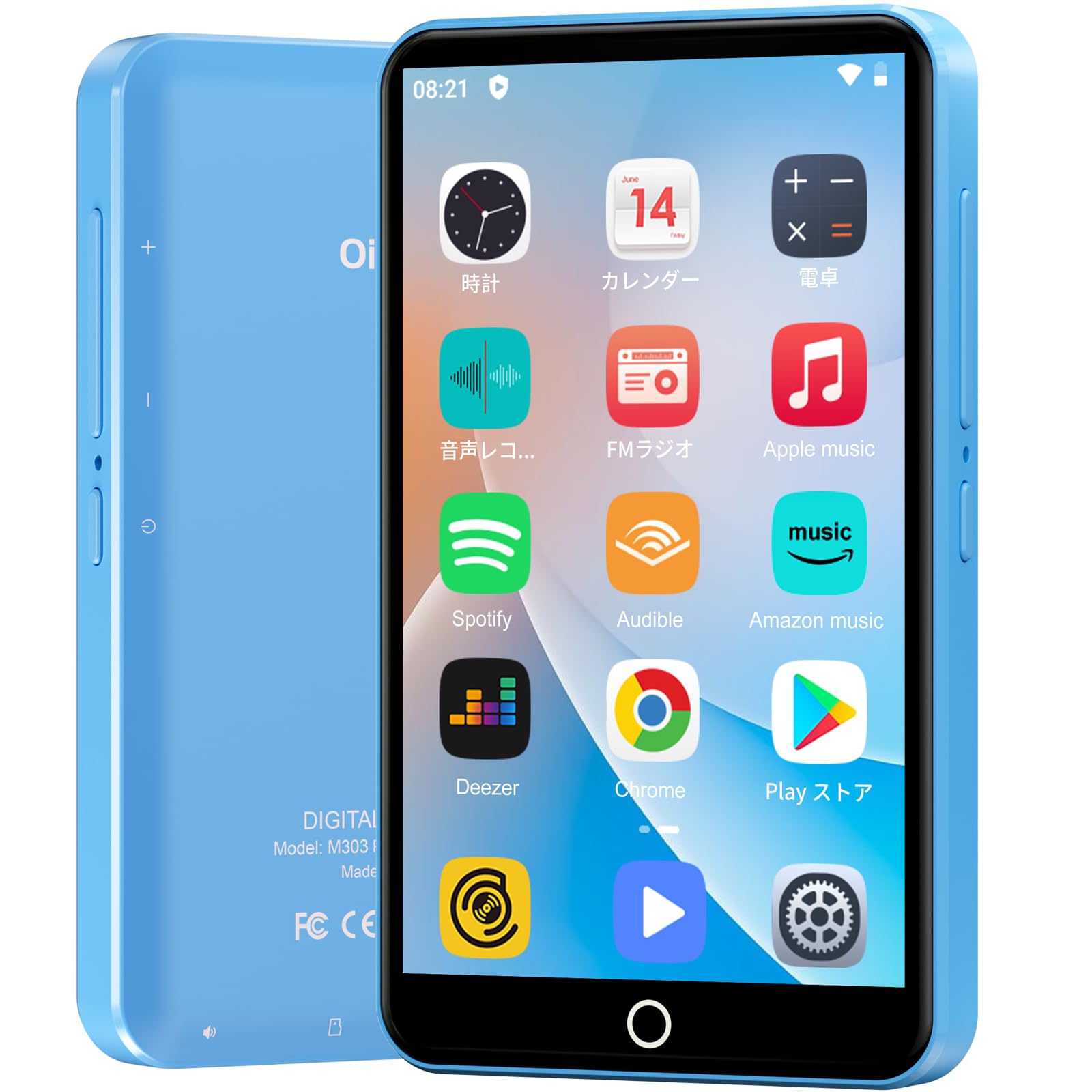
Aworan: Iwaju view ti Oilsky M303 MP3 Player, ifihanasing apẹrẹ iwapọ rẹ ati wiwo iboju ifọwọkan.
2. Ohun ti o wa ninu Apoti
Jọwọ ṣayẹwo pe gbogbo awọn nkan wọnyi wa ninu package rẹ:
- Oilsky M303 Main Unit
- Awọn agbekọri
- Iru-C Data Cable
- Protective Film (one pre-installed, one spare)
- Multi-language User Manual (including Japanese)
- Ohun elo Idaabobo Silikoni
- 64GB Kaadi Iranti

Image: All included accessories for the Oilsky M303 MP3 Player, neatly arranged.
3. Ọja Ipariview
Familiarize yourself with the device's physical features and controls.
3.1. Device Ìfilélẹ

Aworan: Apa view of the Oilsky M303, highlighting the volume buttons, power button, and USB-C port.
- Bọtini agbara: Tẹ ki o si dimu mọ lati tan/pa tabi lati tun bẹrẹ. Tẹ kukuru lati tan/pa iboju naa.
- Awọn bọtini iwọn didun: Ṣatunṣe iwọn didun ohun.
- Ibudo USB-C: Fun gbigba agbara ati gbigbe data.
- Jack agbekọri 3.5mm: Connect wired earphones.
- Iho kaadi MicroSD: Insert a microSD card for expanded storage.
- Agbọrọsọ ti a ṣe sinu: Fún ìgbọ́hùnsí ohùn láìsí agbekọrí.
4. Eto
4.1. Gbigba agbara akọkọ
Before first use, fully charge the device. Connect the provided Type-C data cable to the player and a USB power adapter (not included). A full charge takes approximately 3 hours. The device has a 2000mAh battery for extended use.
4.2. Agbara Tan / Paa
- Lati Fi agbara: Tẹ bọtini Power mọlẹ titi iboju yoo fi tan.
- Lati Paarẹ: Tẹ mọlẹ bọtini agbara, lẹhinna yan "Agbara kuro" lati awọn aṣayan.
- Titan/Pa iboju: Short press the Power button to turn the screen on or off.
4.3. Awọn Eto Ede
Upon first boot, you may need to set the language. Navigate to Settings > System > Languages & input > Languages to select your preferred language, such as English or Japanese.
4.4. Asopọ Wi-Fi
To access online features and download apps, connect to a Wi-Fi network:
- Lọ si Eto> Nẹtiwọọki & intanẹẹti> Wi-Fi.
- Yipada Wi-Fi On.
- Yan nẹtiwọki ti o fẹ lati atokọ ki o tẹ ọrọ igbaniwọle sii ti o ba ṣetan.
4.5. Ile itaja Google Play
The Oilsky M303 supports Google Play Store, allowing you to download various applications.
- Ensure you are connected to Wi-Fi.
- Ṣii awọn Play itaja app from the home screen.
- Wọle pẹlu akọọlẹ Google rẹ.
- Wa fun and install desired applications like YouTube, Spotify, or other streaming services.

Image: The Oilsky M303 screen showing the Google Play Store interface with various app icons.
5. Awọn ilana Iṣiṣẹ
5.1. Sisisẹsẹhin Orin
The device supports various audio formats including MP3, WMA, WAV, FLAC, OGG, AAC, APE, and M4A.
- Transfer Music: Connect the player to your computer using the Type-C cable and transfer audio files to the device's internal storage or the microSD card.
- Mu Orin: Open the Music app. You can browse by artist, album, song, or create custom playlists.
- Agbẹgbẹ: Adjust sound settings using the built-in equalizer for a personalized audio experience.
- Online Lyrics: The player supports displaying online lyrics for songs.

Image: The Oilsky M303 displaying its music playback interface, showing options for song classification, search, playlist creation, and equalizer settings.
5.2. Sisisẹsẹhin fidio
Enjoy videos on the 4-inch IPS full-touch screen with 480x800px resolution, supporting up to 1080P Full HD video playback. Supported formats include RM, AVI, RMVB, FLV, MP4, DAT, MKV, MPG, MOV, TS.
- Transfer Videos: Gbigbe fidio files lati kọmputa rẹ si ẹrọ.
- Mu awọn fidio ṣiṣẹ: Open the Video app and select your desired video.
- Awọn aṣayan Sisisẹsẹhin: Features include loop or random playback, variable speed playback, sleep timer, and gesture controls for zoom.

Image: The Oilsky M303 displaying a video on its 4-inch screen, illustrating its video playback capabilities.
5.3. Asopọ Bluetooth
Connect your player to Bluetooth headphones, speakers, or car audio systems.
- Lọ si Eto > Awọn ẹrọ ti a ti sopọ > Bluetooth.
- Yi Bluetooth pada On.
- Make sure your Bluetooth accessory is in pairing mode.
- Select the accessory from the list of available devices to pair.

Image: The Oilsky M303 demonstrating its Bluetooth connectivity with various audio devices like speakers and headphones.
5.4. Redio FM
The device includes an FM radio function. Connect wired earphones to act as an antenna for optimal reception.
5.5. Agbohunsile
Use the built-in voice recorder for capturing audio notes or lectures. Open the Agbohunsile app to start recording.
5.6. File Isakoso
The player comes with 16GB of internal storage and a 64GB microSD card, providing a total of 80GB usable storage. This can be expanded further up to 512GB using a larger microSD card. Use the File Manager app to organize your media and documents.
6. Itọju
- Ninu: Lo asọ asọ ti o gbẹ lati nu ẹrọ naa. Yago fun awọn olutọpa omi tabi awọn ohun elo abrasive.
- Ibi ipamọ: Tọju ẹrọ naa ni itura, aye gbigbẹ kuro lati orun taara ati awọn iwọn otutu to gaju.
- Itọju Batiri: Láti mú kí batiri pẹ́ sí i, má ṣe jẹ́ kí batiri náà máa jáde nígbà gbogbo. Gba agbára rẹ̀ déédéé.
- Awọn imudojuiwọn sọfitiwia: Ṣayẹwo fun awọn imudojuiwọn eto lorekore ni Ètò > Ètò > To ti ni ilọsiwaju > Àtúnṣe sí ètò lati rii daju iṣẹ ṣiṣe ati aabo to dara julọ.
7. Laasigbotitusita
| Isoro | Owun to le Solusan |
|---|---|
| Ẹrọ naa ko ṣiṣẹ. | Rii daju pe batiri ti gba agbara. Sopọ si ṣaja fun o kere iṣẹju 30 ṣaaju igbiyanju lati tan-an lẹẹkansi. |
| Ko le sopọ si Wi-Fi. | Check if Wi-Fi is enabled in settings. Ensure the password is correct. Restart the device and your Wi-Fi router. |
| Bluetooth connection is unstable or disconnects. | Ensure the player and Bluetooth accessory are within close range. Avoid areas with strong electromagnetic interference. Try re-pairing the devices. |
| Àwọn ohun èlò náà lọ́ra tàbí wọn kò dáhùn. | Close unnecessary background applications. Clear app cache (Settings > Apps & notifications > See all apps > [App Name] > Storage & cache > Clear cache). Restart the device. |
| Ẹrọ naa yoo gbona lakoko lilo. | It is normal for the device to warm up during intensive use (e.g., video playback, gaming). If it becomes excessively hot, close applications and let it cool down. |
| Cannot charge with USB-C PD charger. | The device may not support USB-C Power Delivery (PD) protocols. Use a standard USB-A to USB-C cable with a compatible USB-A power adapter (5V, up to 900mA). |
8. Awọn pato
| Brand | Oilsky |
| Awoṣe | M303 |
| Eto isesise | Android 9.0 |
| Iboju | 4-inch Full-touch IPS LCD (480x800px) |
| isise | 8-core (MTK 8-Core) |
| Àgbo | 2GB |
| Ibi ipamọ inu | 16GB |
| Expandable Ibi ipamọ | MicroSD card up to 512GB (64GB card included) |
| Batiri | 2000mAh |
| Asopọmọra | Wi-Fi, Bluetooth |
| Awọn ọna kika Audio atilẹyin | MP3, WMA, WAV, FLAC, OGG, AAC, APE, M4A |
| Awọn ọna kika fidio atilẹyin | RM, AVI, RMVB, FLV, MP4, DAT, MKV, MPG, MOV, TS (up to 1080P) |
| Iwọn (D x W x H) | 1 x 6.1 x 10.3 cm |
| Awọn ẹya ara ẹrọ | Touchscreen, Voice Recorder, Built-in Speaker, Video Playback, FM Radio, Calculator, Calendar, Alarm |
| Ipilẹṣẹ | China |
9. Atilẹyin ọja ati Support
The Oilsky M303 MP3 Player comes with a 1-odun atilẹyin ọja lati ọjọ ti o ra. Jọwọ ṣe idaduro ẹri rira rẹ fun awọn iṣeduro atilẹyin ọja.
For technical support or warranty inquiries, please contact the retailer or manufacturer directly. Refer to the contact information provided in the packaging or on the official Oilsky webojula.
Ask a question about this manual
Ask about setup, troubleshooting, compatibility, parts, safety, or missing instructions. Manuals+ will review the question and use this page’s manual context to help answer it.