
Donner STARRYPAD MINI (Model EC7176)
Ìwé Ìtọ́sọ́nà Olùlò Olùdarí MINI Donner STARRYPAD MINI
Model: STARRYPAD MINI (EC7176)
1. Ifihan
The Donner STARRYPAD MINI is a compact and portable MIDI controller designed for music production, beat making, and live performance. Featuring 16 velocity-sensitive RGB pads with polyphonic aftertouch and a Note Repeat function, it offers versatile control for various digital audio workstations (DAWs) and music software. This manual provides essential information for setting up, operating, and maintaining your STARRYPAD MINI.
2. Package Awọn akoonu
Jọwọ rii daju pe gbogbo awọn ohun kan wa ninu apo rẹ:
- Donner STARRYPAD MINI MIDI Controller
- USB-C si okun USB-A
- Afowoyi Olumulo (iwe-ipamọ yii)

Image: The Donner STARRYPAD MINI MIDI Controller shown with its included USB-C to USB-A cable.
3. Ọja Ipariview
The STARRYPAD MINI features a grid of 16 illuminated pads and a USB-C port for connectivity and charging. Its compact design allows for easy portability.
3.1 Key Awọn ẹya ara ẹrọ
- 16 RGB Velocity-Sensitive Pads: Responsive pads with customizable RGB lighting and velocity curves.
- Polyphonic Aftertouch: Adds expressive control to your performances.
- Note Repeat Function: For creating rhythmic effects.
- Awọn aṣayan Asopọmọra pupọ: Supports both USB-C and wireless (Bluetooth) MIDI connections.
- Batiri Gbigba agbara ti a ṣe sinu: Provides up to 10 hours of operation.
- Ibamu gbooro: Works with Android, iOS, Mac, and Windows devices.
- Software isọdi: Allows for detailed configuration of pad behavior, colors, and MIDI messages.

Image: A hand interacting with the illuminated pads of the STARRYPAD MINI, illustrating its expressive capabilities.
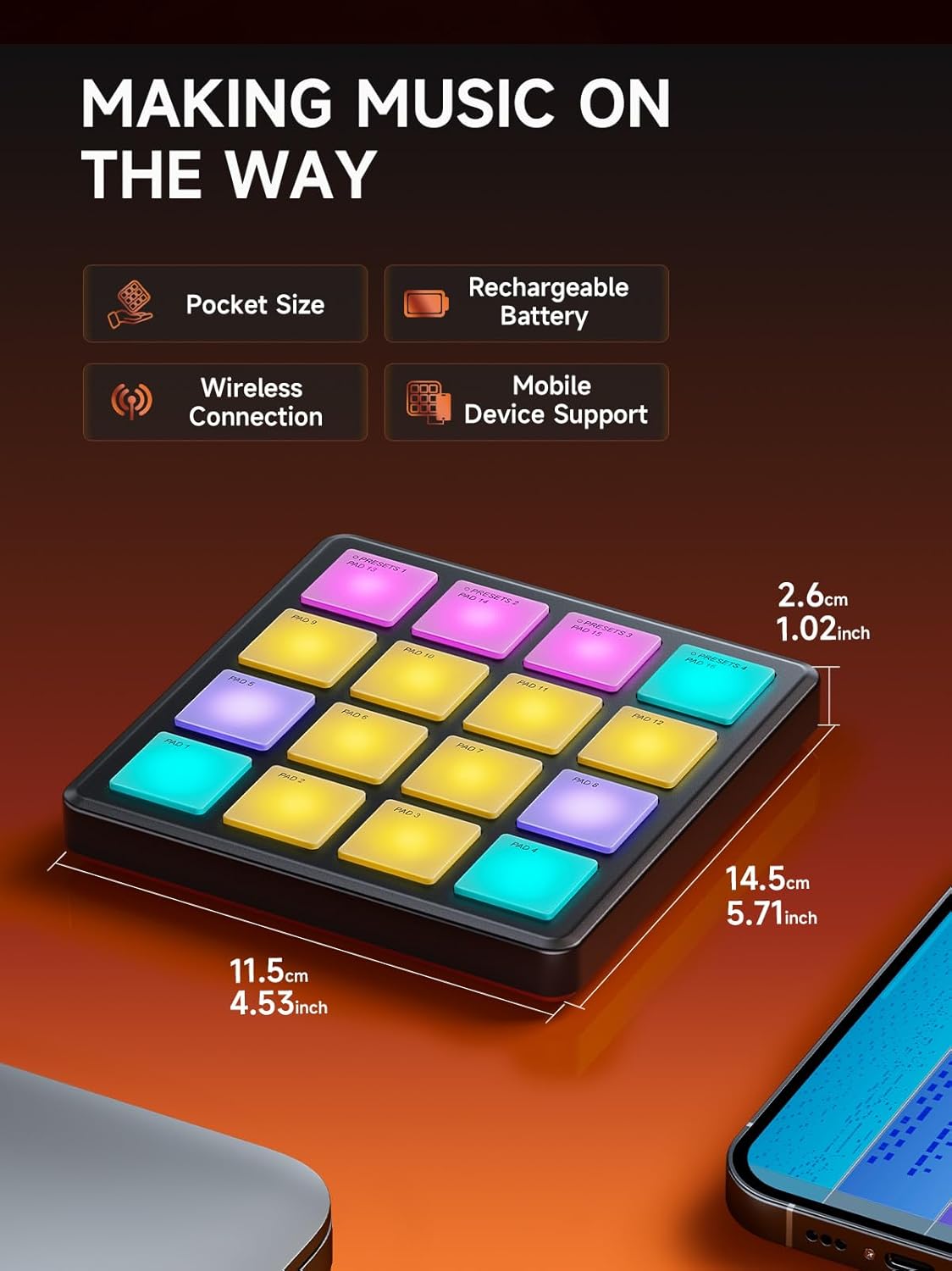
Image: The compact dimensions of the STARRYPAD MINI, highlighting its portability and built-in features.
4. Eto
4.1 Ngba agbara si Ẹrọ
Before initial use, fully charge your STARRYPAD MINI. Connect the included USB-C cable to the device's USB-C port and the other end to a standard USB power adapter (not included) or a computer's USB port. The device's indicator light will show charging status.

Image: The STARRYPAD MINI offers up to 10 hours of battery life on a full charge.
4.2 Connecting to a Computer (USB-C)
- Connect the STARRYPAD MINI to your computer using the provided USB-C cable.
- The device is USB Class Compliant, meaning no special drivers are typically required for Windows, macOS, or Linux.
- Your computer should automatically recognize the STARRYPAD MINI as a MIDI input device.
4.3 Connecting Wirelessly (Bluetooth MIDI)
- Power on the STARRYPAD MINI.
- On your computer (Mac/Windows with Bluetooth MIDI support) or mobile device (iOS/Android), open your device's Bluetooth settings.
- Wa fun available Bluetooth MIDI devices and select "STARRYPAD MINI" to pair.
- Once paired, the device can transmit MIDI data wirelessly to your music software.

Image: The STARRYPAD MINI supports both USB-C and wireless MIDI connections for flexible setup.

Image: The STARRYPAD MINI is compatible with a wide range of devices, including PC, Mac, Android, and iOS.
4.4 Software Integration
The STARRYPAD MINI requires Digital Audio Workstation (DAW) software or other music production applications to produce sound. It acts as a controller, sending MIDI messages to your software.
- DAW Software: Configure your DAW (e.g., Ableton Live, GarageBand, Cubase) to recognize the STARRYPAD MINI as a MIDI input device. Refer to your DAW's manual for specific instructions.
- Included Software Bundle: The STARRYPAD MINI comes with a music software bundle, which may include applications like Melodics, Cubasis LE3, Cubase LE, and WaveLab LE. Install these as per their respective instructions to enhance your music production capabilities.

Image: The STARRYPAD MINI includes a software bundle to get you started with music production.
5. Awọn ilana Iṣiṣẹ
5.1 Basic Pad Operation
The 16 pads are velocity-sensitive, meaning the sound's intensity (velocity) will vary based on how hard you strike the pad. They also support polyphonic aftertouch, allowing for additional expressive control by pressing down on a pad after the initial strike.
5.2 Note Repeat Function
The Note Repeat function allows you to automatically trigger a note repeatedly at a set tempo and division while holding down a pad. This is useful for creating rolls, arpeggios, and other rhythmic patterns.

Image: The STARRYPAD MINI features built-in MIDI effects such as Note Repeat for dynamic performance.

Aworan: Alaye view of the Note Repeat function's adjustable parameters.
5.3 Customization with MIDI Suite Software
The STARRYPAD MINI can be extensively customized using the dedicated MIDI Suite software (available for Windows, macOS, iOS, and Android). This software allows you to:
- Adjust velocity curves for each pad.
- Change pad colors.
- Configure MIDI messages sent by each pad.
- Save and recall up to 4 presets.

Image: The MIDI Suite software provides comprehensive customization options for the STARRYPAD MINI.

Image: The STARRYPAD MINI offers extensive customization through its software, including pad behavior and color settings.

Image: The controller supports various MIDI message types for broad compatibility.

Image: The STARRYPAD MINI allows users to save and recall up to 4 custom presets.
6. Itọju
6.1 Ninu
To clean the STARRYPAD MINI, use a soft, dry, lint-free cloth. Do not use abrasive cleaners, solvents, or sprays directly on the device. Avoid moisture near ports and pads.
6.2 batiri Itọju
To prolong battery life, avoid fully discharging the device frequently. If storing for an extended period, charge the battery to approximately 50% and store in a cool, dry place. Recharge every few months to prevent deep discharge.
7. Laasigbotitusita
- Ko si Ijade ohun: The STARRYPAD MINI is a MIDI controller and does not produce sound on its own. Ensure it is connected to a computer or mobile device running a DAW or music software, and that the software is configured to receive MIDI input from the STARRYPAD MINI and has an instrument loaded.
- Connectivity Issues (USB): Ensure the USB-C cable is securely connected to both the controller and your computer. Try a different USB port or cable. Restart your computer and the STARRYPAD MINI.
- Àwọn Ìṣòro Ìsopọ̀mọ́ra (Aláìlágbára/Bluetooth): Ensure Bluetooth is enabled on your host device and the STARRYPAD MINI is powered on. Unpair and re-pair the device if connection is unstable. Ensure your host device supports Bluetooth MIDI.
- Pads Not Responding/Inconsistent Velocity: Check the pad sensitivity settings in the MIDI Suite software. Ensure the pads are clean and free from debris. A firmware update might resolve some performance issues; check the Donner webAaye fun famuwia tuntun ati awọn ilana imudojuiwọn.
- Sọfitiwia Ko ṣe idanimọ Ẹrọ: Verify that your DAW or music software's MIDI settings are correctly configured to detect and use the STARRYPAD MINI as an input device.
- Pad Colors Not Changing: Ensure you are using the MIDI Suite software to customize pad colors and that the changes are saved and applied to the device.
8. Awọn pato
| Ẹya ara ẹrọ | Ẹ̀kúnrẹ́rẹ́ |
|---|---|
| Nọmba awoṣe | EC7176 |
| Awọn paadi | 16 RGB Velocity-Sensitive Pads with Polyphonic Aftertouch |
| Asopọmọra | USB Type-C, Wireless (Bluetooth MIDI) |
| Awọn ẹrọ ibaramu | Kọǹpútà alágbèéká, PC, Tabulẹti, Foonuiyara |
| Hardware Platform | PC/Mac, Mobile (Android/iOS) |
| Software atilẹyin | Ableton Live, Melodics, Cubasis LE3, Cubase LE, WaveLab LE (and other DAWs) |
| Igbesi aye batiri | Titi di wakati 10 |
| Iwọn Nkan | 6.7 iwon (0.19 kilo) |
| Awọn iwọn (L x W x H) | 5.71 x 4.53 x 1.02 inches (14.5 x 11.5 x 2.6 cm) |
9. Atilẹyin ọja ati Support
For warranty information, please refer to the documentation included with your purchase or visit the official Donner website. For technical support, product registration, or to download the latest drivers and software, please visit the Donner support page on their official webojula.
Donner Official Webojula: www.donnerdeal.com
Awọn iwe aṣẹ ti o jọmọ - STARRYPAD MINI (Model EC7176)
 |
Donner STARRYPAD User Manual: MIDI Pad Controller Guide Comprehensive user manual for the Donner STARRYPAD MIDI pad controller. Learn about its features, operation, and specifications for music production, including models STARRYPAD MINI and DPD-16. |
 |
Donner Starrypad MIDI paadi Laasigbotitusita Itọsọna Itọsọna laasigbotitusita okeerẹ fun Donner Starrypad MIDI Pad, ti n ba sọrọ awọn ọran ti o wọpọ bii ko si iṣelọpọ ohun, ibaramu tabulẹti/foonu, awọn iṣoro asopọ kọnputa, ati idahun paadi. |
 |
Donner STARRYPAD Color Replacement Instructions Step-by-step guide for replacing colors on the Donner STARRYPAD MIDI pad controller using the provided software. |
 |
Donner Essential D1 Performance Beat Machine User Manual Comprehensive user manual for the Donner Essential D1 Performance Beat Machine, covering panel layout, setup, operation, effects, file management, beat programming, global settings, and technical specifications. |
 |
Donner Starrypad Mini MIDI Controller User Manual Comprehensive user manual for the Donner Starrypad Mini MIDI Controller, covering device connection (USB, wireless), function introduction, presets, pad usage, safety precautions, and compliance statements. |
 |
Ìwé Ìtọ́sọ́nà Olùlò Olùdarí MINI Donner STARRYPAD MINI Ìwé ìtọ́ni fún Donner STARRYPAD MINI MIDI Controller, èyí tí ó ń pèsè àwọn ìtọ́ni lórí ìsopọ̀ ẹ̀rọ (USB, aláìlókùn), àwọn iṣẹ́, yíyàn tí a ti ṣètò tẹ́lẹ̀, àwọn iṣẹ́ pádì, àti àwọn ìlànà ààbò. |
Ask a question about this manual
Ask about setup, troubleshooting, compatibility, parts, safety, or missing instructions. Manuals+ will review the question and use this page’s manual context to help answer it.