1. Ifihan
Thank you for choosing the Turtlebox Original Gen 3 Portable Outdoor Bluetooth Speaker. This speaker is engineered for exceptional durability and sound performance in outdoor environments. It features an ultra-loud output, IP67 waterproof rating, impact resistance, and an extended battery life. This manual provides essential information for setting up, operating, maintaining, and troubleshooting your device to ensure optimal performance and longevity.
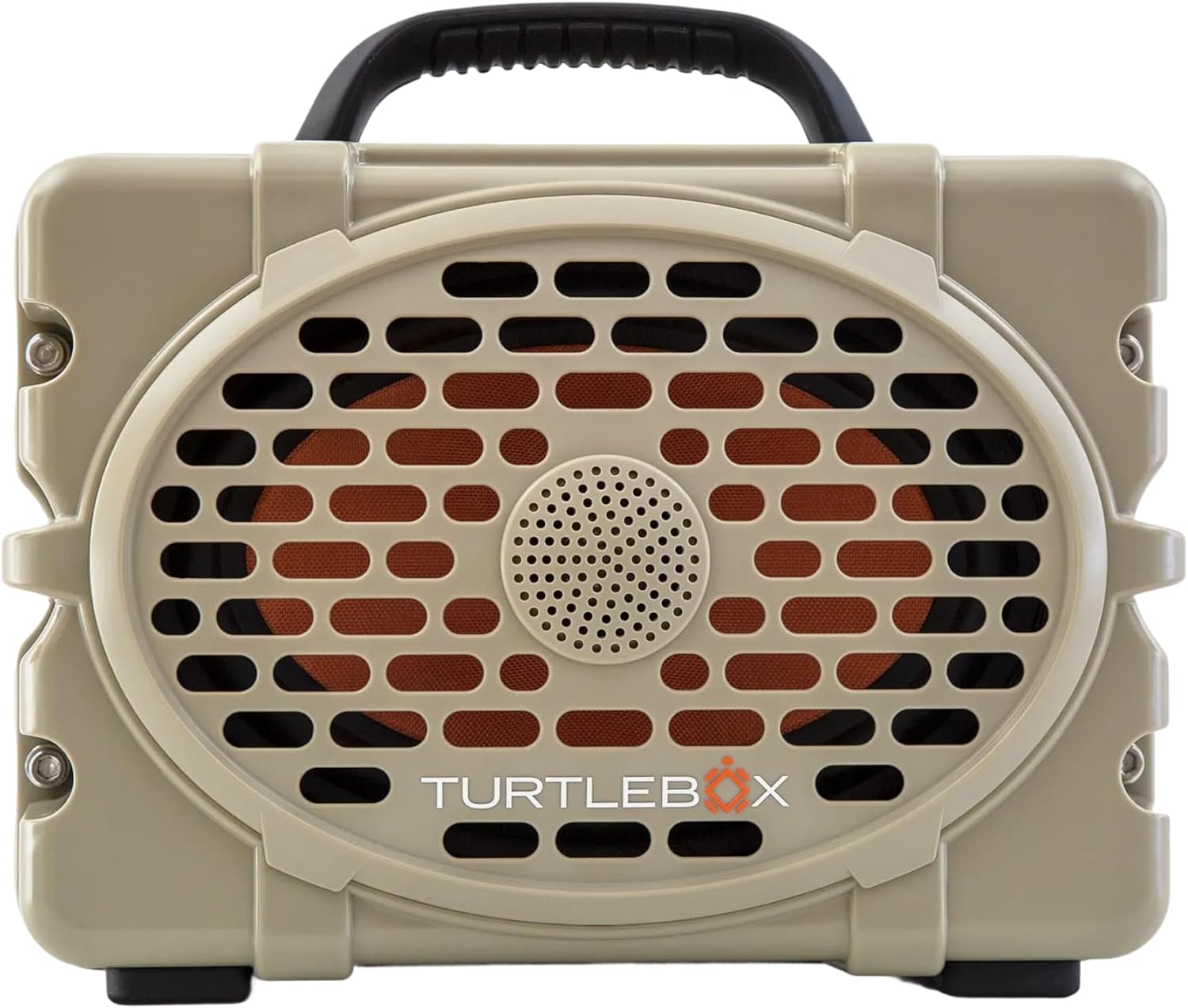
olusin 1: Iwaju view of the Turtlebox Original Gen 3 speaker.
2. Alaye Aabo
- Má ṣe gbìyànjú láti tú agbọ́rọ̀sọ náà ká, tún un ṣe, tàbí ṣe àtúnṣe rẹ̀. Èyí lè sọ àtìlẹ́yìn náà di òfo, ó sì lè fa ewu ààbò.
- Ensure all port covers are securely closed before exposing the speaker to water to maintain its IP67 waterproof rating.
- Use only the provided charger or a certified equivalent to prevent damage to the battery.
- Avoid prolonged exposure to extreme temperatures (hot or cold) as this can affect battery life and speaker performance.
- Do not operate the speaker while it is charging if it is exposed to water.
3. Package Awọn akoonu
Daju pe gbogbo awọn nkan wa ninu apo rẹ:
- Turtlebox Original Gen 3 Speaker
- Ṣaja
4. Ọja Ipariview
4.1. Iṣakoso igbimo
The control panel is located on the top of the speaker, providing easy access to essential functions.

Figure 2: Control Panel with labeled buttons.
- Bọtini agbara: Tẹ lati tan tabi paa agbohunsoke.
- Àwọn bọ́tìnì ohùn (-/+): Ṣatunṣe iwọn didun ṣiṣiṣẹsẹhin.
- Track Control Buttons (|<|): Rekọja si orin iṣaaju tabi atẹle.
- Bọtini Bluetooth: Ti bẹrẹ ipo sisọpọ Bluetooth.
- Party Mode Button: Activates Party Mode for multi-speaker synchronization.
4.2. Awọn ibudo ati awọn isopọ
The rear panel features protected ports for charging and external audio connections.
Fidio 1: Pariview of the Turtlebox speaker's side and ports, demonstrating the waterproof cover.
- Ibudo gbigba agbara: Fún síso ohun tí ń mú agbára pọ̀ láti gba agbára sí agbohunsoke.
- AX IN: Iṣagbewọle ohun 3.5mm fun awọn asopọ ti a firanṣẹ.
- MIC NI: Input for connecting a microphone.
- USB-C Jade: Output port for charging external devices.
4.3. Awọn ẹya ara ẹrọ ti ara
- Imudani Iṣọkan: Fun irọrun gbigbe.
- Àwọn Ohun Èlò Irin Alagbara: Secure the speaker to a UTV or boat.
- C líleasing: Provides drop, crush, and dust-proof protection.
5. Eto
5.1. Gbigba agbara akọkọ
Before first use, fully charge your Turtlebox speaker. Connect the provided charger to the charging port on the rear panel and plug it into a power outlet. The battery indicator lights on the control panel will show charging progress.
5.2. Agbara lori / Paa
- To power on, press and hold the Power Button on the control panel until the indicator lights illuminate.
- To power off, press and hold the Power Button again until the indicator lights turn off.
5.3. Sisopọ Bluetooth
Lati so ẹrọ rẹ pọ nipasẹ Bluetooth:
- Ensure the Turtlebox speaker is powered on.
- Press the Bluetooth Button on the control panel. The Bluetooth indicator light will flash, indicating pairing mode.
- On your audio device (e.g., smartphone, tablet), navigate to Bluetooth settings and select "Turtlebox Gen 3" from the list of available devices.
- Nígbà tí a bá ti so pọ̀, ìmọ́lẹ̀ àmì Bluetooth lórí agbọ́hùnsọ̀ náà yóò di alágbára.
6. Awọn ilana Iṣiṣẹ
6.1. Sisisẹsẹhin Ohun Ipilẹ
- Atunse iwọn didun: Use the '+' and '-' buttons on the control panel.
- Tọpinpin lilọ kiri: Use the '|<' and '>|' buttons to skip tracks.
6.2. Party Mode (Multi-Speaker Pairing)
Party Mode allows you to connect multiple Turtlebox Original Gen 3 speakers for an expanded sound experience. Note: The Original Gen 3 does not pair with Gen 1 or Gen 2 Turtlebox speakers.
- Ensure all speakers are powered on and not currently connected to a Bluetooth device.
- On the primary speaker (the one you want to connect to your device), press the Bluetooth Button to enter pairing mode. Connect your audio device to this speaker.
- On the primary speaker, press the Party Mode button. The Party Mode indicator will flash.
- On each additional speaker, press the Party Mode button. They will automatically search for and connect to the primary speaker.
- Once connected, all speakers will play audio from your device.
6.3. Using AUX Input
For wired audio connections, open the rear port cover and connect a 3.5mm audio cable from your device to the AUX IN port. The speaker will automatically switch to AUX input mode.
6.4. Using Microphone Input
To use a microphone, open the rear port cover and connect your microphone to the MIC IN port. Adjust microphone volume as needed from the connected microphone or audio source.
6.5. Ngba agbara si Awọn ẹrọ Ita
The USB-C OUT port can be used to charge compatible external devices. Open the rear port cover and connect your device's charging cable to the USB-C OUT port.
7. Itọju
7.1. Ninu
Nu agbọrọsọ pẹlu ipolowoamp cloth. For stubborn dirt, use mild soap and water. Ensure all port covers are closed during cleaning. Do not use abrasive cleaners or solvents.
7.2. Ṣíṣàyẹ̀wò Èdìdì Omi
Regularly inspect the rubber seals around the port cover for any signs of wear or damage. A compromised seal can affect the speaker's waterproof integrity. Always ensure the port cover is firmly closed with an audible "click" before exposing the speaker to water.
7.3. Itọju batiri
To maximize battery life, avoid fully discharging the battery frequently. Store the speaker in a cool, dry place when not in use for extended periods. Charge the battery at least once every three months to prevent deep discharge.
7.4. Ibi ipamọ
When storing the speaker, especially for long durations, ensure it is clean, dry, and all port covers are securely fastened. Store in a location away from direct sunlight and extreme temperatures.
8. Laasigbotitusita
- Ko si Agbara: Ensure the battery is charged. Connect the speaker to the charger and allow it to charge for at least 30 minutes before attempting to power on again.
- Bluetooth Ko Sopọ: Ensure the speaker is in pairing mode (flashing Bluetooth light). Turn off and on your device's Bluetooth. Move the speaker closer to your device. If issues persist, try forgetting the device in your Bluetooth settings and re-pairing.
- Ko si Ohun: Check the volume levels on both the speaker and your connected device. Ensure the correct input source (Bluetooth or AUX) is selected.
- Party Mode Issues: Ensure all speakers are Gen 3 models. Confirm all speakers are in Party Mode pairing. Try resetting all speakers and re-initiating Party Mode from the primary speaker.
- Ohun Yiyi: Din iwọn didun silẹ lori mejeeji agbọrọsọ ati ẹrọ rẹ. Rii daju pe orisun ohun jẹ didara to dara.
9. Awọn pato
| Ẹya ara ẹrọ | Sipesifikesonu |
|---|---|
| Orukọ awoṣe | Turtlebox Gen 3 |
| Ohun elo | Fiberglass, Stainless Steel, Titanium |
| Agbọrọsọ Iru | Tweeter, Bass Driver |
| Pataki Awọn ẹya ara ẹrọ | 120 decibels of sound, 1” Titanium tweeter, 6” x 9” woofer, 85Wh Lithium-ion battery, Powerful Class D digital ampitanna |
| Awọn ẹrọ ibaramu | iPhone, Android |
| Kakiri Ohun ikanni iṣeto ni | 2.0 |
| Àwọ̀ | Tan/dudu |
| Ọja Mefa | 12"D x 8.75"W x 7"H |
| Omi Resistance Ipele | IP67 mabomire |
| Batiri | 1 Lithium Ion battery (included), up to 3 days playtime |
| Ọna Iṣakoso | Fọwọkan |
| Imọ-ẹrọ Ibaraẹnisọrọ Alailowaya | Bluetooth |
| Agbọrọsọ Agbara Ijade ti o pọju | 100 Wattis |
| Iwọn Nkan | 11.88 iwon |
| UPC | 850024307742 |
10. Atilẹyin ọja ati Support
The Turtlebox Original Gen 3 speaker comes with a 1-Year Manufacturer Warranty. For warranty claims, technical support, or additional product information, please refer to the official Turtlebox webojula tabi kan si wọn onibara iṣẹ taara. Jeki ẹri rira rẹ fun ijẹrisi atilẹyin ọja.