
1Mii Safefly Min+
1Mii Safefly Min+ Bluetooth Transmitter and Receiver User Manual
Model: Safefly Min+
1. Ifihan
The 1Mii Safefly Min+ is a versatile Bluetooth 5.3 audio adapter designed to function as both a transmitter (TX) and a receiver (RX). In TX mode, it enables non-Bluetooth audio sources like airplane entertainment systems, TVs, and computers to wirelessly stream audio to Bluetooth headphones or speakers. In RX mode, it allows your smartphone or tablet to connect to wired headphones, car stereos, or home stereo systems via Bluetooth. This device supports various audio codecs including SBC, AAC, aptX, aptX-Low Latency, aptX-HD, and aptX-Adaptive, ensuring a high-quality audio experience.
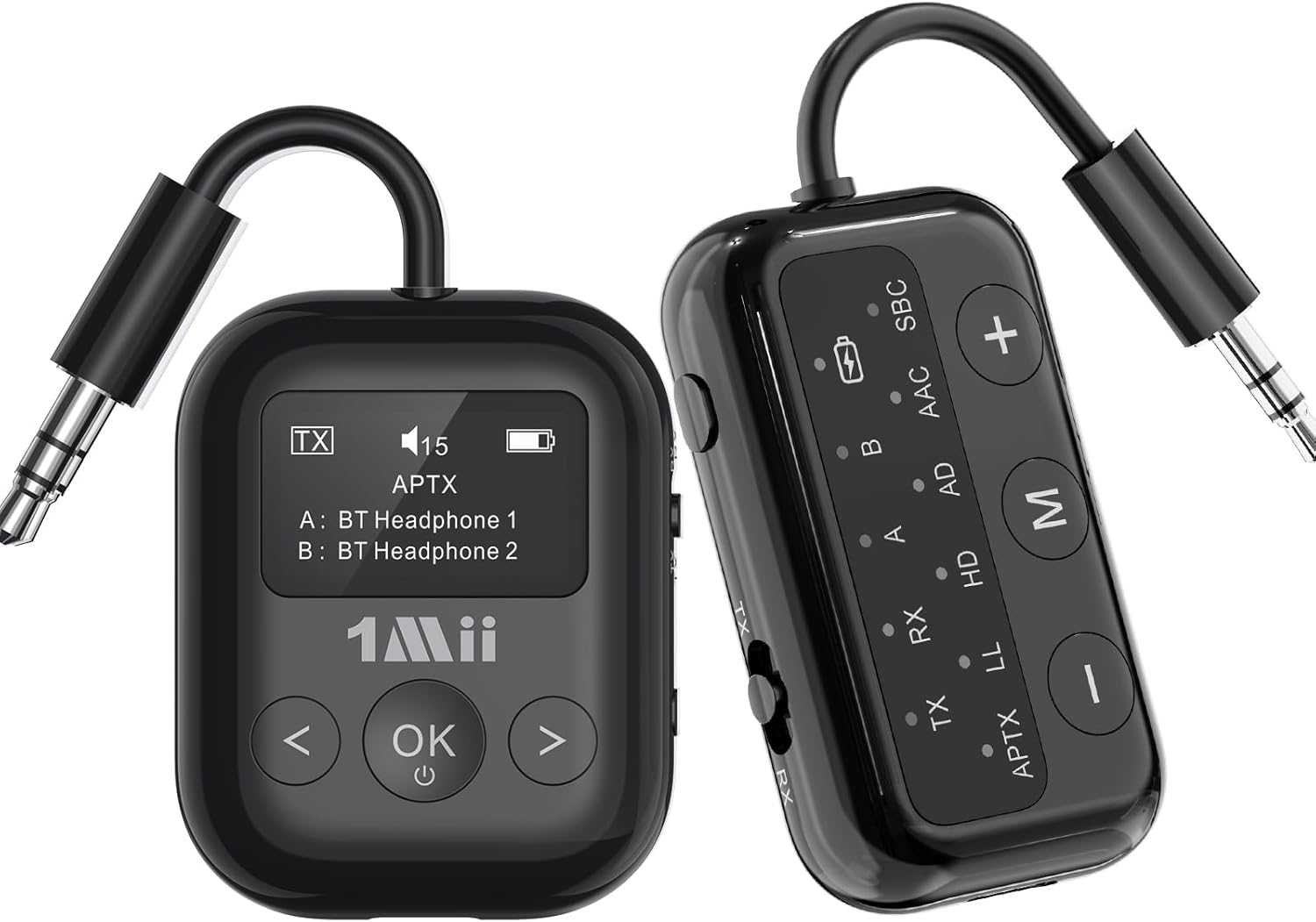
Image 1.1: The 1Mii Safefly Min+ Bluetooth Transmitter and Receiver, showcasing its compact design and dual functionality.
2. Key Awọn ẹya ara ẹrọ
- Bluetooth 5.3 Imọ-ẹrọ: Utilizes the latest Bluetooth standard for stable connections and efficient power consumption.
- Multiple Audio Codec Support: Supports SBC, AAC, aptX, aptX-Low Latency (aptX-LL), aptX-HD, and aptX-Adaptive for broad compatibility and superior sound quality.
- 2-in-1 Iṣẹ-ṣiṣe: Seamlessly switches between Transmitter (TX) and Receiver (RX) modes.
- Laiyara kekere aptX: Minimizes audio delay for synchronized audio and video, ideal for gaming and watching movies.
- Isopọ meji: In TX mode, connect to two Bluetooth headphones simultaneously for shared listening.
- Intuitive Indicator Panel: Clear display of connection mode, audio codec, paired devices, and battery level.
- Gbohungbohun ti a ṣe sinu: Enables hands-free calling in RX mode when connected to a car stereo or wired headphones.
- Apẹrẹ to gbe: Lightweight and compact, making it convenient for travel, including a two-prong airplane adapter.
- Awọn bọtini Iṣakoso Rọrun: Accessible buttons for volume adjustment, mode switching, and connection management.
3. Package Awọn akoonu
Jọwọ ṣayẹwo awọn akoonu package lori ṣiṣi silẹ lati rii daju pe gbogbo awọn nkan wa:
- 1Mii Safefly Min+ Bluetooth Transmitter and Receiver
- USB-C Ngba agbara Cable
- 3.5mm Audio Female Plug Adapter
- Dual 3.5mm Male to Female Airplane Adapter
- Audio Plug Protector
- Itọsọna olumulo
4. Aworan atọka ọja
Familiarize yourself with the various components and controls of your 1Mii Safefly Min+ device:

Image 4.1: Detailed product diagram illustrating the flexible audio cable, 3.5mm audio connection, Bluetooth codec indicators, battery indicator, device A/B indicators, RX/TX mode indicators, volume/track buttons, multi-function button, microphone, and Type-C charging port.
- Flexible Audio Cable: Integrated 3.5mm audio jack for connecting to audio sources/devices.
- Pair/Reset Button: Used for initiating pairing mode or resetting connections.
- TX/OFF/RX Switch: Slides to select Transmitter mode, power off, or Receiver mode.
- Atọka Batiri: Ṣe afihan ipele batiri lọwọlọwọ.
- Bluetooth Codec Indicators: Lights indicate the active audio codec (SBC, AAC, aptX, LL, HD, AD).
- Device A/B Indicators: Show which devices are currently connected in TX mode.
- Bọtini Ilọsoke Iwọn didun / Bọtini Orin ti nbọ (+): Ṣe alekun iwọn didun tabi fo si orin atẹle.
- Ìwọ̀n Ìsàlẹ̀ / Bọ́tìnì Orin Tẹ́lẹ̀ (-): Din iwọn didun tabi lọ si orin ti tẹlẹ.
- Bọ́tìnì oníṣẹ́ púpọ̀ (M): Used for various functions like play/pause, answer/end calls, and mode switching.
- Gbohungbohun: Built-in for voice input in RX mode.
- Ibudo Ngba agbara Iru-C: Fun gbigba agbara ẹrọ.
5. Eto ati isẹ
5.1. Ngba agbara ẹrọ
Before first use, fully charge the Safefly Min+. Connect the provided USB-C charging cable to the device's Type-C port and the other end to a USB power adapter (not included) or a computer's USB port. The battery indicator lights will show charging status and turn off when fully charged.
5.2. Agbara Tan / Pa ati Aṣayan Ipo
Slide the TX/OFF/RX switch to the desired mode:
- TX: Transmitter Mode (for streaming audio from non-Bluetooth devices).
- PA: Powers off the device.
- RX: Receiver Mode (for receiving audio from Bluetooth devices).
5.3. Atagba (TX) Ipo Iṣeto
In TX mode, the Safefly Min+ transmits audio from a non-Bluetooth source to your Bluetooth headphones or speakers.
- Sopọ si Orisun Olohun: Plug the 3.5mm audio cable of the Safefly Min+ into the audio output jack of your device (e.g., airplane entertainment system, TV, computer, gym equipment). Use the dual-prong airplane adapter if needed for airplane audio jacks.
- Tẹ Ipo Sisopọ: Slide the switch to TX. The device will automatically enter pairing mode, indicated by flashing lights on the indicator panel.
- Papọ pẹlu Awọn agbekọri/Agbohunsoke Bluetooth: Put your Bluetooth headphones or speakers into their pairing mode. Place them close to the Safefly Min+. The devices will automatically connect. Once connected, the 'A' indicator light will become solid.
- Dual Connection (TX Mode): To connect a second pair of Bluetooth headphones, press the 'Pair/Reset' button on the side of the Safefly Min+. The device will re-enter pairing mode. Put your second pair of headphones into pairing mode. Once connected, the 'B' indicator light will become solid.

Image 5.1: Safefly Min+ in TX mode, connected to an airplane's audio jack using the dual-prong adapter, transmitting audio to wireless earbuds.

Image 5.2: Safefly Min+ in TX mode, connected to a television, wirelessly transmitting audio to two pairs of Bluetooth headphones.

Image 5.3: Enjoying high-quality audio streaming in flight using the Safefly Min+ with aptX Low Latency, connected to wireless earbuds and headphones.

Image 5.4: The Safefly Min+ in TX mode, demonstrating its ability to easily pair with two Bluetooth headphones simultaneously for shared audio experience.
5.4. Olugba (RX) Ipo Iṣeto
In RX mode, the Safefly Min+ receives audio from your Bluetooth-enabled smartphone or tablet and outputs it to wired headphones, car stereos, or home stereo systems.
- Sopọ si Ẹrọ Olohun: Plug the 3.5mm audio cable of the Safefly Min+ into the audio input jack of your wired headphones, car stereo, or home speaker system.
- Tẹ Ipo Sisopọ: Slide the switch to RX. The device will automatically enter pairing mode, indicated by flashing lights.
- Pair with Smartphone/Tablet: Lori foonuiyara tabi tabulẹti, mu Bluetooth ṣiṣẹ ki o wa fun

Image 5.5: Safefly Min+ in RX mode, demonstrating connections to a wired speaker for outdoor use and a car stereo for in-car audio streaming.