
1Mii B03Pro+, DS700
1Mii B03Pro+ & DS700 Bluetooth Audio Adapters User Manual
Itọsọna okeerẹ fun Eto, Isẹ, ati Itọju
1. Ifihan
This manual provides detailed instructions for the setup, operation, and maintenance of your 1Mii B03Pro+ Bluetooth 5.3 Transmitter Receiver and 1Mii DS700 HiFi Bluetooth Audio Transmitter Receiver. These devices are designed to enhance your audio experience by enabling wireless connectivity for a wide range of audio equipment, supporting high-resolution audio codecs like LDAC.

Image 1.1: The 1Mii B03Pro+ (left) and 1Mii DS700 (right) Bluetooth audio adapters.
2. Ọja Ipariview
2.1 1Mii B03Pro+ Bluetooth 5.3 Transmitter Receiver
The B03Pro+ is a versatile Bluetooth 5.3 audio adapter capable of functioning as both a transmitter (TX) and a receiver (RX). It allows you to stream audio from your phone, tablet, or computer to an older sound system (RX mode) or connect Bluetooth headphones/speakers to your TV (TX mode). It supports high-resolution audio with LDAC and aptX HD codecs.
- Iṣẹ ṣiṣe lọpọlọpọ: Operates as both a Bluetooth transmitter and receiver.
- Ohun Hi-Res: Supports LDAC for high-resolution wireless audio up to 24-bit/96kHz. Also supports aptX HD.
- Ipo-kọja: Allows simultaneous audio output to wired speakers/soundbar and wireless headphones in TX mode, ideal for varying volume needs.
- Bluetooth 5.3: Ṣe idaniloju asopọ alailowaya iduroṣinṣin ati lilo daradara.

Image 2.1: Close-up of the 1Mii B03Pro+ display, highlighting LDAC support for uncompromised sound quality.
2.2 1Mii DS700 HiFi Bluetooth Audio Transmitter Receiver
The DS700 is a high-fidelity Bluetooth adapter designed to transform your wired home audio devices into Bluetooth-enabled systems. It features a comprehensive set of analog and digital audio ports, making it compatible with almost any home audio setup.
- Asopọmọra Wapọ: Equipped with analog RCA, digital optical (Toslink), and digital coaxial ports for broad compatibility.
- Hi-Res Wireless Audio: Delivers high-resolution audio with LDAC, aptX HD, aptX Low Latency, aptX, SBC, and AAC codecs.
- Audiophile DAC: Integrates a Digital-to-Analog Converter for superior sound quality.

Image 2.2: The 1Mii DS700 unit, illustrating its support for various high-fidelity Bluetooth codecs including LDAC, aptX HD, and aptX Low Latency.
3. Package Awọn akoonu
Jọwọ ṣayẹwo package fun awọn nkan wọnyi:
- 1Mii B03Pro+ Bluetooth 5.3 Transmitter Receiver Unit
- 1Mii DS700 HiFi Bluetooth Audio Transmitter Receiver Unit
- Adapter (awọn)
- Okun Okun Optical
- RCA Audio USB
- 3.5mm AUX Audio Cable
- USB Charging Cable (for power)
- Afowoyi Olumulo (iwe-ipamọ yii)
4. Eto Itọsọna
Follow these steps to set up your 1Mii Bluetooth audio adapters.
4.1 Asopọ agbara
Connect the provided power adapter to the DC 5V input port on the back of the B03Pro+ or DS700 unit, then plug the adapter into a power outlet. The device will power on automatically or can be turned on using the power button.
4.2 Audio Connection (B03Pro+)
The B03Pro+ supports Optical, RCA, and 3.5mm AUX audio connections.
- Ipo Atagba (TX): Connect the B03Pro+ to your audio source (e.g., TV, PC) using an Optical, RCA, or 3.5mm AUX cable from the source's audio output to the B03Pro+'s corresponding input.
- Ipo olugba (RX): Connect the B03Pro+ to your audio system (e.g., stereo receiver, powered speakers) using an Optical, RCA, or 3.5mm AUX cable from the B03Pro+'s corresponding output to your audio system's input.
4.3 Audio Connection (DS700)
The DS700 supports Optical, Coaxial, and RCA audio connections.
- Ipo Atagba (TX): Connect the DS700 to your audio source (e.g., TV, PC) using an Optical or Coaxial cable from the source's digital audio output to the DS700's corresponding input.
- Ipo olugba (RX): Connect the DS700 to your audio system (e.g., stereo receiver, powered speakers) using an Optical, Coaxial, or RCA cable from the DS700's corresponding output to your audio system's input.

Image 4.1: Illustrates common setup configurations for the 1Mii Bluetooth adapters in both Transmitter (TX) and Receiver (RX) modes, connecting to various devices like phones, PCs, TVs, stereo receivers, and headphones.
4.4 Sisopọ Bluetooth
Once connected, put the device into the desired mode (TX or RX) and initiate pairing.
- Yan Ipo: Use the TX/RX switch or button on the device to select the desired mode.
- Tẹ Ipo Sisopọ: The device will typically enter pairing mode automatically when first turned on or after a mode switch. Look for a blinking Bluetooth indicator or a "Pairing" message on the screen (B03Pro+). You may also press a dedicated "PAIR" button.
- Sopọ pẹlu Ẹrọ Rẹ:
- In TX Mode (connecting to headphones/speakers): Put your Bluetooth headphones or speaker into pairing mode. They should appear on the 1Mii device's screen (B03Pro+) or connect automatically.
- In RX Mode (connecting to phone/tablet): On your phone or tablet, go to Bluetooth settings and select the 1Mii device (e.g., "1Mii B03Pro+", "1Mii DS700") from the list of available devices.
- Ìmúdájú Ìsopọ̀: Once paired, the Bluetooth indicator will become solid, and the device's screen (B03Pro+) will show "Connected" or the name of the paired device.
5. Awọn ọna ṣiṣe
5.1 Atagba (TX) Ipo
In TX mode, the 1Mii device transmits audio from a non-Bluetooth source (like a TV or PC) to Bluetooth-enabled headphones or speakers.
- Ensure the device is switched to TX mode.
- Connect the audio source to the 1Mii device's input.
- Pair with your Bluetooth headphones or speakers as described in Section 4.4.
- The B03Pro+ supports dual link, allowing connection to two Bluetooth headphones/speakers simultaneously.
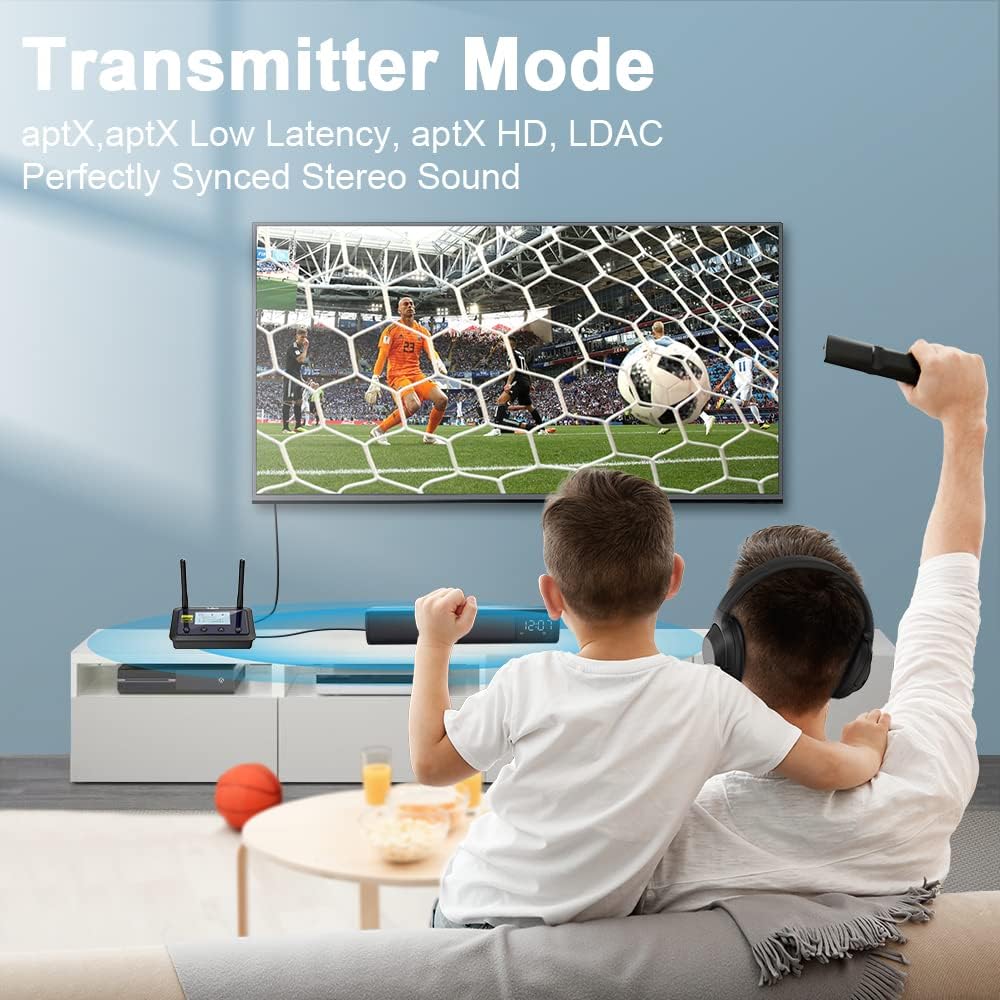
Image 5.1: The 1Mii B03Pro+ operating in Transmitter Mode, allowing two users to enjoy TV audio wirelessly through Bluetooth headphones, ensuring perfectly synced stereo sound.

Image 5.2: Demonstrates the 1Mii adapter in Transmitter mode, providing dual link capability with aptX Low Latency for synchronized audio when watching TV with multiple headphones.
5.2 Olugba (RX) Ipo
In RX mode, the 1Mii device receives Bluetooth audio from your phone, tablet, or computer and outputs it to a wired audio system (e.g., home stereo, wired speakers).
- Ensure the device is switched to RX mode.
- Connect the 1Mii device's output to your wired audio system's input.
- Pair your phone or tablet with the 1Mii device as described in Section 4.4.

Image 5.3: The 1Mii B03Pro+ in Receiver Mode, allowing a user to stream music wirelessly from a smartphone to a wired speaker system, supporting various decoding formats like AAC, aptX, aptX HD, and LDAC.

Image 5.4: A user enjoying high-fidelity music through a stereo receiver, which is connected to the 1Mii DS700 operating in Receiver mode, enabling wireless audio streaming from a source device.
5.3 Bypass Mode (B03Pro+ Only)
The B03Pro+ features a unique bypass mode (TX Bypass) that allows audio to be simultaneously output to both wired speakers/soundbar and wireless Bluetooth headphones. This is useful when some family members prefer to listen through headphones while others use the TV's sound system.
- Connect your TV's audio output to the B03Pro+'s input.
- Connect the B03Pro+'s output to your wired soundbar or speakers.
- Ensure the B03Pro+ is in TX mode and activate the bypass function (refer to the device's specific button/setting for bypass).
- Pair your Bluetooth headphones with the B03Pro+.

Image 5.5: Diagram illustrating the 1Mii B03Pro+ in Transmitter + Bypass Mode, enabling simultaneous audio output to both wired speakers and wireless Bluetooth headphones from a single TV source.
5.4 LDAC and aptX HD Codec Usage
Both B03Pro+ and DS700 support high-resolution audio codecs like LDAC and aptX HD. To utilize these codecs, ensure that your paired Bluetooth device (headphones or speaker) also supports the same codec. The B03Pro+ display will indicate the active codec.
- In TX mode, LDAC is supported when paired with only one Bluetooth headphone or speaker.
- The devices will automatically attempt to connect using the highest quality codec supported by both devices.
6. Awọn pato
| Ẹya ara ẹrọ | Apejuwe |
|---|---|
| Brand | 1 Mii |
| Ẹya Bluetooth | Bluetooth 5.3 (B03Pro+), Bluetooth 5.0 (DS700) |
| Awọn kodẹki atilẹyin | LDAC, aptX HD, aptX Low Latency, aptX, SBC, AAC |
| Audio Inputs (TX Mode) | Optical (Toslink), RCA, 3.5mm AUX (B03Pro+); Optical, Coaxial (DS700) |
| Audio Outputs (RX Mode) | Optical (Toslink), RCA, 3.5mm AUX (B03Pro+); Optical, Coaxial, RCA (DS700) |
| Agbara Input | DC 5V |
| Ibiti nṣiṣẹ | Up to 50ft / 15m (typical, actual range may vary) |
Akiyesi: Awọn alaye ni o wa labẹ iyipada laisi akiyesi.
7. Laasigbotitusita
If you encounter issues with your 1Mii Bluetooth audio adapters, please refer to the following common solutions:
- Ko si Ohun:
- Ensure all audio cables are securely connected to the correct input/output ports.
- Verify the 1Mii device is in the correct TX or RX mode.
- Check the volume levels on both the 1Mii device and your connected audio equipment/headphones.
- Confirm that the paired Bluetooth device is within range and properly connected.
- If using Optical/Coaxial, ensure your source device's audio output is set to PCM/Stereo, not Bitstream/Dolby/DTS.
- Ko le So pọ:
- Ensure the 1Mii device is in pairing mode (blinking Bluetooth indicator).
- Place the 1Mii device and the target Bluetooth device close to each other.
- Clear the pairing history on both devices and try pairing again.
- Turn off other nearby Bluetooth devices to avoid interference.
- Poor Audio Quality / Disconnections:
- Reduce the distance between the 1Mii device and the paired Bluetooth device.
- Remove any obstacles (walls, large metal objects) that may interfere with the signal.
- Ensure there are no strong Wi-Fi routers or other 2.4GHz wireless devices nearby causing interference.
- If using LDAC/aptX HD, ensure both devices support the codec and that only one device is connected in TX mode for LDAC.
- Ẹrọ ti ko ni agbara:
- Check the power adapter and cable for damage.
- Rii daju pe iṣan agbara jẹ iṣẹ-ṣiṣe.
- Try a different power outlet or USB port (if applicable).
8. Itọju
To ensure the longevity and optimal performance of your 1Mii Bluetooth audio adapters, follow these maintenance guidelines:
- Ninu: Lo asọ ti o tutu, ti o gbẹ lati nu ita awọn ẹrọ naa. Maṣe lo awọn olutọpa olomi tabi awọn aerosols.
- Ibi ipamọ: Tọju awọn ẹrọ naa ni itura, aye gbigbẹ kuro lati orun taara ati awọn iwọn otutu to gaju.
- Mimu: Yago fun jisilẹ tabi fifi awọn ẹrọ si awọn ipa to lagbara.
- Afẹfẹ: Rii daju pe fentilesonu to dara ni ayika awọn ẹrọ lati ṣe idiwọ igbona.
9. Atilẹyin ọja ati Support
1Mii products typically come with a standard manufacturer's warranty. Please refer to the warranty card included in your product packaging or visit the official 1Mii webAaye fun alaye atilẹyin ọja ofin ati ipo.
For technical support, troubleshooting assistance, or any inquiries regarding your 1Mii B03Pro+ or DS700, please contact 1Mii customer service through their official webaaye tabi alaye olubasọrọ ti a pese pẹlu rira rẹ.
Official 1Mii Webojula: www.1mii.com