
Montech XR Wood Black (11-970-017)
MONTECH XR Wood PC Gaming Case Instruction Manual
Brand: Montech | Model: XR Wood Black (11-970-017)
1. Ọja Ipariview
This manual provides detailed instructions for the MONTECH XR Wood ATX Mid-Tower PC Gaming Case. It covers setup, operation, maintenance, and specifications to ensure optimal performance and longevity of your PC case.

Figure 1.1: MONTECH XR Wood PC Gaming Case, showcasing its genuine black walnut front panel and pre-installed ARGB fans.
The MONTECH XR Wood case combines aesthetic appeal with high functionality, featuring a genuine black walnut front panel, extensive cooling support, and comprehensive dust filtration.
2. Key Awọn ẹya ara ẹrọ
- Genuine Black Walnut Front: Experience the elegance of American Walnut wood integration, seamlessly blending nature and modern design on the front panel.
- Superior Airflow & Cooling: Achieve superior airflow with extensive cooling support, accommodating up to 12 fans for maximum ventilation.
- Comprehensive Dust Filtration: 360° four-sided dust filter, ensuring all fans are shielded for optimal protection against dust accumulation.
- Spacious Compatibility: Designed for spacious compatibility and high-performance hardware, supporting up to a 360mm AIO cooler and the latest RTX 50 series GPUs.
- Pre-installed ARGB PWM Fans: Comes with four high-performance GF120 ARGB PWM fans, delivering optimized airflow and stunning customizable lighting.
- Robust I/O: Features two USB 3.0 ports and a USB Type-C port for faster transfers and wider device support.

Figure 2.1: The genuine black walnut front panel with fine laser engraving, highlighting the blend of nature and design.
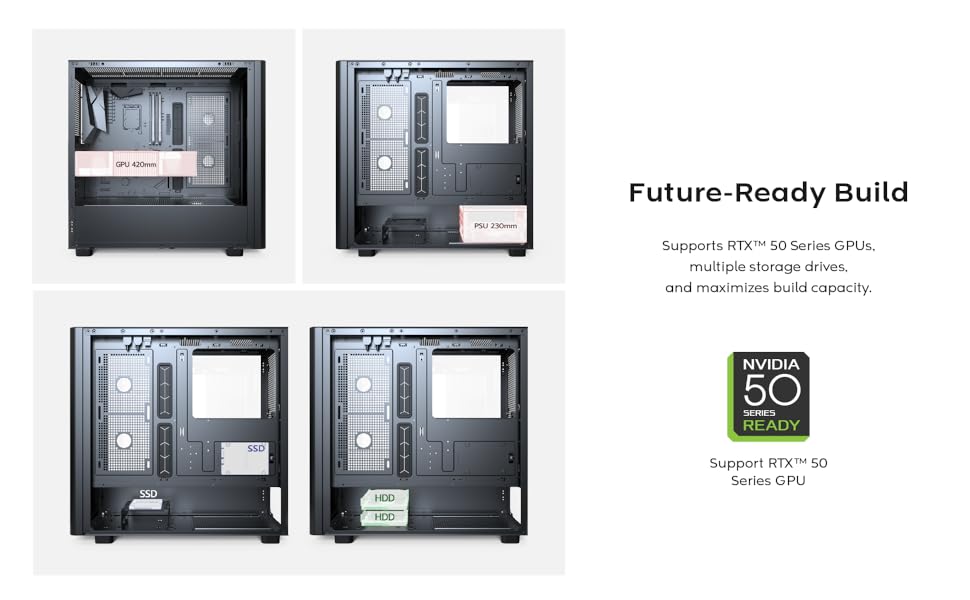
Figure 2.2: Illustration of the extensive cooling support, detailing fan and radiator placements for optimal thermal performance.

Figure 2.3: Internal layout demonstrating compatibility with large GPUs, including the latest RTX 50 series.

Figure 2.4: The robust top I/O panel, providing convenient access to essential ports and controls.
3. Eto Itọsọna
3.1 Ṣiṣii silẹ
Carefully remove the PC case from its packaging. Inspect the case for any signs of damage that may have occurred during transit. Retain the packaging for future transport or warranty purposes.
3.2 Fi sori ẹrọ paati
Follow these general steps for installing your PC components into the MONTECH XR Wood case. Refer to your individual component manuals for specific installation details.
- Fifi sori ẹrọ modaboudu: Align your ATX, Micro-ATX, or Mini-ITX motherboard with the standoffs inside the case. Secure it with the provided screws.
- Ẹka Ipese Agbara (PSU) fifi sori ẹrọ: Install the PSU into the bottom mount bay. Secure it with screws from the rear of the case.
- Fifi sori Drive Drive: Install 2.5" SSDs and 3.5" HDDs into the designated bays. The case supports multiple storage drives.
- Fifi sori Kaadi Awọn aworan (GPU): Insert your graphics card into the appropriate PCIe slot on the motherboard. Ensure it is securely seated and fastened with the retention clip or screw. The case supports GPUs up to 420mm in length.
- Iṣakoso USB: Lo awọn gige ipa ọna okun ati awọn aaye di-isalẹ lẹhin atẹ modaboudu lati ṣakoso awọn kebulu daradara. Eleyi se airflow ati aesthetics.

olusin 3.1: Ti abẹnu view of the case demonstrating component installation and cable management possibilities.
4. Awọn ilana Iṣiṣẹ
4.1 Agbara Lori
After all components are installed and cables are connected, ensure the power switch on your Power Supply Unit (PSU) is in the 'ON' position. Then, press the power button located on the top I/O panel of the case to start your system.
4.2 Iṣakoso Fẹ́ẹ́fù ARGB
The MONTECH XR Wood case comes with four pre-installed GF120 ARGB PWM fans. These fans offer customizable lighting effects. You can control the ARGB lighting in one of two ways:
- Sọfitiwia modaboudu: If your motherboard supports Addressable RGB (ARGB) synchronization (e.g., ASUS Aura Sync, MSI Mystic Light Sync, GIGABYTE RGB Fusion, ASRock Polychrome RGB), connect the fans' ARGB cables to the appropriate 3-pin 5V ARGB header on your motherboard. Use the motherboard's software to customize lighting effects and colors.
- Case RGB Button: The case may feature a dedicated RGB button on the top I/O panel. Press this button to cycle through various pre-set lighting modes or to turn the RGB lighting on/off.

Figure 4.1: Illustration of optimized airflow provided by the four pre-installed GF120 ARGB PWM fans.
5. Itọju
5.1 eruku Filter Cleaning
The MONTECH XR Wood case features a comprehensive 360° four-sided dust filter system to protect your components from dust accumulation and maintain optimal airflow. Regular cleaning of these filters is crucial for system longevity and performance.
To clean the dust filters:
- Agbara Pa: Ensure your PC is completely powered off and unplugged from the wall outlet before performing any maintenance.
- Yọ Awọn Ajọ kuro: Gently remove the magnetic dust filters located on the top, front, and bottom of the case. The side glass panel can also be removed for access to internal areas.
- Awọn Ajọ mimọ: Use a soft brush, a vacuum cleaner with a brush attachment, or compressed air to remove accumulated dust from the filters. Do not use water or liquid cleaners.
- Reattach Filters: Once clean and dry, reattach the filters securely to their respective positions.

olusin 5.1: exploded view illustrating the comprehensive dust filtration system and removable panels for easy cleaning.
6. Imọ ni pato
| Ẹya ara ẹrọ | Sipesifikesonu |
|---|---|
| Orukọ awoṣe | XR Wood |
| Nọmba Awoṣe Nkan | 11-970-017 |
| Iru Irú | Ile-iṣọ Mid |
| Modaboudu Ibamu | ATX, Micro ATX, Mini ITX |
| Awọn iwọn (L x W x H) | 18.7 x 9.1 x 17.9 inches (47.5 x 23.1 x 45.5 cm) |
| Iwọn Nkan | 15.1 poun (6.85 kg) |
| Awọn onijakidijagan ti a ti fi sii tẹlẹ | 4 x 120mm GF120 ARGB PWM Fans |
| Max Fan Support | Up to 12 fans |
| Max Radiator Support | Up to 360mm AIO |
| GPU Kiliaransi | Ti o de 420mm |
| PSU Mounting Type | Isalẹ Oke |
| I/O Ports | 2 x USB 3.0, 1 x USB Type-C, Audio, Mic, Reset Button, Power Button |
| Awọn Ajọ eruku | 360° four-sided (Top, Front, Bottom) |
7. Laasigbotitusita
7.1 Ko si Agbara
- Ensure all power cables are securely connected to the PSU, motherboard, and wall outlet.
- Verify the power switch on the PSU is in the "ON" position.
- Ṣayẹwo awọn iwaju nronu agbara bọtini asopọ si awọn modaboudu.
7.2 Awọn onijakidijagan Ko Yiyi / RGB Ko Ṣiṣẹ
- Ṣayẹwo àìpẹ agbara awọn isopọ si awọn modaboudu tabi àìpẹ oludari.
- Ensure ARGB headers are correctly connected to the 3-pin 5V ARGB header on your motherboard.
- Verify that compatible motherboard RGB software is installed and configured correctly, or try cycling through modes using the case's RGB button.
7.3 Overheating oran
- Verify proper fan orientation for optimal airflow (intake vs. exhaust).
- Clean dust filters regularly to prevent airflow restriction.
- Ensure adequate space around the PC case for proper ventilation.
- Check CPU cooler and GPU fan functionality.
8. Atilẹyin ọja ati Support
For detailed warranty information, technical support, and customer service inquiries regarding your MONTECH XR Wood PC Gaming Case, please visit the official Montech website or contact their authorized support channels. It is recommended to retain your proof of purchase for any warranty claims.
Montech Official Webojula: www.montechpc.com
Ask a question about this manual
Ask about setup, troubleshooting, compatibility, parts, safety, or missing instructions. Manuals+ will review the question and use this page’s manual context to help answer it.