
1. Ifihan
This manual provides detailed instructions for the installation, operation, and maintenance of your GIGABYTE B550M DS3H AC R2 motherboard. This micro-ATX motherboard is designed to support AMD Ryzen 5000, 4000, and 3000 series CPUs on the AM4 socket, offering a robust platform for various computing needs. Please read this manual thoroughly before beginning installation to ensure proper setup and functionality.
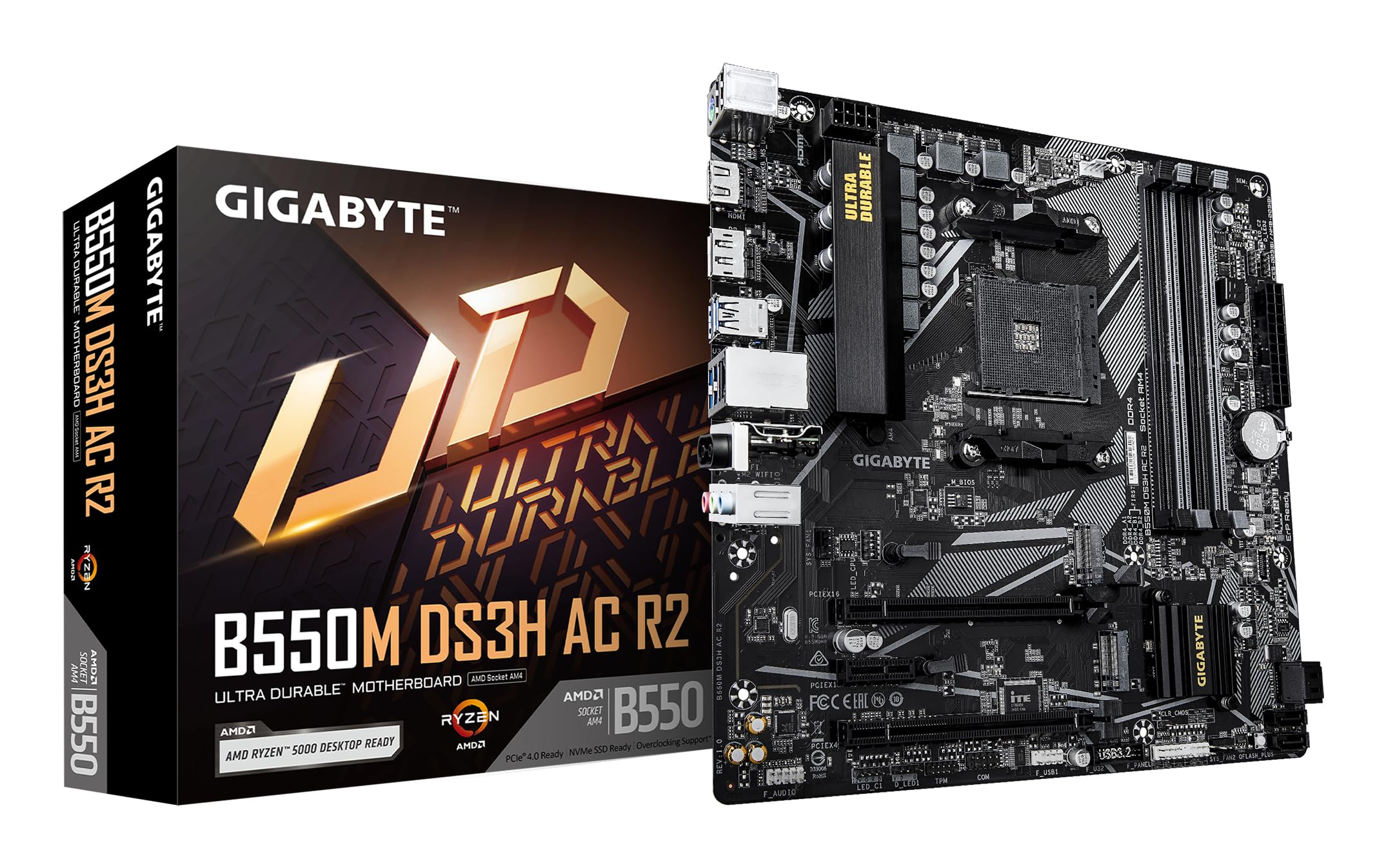
olusin 1.1: Top-isalẹ view of the GIGABYTE B550M DS3H AC R2 Motherboard, showcasing its layout including the CPU socket, DIMM slots, and various connectors.
2. Key Awọn ẹya ara ẹrọ
- AMD B550 Chipset: Supports AMD Ryzen 5000, 4000, and 3000 series CPUs with AM4 socket.
- High-Speed DDR4 Memory: Dual-channel support for up to 4733MHz (O.C.) across 4 DIMM slots.
- Advanced Storage Options: Includes one PCIe 4.0 M.2 slot and one PCIe 3.0 M.2 slot, alongside PCIe slots for graphics and expansion.
- Integrated Connectivity: Features Wi-Fi 5, Bluetooth 5.0, and 1GbE LAN for reliable network connections.
- Flexible Display Outputs: Equipped with HDMI and DisplayPort for multi-monitor configurations.
- Smart Cooling System: Smart Fan 6 with multiple temperature sensors ensures efficient thermal management.
- Q-Flash Plus: Allows BIOS updates without the need for CPU, memory, or graphics card installation.
3. Eto ati fifi sori
3.1 Sipiyu fifi sori
- Rí i dájú pé ìdènà ihò CPU wà ní ipò tí ó ṣí sílẹ̀.
- Carefully align the triangular mark on the AMD Ryzen CPU with the mark on the AM4 socket.
- Fi rọra gbe Sipiyu sinu iho lai fi agbara mu.
- Sokale awọn lefa lati oluso awọn Sipiyu ni ibi.
- Fi Sipiyu kula ni ibamu si awọn ilana olupese rẹ.
3.2 Memory (Àgbo) fifi sori
- Ṣii awọn agekuru ni opin mejeeji ti awọn iho DIMM.
- Parapọ ogbontarigi lori DDR4 iranti module pẹlu awọn bọtini ni DIMM Iho.
- Insert the memory module firmly until the clips snap into place. For dual-channel operation, refer to the motherboard manual for recommended slot configurations.
3.3 Fifi sori ẹrọ Ibi ipamọ
This motherboard supports both M.2 NVMe SSDs and SATA drives.
- M.2 SSD: Locate the M.2 slots (one PCIe 4.0, one PCIe 3.0). Insert the M.2 SSD at an angle and secure it with the provided screw.
- Awọn awakọ SATA: Connect SATA data cables from your SSDs/HDDs to the SATA ports on the motherboard. Connect power cables from your power supply to the drives.
3.4 Imugboroosi kaadi sori
Install your graphics card or other PCIe expansion cards into the appropriate PCIe slots. Ensure they are seated firmly and secured with the case screw.
3.5 Awọn isopọ agbara
- So 24-pin ATX asopo agbara akọkọ lati ipese agbara rẹ si modaboudu.
- So 8-pin ATX 12V Sipiyu asopo agbara si modaboudu.
3.6 Rear I/O Panel Overview

Figure 3.1: The rear I/O panel of the GIGABYTE B550M DS3H AC R2 motherboard, showing various ports including USB, HDMI, DisplayPort, LAN, and audio jacks.
The rear I/O panel provides connectivity for external devices. It includes USB 2.0, USB 3.2 Gen 1, HDMI, DisplayPort, 1GbE LAN, Wi-Fi antenna connectors, and audio jacks. Refer to the detailed diagram in the physical manual for specific port identification.
4. Awọn ilana Iṣiṣẹ
4.1 BIOS Oṣo
The BIOS (Basic Input/Output System) is firmware that initializes hardware during the booting process. To enter BIOS Setup, press the DEL key during the Power-On Self-Test (POST). Here you can configure system settings, boot order, and monitor hardware status.
4.2 Q-Flash Plus
Q-Flash Plus allows you to update the BIOS without installing the CPU, memory, or graphics card. Simply download the latest BIOS file lati GIGABYTE website, rename it to GIGABYTE.bin, save it to a USB flash drive, and insert it into the designated Q-Flash Plus USB port. Press the Q-Flash Plus button to initiate the update.
4.3 Driver fifi sori
After installing your operating system, install the necessary drivers for the motherboard chipset, audio, LAN, Wi-Fi, and other integrated components. These drivers are typically provided on a support DVD or can be downloaded from the official GIGABYTE webojula.
5. Itọju
5.1 Ninu
Regularly clean your computer's interior to prevent dust buildup, which can lead to overheating and reduced performance. Use compressed air to remove dust from components, especially heatsinks and fans. Ensure the system is powered off and unplugged before cleaning.
5.2 BIOS Awọn imudojuiwọn
Lokọọkan ṣayẹwo GIGABYTE website for BIOS updates. Updates can improve system stability, add support for new hardware, or fix known issues. Follow the instructions provided by GIGABYTE carefully when performing a BIOS update.
5.3 Fẹ́ńpì Ọlọ́gbọ́n 6
Utilize the Smart Fan 6 utility in the BIOS or GIGABYTE's software to monitor system temperatures and adjust fan speeds. Proper fan configuration helps maintain optimal operating temperatures and extends component lifespan.
6. Laasigbotitusita
- Eto Kuna lati Bata: Check all power connections (24-pin ATX, 8-pin CPU), ensure RAM modules are properly seated, and verify the CPU is correctly installed. Try clearing the CMOS.
- Ko si Abajade Ifihan: Confirm the graphics card is fully seated in its PCIe slot and connected to power (if required). Ensure your monitor cable is connected to the graphics card, not the motherboard's integrated graphics ports (unless using an APU).
- Awọn ọrọ agbeegbe: If USB devices or other peripherals are not working, ensure drivers are installed and check BIOS settings for port enablement.
- Aisedeede/iparun eto: This can be caused by outdated drivers, overheating, or faulty hardware. Update drivers, monitor temperatures, and test components individually if possible.
- Ikuna imudojuiwọn BIOS: If a BIOS update fails, use the Q-Flash Plus feature to recover the BIOS.
7. Awọn pato
| Ẹya ara ẹrọ | Sipesifikesonu |
|---|---|
| Brand | GIGABYTE |
| Orukọ awoṣe | B550M DS3H AC R2 |
| Sipiyu Socket | Iho AM4 |
| Awọn isise ibaramu | AMD Ryzen 3000 Series, AMD Ryzen 4000 Series, AMD Ryzen 5000 Series |
| Chipset Iru | AMD B550 |
| Ramu Memory Technology | DDR4 |
| Iyara aago iranti | Up to 4733 MHz (O.C.) |
| Iho iranti Wa | 4 |
| Ramu Memory pọju Iwon | 128 GB |
| Graphics Card Interface | PCI Express 4.0 |
| Total PCIe Ports | 1 (PCIe 4.0 x16 for GPU) + other PCIe slots |
| M.2 Iho | 1x PCIe 4.0 M.2, 1x PCIe 3.0 M.2 |
| Total SATA Ports | 4 |
| Alailowaya Asopọmọra | Wi-Fi 5, Bluetooth 5.0 |
| LAN | 1GbE lan |
| Lapapọ Awọn ibudo USB | 6 (I/O Ẹ̀yìn) + Àwọn Àkọlé Inú |
| Awọn abajade ifihan | 1x HDMI, 1x DisplayPort |
| Fọọmù ifosiwewe | Micro ATX |
| Awọn iwọn Nkan L x W x H | 24.4L x 24.4W x 3.5H centimita |
| Iwọn Nkan | 980 giramu |
8. atilẹyin ọja Information
The GIGABYTE B550M DS3H AC R2 motherboard comes with a 3-YEAR Manufacturer Warranty. Please retain your proof of purchase for warranty claims. For detailed terms and conditions, refer to the official GIGABYTE warranty policy available on their webojula.
9. Atilẹyin ati Olubasọrọ
For technical support, driver downloads, BIOS updates, and further product information, please visit the official GIGABYTE website. You can also contact GIGABYTE customer service for assistance.
Alaye olubasọrọ Olupese:
GIGABYTE Technology (India) Pvt. Ltd.
Unit No. 807 & 808, 8th Floor, Naman Midtown B-Wing,
Elphinstone Road, Mumbai – 400013, India
For the most up-to-date contact details and support resources, please refer to the GIGABYTE official webojula: www.gigabyte.com