
Micool DY20PLUS
Ìwé Ìtọ́sọ́nà Olùlò Micool DY20PLUS Bluetooth Agbekọri V5.4
Model: DY20PLUS | Brand: Micool
Ọrọ Iṣaaju
Thank you for choosing the Micool DY20PLUS Bluetooth Headset V5.4. This manual provides comprehensive instructions to help you set up, operate, and maintain your new headset. Please read this manual carefully before use to ensure optimal performance and longevity of your device.
Package Awọn akoonu
- Micool DY20PLUS Bluetooth Headset
- USB-C Ngba agbara Cable
- Itọsọna olumulo
- Multiple Sized Ear Tips (L, M, S)
Ọja Pariview
Familiarize yourself with the components of your Micool DY20PLUS Bluetooth Headset.
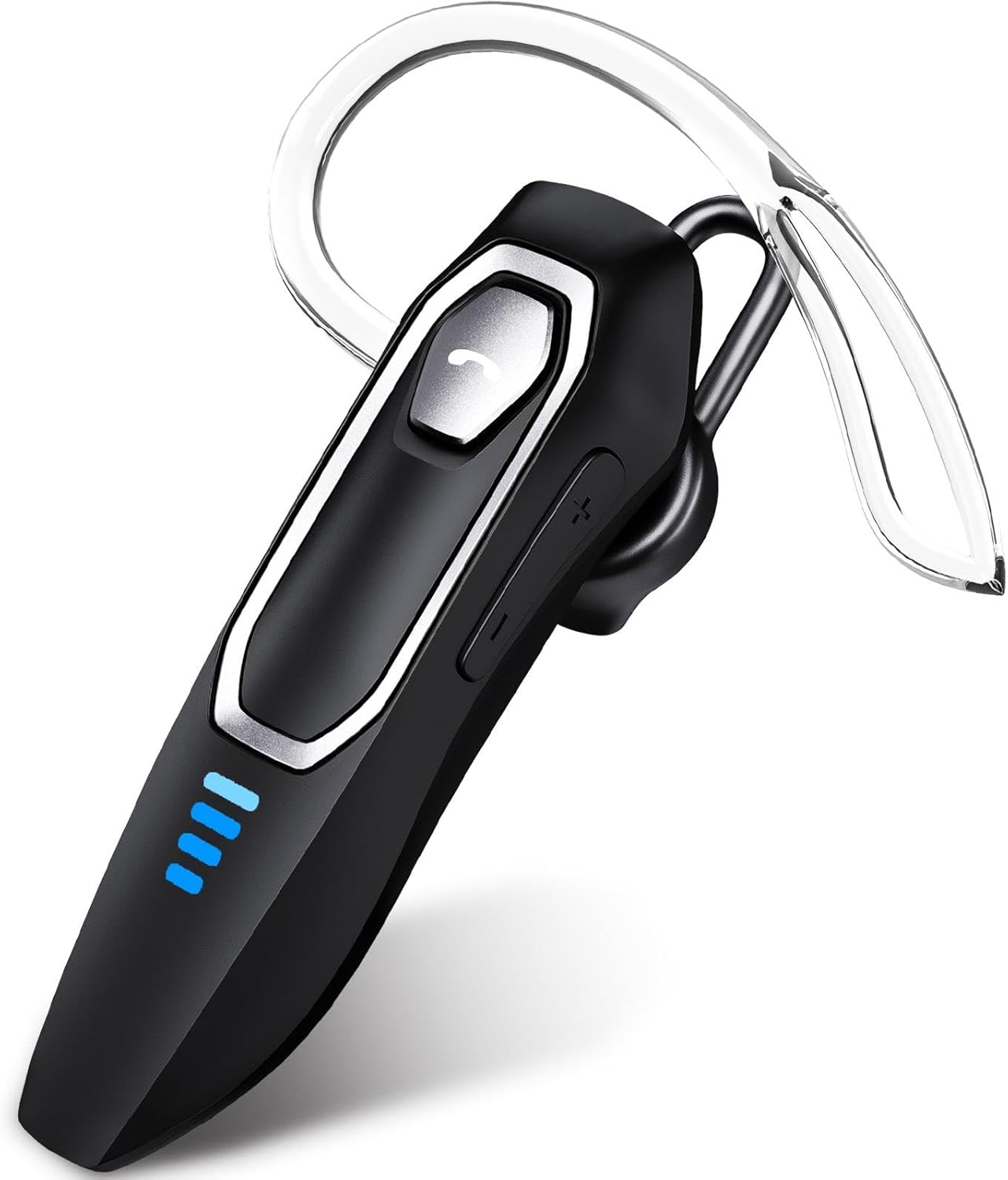
Image 1: Micool DY20PLUS Bluetooth Headset. This image displays the main headset unit, highlighting the call button, volume controls, and LED power indicators.

Image 2: Headset Controls Diagram. This diagram illustrates the Multi-Function Button (MFB) for power, play/pause, and Bluetooth pairing, along with volume controls and mute function.
Ngba agbara si Agbekọri
Kí o tó lo ó fún ìgbà àkọ́kọ́, gba agbára headset náà pátápátá.
- Connect the provided USB-C charging cable to the charging port on the headset.
- So opin okun miiran pọ si orisun agbara USB (fun apẹẹrẹ, kọnputa, ohun ti nmu badọgba ogiri).
- The LED indicators will show charging status. A full charge typically takes 1.5-2 hours.
- Once fully charged, the LED indicators will change or turn off (refer to LED Power Display section for details).
The headset offers up to 36 hours of talk time and 45 hours of music playback on a single charge.
Ṣeto
Titan / Paa
- Agbara Tan: Press and hold the Multi-Function Button (MFB) for approximately 3 seconds until the LED indicator flashes.
- Agbara Pa: Press and hold the MFB for approximately 3 seconds until the LED indicator turns off.
Asopọ Bluetooth
- Rii daju pe agbekari ti ni agbara ni pipa.
- Press and hold the MFB for approximately 3 seconds until the LED indicator flashes red and blue alternately, indicating pairing mode.
- Lori ẹrọ rẹ (foonuiyara, tabulẹti, kọmputa), mu Bluetooth ṣiṣẹ ki o wa awọn ẹrọ to wa.
- Select "DY20PLUS" from the list of found devices.
- Once connected, the LED indicator on the headset will flash blue slowly.
Asopọmọra Multipoint: The DY20PLUS headset can connect to two devices simultaneously. After pairing with the first device, disable Bluetooth on that device. Then, put the headset back into pairing mode and connect to the second device. Re-enable Bluetooth on the first device, and the headset should automatically connect to both.
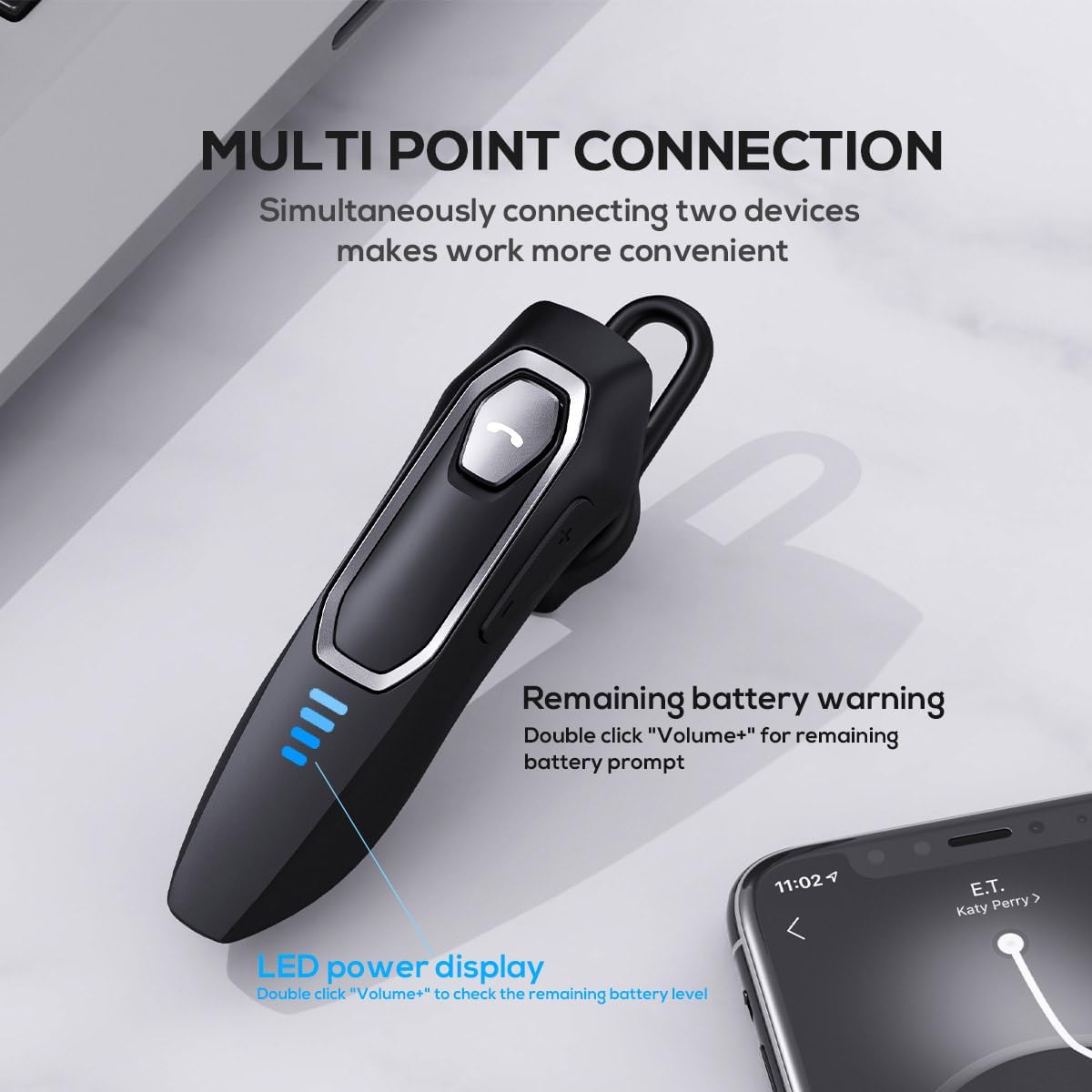
Image 3: Multi-Point Connection and LED Display. This image illustrates the headset's ability to connect to two devices simultaneously and the LED power display.
Awọn ilana Iṣiṣẹ
Isakoso Ipe
- Idahun/Ipe Ipari: Tẹ MFB lẹẹkan.
- Kọ Ipe: Press and hold the MFB for approximately 2 seconds.
- Pa ẹ / Mu Gbohungbohun dakẹ: During a call, press and hold the volume down button (marked with a microphone icon) for approximately 2 seconds.
- Redial Last Outgoing Call: Triple-tap the MFB.
Sisisẹsẹhin Orin
- Ṣiṣẹ/Daduro: Tẹ MFB lẹẹkan.
- Orin t’okan: Press and hold the Volume + button for approximately 2 seconds.
- Tẹlẹ Orin: Press and hold the Volume - button for approximately 2 seconds.
- Iwọn didun Soke/Isalẹ: Press the Volume + or Volume - button briefly.
Oluranlọwọ ohun
- Mu Oluranlọwọ ohun ṣiṣẹ (Siri, Oluranlọwọ Google, ati bẹbẹ lọ): Double-tap the MFB.
LED Power Ifihan
The headset features an LED power display with four levels, each representing 25% of the battery charge.
- To check the remaining power, double-click the Volume + button.
Itunu ati Fit
The Micool DY20PLUS is designed for comfortable, all-day wear.
- The ergonomic design ensures a secure fit without causing ear fatigue.
- Interchangeable ear tips (L, M, S) are included to help you find the best fit for your ear canal, optimizing bass and overall sound quality.
- The headset can be worn on either the left or right ear.

Image 4: Ear Tips and Durability. This image shows the included ear tips in different sizes (L, M, S) and highlights the enhanced durability features of the headset.
Itoju
- Ninu: Lo aṣọ rírọrùn tí ó gbẹ láti nu agbekọri naa. Maṣe lo awọn kemikali lile tabi awọn ohun elo ti o nfi pa ara.
- Ibi ipamọ: Nigbati o ko ba si ni lilo, tọju agbekari ni itura, aye gbigbẹ, kuro lati orun taara ati awọn iwọn otutu to gaju.
- Itọju Batiri: Lati pẹ aye batiri, yago fun gbigba agbara agbekari ni kikun nigbagbogbo. Gba agbara rẹ nigbagbogbo, paapaa ti kii ṣe ni lilo igbagbogbo.
- Omi Resistance: The headset is water-resistant, but not waterproof. Avoid submerging it in water or exposing it to heavy rain.
Laasigbotitusita
| Isoro | Owun to le Solusan |
|---|---|
| Agbekọri ko ni agbara. | Rí i dájú pé agbekọri naa ti gba agbara. So o pọ mọ orisun agbara nipa lilo okun USB-C. |
| Ko le so pọ pẹlu ẹrọ. |
|
| Ko si ohun tabi didara ohun ti ko dara. |
|
| Gbohungbohun ko ṣiṣẹ lakoko awọn ipe. |
|
| Voice assistant not activating. | Ensure the headset is connected and double-tap the MFB firmly. Check your device settings for voice assistant activation. |
Awọn pato
| Ẹya ara ẹrọ | Ẹ̀kúnrẹ́rẹ́ |
|---|---|
| Orukọ awoṣe | DY20PLUS |
| Asopọmọra Technology | Ailokun (Bluetooth) |
| Ẹya Bluetooth | 5.4 |
| Bluetooth Ibiti | Titi de awọn mita 50 (164 ẹsẹ) |
| Igbesi aye batiri (Aago Ọrọ) | Titi di wakati 36 |
| Igbesi aye batiri (Sisisẹsẹhin Orin) | Titi di wakati 45 |
| Akoko gbigba agbara | 1.5-2 wakati |
| Gbigba agbara Port | USB-C |
| Ifagile Ariwo | Dual Microphones with Noise Reduction Algorithm |
| Pataki Awọn ẹya ara ẹrọ | Voice Assistant, Multipoint Pairing, LED Power Display, Mute Function, Fast Charging |
| Iwọn | Nǹkan bí 12g (0.42 oz) |
| Omi Resistance Ipele | Omi sooro |
| Awọn ẹrọ ibaramu | Àwọn fóònù alágbèéká, Táblẹ́ẹ̀tì, Àwọn Agbọrọsọ Ọlọ́gbọ́n |
Atilẹyin ọja ati Support
For warranty information or technical support, please refer to the documentation included with your purchase or contact Micool customer service through their official channels.
Ask a question about this manual
Ask about setup, troubleshooting, compatibility, parts, safety, or missing instructions. Manuals+ will review the question and use this page’s manual context to help answer it.