
1. Ifihan
This manual provides essential information for the installation, operation, and maintenance of your FSP VITA GM 650W ATX 3.1 PC Power Supply. Please read this manual thoroughly before installation to ensure proper and safe usage of the product. The FSP VITA GM 650W is designed to deliver stable and efficient power to your computer system, adhering to the ATX 3.1 and PCIe Gen 5.1 specifications.
2. Alaye Aabo
Nigbagbogbo ṣe akiyesi awọn iṣọra ailewu atẹle lati yago fun ipalara tabi ibajẹ si ohun elo rẹ:
- Ma ṣe ṣii ẹrọ ipese agbara. Iwọn gigatages are present inside, and opening the casing voids the warranty and poses a risk of electric shock.
- Fi sori ẹrọ ipese agbara ni agbegbe ti o ni afẹfẹ daradara, kuro lati awọn orisun ooru, oorun taara, ati ọrinrin.
- Ensure the power supply is correctly installed and secured in your PC case.
- Use only the modular cables provided with the power supply. Using incompatible cables can cause damage.
- Connect the power supply to a grounded electrical outlet.
- Disconnect the AC power cord from the wall outlet before installing or removing the power supply or any other components.
- Avoid placing heavy objects on the power supply or its cables.
- If the power supply is damaged or malfunctioning, discontinue use immediately and contact FSP support.
3. Package Awọn akoonu
Daju pe gbogbo awọn nkan wa ninu apo rẹ:
- FSP VITA GM 650W ATX 3.1 PC Power Supply
- Modular Cable Set (Motherboard, CPU, PCIe, SATA, Peripheral)
- AC Agbara okun
- Iṣagbesori skru
- Afowoyi Olumulo (iwe-ipamọ yii)
4. Ọja Ipariview
The FSP VITA GM 650W is a high-efficiency power supply designed for modern PC systems. It features:
- Ìbámu ATX 3.1: Designed to meet the latest Intel Power Design Guide ATX 3.1 specifications, ensuring compatibility with future hardware.
- PCIe Gen 5.1 Support: Ready for next-generation graphics cards.
- 80 PLUS Iwe-ẹri goolu: Achieves high efficiency, reducing power dissipation, heat, and noise.
- Synchronous Rectifier LLC Resonance Converter Topology: Reduces switching loss and enhances efficiency.
- +5V & 3.3V DC to DC Circuit Design: Improves efficiency and stabilizes output voltage.
- 105°C Japanese Bulk Capacitor: Ensures reliability and extended lifespan.

olusin 4.1: Iwaju-ẹgbẹ view of the FSP VITA GM 650W Power Supply, showcasing its compact design and fan grille.
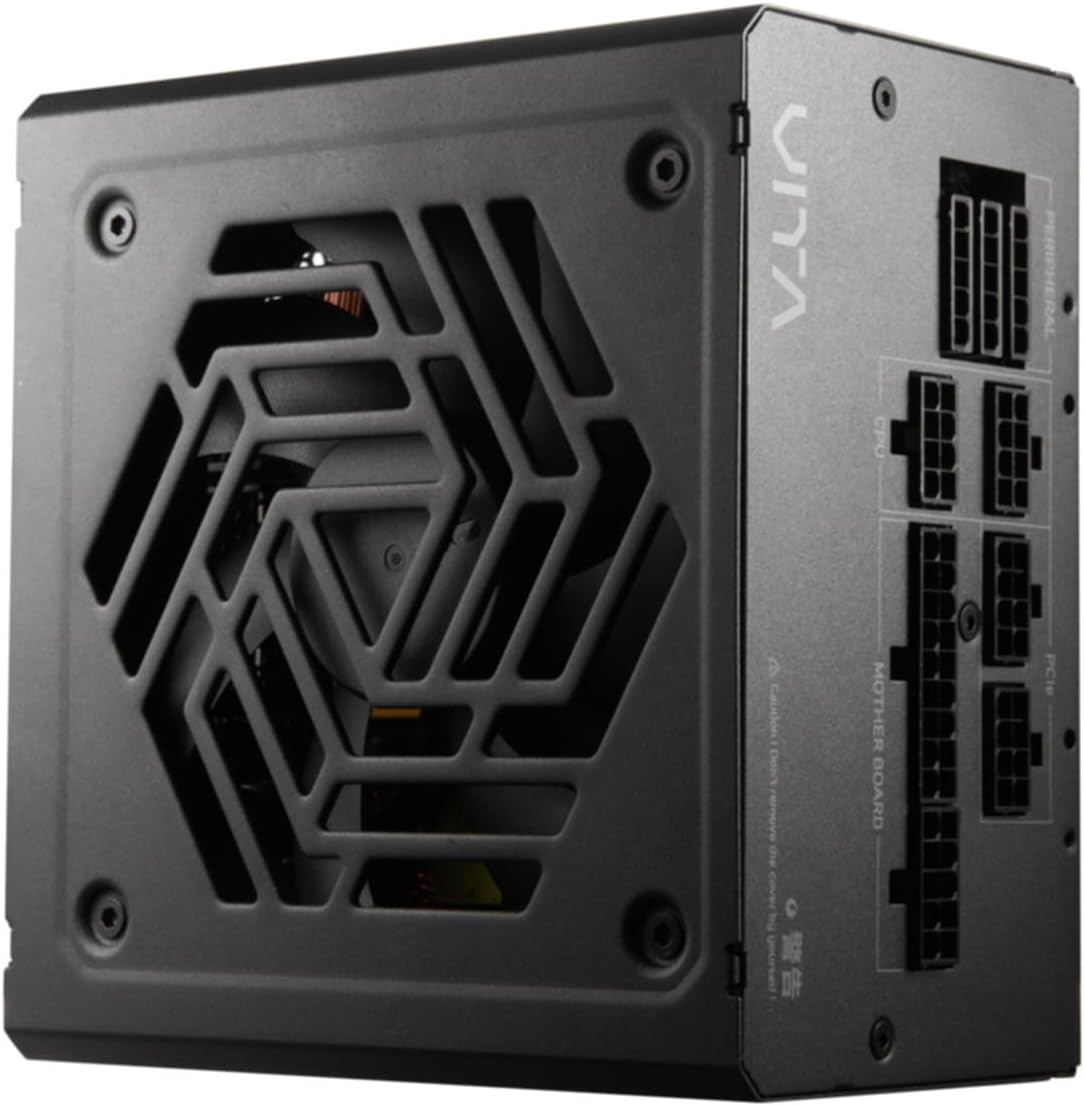
olusin 4.2: Top-isalẹ view of the FSP VITA GM 650W Power Supply, highlighting the fan and ventilation design.

olusin 4.3: Apa view of the FSP VITA GM 650W Power Supply, showing the FSP branding and VITA model name.
5. Eto ati fifi sori
Follow these steps to install your FSP VITA GM 650W power supply:
- Igbaradi:
- Pa kọ̀ǹpútà rẹ kí o sì yọ okùn agbára AC kúrò nínú ihò ìtajà ògiri.
- Ṣii apoti kọnputa rẹ.
- Ti o ba rọpo ipese agbara ti o wa tẹlẹ, ge gbogbo awọn kebulu kuro lati PSU atijọ ki o yọ kuro ninu ọran naa.
- Gbigbe PSU:
- Carefully place the FSP VITA GM 650W into the power supply bay of your PC case.
- Sopọ awọn iho dabaru lori PSU pẹlu awọn ti o wa lori ọran naa.
- Ṣe aabo ipese agbara nipa lilo awọn skru iṣagbesori ti a pese.
- Àwọn okùn onípele tí ń sopọ̀ mọ́ra:
The FSP VITA GM 650W is a modular power supply. Connect only the cables required for your system components.

Figure 5.1: Modular cable connection panel. Ensure cables are firmly seated.
- Agbara modaboudu: So okun ATX 24-pin pọ si modaboudu naa.
- Agbara Sipiyu: Connect the 4+4-pin or 8-pin EPS/ATX12V cable(s) to the CPU power connector(s) on your motherboard.
- PCIe agbara: Connect the 6+2-pin PCIe cables to your graphics card(s).
- Agbara SATA: Connect SATA power cables to SSDs, HDDs, and optical drives.
- Peripheral Power: Connect 4-pin Molex cables to other peripherals as needed.
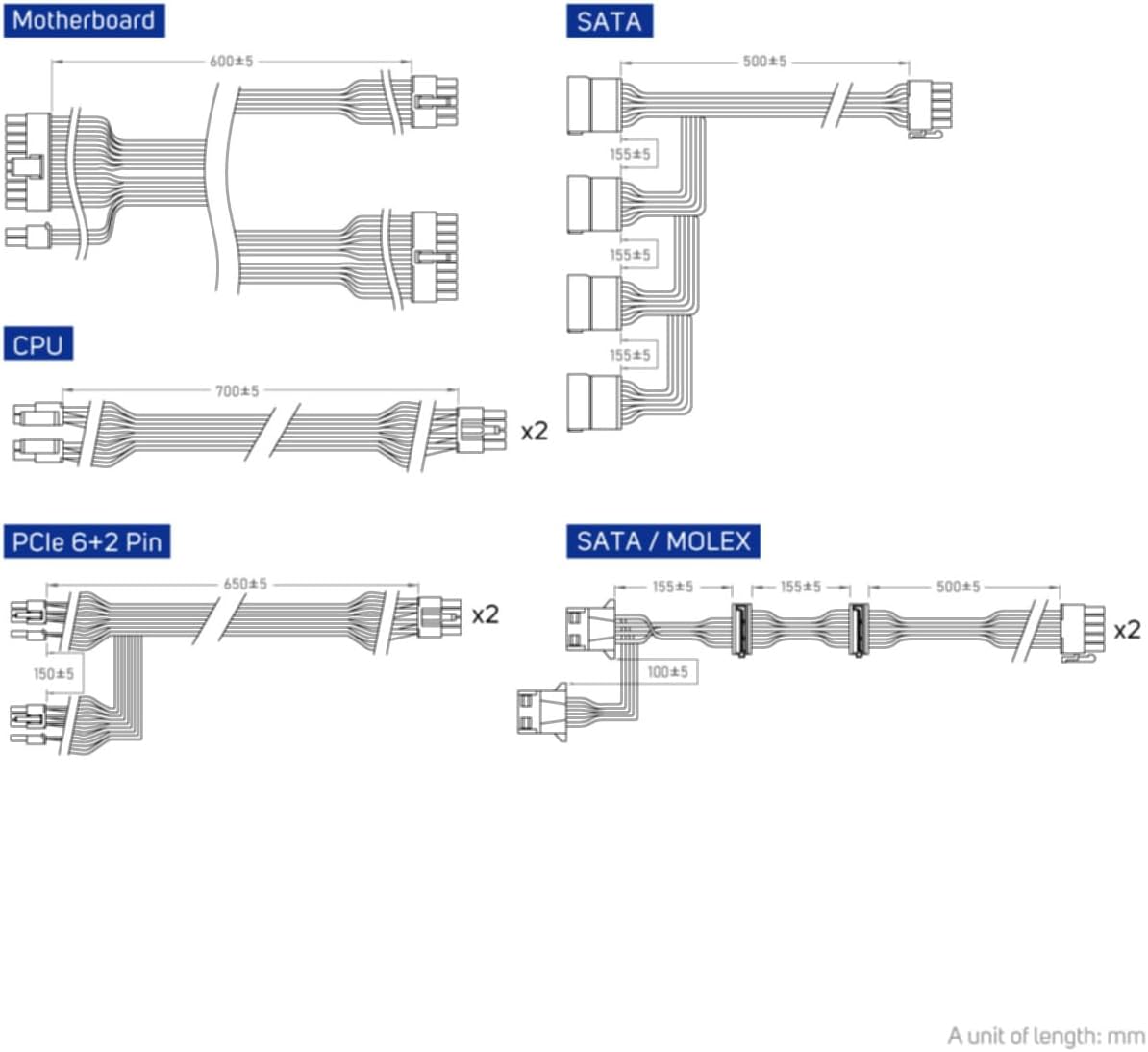
Figure 5.2: Diagram illustrating the various modular cables included and their approximate lengths (in mm).
- Awọn ayẹwo Ipari:
- Ensure all cables are securely connected and routed to avoid obstructing airflow.
- Pa ọran kọmputa rẹ.
- So okun agbara AC pọ si ipese agbara ati lẹhinna si iṣan ogiri ti o wa lori ilẹ.
6. Awọn ilana Iṣiṣẹ
After installation, you can power on your system:
- Ensure the power switch on the back of the power supply is in the "ON" (I) position.
- Tẹ bọtini agbara lori apoti kọnputa rẹ.
- The power supply will provide stable power to your components.

olusin 6.1: Ẹyìn view of the power supply, showing the AC power input and the main power switch.
Bridge Time Importance: The FSP VITA GM 650W adheres to the recommended ATX 3.1 bridge time values. This feature ensures the power supply can maintain a stable output voltage for a critical duration after a power interruption, preventing system instability or damage during sudden power fluctuations or outages.
7. Itọju
To ensure optimal performance and longevity of your power supply:
- Pipa eruku: Lorekore nu eruku lati grille afẹfẹ ipese agbara ati awọn atẹgun nipa lilo afẹfẹ fisinuirindigbindigbin. Rii daju pe eto naa ti wa ni pipa ati yọọ kuro ṣaaju ṣiṣe mimọ.
- Iṣakoso USB: Maintain good cable management inside your PC case to ensure proper airflow and prevent overheating.
- Awọn ipo Ayika: Ṣiṣẹ ipese agbara laarin iwọn otutu ati awọn iwọn otutu ti a ṣeduro.
8. Laasigbotitusita
If you encounter issues with your FSP VITA GM 650W power supply, refer to the following common problems and solutions:
| Isoro | Owun to le Fa | Ojutu |
|---|---|---|
| System ko ni agbara lori. |
|
|
| Eto naa n tan ṣugbọn o wa ni pipa lẹsẹkẹsẹ. |
|
|
| Awọn ariwo dani lati PSU. |
|
|
If the problem persists after trying these solutions, please contact FSP customer support for further assistance.
9. Awọn pato
| Ẹya ara ẹrọ | Ẹ̀kúnrẹ́rẹ́ |
|---|---|
| Nọmba awoṣe | 790980 |
| Brand | FSP |
| Wattage | 650W |
| Ẹya ATX | 3.1 |
| Ijẹrisi ṣiṣe | 80 Plus Gold |
| Iwọn Nkan | kilo 2.72 (5.98 poun) |
| Olupese | FSP |
| Ọjọ Akọkọ Wa | Oṣu Kẹjọ Ọjọ 15, Ọdun 2024 |
10. Atilẹyin ọja ati Support
For warranty information, technical support, or service inquiries, please refer to the official FSP webojula tabi kan si wọn onibara iṣẹ Eka. Jeki ẹri rira rẹ fun awọn iṣeduro atilẹyin ọja.
FSP Official Webojula: www.fsp-group.com
11. Atunlo ati isọnu
Please dispose of this product responsibly. Electronic waste should not be disposed of with household waste. Contact your local authorities or recycling center for information on proper disposal methods for electronic components.