
1. Ifihan
This instruction manual provides essential information for the safe and efficient use of your ApoloSign 32-inch UHD 4K Smart Portable TV Gen2. Please read this manual thoroughly before operating the device and retain it for future reference. This portable smart TV combines a high-resolution display with smart features, offering versatile entertainment and productivity options throughout your home.

Image: The ApoloSign 32-inch Portable TV Gen2 positioned in a modern living room, showcasing its sleek design and portability.
2. Alaye Aabo
Gbogbogbo Aabo Awọn iṣọra
- Má ṣe fi ẹ̀rọ náà sí ojú òjò tàbí ọrinrin láti dènà iná tàbí ìkọlù iná mànàmáná.
- Rii daju pe fentilesonu to dara. Ma ṣe dina awọn ṣiṣi atẹgun.
- Lo oluyipada agbara nikan ti a pese pẹlu ẹrọ naa.
- Yẹra fún gbígbé ẹ̀rọ náà sí orí àwọn ibi tí kò dúró dáadáa.
- Ma ṣe gbiyanju lati tunto tabi tun ẹrọ naa funrararẹ. Tọkasi gbogbo iṣẹ si oṣiṣẹ oṣiṣẹ.
Aabo batiri
- The device contains a built-in 15000mAh lithium-ion battery. Do not expose it to excessive heat, direct sunlight, or fire.
- Gba agbara si batiri ni kikun ṣaaju lilo akọkọ.
- If the battery shows signs of swelling, leakage, or damage, discontinue use immediately and contact support.
- Sọ awọn batiri sọnu ni ibamu si awọn ilana agbegbe.
3. Package Awọn akoonu
Jẹrisi pe gbogbo awọn ohun kan wa ninu package:
- ApoloSign 32-inch UHD 4K Smart Portable TV Gen2 Display
- Rolling Stand Base
- Stand Pole (multiple sections)
- Adapter agbara
- Ohun Remote Iṣakoso
- 8MP Camera Module
- Assembly Screws and Tools
- Afowoyi Olumulo (iwe-ipamọ yii)

Image: The voice remote control, a key accessory for navigating the ApoloSign TV.

Image: The detachable 8MP camera module, designed for video calls and other interactive features.
4. Ọja Ipariview
The ApoloSign 32-inch UHD 4K Smart Portable TV Gen2 is a versatile device designed for flexible use across various environments. Its main components include:
- 32-inch UHD 4K Touchscreen: A large, high-resolution display with touch functionality for intuitive interaction.
- Rolling Stand: A sturdy base with smooth wheels for easy movement between rooms.
- Adjustable Screen Mount: Allows for height adjustment, left/right swivel, and tilt for optimal viewing angles in both portrait and landscape orientations.
- Integrated 8MP Camera: For video conferencing and other camera-enabled applications.
- Voice Remote Control: Enables hands-free operation and navigation.
- Batiri 15000mAh ti a ṣe sinu: Provides up to 8 hours of portable use.
- Awọn ibudo Asopọmọra: Includes HDMI, USB 2.0, USB 3.0, Bluetooth 5.3, and Wi-Fi for various connections.
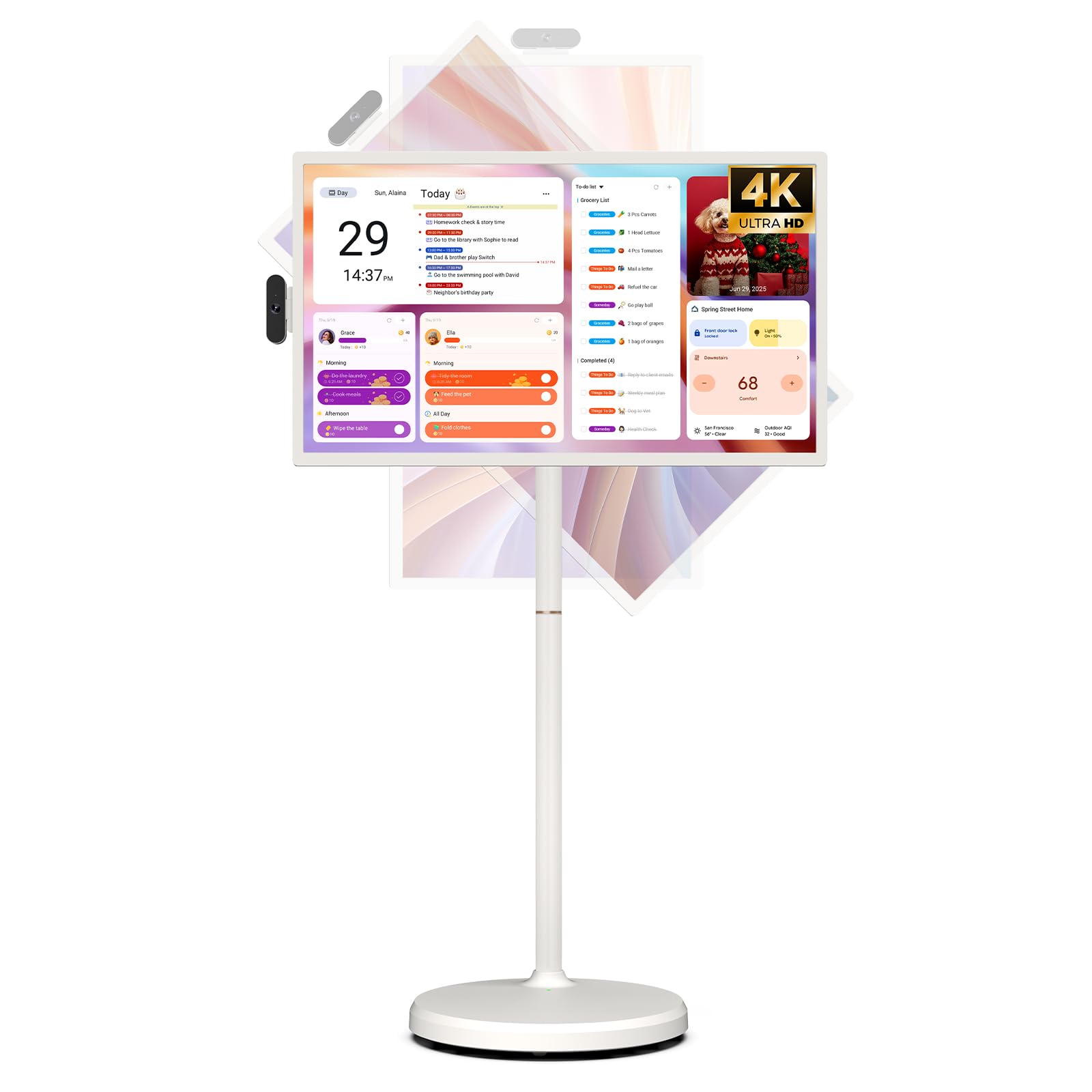
Image: The ApoloSign 32-inch UHD 4K Smart Portable TV Gen2, highlighting its large screen and mobile stand.
5. Eto
Apejọ
- Yọọ gbogbo awọn paati lati inu apoti.
- Attach the stand pole sections to the rolling base using the provided screws.
- Carefully mount the TV display onto the top of the assembled stand pole, ensuring it clicks securely into place.
- Connect the internal power cable from the stand to the display.
- Attach the 8MP camera module to the designated slot on top of the display.
Initial Power-On and Network Connection
- Connect the power adapter to the TV and a power outlet. The device will begin charging.
- Press the power button located on the back of the display to turn on the TV.
- Tẹle awọn itọsọna loju iboju lati yan ede ati agbegbe rẹ.
- Sopọ̀ mọ́ nẹ́tíwọ́ọ̀kì Wi-Fi rẹ nípa yíyàn án láti inú àkójọ náà kí o sì tẹ ọ̀rọ̀ìpamọ́ náà.
- Sign in with your Google account to access the Google Play Store and other services.
Isọdọmọ Iṣakoso Latọna jijin
- Insert batteries into the voice remote control.
- On the TV screen, navigate to Ètò > Àwọn ọ̀nà àbáwọlé àti àwọn ẹ̀rọ mìíràn > Fi àwọn ẹ̀rọ mìíràn kún.
- Press and hold the specified pairing buttons on the remote (refer to remote's mini-guide) until the indicator light blinks.
- Select the remote control from the list on the TV screen to complete pairing.
6. Awọn ilana Iṣiṣẹ
Ipilẹ Lilọ kiri
- Afi ika te: Tap, swipe, and pinch to navigate menus, open apps, and interact with content.
- Latọna ohun: Use the directional pad and selection buttons for menu navigation. Press the voice button to activate voice commands for searching or launching apps.
Screen Rotation and Adjustment
The screen can be rotated 90 degrees between landscape and portrait modes. It also allows for height adjustment, left/right swivel, and tilting to achieve the desired viewigun igun.

Image: Illustrations demonstrating the various ways the ApoloSign TV screen can be adjusted: height, tilt, and rotation.
Apps and Google Play Store
Running on a customized Android 15 OS and Google certified, you can download and install any app available on the Google Play Store. Access streaming services, social media, productivity tools, and games.

Image: The ApoloSign TV screen showing the Android 15 interface with icons for popular apps like Netflix, YouTube, Spotify, and TikTok.
Wireless and Wired Casting
Share content from your mobile phone, tablet, or laptop to the TV screen.
- Simẹnti Alailowaya: Use the built-in MixCast feature or other compatible casting protocols. Ensure your device and the TV are on the same Wi-Fi network.
- Wired Casting: Connect external devices like gaming consoles or laptops via the HDMI port. The TV supports 4K HDMI output.
Video: A demonstration of how to screen mirror a mobile phone, tablet, or laptop to the ApoloSign Smart Portable TV.
Calendar Widget and Screensavers
The interactive desktop calendar widget syncs with Google Calendar, Outlook, and Google Tasks to help manage your schedule. Utilize dynamic screensavers to transform the TV into a digital clock, photo frame, or market billboard.

Image: The ApoloSign TV screen showcasing its digital calendar feature, displaying daily schedules and events.

Image: The ApoloSign TV screen demonstrating different digital screensaver options, including a photo display and a music player interface.
Lilo kamẹra
The integrated 8MP camera is ideal for video calls and conferences. Ensure the camera is correctly installed and facing the desired direction.
7. Itọju
Ninu
- Yọọ ẹrọ naa nigbagbogbo ṣaaju ṣiṣe mimọ.
- Lo asọ asọ, ti ko ni lint die-die dampfi omi tàbí ẹ̀rọ ìfọmọ́ ìbòjú pamọ́ láti nu ìbòjú náà. Yẹra fún àwọn kẹ́míkà líle koko.
- Wipe the body of the TV and stand with a dry, soft cloth.
Itọju Batiri
- Fún ìgbà tí batiri bá pẹ́ tó, má ṣe jẹ́ kí batiri náà máa gbẹ pátápátá nígbàkúgbà.
- Tọju ẹrọ naa ni itura, aye gbigbẹ nigbati o ko ba wa ni lilo fun awọn akoko gigun.
- Gba agbara batiri naa lorekore ti o ba ti fipamọ fun igba pipẹ lati dena jijo omi jinle.
Awọn imudojuiwọn Software
Regularly check for and install software updates to ensure optimal performance and access to the latest features. Updates can usually be found in the device's settings menu.
8. Laasigbotitusita
- Device not powering on or shutting off abruptly:
Ensure the power adapter is securely connected and the battery is charged. If the issue persists, perform a soft reset by holding the power button for 10-15 seconds. If problems continue, contact customer support. - Remote control not responding or selective functionality:
Check the remote's batteries and replace if necessary. Ensure the remote is paired correctly (refer to Section 5). If the remote is still unresponsive, try re-pairing it. - Awọn oran Asopọmọra Wi-Fi:
Verify that your Wi-Fi router is working correctly. Restart the TV and your router. Ensure the TV is within range of your Wi-Fi signal. - Mirroring iboju ko ṣiṣẹ:
Confirm that both the TV and the source device (phone, tablet, laptop) are connected to the same Wi-Fi network. Ensure the casting feature is activated on both devices. - Poor picture or sound quality:
For streaming content, check your internet connection speed. For wired connections (HDMI), ensure cables are securely connected and undamaged. Adjust display settings (resolution, brightness) as needed.
9. Awọn pato
| Ẹya ara ẹrọ | Ẹ̀kúnrẹ́rẹ́ |
|---|---|
| Orukọ awoṣe | SW3299T-4K |
| Iwon iboju | 32 inches |
| Ipinnu | 4K UHD 2160p (3840x2160 Pixels) |
| Ifihan ọna ẹrọ | LCD |
| Oṣuwọn sọtun | 60 Hz |
| Eto isesise | Android 15 |
| Àgbo | 16GB (8+8GB) |
| Ibi ipamọ inu | 256GB |
| Agbara Batiri | 15000mAh (up to 8 hours runtime) |
| Kamẹra | 8MP |
| Asopọmọra | Bluetooth 5.3, Wi-Fi |
| Awọn ibudo | 1x HDMI, 1x USB 2.0, 1x USB 3.0 |
| Agbọrọsọ Apejuwe | 2.1 awọn agbọrọsọ ikanni |
| Ọna Iṣakoso | Touch, Voice Remote |
| Ọja Mefa | 16.14"D x 28.87"W x 60.26"H |
10. Atilẹyin ọja ati Support
Atilẹyin ọja olupese
This ApoloSign product is covered by a 1 Odun olupese atilẹyin ọja lati ọjọ ti o ra. Atilẹyin ọja yi ni wiwa awọn abawọn ninu awọn ohun elo ati iṣẹ ṣiṣe labẹ lilo deede. Jọwọ ṣe idaduro ẹri rira rẹ fun awọn iṣeduro atilẹyin ọja.
Onibara Support
For technical assistance, troubleshooting, or warranty inquiries, please contact ApoloSign Official customer support. They offer 24/7 fast support to address any issues you may encounter.
Fun alaye diẹ sii, ṣabẹwo si ApoloSign Store on Amazon.