
RSH Android Smart Tag
RSH Android Smart Tag Itọsọna olumulo
Model: Android Smart Tag
Orúkọ ìtajà: RSH
Ọrọ Iṣaaju
The RSH Android Smart Tag is a compact and efficient device designed to help you locate your valuable items using the Google Find My Device app. This manual provides comprehensive instructions to ensure you get the most out of your Smart Tag.

Image: Four RSH Android Smart Tags, ifihanasing their design and quantity in the pack.
Ṣeto
1. Agbara Tan ati Paa
The RSH Android Smart Tag features a function button for basic operations. Refer to the diagram below for the button's location.
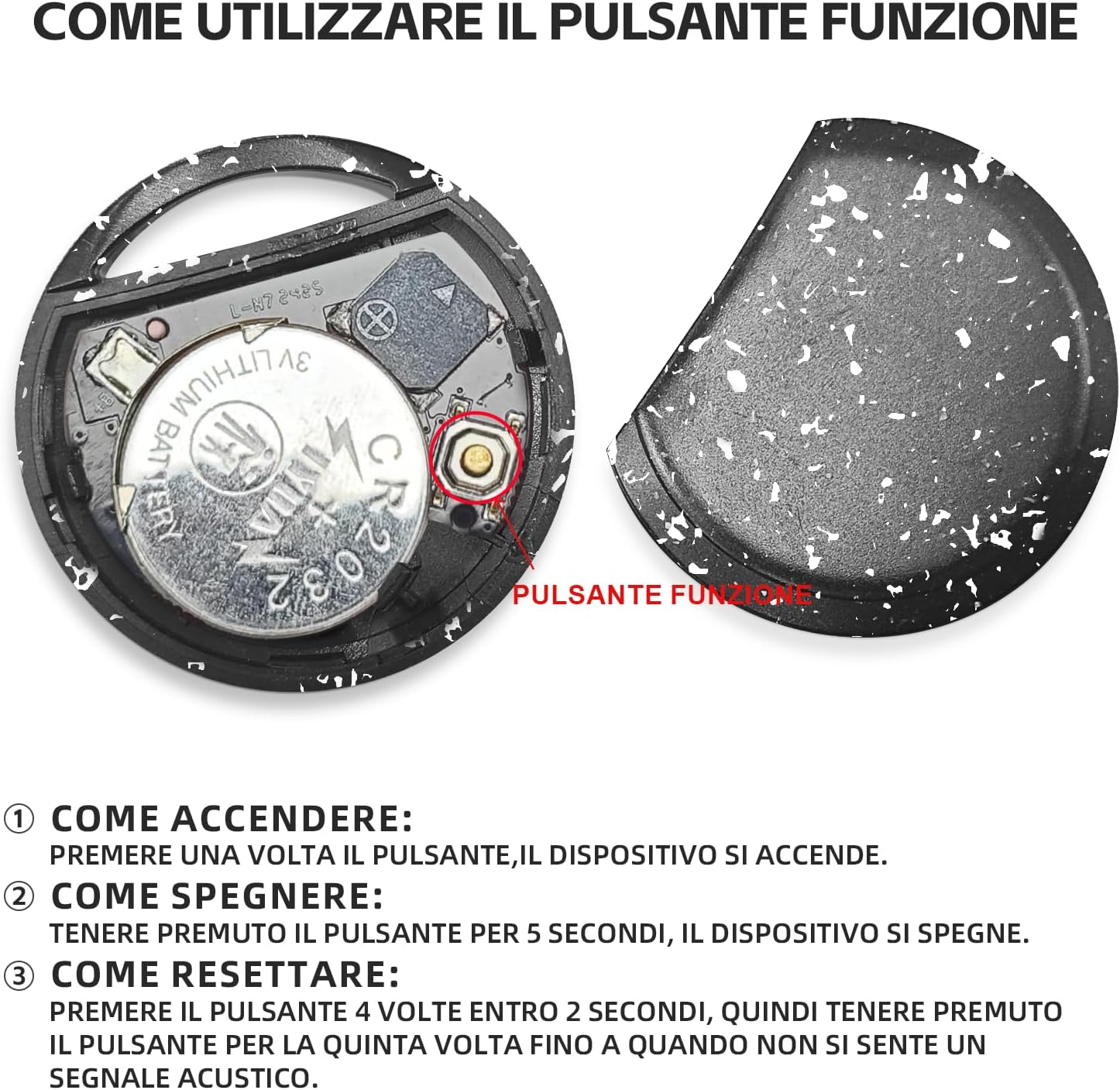
Aworan: Ti abẹnu view ti Smart Tag, illustrating the battery and function button.
- Bi o ṣe le Tan-an: Press the function button once. The device will turn on.
- Bi o ṣe le Paa: Press and hold the function button for 5 seconds. The device will turn off.
2. Fast Pairing with Android Devices
Awọn Smart Tag is designed for quick and seamless pairing with your Android smartphone.
- Rii daju pe Bluetooth foonu Android rẹ ti ṣiṣẹ.
- Bring the RSH Android Smart Tag sunmo si foonu rẹ.
- A connection invitation will automatically appear on your phone's screen. Follow the on-screen prompts to complete the pairing process.

Image: Visual representation of the Smart Tag's compatibility with a wide range of Android devices.
Awọn ilana Iṣiṣẹ
1. Tracking and Item Search
Utilize the Google Find My Device app to locate your RSH Android Smart Tag.
- Within Bluetooth Range: Open the Google Find My Device app. If the tag is within Bluetooth range, you can activate its built-in speaker to emit an audible signal, helping you pinpoint its exact location.
- Out of Bluetooth Range: Ti o ba ti tag is outside Bluetooth range, the app will display its last known location on a map, leveraging the Google Find My Device network.

Image: Demonstration of the 'Play sound' feature within the Google Find My Device app.

Image: The Smart Tag attached to a backpack, illustrating its use for tracking items.

Image: The Smart Tag attached to luggage, emphasizing its utility for travel.
2. Loss Mode
Activate Loss Mode in the Google Find My Device app if your item is missing. This feature leverages the vast network of billions of Android devices to help locate your lost item.
3. Sharing Items
You can share access to your Smart Tag with others through the Google Find My Device app. This allows multiple users to view the item's location on the map.

Image: Various use cases for the Smart Tag, demonstrating its versatility for tracking different items.
Itoju
1. Batiri Rirọpo
The RSH Android Smart Tag uses a replaceable CR2032 battery, which typically lasts up to 1 year. To replace the battery:
- Fara ṣii Smart Tag casing.
- Yọ batiri CR2032 atijọ kuro.
- Fi batiri CR2032 tuntun sii, ni idaniloju polarity ti o pe.
- Pa casing ni aabo.
2. Omi Resistance
MiTag tracker is IP67 certified, meaning it is protected from dust and can withstand immersion in 1 meter of water for up to 30 minutes. While it is water-resistant, it is not recommended for prolonged submersion or use during swimming.
Laasigbotitusita
Atunto Ẹrọ naa
If you experience connectivity issues or unusual behavior, you may need to reset your RSH Android Smart Tag:
- Press the function button 4 times within 2 seconds.
- Immediately after the fourth press, press and hold the function button for the fifth time until you hear an audible signal. This indicates the device has been reset.
Awọn pato
| Ẹya ara ẹrọ | Ẹ̀kúnrẹ́rẹ́ |
|---|---|
| Brand | RSH |
| Ohun elo | Ṣiṣu |
| Ọja Mefa | 36L x 36W x 8Th millimetres |
| Iwọn Nkan | 7.6 giramu |
| Awọn ẹrọ ibaramu | Smartphone (Android Only) |
| Ọna Iṣakoso | App (Google Find My Device) |
| Batiri Iru | 1 CR2032 (included, replaceable) |
| Omi Resistance | IP67 Ifọwọsi |
Atilẹyin ọja ati Support
Information regarding product warranty and customer support is not provided in the available data. Please refer to the product packaging or the seller's website for details on warranty coverage and how to contact customer support.
Ask a question about this manual
Ask about setup, troubleshooting, compatibility, parts, safety, or missing instructions. Manuals+ will review the question and use this page’s manual context to help answer it.