
Ọrọ Iṣaaju
This manual provides detailed instructions for the installation, operation, and maintenance of your Montech Century II 1050W ATX Gaming Power Supply. Please read this manual thoroughly before installation and keep it for future reference.

Image: The Montech Century II 1050W Power Supply Unit, showcasing awọn oniwe-apẹrẹ ati bọtini awọn ẹya ara ẹrọ.
Alaye Aabo
Nigbagbogbo ṣe akiyesi awọn iṣọra ailewu atẹle lati yago fun ipalara tabi ibajẹ si ohun elo rẹ:
- Ensure the power supply is disconnected from the main power outlet before installation or maintenance.
- Do not open the power supply unit casing. Iwọn gigatages are present inside, which can cause electric shock.
- Fi ipese agbara sinu agbegbe ti afẹfẹ wa daradara, kuro ni awọn orisun ooru ati oorun taara.
- Use only the modular cables provided with this power supply. Using incompatible cables may damage the unit or connected components.
- Yẹra fún fífi agbára sí ọrinrin tàbí ooru tó le koko.
Package Awọn akoonu
Daju pe gbogbo awọn nkan wa ninu apo rẹ:
- Montech Century II 1050W Power Supply Unit
- AC Agbara okun
- Modular Cable Set (including 12V-2x6 cable)
- Iṣagbesori skru
- USB Ties
- Afowoyi Olumulo (iwe-ipamọ yii)

Image: The Montech Century II Power Supply with its included flat and flexible modular cables, designed for a neat build.
Ọja Pariview
The Montech Century II 1050W is a high-performance ATX gaming power supply designed for modern PC systems. It features 80 Plus Gold and Cybenetics Platinum efficiency ratings, ensuring stable and reliable power delivery. The fully modular design simplifies cable management, and its ATX 3.1 and PCIe 5.1 readiness, including a 12V-2x6 cable, provides compatibility with the latest hardware.
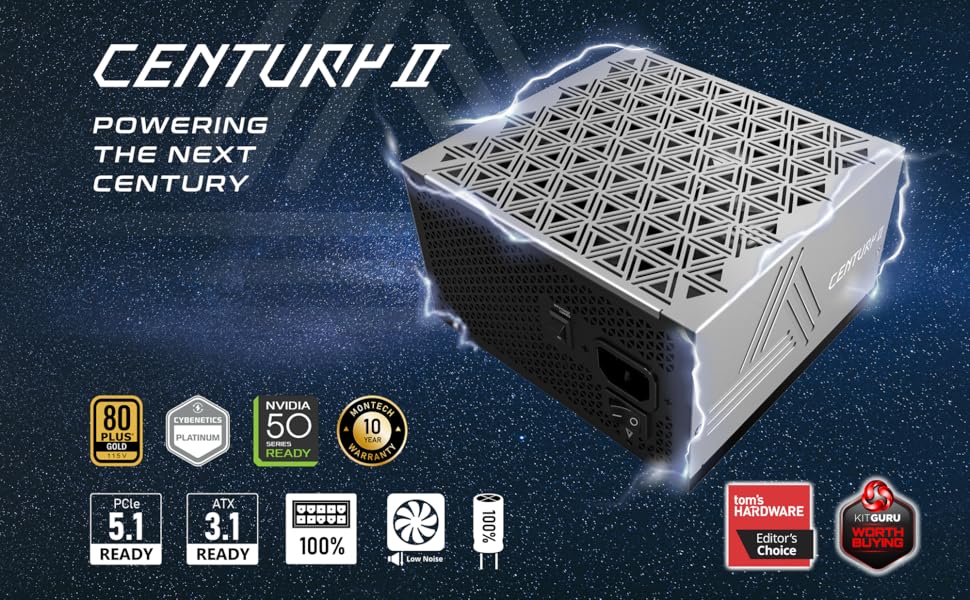
Aworan: Pariview of the Montech Century II Power Supply, highlighting its ATX 3.1 and PCIe 5.1 readiness.
Awọn ẹya pataki:
- 80 Plus Gold & Cybenetics Platinum Certified: High efficiency for reduced power consumption and heat.
- Apẹrẹ Modulu ni kikun: Connect only the cables you need for improved airflow and cable management.
- ATX 3.1 & PCIe 5.1 Ti ṣetan: Future-proof compatibility with next-generation components, including a native 12V-2x6 cable.
- Smart Zero Fan Mode: Optimizes cooling and reduces noise by stopping the fan at low loads.
- Àwọn Capacitors ti Japan 100%: Ensures long-term stability and reliability.
Eto ati fifi sori
Follow these steps to install your Montech Century II 1050W Power Supply:
- Mura Eto Rẹ: Ensure your computer is powered off and unplugged from the wall outlet. Open your PC case to access the power supply mounting area.
- Yọ PSU Atijọ kuro (ti o ba wulo): Ge gbogbo awọn kebulu kuro lati ipese agbara atijọ rẹ ki o yọ kuro ninu ọran naa.
- Fi PSU tuntun sori ẹrọ: Carefully place the Montech Century II 1050W PSU into the designated bay in your PC case. Secure it with the provided mounting screws. Ensure the fan is oriented correctly (typically facing downwards if your case has a bottom vent, or upwards if not).
- So awọn okun onirin pọ: Identify the necessary cables for your motherboard, CPU, graphics card(s), and storage devices. Connect them to the corresponding ports on the power supply.
- Modaboudu: So okùn ATX 24-pin pọ.
- Sipiyu: Connect the 4+4-pin or 8-pin EPS cables to your motherboard's CPU power connectors.
- Kaadi eya aworan (GPU): Use the appropriate PCIe cables. For modern GPUs requiring a 12V-2x6 connector, use the dedicated cable provided.
- Storage/Peripherals: Connect SATA power cables for SSDs/HDDs and Molex cables for other peripherals as needed.
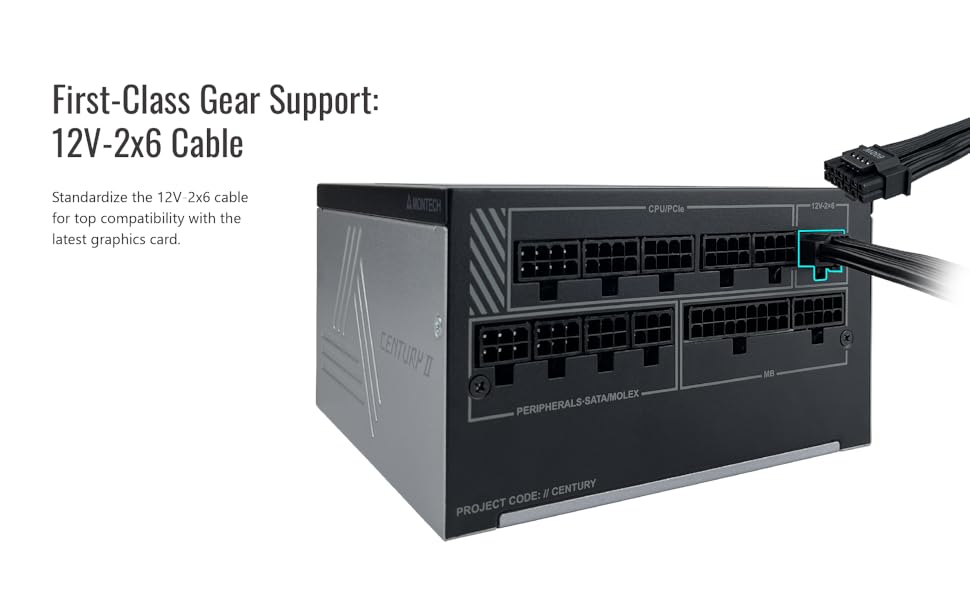
Image: A diagram illustrating the modular cable connection ports on the Montech Century II Power Supply, including the 12V-2x6 connector.
- Iṣakoso USB: Route cables neatly to improve airflow and aesthetics. Use the included cable ties to secure them.
- Sopọ agbara AC: So okùn agbára AC mọ́ orísun agbára náà, lẹ́yìn náà, so orísun agbára náà mọ́ orí ògiri.
- Agbara Tan: Flip the main power switch on the back of the PSU to the "ON" position. You can then power on your computer.
Awọn ilana Iṣiṣẹ
Smart Zero Fan Mode:
The Montech Century II 1050W features a Smart Zero Fan mode, which allows the power supply fan to remain off at low loads (typically below 30-40% of total wattage) for silent operation. The fan will automatically activate when the load increases to maintain optimal cooling.
To enable or disable this feature, use the "SMART ZERO FAN" switch located on the back of the power supply unit.
- LATI: Fan operates only when needed (Smart Zero Fan mode active).
- PA: Fan runs continuously at a low speed, regardless of load.

Image: Rear panel of the Montech Century II Power Supply, highlighting the main power switch and the Smart Zero Fan toggle switch.
Itoju
Itọju deedee ṣe iranlọwọ lati rii daju pe ipese agbara rẹ pẹ to ati iṣẹ to dara julọ:
- Yiyọ eruku kuro: Periodically clean the exterior of the power supply and its fan grille using compressed air or a soft brush to remove dust buildup. Ensure the PSU is powered off and unplugged before cleaning.
- Ayẹwo USB: Occasionally check all modular cable connections to ensure they are securely seated.
- Ayika: Maintain a clean, cool, and dry environment for your PC to prevent excessive heat and moisture exposure to the PSU.
Laasigbotitusita
If you encounter issues with your Montech Century II 1050W Power Supply, refer to the following common problems and solutions:
Ko si Agbara:
- Ṣayẹwo okun agbara: Rí i dájú pé okùn agbára AC ti so mọ́ PSU àti ihò ìtajà ògiri dáadáa.
- Iyipada Agbara akọkọ: Verify that the main power switch on the back of the PSU is in the "ON" position.
- Awọn Cable Modul: Confirm all modular cables (especially the 24-pin motherboard and CPU power cables) are correctly and firmly connected.
- Odi Odi: Test the wall outlet with another device to ensure it is functioning.
Aisedeede/iparun eto:
- Apọju: Ensure your system's power requirements do not exceed the PSU's 1050W capacity. Use a power calculator if unsure.
- Awọn Isopọ USB: Recheck all power connections, particularly to the motherboard and graphics card, for secure fit.
- Awọn oran Ẹka: Rule out other components (RAM, GPU, CPU) as potential causes by testing them if possible.
Fan Not Spinning (Smart Zero Fan ON):
- This is normal behavior if Smart Zero Fan mode is enabled and the system load is low. The fan will activate when the load increases.
- If the fan does not spin even under high load, try disabling Smart Zero Fan mode via the switch on the back of the PSU. If it still doesn't spin, contact support.
If problems persist after attempting these solutions, please contact Montech customer support.
Awọn pato
Detailed technical specifications for the Montech Century II 1050W Power Supply:
| Ẹya ara ẹrọ | Sipesifikesonu |
|---|---|
| Orukọ awoṣe | Century II 1050W |
| Wattage | 1050 Wattis |
| Ijẹrisi ṣiṣe | 80 Plus Gold & Cybenetics Platinum |
| Fọọmù ifosiwewe | ATX |
| Modulu Iru | Module ni kikun |
| Ẹya ATX | ATX 3.1 setan |
| Ẹ̀yà PCIe | PCIe 5.1 Ready (with 12V-2x6 Cable) |
| Ọna Itutu | Air (135mm fan with Smart Zero Fan mode) |
| Awọn agbara agbara | 100% Japanese Capacitors |
| Awọn iwọn Ọja (L x W x H) | 10 x 10 x 10 inches |
| Iwọn Nkan | 5.29 iwon |

Image: Graphs illustrating the efficiency curve and efficiency levels of the Montech Century II Power Supply, demonstrating its 80 Plus Gold and Cybenetics Platinum performance.

Aworan: A sunmọ-soke view of the 100% Japanese capacitors used in the Montech Century II Power Supply, indicating high-quality internal components.
Atilẹyin ọja ati Support
The Montech Century II 1050W Power Supply comes with a 10-odun atilẹyin ọja, ensuring long-term reliability and peace of mind. For warranty claims, technical support, or any inquiries not covered in this manual, please contact Montech customer service through their official webaaye tabi alagbata ti o ti ra ọja naa.
Jọwọ ṣe idaduro ẹri rira rẹ fun ijẹrisi atilẹyin ọja.
Ọja Video Loriview
Fidio: Unboxing ati loriview of the Montech Century II 850W Power Supply. While this video features the 850W model, it provides a general look at the design, packaging, and modular cables common to the Century II series, including the 1050W model.