
THINKYA JA-318
THINKYA Vintage Bluetooth Stereo System
Model: JA-318
Ọrọ Iṣaaju
Thank you for choosing the THINKYA Vintage Bluetooth Stereo System. This manual provides essential information for setting up, operating, and maintaining your new audio system. Please read this manual thoroughly before using the product to ensure proper operation and to maximize your listening experience. Keep this manual for future reference.
Package Awọn akoonu
Jọwọ ṣayẹwo awọn akoonu ti package farabalẹ. Ti awọn ohun kan ba nsọnu tabi bajẹ, kan si alagbata rẹ.
- THINKYA Vintage Bluetooth Stereo System Unit
- Isakoṣo latọna jijin
- Adapter agbara
- FM Antenna (if applicable)
- Afowoyi Olumulo (iwe-ipamọ yii)
Ọja Pariview
Familiarize yourself with the components and features of your stereo system.

Nọmba 1: Iwaju view of the stereo system with the included remote control. The system features a top-loading CD player and integrated speakers.

Nọmba 2: The system supports Bluetooth 5.1 for wireless audio streaming, along with Aux and USB playback options. A smartphone is shown connected via Bluetooth.

Nọmba 3: The system features a premium 30W RMS sound system with dual 3-inch full-range units, designed for clear and powerful audio output.
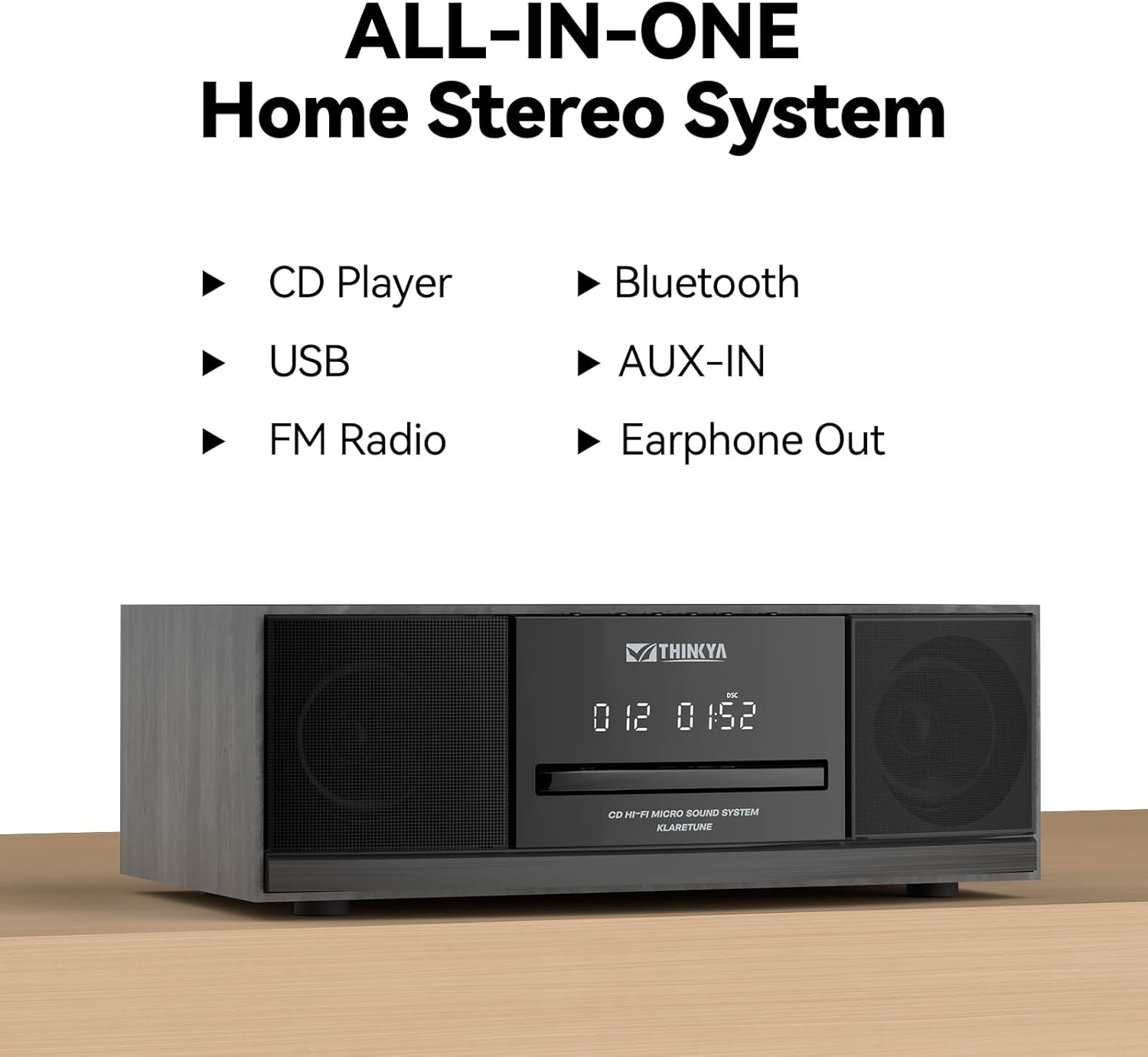
Nọmba 4: This all-in-one home stereo system integrates multiple audio sources including CD Player, USB, FM Radio, Bluetooth, AUX-IN, and Earphone Out.

Nọmba 5: The top-loading CD player supports various disc formats including CD, CD-R, CD-RW, and MP3 CDs. It also offers 5 EQ modes: Flat, Pop, Rock, Jazz, and Classic.

Nọmba 6: Rear panel connections include AUX Input (RCA and 3.5mm), USB Input, and Earphone Output for versatile connectivity.
Ṣeto
1. Ifiweranṣẹ
Gbé ètò sitẹrio náà sí orí ilẹ̀ tí ó dúró ṣinṣin, tí ó jìnnà sí oòrùn tààrà, àwọn orísun ooru, àti eruku tàbí ọrinrin tí ó pọ̀ jù. Rí i dájú pé afẹ́fẹ́ tó wà ní àyíká ẹ̀rọ náà.
2. Asopọ agbara
- So adapter agbara pọ mọ ibudo DC IN ni ẹhin ẹrọ naa.
- Pulọọgi ohun ti nmu badọgba agbara sinu iṣan ogiri boṣewa kan.
3. Asopọ eriali FM
For optimal FM radio reception, connect the included FM antenna to the FM ANT port on the rear of the unit. Extend the antenna fully and adjust its position for the best signal.
Awọn ilana Iṣiṣẹ
Titan / Paa
Tẹ awọn AGBARA button on the unit or the remote control to turn the system on or off.
Aṣayan Ipo
Tẹ awọn MODE button on the unit or remote control repeatedly to cycle through available modes: CD, Bluetooth, FM Radio, USB, and AUX-in.
CD Player isẹ
- Yan Ipo CD.
- Gently insert a CD into the top-loading CD slot with the label side facing up. The disc will be automatically detected and playback will begin.
- Lo awọn ERE/SINMI, FOJU IWAJU, ati FO Sẹhin awọn bọtini lati ṣakoso ṣiṣiṣẹsẹhin.
- Tẹ awọn DURO bọtini lati da sẹhin duro.
- Repeat Modes: Tẹ awọn Tun button to cycle through repeat one, repeat all, or random playback.
- Awọn ọna EQ: Tẹ awọn EQ button to select desired sound equalization: Flat, Classic, Rock, Pop, or Jazz.
Asopọ Bluetooth
- Select Bluetooth mode. The display will show "BT" and flash, indicating it's in pairing mode.
- Lori ẹrọ Bluetooth ti o ṣiṣẹ (foonuiyara, tabulẹti, ati bẹbẹ lọ), mu Bluetooth ṣiṣẹ ki o wa awọn ẹrọ to wa.
- Select "THINKYA JA-318" (or similar name) from the list.
- Once paired, the "BT" indicator will stop flashing and remain solid. You can now stream audio from your device to the stereo system.
- Note: This system is designed for receiving Bluetooth audio from devices and does not support connection to wireless headphones.
FM Radio isẹ
- Select FM Radio mode.
- Ṣiṣayẹwo Aifọwọyi: Tẹ mọlẹ ERE/SINMI bọtini lati ṣe ọlọjẹ laifọwọyi ati fipamọ awọn ibudo FM ti o wa.
- Itọsọna Afowoyi: Lo awọn FOJU IWAJU or FO Sẹhin awọn bọtini lati ṣe atunṣe pẹlu ọwọ si awọn igbohunsafẹfẹ ti o fẹ.
- Awọn ibudo tito tẹlẹ: Use the number buttons on the remote control to directly select saved preset stations.
USB Sisisẹsẹhin
- Yan ipo USB.
- Fi kọnputa USB sii ti o ni MP3 tabi ohun WMA ninu files into the USB port on the rear of the unit.
- Playback will begin automatically. Use the playback controls (PLAY/PAUSE, SKIP FORWARD/BACKWARD) to navigate your music.
AUX-in Usage
- Select AUX-in mode.
- Connect an external audio device (e.g., smartphone, MP3 player) to the AUX-in port (3.5mm or RCA) on the rear of the unit using an appropriate audio cable (not included).
- Ṣakoso ṣiṣiṣẹsẹhin taara lati inu ẹrọ ita ti o sopọ mọ rẹ.
Awọn iṣẹ iṣakoso latọna jijin

Nọmba 7: The included remote control allows convenient operation of all system functions from a distance.
The remote control provides full functionality for the stereo system. Ensure batteries are correctly inserted. Refer to the button labels on the remote for specific functions such as Power, Mode, Volume, Playback controls, EQ, and Number buttons for FM presets.
Itoju
Ninu
Wipe the unit with a soft, dry cloth. Do not use abrasive cleaners, waxes, or solvents as they may damage the finish. For the CD lens, use a specialized CD lens cleaner if necessary.
Ibi ipamọ
Tí a kò bá lo ẹ̀rọ náà fún ìgbà pípẹ́, yọ ọ́ kúrò nínú ẹ̀rọ agbára kí o sì tọ́jú rẹ̀ sí ibi tí ó tutù tí ó sì gbẹ.
CD Itọju
Mú àwọn CD náà ní etí wọn. Jẹ́ kí wọ́n mọ́ tónítóní, kí wọ́n má sì ní ìfọ́. Tọ́jú àwọn CD náà sí àpò wọn nígbà tí wọn kò bá lò ó.
Laasigbotitusita
Ti o ba pade awọn ọran eyikeyi, jọwọ tọka si tabili atẹle ṣaaju ki o kan si atilẹyin alabara.
| Isoro | Owun to le Fa | Ojutu |
|---|---|---|
| Ko si agbara | Okun agbara ko sopọ; Agbara iṣan ko ṣiṣẹ. | Rí i dájú pé okùn agbára náà wà ní ààbò. Gbìyànjú ọ̀nà agbára mìíràn. |
| Ko si ohun | Volume too low; Incorrect mode selected; Mute function active. | Increase volume. Select the correct input mode (CD, BT, FM, USB, AUX). Press the MUTE button on the remote. |
| CD fo tabi ko dun | CD is dirty or scratched; CD inserted incorrectly. | Clean the CD with a soft, lint-free cloth. Ensure the CD is inserted label side up. Try a different CD. |
| Bluetooth ko sopọ | System not in pairing mode; Device Bluetooth off; Device too far. | Ensure system is in Bluetooth mode and "BT" is flashing. Enable Bluetooth on your device. Move device closer to the system (within 30 feet). |
| Gbigba FM ti ko dara | Antenna kò sopọ̀ mọ́ ara wọn tàbí kò sí ní ipò tí kò dára. | Connect the FM antenna and adjust its position for better signal. |
| Isakoṣo latọna jijin ko ṣiṣẹ | Awọn batiri ti ku tabi fi sii lọna ti ko tọ; Idilọwọ laarin latọna jijin ati ẹyọkan. | Replace batteries. Ensure correct polarity. Remove any obstructions. Point remote directly at the unit's sensor. |
Awọn pato
| Ẹya ara ẹrọ | Ẹ̀kúnrẹ́rẹ́ |
|---|---|
| Nọmba awoṣe | JA-318 |
| Brand | TINKYA |
| Awọn iwọn Ọja (L x W x H) | 16 x 11 x 9 inches |
| Iwọn Nkan | 8.73 iwon |
| Asopọmọra Technology | Bluetooth |
| Agbọrọsọ Iru | Sitẹrio |
| Àwọ̀ | Dudu |
| Ijade Agbara RMS | 30W (15W RMS per speaker) |
| CD Ibamu | CD, CD-R/RW, CD MP3 |
| Awọn awoṣe EQ | Flat, Classic, Rock, Pop, Jazz |
| Awọn tito tẹlẹ FM | 20 ibudo |
| Awọn igbewọle | USB Port, Aux-in (3.5mm, RCA) |
| Awọn abajade | Earphone Port |
Atilẹyin ọja ati Support
For warranty information and technical support, please refer to the contact details provided with your purchase or visit the official THINKYA webojula. Jeki ẹri rira rẹ fun eyikeyi awọn ibeere atilẹyin ọja.
Fun iranlọwọ siwaju sii, jọwọ kan si:
- Olupese: TINKYA
- Webojula: Search THINKYA on Amazon (or official weboju opo wẹẹbu ti o ba wa)
Ask a question about this manual
Ask about setup, troubleshooting, compatibility, parts, safety, or missing instructions. Manuals+ will review the question and use this page’s manual context to help answer it.