
Ọrọ Iṣaaju
Thank you for choosing the iKF T1 Max Wireless Bluetooth Over Ear Headphones. These headphones are designed to provide a premium audio experience with features like Active Noise Cancellation, HiFi sound, and extended battery life. This manual will guide you through the setup, operation, and maintenance of your new headphones to ensure optimal performance and enjoyment.
Aworan: Iwaju view of the iKF T1 Max Wireless Bluetooth Over Ear Headphones.
Ohun ti o wa ninu Apoti
Jọwọ ṣayẹwo awọn akoonu package lati rii daju pe gbogbo awọn ohun kan wa:
- iKF T1 Max Wireless Bluetooth Over Ear Headphones
- Itọsọna olumulo
- Ngba agbara USB
- Okùn Ohùn (AUX 3.5mm)

Image: The iKF T1 Max headphones and included accessories.
Ọja Awọn ẹya ara ẹrọ
Premium HiFi Sound with 40mm Drivers
The iKF T1 Max headphones feature 40mm HiFi speakers, engineered to deliver deep bass, rich mids, and crisp highs. This ensures a studio-quality audio performance for music, movies, and podcasts.

Image: Illustration of the 40mm dynamic driver for HiFi sound.
Up to 100 Wakati Playtime
Enjoy extended listening sessions with a long-lasting battery. The headphones offer up to 100 hours of wireless playtime with Active Noise Cancellation (ANC) off, and 75 hours with ANC on. This makes them suitable for long commutes, travel, or remote work without frequent recharging.

Image: Battery life details for iKF T1 Max headphones.
Active Noise Cancelling with Adjustable Levels
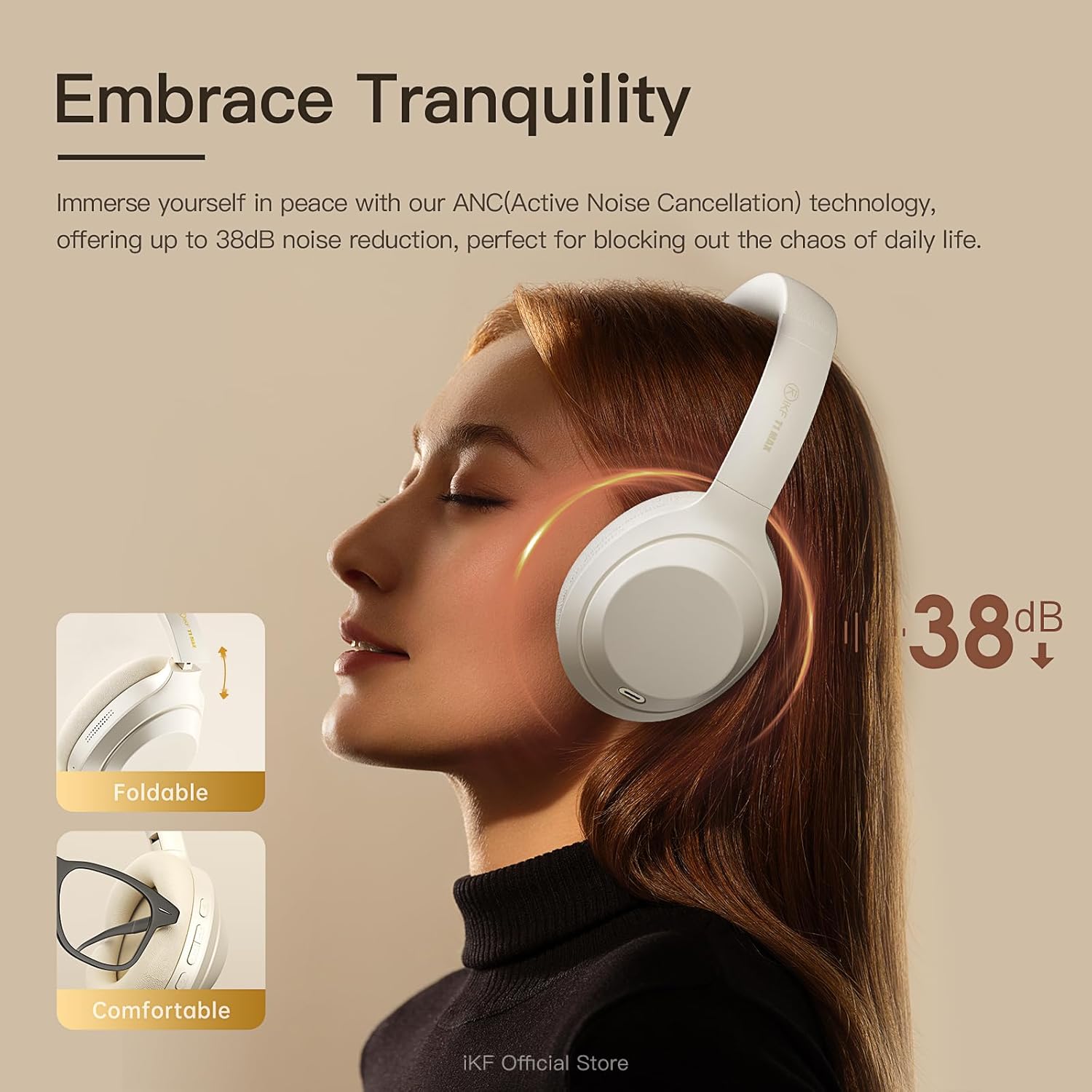
Immerse yourself in your audio with advanced Active Noise Cancellation (ANC) technology, providing up to 38dB noise reduction. Customize ANC levels through the iKF app to effectively block out distractions in various environments such as flights, offices, or public spaces.

Image: Active Noise Cancellation feature of the iKF T1 Max headphones.
Dual Device Bluetooth Connection
Connect your headphones to two Bluetooth devices simultaneously. This allows for seamless switching between your phone and laptop for calls, meetings, or music without the need to disconnect and reconnect. This feature is ideal for multitasking professionals.

Image: Dual device connection capability of the headphones.
Wireless and Wired Modes
The iKF T1 Max offers both wireless Bluetooth 5.4 connectivity and a wired mode via the included 3.5mm AUX audio cable. This ensures continuous listening even if the battery runs low, providing flexibility for various usage scenarios.

Image: Wireless and wired connection options.
Customization via iKF App
Connect to the iKF-APP to personalize your listening experience. Adjust ANC levels, create custom sound profiles, and fine-tune settings to match your unique preferences and lifestyle.

Image: iKF App interface for personalized settings.
Ṣeto
1. Ngba agbara si awọn Agbekọri
Before first use, fully charge your iKF T1 Max headphones. Connect the provided charging cable to the USB-C port on the headphones and to a USB power source (e.g., computer, wall adapter). The charging time is approximately 2 hours for a full charge.

Image: Charging port location on the headphones.
2. Agbara lori / Paa
- Lati Fi agbara: Tẹ mọlẹ bọtini agbara fun isunmọ awọn aaya 3 titi ti ina olufihan yoo tan.
- Lati Paarẹ: Tẹ mọlẹ bọtini agbara fun isunmọ awọn aaya 5 titi ti ina olufihan yoo wa ni pipa.
3. Sisopọ Bluetooth
- Rii daju pe awọn agbekọri ti wa ni pipa.
- Press and hold the Power button for about 5-7 seconds until the indicator light flashes blue and red, indicating pairing mode.
- Lórí ẹ̀rọ rẹ (fóònù alágbéka, kọ̀ǹpútà alágbèéká, àti bẹ́ẹ̀ bẹ́ẹ̀ lọ), mu Bluetooth ṣiṣẹ́ kí o sì wá àwọn ẹ̀rọ tó wà.
- Select "iKF T1 Max" from the list of found devices.
- Once connected, the indicator light will turn solid blue or flash blue slowly.
4. Asopọ onirin (Ipo AUX)
To use the headphones in wired mode, connect one end of the 3.5mm audio cable to the AUX port on the headphones and the other end to your audio source. The headphones will automatically switch to wired mode, and Bluetooth will be disabled.
Awọn ilana Iṣiṣẹ

Aworan: Pariview of headphone control buttons.
Sisisẹsẹhin Orin
- Ṣiṣẹ/Daduro: Press the Multi-function button (usually the power button or a dedicated play/pause button) once.
- Orin t’okan: Press and hold the Volume Up button or a dedicated "Next" button. (Refer to specific button layout in the included manual for exact controls).
- Tẹlẹ Orin: Press and hold the Volume Down button or a dedicated "Previous" button. (Refer to specific button layout in the included manual for exact controls).
- Iwọn didun Up: Kukuru tẹ bọtini Iwọn didun Up.
- Iwọn didun isalẹ: Kukuru tẹ bọtini Iwọn didun isalẹ.
Isakoso Ipe
- Idahun/Ipe Ipari: Tẹ bọtini Olona-iṣẹ lẹẹkan.
- Kọ Ipe: Tẹ mọlẹ bọtini iṣẹ-ọpọlọpọ fun iṣẹju-aaya 2.
- Oluranlọwọ ohun: Double-press the Multi-function button to activate your device's voice assistant (Siri, Google Assistant).
Ti nṣiṣe lọwọ Noise ifagile (ANC) Iṣakoso
- Yí àwọn Ìgbékalẹ̀ ANC padà: Press the ANC button once to cycle through ANC On, Ambient Sound Mode, and ANC Off.
- Customize ANC: Use the iKF app to fine-tune ANC levels and ambient sound settings.
Meji Device Asopọ
When connected to two devices, the headphones will intelligently switch audio sources. For example, if you are listening to music on your laptop and receive a call on your phone, the headphones will automatically switch to the phone call. After the call, they will return to the laptop audio.
Itoju
- Ninu: Lo asọ asọ ti o gbẹ lati nu agbekọri naa. Ma ṣe lo abrasive ose tabi epo.
- Ibi ipamọ: Store the headphones in a cool, dry place, away from direct sunlight and extreme temperatures. When not in use for extended periods, ensure they are fully charged.
- Ifihan omi: Awọn agbekọri wọnyi kii ṣe mabomire. Yago fun ifihan si omi tabi ọrinrin pupọ.
- Itọju Batiri: Lati pẹ aye batiri, yago fun gbigba agbara ni kikun awọn agbekọri nigbagbogbo. Gba agbara si wọn nigbagbogbo, paapaa ti kii ṣe ni lilo igbagbogbo.
Laasigbotitusita
| Isoro | Owun to le Solusan |
|---|---|
| Awọn agbekọri ko ṣiṣẹ. | Ensure the headphones are charged. Connect them to a power source using the charging cable. |
| Ko le so pọ nipasẹ Bluetooth. |
|
| Ko si ohun tabi iwọn kekere. |
|
| ANC is not effective. |
|
| Didara ohun ko dara. |
|
Awọn pato
| Ẹya ara ẹrọ | Ẹ̀kúnrẹ́rẹ́ |
|---|---|
| Orukọ awoṣe | iKF T1 Max |
| Asopọmọra Technology | Bluetooth, Wired (3.5mm Jack) |
| Alailowaya Ibaraẹnisọrọ | Bluetooth 5.4 |
| Gbigbe Eti | Lori Eti |
| Ariwo Iṣakoso | Active Noise Cancellation, Environmental Noise Cancellation |
| Awakọ Iwon | 40mm |
| Igbesi aye batiri (ANC Paa) | Titi di awọn wakati 100 |
| Igbesi aye batiri (ANC Titan) | Titi di awọn wakati 75 |
| Akoko gbigba agbara | O fẹrẹ to awọn wakati 2 |
| Ohun elo | Plastic, Polyurethane (PU) |
| Awọn irinše to wa | Headphones, Charging Cable, Audio Cable, User Manual |
| Awọn ẹrọ ibaramu | Android Phone, Laptops, Smart Watch, Tablets, iPhone/iPad/Macbook |
Alaye atilẹyin ọja
The iKF T1 Max headphones come with a standard manufacturer's warranty. Please refer to the warranty card included in your product packaging or visit the official iKF webAaye fun alaye atilẹyin ọja ofin ati ipo. Jeki ẹri rira rẹ fun awọn iṣeduro atilẹyin ọja.
Atilẹyin
For further assistance, technical support, or customer service inquiries, please visit the official iKF store or contact their customer support team:
- iKF Official Store: Visit iKF Store on Amazon
- Atilẹyin Ayelujara: Refer to the official iKF webojú-òpó wẹ́ẹ̀bù fún àwọn ìbéèrè àti ìwífún nípa ìbáṣepọ̀.