
1. Ifihan
Thank you for choosing the iKF T1 Max Wireless Bluetooth Over Ear Headphones. These headphones are designed to provide a high-fidelity audio experience with advanced features such as Active Noise Cancellation (ANC), extended battery life, and dual-device connectivity. This manual will guide you through the setup, operation, and maintenance of your new headphones.

Aworan 1.1: exploded view of the 40mm dynamic driver, illustrating the components responsible for HiFi sound quality.
2. Package Awọn akoonu
Jọwọ ṣayẹwo package fun awọn nkan wọnyi:
- iKF T1 Max Wireless Bluetooth Over Ear Headphones
- Itọsọna olumulo
- Okun gbigba agbara (USB-C)
- 3.5mm Audio USB
3. Ọja Ipariview
Familiarize yourself with the various parts of your iKF T1 Max headphones. A detailed diagram of button functions and port locations can typically be found in the printed manual included with your product.

Image 3.1: The iKF T1 Max headphones, showcasing their design and over-ear form factor.
Awọn eroja pataki:
- Awọn afikọti: Padded for comfort, housing the drivers and controls.
- Akọri: Atunṣe fun ibamu to ni aabo.
- Bọtini agbara: Used for powering on/off and pairing.
- Awọn bọtini iwọn didun: Ṣe atunṣe iwọn didun ohun.
- Bọtini iṣẹ-pupọ: Controls playback, calls, and ANC modes.
- Ibudo Ngba agbara USB-C: Fun gbigba agbara awọn agbekọri.
- Jack Audio 3.5mm: Fun asopọ onirin.
- Atọka LED: Ṣe afihan agbara, sisopọ, ati ipo gbigba agbara.
4. Eto
4.1 Ngba agbara si awọn Agbekọri
- So okun gbigba agbara USB-C pọ si ibudo gbigba agbara lori awọn agbekọri.
- So opin okun miiran pọ si ohun ti nmu badọgba agbara USB (kii ṣe pẹlu) tabi ibudo USB ti kọnputa kan.
- The LED indicator will show charging status (e.g., red for charging, blue for fully charged). A full charge typically takes approximately 2 hours.
4.2 Agbara Tan / Pa
- Lati Fi agbara: Press and hold the Power button for approximately 3 seconds until the LED indicator flashes.
- Lati Paarẹ: Tẹ mọlẹ bọtini agbara fun isunmọ awọn aaya 5 titi ti itọkasi LED yoo wa ni pipa.
4.3 Sisopọ Bluetooth
- Rii daju pe awọn agbekọri ti wa ni pipa.
- Press and hold the Power button for approximately 5-7 seconds until the LED indicator flashes rapidly (usually blue and red alternately), indicating pairing mode.
- Lori ẹrọ rẹ (foonuiyara, tabulẹti, kọǹpútà alágbèéká), mu Bluetooth ṣiṣẹ ki o wa awọn ẹrọ to wa.
- Select "iKF T1 Max" from the list of found devices.
- Nígbà tí a bá ti so pọ̀ mọ́ ara wọn, àmì LED náà yóò máa fi ìmọ́lẹ̀ aláwọ̀ búlúù tàbí ìmọ́lẹ̀ díẹ̀díẹ̀ hàn.
4.4 iKF App Connection
For advanced customization, including ANC level adjustments and personalized sound profiles, download the official iKF app from your device's app store. Follow the in-app instructions to connect your headphones.

Image 4.1: The iKF T1 Max headphones connected to the iKF mobile application, demonstrating app-based control and customization.
5. Awọn ilana Iṣiṣẹ
5.1 Ifagile Ariwo Nṣiṣẹ (ANC)
The iKF T1 Max features Active Noise Cancellation to reduce ambient noise. You can activate and adjust ANC levels:
- Mu ṣiṣẹ/muṣiṣẹ: Press the dedicated ANC button (refer to your product diagram for exact location).
- Ṣatunṣe Awọn ipele: Use the iKF app to fine-tune ANC intensity to your preference.
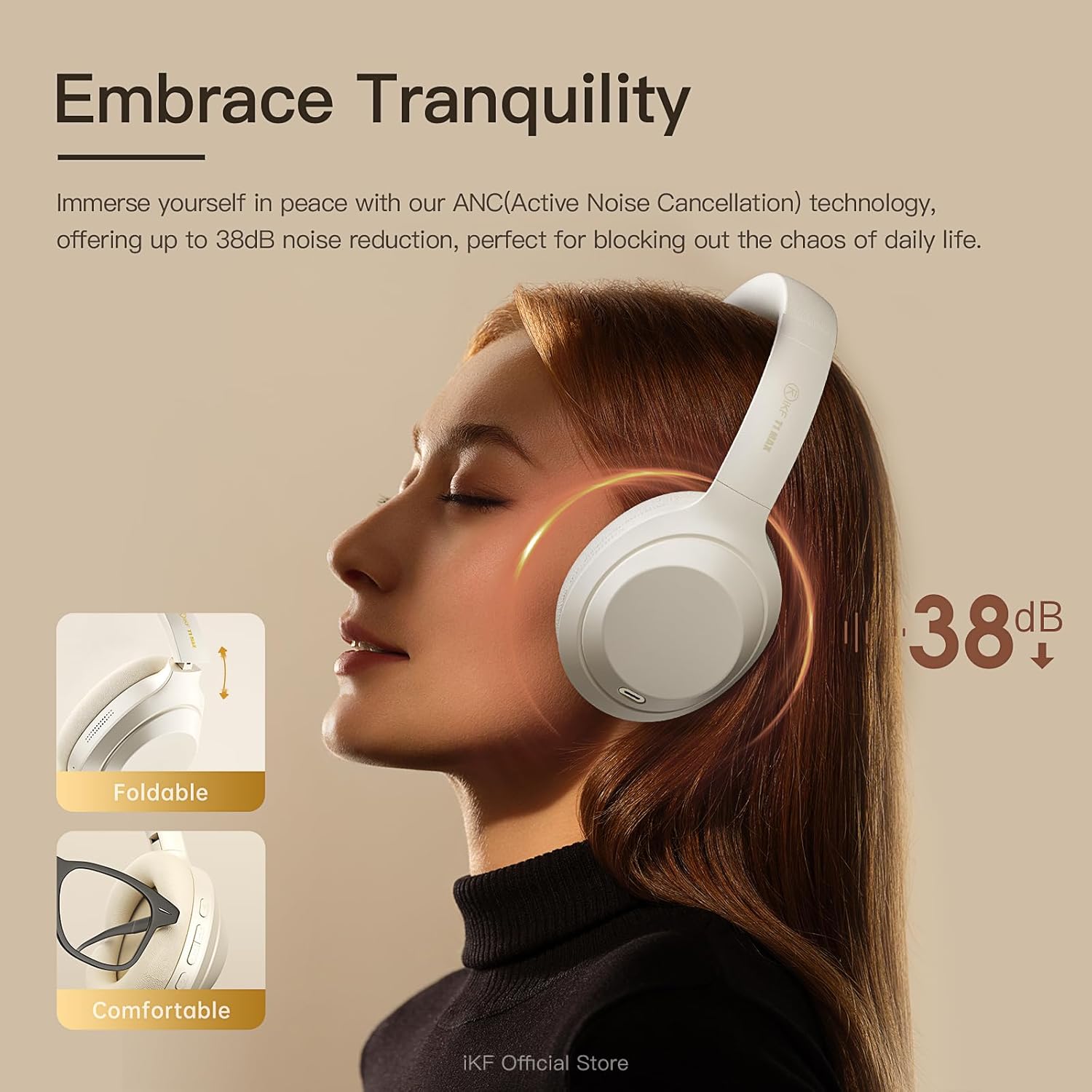
Image 5.1: A user experiencing the noise reduction capabilities of the iKF T1 Max headphones, highlighting up to 38dB noise cancellation.
5.2 Meji Device Asopọ
The headphones can connect to two Bluetooth devices simultaneously, allowing for seamless switching between audio sources.
- Pair the headphones with your first device (e.g., smartphone) as described in Section 4.3.
- Disconnect Bluetooth on the first device temporarily.
- Pair the headphones with your second device (e.g., laptop).
- So Bluetooth pọ̀ mọ́ ẹ̀rọ àkọ́kọ́. Ó yẹ kí a so agbekọri náà pọ̀ mọ́ ẹ̀rọ méjèèjì báyìí.
- Audio will automatically switch to the device playing content or receiving a call.

Image 5.2: The iKF T1 Max headphones demonstrating simultaneous connection to a smartphone and a laptop, enabling effortless switching between devices.
5.3 Ti firanṣẹ Ipo
For continuous listening or when battery is low, use the included 3.5mm audio cable.
- So opin kan ti okun ohun 3.5mm sinu jaketi ohun ti agbekọri naa.
- So opin keji mọ ibudo orisun ohun rẹ ti 3.5mm.
- The headphones will automatically switch to wired mode. Bluetooth functions will be disabled.

Image 5.3: A visual comparison illustrating the flexibility of the iKF T1 Max headphones, supporting both wireless Bluetooth and wired 3.5mm audio connections.
5.4 Ipilẹ idari
- Ṣiṣẹ/Daduro: Single press the Multi-function button.
- Iwọn didun Soke/Isalẹ: Press the Volume + / - buttons.
- Orin t’okan: Lẹẹmeji tẹ bọtini iṣẹ-ọpọlọpọ.
- Tẹlẹ Orin: Meteta tẹ awọn Olona-iṣẹ bọtini.
- Idahun/Ipe Ipari: Single press the Multi-function button during an incoming call or active call.
- Kọ Ipe: Tẹ mọlẹ bọtini iṣẹ-ọpọlọpọ nigba ipe ti nwọle.

Image 5.4: The iKF T1 Max headphones adapting to various audio experiences, including music listening, movie watching, and gaming, demonstrating seamless transition.
6. Itọju
6.1 Ninu
- Mu awọn agbekọri nu pẹlu asọ, gbẹ, asọ ti ko ni lint.
- Maṣe lo awọn afọmọ abrasive, ọti-lile, tabi awọn nkan ti kemikali.
- Yago fun gbigba ọrinrin sinu eyikeyi awọn ṣiṣi.
6.2 Ibi ipamọ
- Tọ́jú àwọn agbekọri náà sí ibi tí ó tutù tí ó sì gbẹ, tí kò sí ibi tí ó le koko jù àti ibi tí oòrùn lè tàn ká.
- Nigbati o ko ba wa ni lilo fun awọn akoko ti o gbooro sii, gba agbara si awọn agbekọri ni kikun o kere ju lẹẹkan ni gbogbo oṣu mẹta lati tọju igbesi aye batiri.
- The headphones are foldable for compact storage.
7. Laasigbotitusita
If you encounter issues with your iKF T1 Max headphones, refer to the following common problems and solutions:
| Isoro | Ojutu |
|---|---|
| Awọn agbekọri ko ṣiṣẹ. | Ensure the headphones are charged. Connect to a power source and try again after a few minutes. |
| Ko le so pọ pẹlu ẹrọ kan. | Ensure headphones are in pairing mode (LED flashing rapidly). Turn off and on Bluetooth on your device. Move headphones closer to the device. |
| Ko si ohun tabi iwọn kekere. | Check volume levels on both headphones and the connected device. Ensure headphones are properly paired. If in wired mode, check cable connection. |
| ANC is not effective. | Ensure ANC is activated. Adjust ANC levels via the iKF app. Ensure earcups form a good seal around your ears. |
| Dual device switching not working. | Ensure both devices are actively connected via Bluetooth. Play audio on one device to initiate the switch. |
8. Awọn pato
Key technical specifications for the iKF T1 Max Wireless Bluetooth Over Ear Headphones:
- Brand: iKF
- Awoṣe: Iye ti o ga julọ ti T1
- Gbigbe Eti: Lori Eti
- Iṣakoso Ariwo: Active Noise Cancellation, Environmental Noise Cancellation
- Imọ-ẹrọ Asopọmọra: Bluetooth 5.4, Wired (3.5mm Jack)
- Iwọn Awakọ: 40mm
- Battery Life (ANC Off): Titi di wakati 100
- Battery Life (ANC On): Titi di wakati 75
- Akoko gbigba agbara: O fẹrẹ to awọn wakati 2
- Awọn ẹrọ ibaramu: Android Phone, Laptops, Smart Watch, Tablets, iPhone/iPad/Macbook
- Ohun elo: Plastic, Polyurethane (PU)

Image 8.1: The iKF T1 Max headphones highlighting their extended battery performance: up to 100 hours with ANC off and 75 hours with ANC on.
9. Atilẹyin ọja ati Support
9.1 atilẹyin ọja Alaye
The iKF T1 Max Wireless Bluetooth Over Ear Headphones come with a 1-Year Store Warranty Láti ọjọ́ tí a ti rà á. Àtìlẹ́yìn yìí bo àwọn àbùkù iṣẹ́-ọnà àti iṣẹ́-ọnà lábẹ́ lílo déédéé. Kò bo ìbàjẹ́ tí ó wáyé nípasẹ̀ ìlòkulò, jàǹbá, àtúnṣe tí a kò fún ní àṣẹ, tàbí ìbàjẹ́ déédé. Jọ̀wọ́ pa ẹ̀rí ríra rẹ mọ́ fún àwọn ẹ̀tọ́ àtìlẹ́yìn.
9.2 Onibara Support
For further assistance, technical support, or warranty inquiries, please contact iKF customer service through the retailer's platform or the official iKF webojula. Jọwọ ni awoṣe ọja rẹ ati awọn alaye rira ti ṣetan nigbati o ba kan si atilẹyin.