
1. Ifihan
This manual provides essential information for setting up, operating, maintaining, and troubleshooting your GIGABYTE AORUS Elite 16 BWH gaming laptop. The AORUS Elite 16 BWH is designed for high-performance gaming and demanding applications, featuring an Intel Core Ultra 9 processor, NVIDIA GeForce RTX 5070 laptop GPU, a 16-inch WQXGA 165Hz display, and Windows 11 Pro.
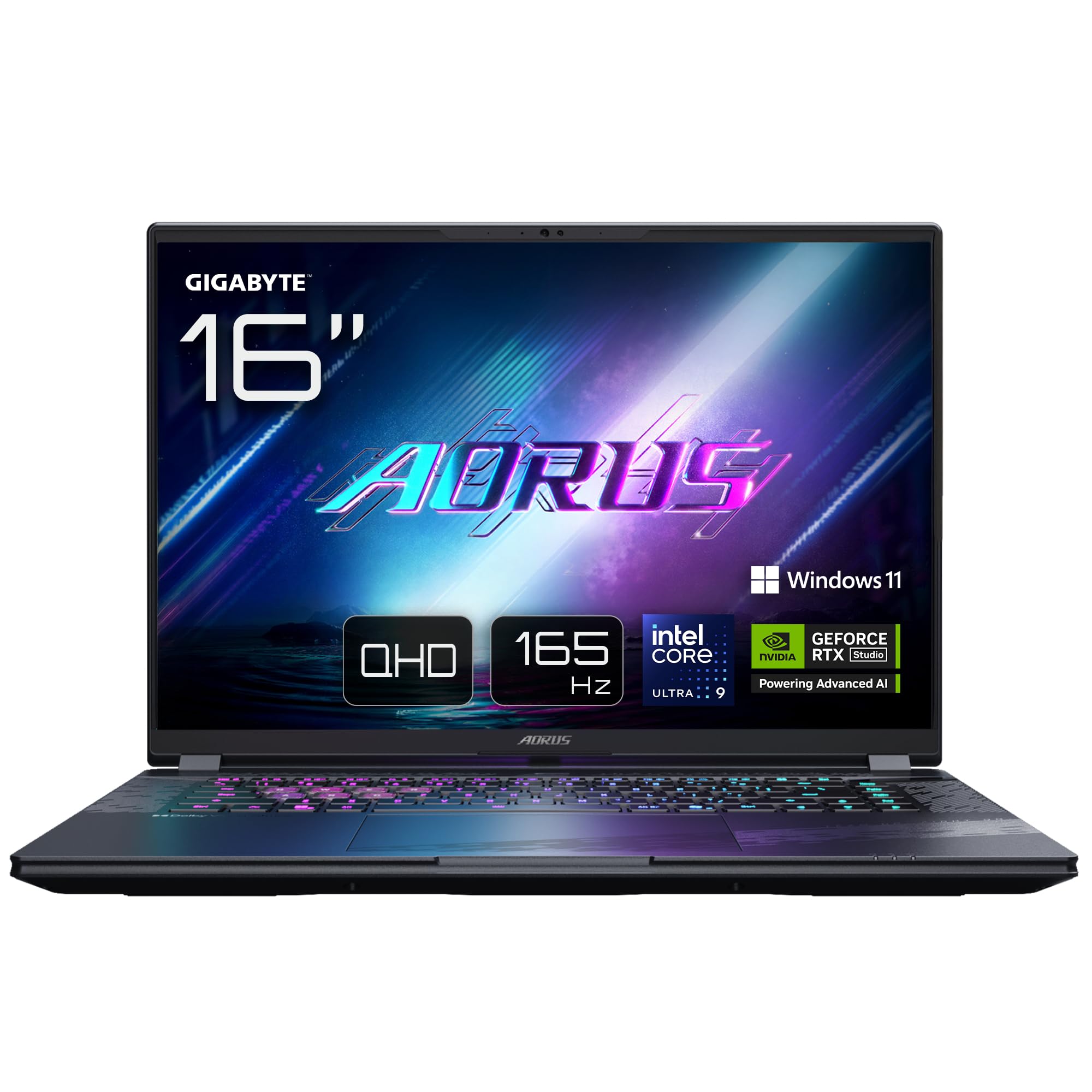
Image: The GIGABYTE AORUS Elite 16 BWH gaming laptop, showcasing its open display and keyboard.
2. Eto
2.1 Unboxing ati Ibẹrẹ ayewo
Fi iṣọra yọ kọǹpútà alágbèéká ati gbogbo awọn ẹya ẹrọ kuro ninu apoti. Daju pe gbogbo awọn paati ti a ṣe akojọ si ni apakan “Kini ninu Apoti” wa ati ti ko bajẹ.
- GIGABYTE AORUS ELITE 16 BWHC3FRC65SP Laptop
- Power Adapter ati Cable
- Awọn iwe aṣẹ (Afowoyi yii, kaadi atilẹyin ọja)
2.2 Nsopọ Agbara
Connect the power adapter to the laptop's power input port and then plug the power cable into an electrical outlet. It is recommended to fully charge the battery before initial use.
2.3 First Power On
Press the power button to turn on the laptop. Follow the on-screen instructions to complete the Windows 11 Pro setup process, including language selection, network connection, and user account creation.
2.4 Connecting Peripherals and Network
The laptop features various ports for connecting external devices and networks.
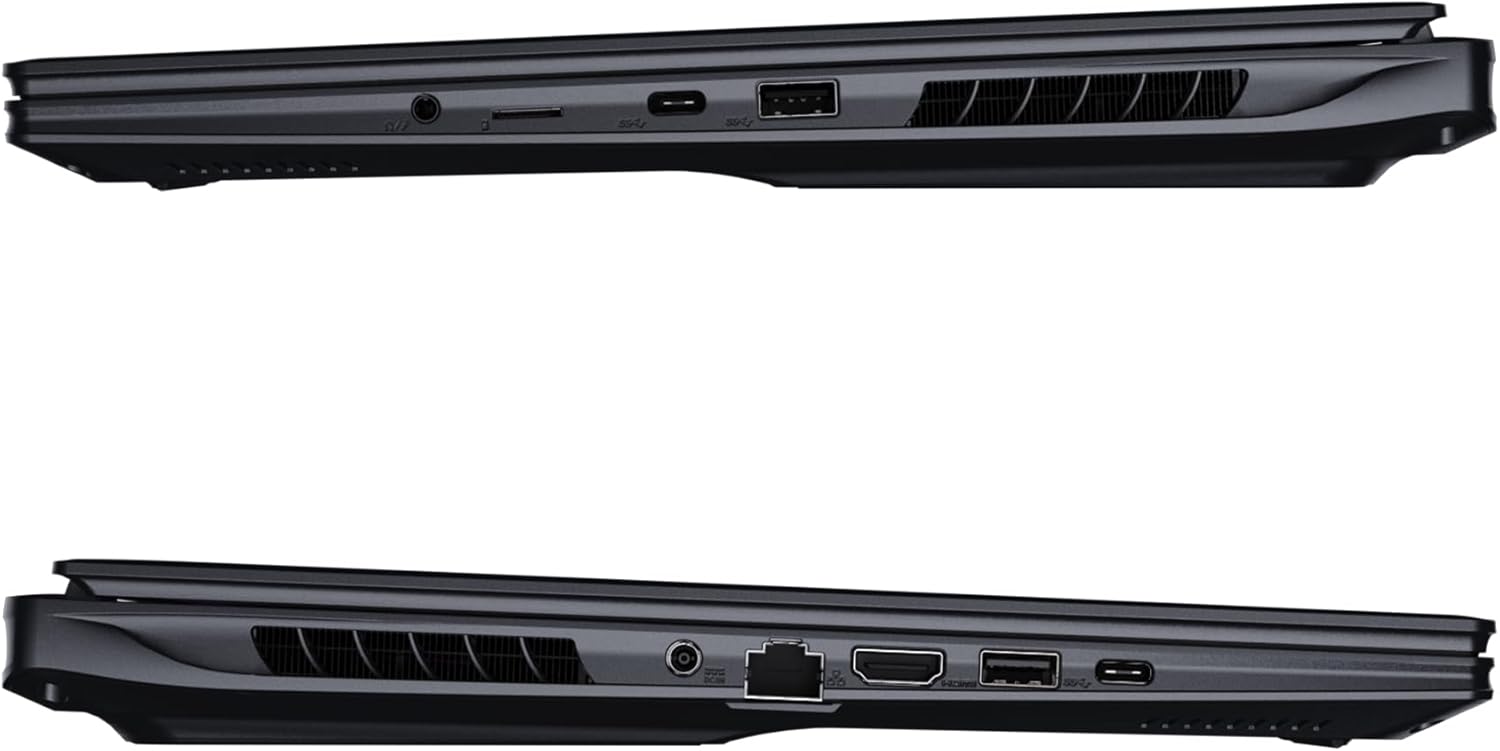
Aworan: Apa view of the laptop illustrating the available ports for connectivity.
- Awọn ibudo USB: Connect USB devices such as mice, keyboards, or external storage.
- Ibudo HDMI: Connect to an external display or TV.
- Thunderbolt 4 Port: Fun gbigbe data iyara giga ati ifihan ifihan.
- Àjọlò Port: Fun asopọ nẹtiwọki ti a firanṣẹ.
- Jack agbekari: Fun ifihan ohun si awọn agbekọri tabi awọn agbohunsoke ita.
- Wi-Fi 7: Connect to wireless networks via the integrated Wi-Fi 7 module.
- Bluetooth 5.4: So pọ pẹlu awọn ẹrọ Bluetooth-ṣiṣẹ.
3. Ṣiṣẹ Kọǹpútà alágbèéká Rẹ
3.1 Ifihan Awọn ẹya ara ẹrọ
Your AORUS Elite 16 BWH features a 16-inch WQXGA (2560x1600) IPS display with a 165Hz refresh rate and 16:10 aspect ratio, offering a wide viewing experience. It supports Dolby Vision for enhanced visual quality and is Pantone validated for color accuracy.

Image: The laptop's 16:10 aspect ratio display, highlighting its IPS panel and Pantone validation.
3.2 Keyboard ati Touchpad
The laptop is equipped with a backlit keyboard for comfortable typing in various lighting conditions and a responsive touchpad for navigation.
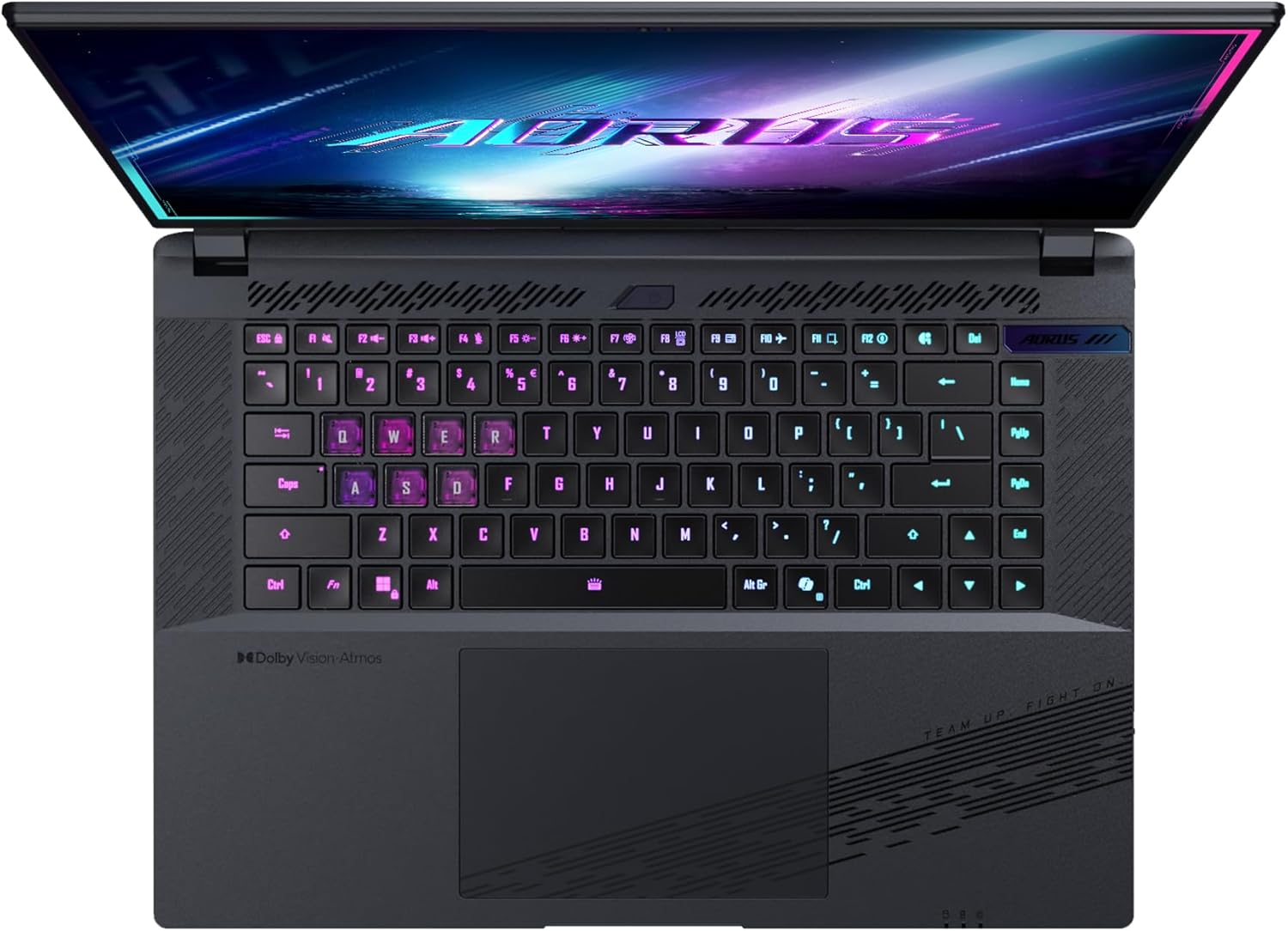
Aworan: Oke-isalẹ view ti awọn laptop ká keyboard, showcasing its backlit keys.
The keyboard also features a dedicated Copilot Key for quick access to AI functionalities in Windows 11.

Image: Close-up of the keyboard, highlighting the Copilot Key for AI features.
3.3 Audio System
Experience immersive audio with Dolby Atmos support and integrated 2W speakers. The laptop also includes a built-in microphone for communication.

Image: Visual representation of Dolby Atmos and Dolby Vision audio and visual enhancements.
3.4 Performance Awọn ẹya ara ẹrọ
The AORUS Elite 16 BWH is powered by an Intel Core Ultra 9 processor with an integrated NPU for AI acceleration and an NVIDIA GeForce RTX 5070 laptop GPU, ensuring high performance for gaming and demanding tasks. It also features Advanced Optimus with DDS Technology for optimized graphics performance.

Aworan: A alaye view of the Intel Core Ultra 9 processor chip.
Aworan: A alaye view of the NVIDIA GeForce RTX 50 Series laptop GPU chip.
3.5 Aṣojú GiMATE AI
Utilize GiMATE, your personal AI agent, to optimize performance, manage smart cooling, enhance privacy, control power settings, and improve audio and voice functionalities.

Image: GiMATE AI Agent interface showing various optimization features.
4. Itọju
4.1 itutu System
The laptop features the WINDFORCE Infinity cooling system to maintain optimal temperatures during intensive use. Ensure the vents are clear of obstructions to allow proper airflow.

Image: Representation of the WINDFORCE Infinity cooling system.
4.2 Ninu
Lo asọ ti ko ni lint lati nu iboju ati awọn oju ita. Fun awọn ami alagidi, dampFi omi tàbí omi ìfọṣọ wẹ aṣọ náà díẹ̀. Yẹra fún àwọn kẹ́míkà líle.
4.3 batiri Itọju
To prolong battery life, avoid extreme temperatures and do not leave the laptop fully charged or fully discharged for extended periods.
4.4 Software imudojuiwọn
Regularly update your Windows operating system, drivers, and GIGABYTE software to ensure optimal performance and security.
5. Laasigbotitusita
5.1 Agbara Oran
- Kọǹpútà alágbèéká ko ni tan: Ensure the power adapter is securely connected and the outlet is functional. Check the battery charge level.
- Batiri ko gba agbara: Rí i dájú pé adapter agbára àti okùn kò bàjẹ́. Gbìyànjú ọ̀nà ìjáde mìíràn.
5.2 Ifihan oran
- Ko si ifihan: Connect an external monitor to check if the issue is with the laptop's screen. Ensure the laptop is powered on.
- Yiyi tabi ifihan ti o daru: Ṣe àtúnṣe àwọn awakọ̀ àwòrán. Ṣàyẹ̀wò àwọn ìsopọ̀ okùn ìfihàn tí o bá ń lo àtẹ̀gùn ìta.
5.3 Asopọmọra Oran
- Wi-Fi ko sopọ: Ṣàyẹ̀wò bóyá Wi-Fi ti ṣiṣẹ́ nínú àwọn ètò Windows. Tún raútà àti kọ̀ǹpútà alágbèéká rẹ bẹ̀rẹ̀.
- Ẹrọ Bluetooth ko so pọ: Ensure the device is in pairing mode and within range. Update Bluetooth drivers.
5.4 Gbogbogbo Performance Oran
- Iṣẹ ṣiṣe ti o lọra: Close unnecessary applications. Check for malware. Ensure sufficient free disk space.
- Igbóná púpọ̀: Ensure cooling vents are clear. Use the laptop on a hard, flat surface.
Fun awọn ọran eka diẹ sii, tọka si atilẹyin GIGABYTE webojula tabi olubasọrọ onibara iṣẹ.
6. Awọn pato
| Ẹya ara ẹrọ | Ẹ̀kúnrẹ́rẹ́ |
|---|---|
| Brand | GIGABYTE |
| Orukọ awoṣe | AORUS ELITE 16 BWHC3FRC65SP |
| Iwon iboju | 16 inches |
| Àwọ̀ | Grẹy |
| Lile Disk Iwon | 2000 GB (2x 1TB SSD Gen4) |
| Sipiyu Awoṣe | Intel Core Ultra 9 275HX |
| Ti fi sori ẹrọ Ramu Iwon | 32 GB DDR5 |
| Eto isesise | Windows 11 Pro |
| Pataki Ẹya | Backlit Keyboard, Memory Card Slot |
| Eya Kaadi Apejuwe | Ifiṣootọ |
| Olupilẹṣẹ Graphics | NVIDIA GeForce RTX 5070 |
| Hard Disk Technology | SSD |
| Iwọn Nkan | 2300 giramu |
| Webcam Capability | Yes (Frontal) |
| Eya Kaadi Ramu Iwon | 8 GB GDDR6 |
| Max Ramu atilẹyin | 64 GB |
| Akoonu Agbara Batiri | 99 Watt-hours (Lithium-polymer, 4 cells) |
| Asopọmọra | Bluetooth 5.4, Ethernet (10/1000 Mbit/s), HDMI (1 port), Thunderbolt 4 (1 port), USB 3.2 Gen 2 (2 ports), Wi-Fi 7 (802.11.be) |
| Iyara isise | 2.7 GHz (Max 5.4 GHz) |
| Nọmba ti isise | 24 |
| Ipinnu iboju | 2560 x 1600 pixels (WQXGA) |
| Ifihan Iru | IPS LCD |
| Audio Awọn ẹya ara ẹrọ | Dolby Atmos, 2x 2W Integrated Speakers, Integrated Microphone |
7. atilẹyin ọja Information
Your GIGABYTE AORUS Elite 16 BWH laptop comes with a 2-odun lopin atilẹyin ọja. This warranty covers manufacturing defects and hardware malfunctions under normal use. Please retain your proof of purchase for warranty claims. For detailed terms and conditions, refer to the warranty card included with your product or visit the official GIGABYTE webojula.
8. Atilẹyin
For technical assistance, driver downloads, and further product information, please visit the official GIGABYTE support webojula. O tun le wa awọn FAQs ati awọn apejọ agbegbe nibẹ.
- GIGABYTE Osise Webojula: www.gigabyte.com
- Iṣẹ onibara: Refer to your regional GIGABYTE webaaye fun alaye olubasọrọ agbegbe.