
1. Ifihan
O ṣeun fun riraasing the JVC XS-N1154B Bluetooth Speaker. This manual provides essential information for the safe and efficient operation of your device. Please read it thoroughly before use and retain it for future reference.
2. Alaye Aabo
- Ma ṣe fi agbọrọsọ si awọn iwọn otutu to gaju, imọlẹ orun taara, tabi ọriniinitutu giga.
- Yago fun sisọ tabi tẹriba agbọrọsọ si awọn ipa to lagbara.
- Má ṣe gbìyànjú láti tú tàbí yí agbọ́hùnsọ náà padà. Èyí yóò sọ àtìlẹ́yìn náà di òfo.
- Keep the speaker away from water and liquids, despite its waterproof rating, to prevent damage to internal components.
- Lo okun gbigba agbara pato nikan ati oluyipada agbara.
- Sọ agbọrọsọ mọ pẹlu asọ asọ ti o gbẹ. Ma ṣe lo abrasive ose tabi epo.
3. Package Awọn akoonu
Rii daju pe gbogbo awọn nkan wa ninu package:
- JVC XS-N1154B Bluetooth Speaker
- Ngba agbara USB
- Itọsọna olumulo
- Iṣakoso latọna jijin (ti o ba wa)
4. Ọja Ipariview
Mọ ararẹ pẹlu awọn paati ati awọn idari ti agbọrọsọ.
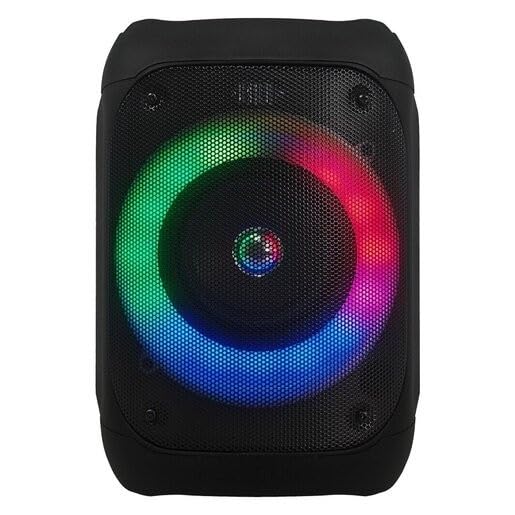
Nọmba 1: Iwaju view of the JVC XS-N1154B Bluetooth Speaker, showcasing the speaker grille and integrated music-activated LED lights.
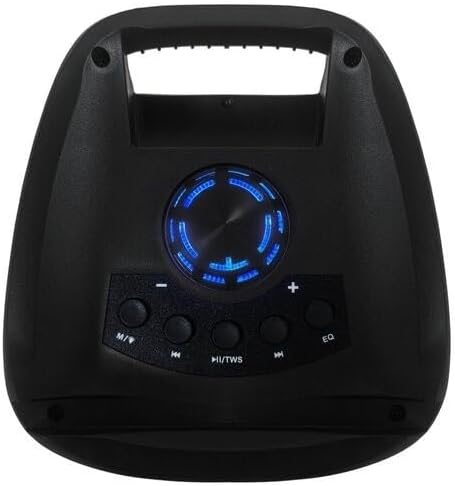
Nọmba 2: Oke view of the JVC XS-N1154B Bluetooth Speaker, displaying the control panel with various buttons and the volume knob.
Awọn iṣẹ igbimọ Iṣakoso:
- Bọtini agbara: Yipada agbọrọsọ si tan tabi paa.
- Bọtini Ipo (M): Switches between Bluetooth, USB, SD Card, and FM Radio modes.
- Play/Pause (►||) / TWS Button: Plays or pauses audio. Long press for TWS (True Wireless Stereo) pairing.
- Previous Track (◀◀) Button: Skips to the previous track or tunes down in FM mode.
- Next Track (►►) Button: Skips to the next track or tunes up in FM mode.
- Bọtini EQ: Yiyipo nipasẹ tito oluṣeto.
- Bọtini Iwọn didun: Rotates to adjust the volume level.
5. Eto
5.1 Gbigba agbara si Agbọrọsọ
- So okun gbigba agbara pọ si ibudo gbigba agbara ti agbọrọsọ.
- So opin keji okun naa sinu adapter agbara USB ti o yẹ (ko si ninu rẹ) tabi ibudo USB ti o ni agbara.
- Ìmọ́lẹ̀ àfihàn gbígbà agbára yóò máa tàn, nígbà tí a bá ń gba agbára.
- Once fully charged, the indicator light may change color (e.g., turn off or turn blue/green). Disconnect the speaker from the power source.
5.2 Titan / Pa a
- Lati Fi agbara: Press and hold the Power button until the speaker powers on and you hear an audible prompt.
- Lati Paarẹ: Press and hold the Power button again until the speaker powers off.
6. Awọn ilana Iṣiṣẹ
6.1 Sisopọ Bluetooth
- Ensure the speaker is powered on and in Bluetooth mode. If not, press the Mode (M) button to switch to Bluetooth mode. The speaker will indicate it is ready for pairing (e.g., a blinking LED or audible prompt).
- Lori ẹrọ alagbeka rẹ (foonuiyara, tabulẹti, kọǹpútà alágbèéká), mu Bluetooth ṣiṣẹ ki o wa awọn ẹrọ to wa.
- Select "JVC XS-N1154B" from the list of devices.
- Once paired, the speaker will provide an audible confirmation, and the Bluetooth indicator light will become solid.
- O le mu ohun ṣiṣẹ bayi lati ẹrọ rẹ nipasẹ agbọrọsọ.
6.2 USB / SD Kaadi Sisisẹsẹhin
- Insert a USB flash drive or an SD card (with supported audio files) into the corresponding port on the speaker.
- The speaker will automatically switch to USB or SD card mode and begin playing audio. If not, press the Mode (M) button to select the correct input.
- Use the Previous Track (◀◀), Next Track (►►), and Play/Pause (►||) buttons to control playback.
6.3 FM Radio isẹ
- Tẹ bọtini Ipo (M) lati yipada si ipo redio FM.
- To auto-scan and save available stations, press and hold the Play/Pause (►||) button. The speaker will scan and store stations automatically.
- Use the Previous Track (◀◀) and Next Track (►►) buttons to navigate between saved FM stations.
6.4 LED Light igbe
The speaker features music-activated LED lights. These lights typically synchronize with the audio playback. There may be an additional button or a combination of buttons to cycle through different light modes or to turn them off. Refer to the remote control section for specific controls if available.
6.5 Iṣakoso iwọn didun
Rotate the Volume Knob on the top panel clockwise to increase volume and counter-clockwise to decrease volume.
6.6 Latọna Iṣakoso Lilo
If your package includes a remote control, it provides convenient access to various functions:
- Agbara: Tan/Pa a
- Ipo: Switch input sources (Bluetooth, USB, SD, FM)
- Iwọn didun +/-: Ṣatunṣe iwọn didun
- Ṣiṣẹ/Daduro: Iṣakoso ṣiṣiṣẹsẹhin
- Ti tẹlẹ/Itele: Skip tracks/stations
- EQ: Change equalizer presets
- LED: Control LED light modes (if applicable)
7. Itọju
7.1 Ninu
Wipe the speaker's exterior with a soft, dry, lint-free cloth. Do not use liquid cleaners, sprays, or solvents, as these may damage the finish or internal components. Ensure all ports are dry before use, especially given its waterproof nature.
7.2 Ibi ipamọ
When not in use for extended periods, store the speaker in a cool, dry place, away from direct sunlight and extreme temperatures. It is recommended to charge the battery periodically to maintain its lifespan.
8. Laasigbotitusita
| Isoro | Owun to le Fa | Ojutu |
|---|---|---|
| Agbọrọsọ ko ni agbara lori. | Batiri ti dinku. | Gba agbara si agbọrọsọ ni kikun. |
| Ko si ohun. | Volume is too low or muted. Device not paired correctly. | Increase volume. Re-pair Bluetooth device. Check audio source. |
| Asopọ Bluetooth kuna. | Agbọrọsọ ko si ni ipo sisopọ. Ẹrọ naa ti jinna pupọ. kikọlu. | Ensure speaker is in Bluetooth pairing mode. Move device closer. Turn off other Bluetooth devices. |
| USB/SD card not playing. | Ti ko tọ file ìṣètò. A kò fi káàdì/wakọ̀ sí i dáadáa. | Ṣe idaniloju ohun afetigbọ files are in a supported format. Reinsert the USB drive/SD card. Press Mode button to select correct input. |
| Gbigba redio FM ko dara. | Ifihan agbara. | Gbe agbọrọsọ lọ si agbegbe pẹlu gbigba to dara julọ. |
9. Awọn pato
- Awoṣe: XS-N1154B
- Brand: JVC
- Asopọmọra: Bluetooth, USB, SD Kaadi
- Redio: Digital FM Redio
- Ijade agbara: 4 Wattis
- Ipo Ijade Ohun: Sitẹrio
- Ọna Iṣakoso: Latọna jijin
- Ohun elo: Ṣiṣu
- Mabomire: Bẹẹni
- Orisun Agbara: Agbara Batiri
- Awọn iwọn: Approximately 18.6D x 18.9W x 25.5H cm
- Ìwúwo: O to 1.2 kg
- Awọn ẹrọ ibaramu: Kọǹpútà alágbèéká, Foonuiyara
10. Atilẹyin ọja ati Support
10.1 atilẹyin ọja Alaye
This JVC XS-N1154B Bluetooth Speaker comes with a 1 Odun atilẹyin ọja Láti ọjọ́ tí a rà á. Àtìlẹ́yìn yìí bo àwọn àbùkù iṣẹ́-ọnà àti iṣẹ́-ọnà lábẹ́ lílo déédéé. Kò bo ìbàjẹ́ tí ó wáyé nípasẹ̀ ìlòkulò, jàǹbá, àtúnṣe tí a kò fún ní àṣẹ, tàbí ìbàjẹ́ déédé.
10.2 Onibara Support
For technical assistance, warranty claims, or further inquiries, please contact JVC customer support through their official website or the retailer where the product was purchased. Please have your product model number (XS-N1154B) and proof of purchase ready when contacting support.