
GTRACING 114vc07
GTRACING Gaming Desk Model 114vc07 Instruction Manual
Itọsọna okeerẹ fun apejọ, isẹ, ati itọju.
1. Ifihan
Thank you for choosing the GTRACING Gaming Desk. This manual provides essential information for the safe and efficient assembly, operation, and maintenance of your new desk. Please read these instructions carefully before beginning assembly and retain them for future reference.
2. Alaye Aabo pataki
Always assemble the desk according to the provided instructions. Be cautious when moving the desk, as it can be heavy and may pose a risk of injury if not handled properly.
- Rii daju pe gbogbo awọn isopọ wa ni aabo ṣaaju lilo.
- Do not overload the desk or monitor stand beyond the recommended weight capacity (300 lbs).
- Keep liquids away from electrical components (power outlets, USB ports, LED lights).
- Children should not climb on or play with the desk.
- Danu awọn ohun elo iṣakojọpọ ni ifojusọna.
3. Package Awọn akoonu
Verify that all components are present before assembly. If any parts are missing or damaged, please contact GTRACING customer support.
- Desk components (desktop panels, legs, monitor stand parts)
- Integrated power strip (2 AC outlets, 2 USB ports)
- LED rinhoho ina
- Extended mouse pad
- Àwọn ìkọ́ agbekọri (x2)
- Assembly hardware (screws, bolts, etc.)
- Awọn irinṣẹ apejọ
- Ilana itọnisọna
4. Apejọ Awọn ilana
Assembly is required. Please follow the detailed step-by-step instructions provided in the separate assembly guide included with your package. All necessary tools are included.
- Yọọ gbogbo awọn paati ati rii daju lodi si atokọ akoonu package.
- Identify all hardware and tools.
- Assemble the desk frame and legs.
- Attach the desktop panels.
- Install the monitor stand.
- Mount the integrated power strip.
- Attach the LED light strip.
- Install the headphone hooks.
- Place the extended mouse pad.

Image: All components of the GTRACING Gaming Desk laid out, ready for assembly. This includes the desktop pieces, legs, monitor stand, and various hardware.

Image: A fully assembled GTRACING Gaming Desk, showcasing the monitor stand, LED lighting, and carbon fiber texture.
5. Awọn ilana Iṣiṣẹ
5.1. LED ina System
The GTRACING Gaming Desk features an integrated LED light strip to enhance your gaming or work environment. The LED lights offer 16 color changes and 6 dynamic modes.
- Connect the LED light strip to the designated power source.
- Use the included remote control to power on/off, change colors, and select dynamic modes.
- Ensure the remote control has a working battery and is pointed towards the LED receiver for optimal functionality.
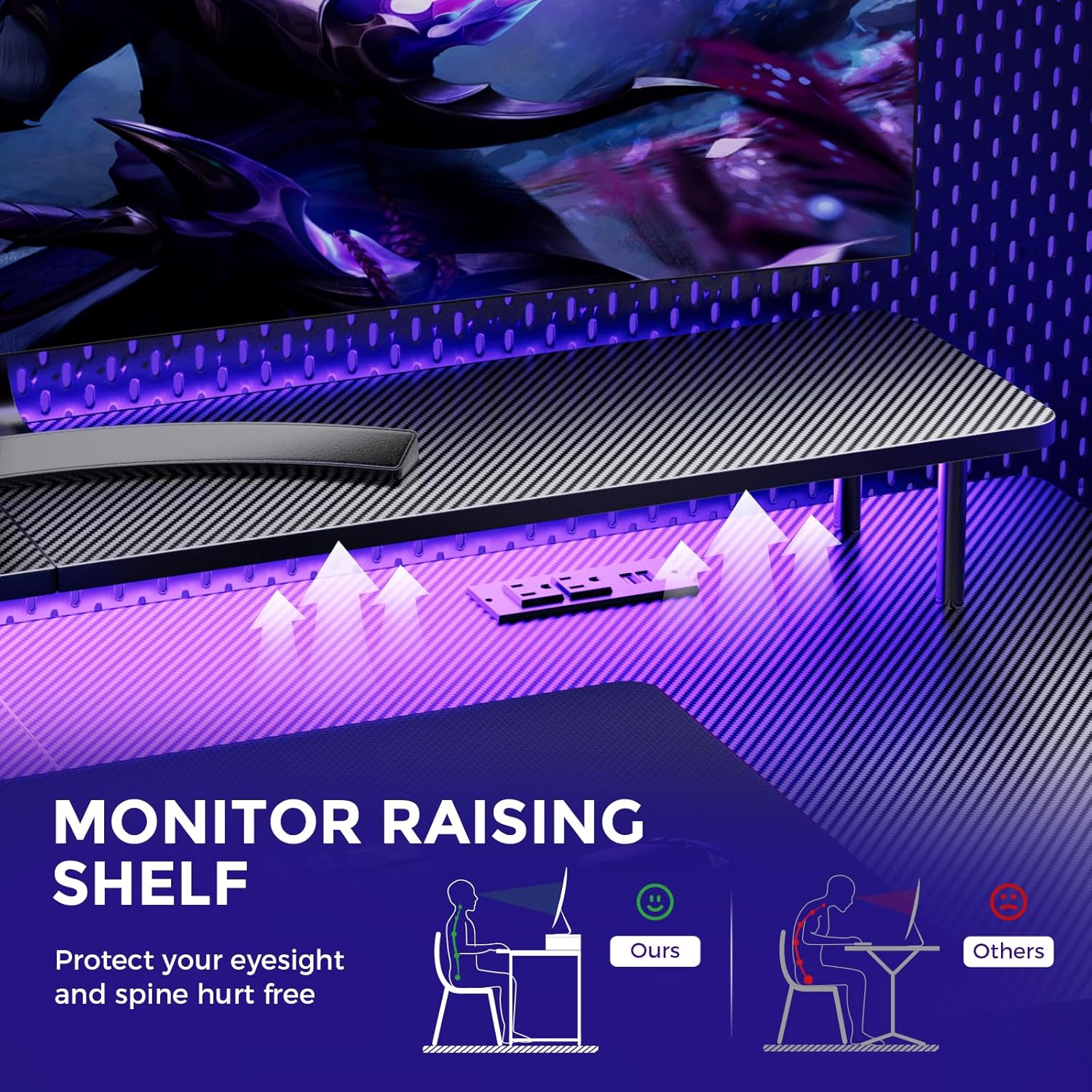
Image: A hand holding a remote control, demonstrating the control over the RGB LED light strip installed beneath the monitor stand of the desk.
Video: An official product video demonstrating the GTRACING 55 Inch Gaming Desk with LED Lights, showcasing its features and aesthetic appeal in a gaming setup.
5.2. Integrated Power Outlets & USB Ports
The desk includes a built-in power strip with 2 AC outlets (120V/12A) and 2 USB charging ports (5V/2A) for convenient device charging and power supply.
- So okùn agbára pàtàkì tábìlì náà mọ́ ibi tí a lè rí ohun èlò ìtajà ògiri.
- So awọn ẹrọ rẹ pọ mọ awọn ibudo AC tabi awọn ibudo USB bi o ṣe nilo.
- Avoid exceeding the maximum power rating of the outlets.

Aworan: A sunmọ-soke view of the recessed power strip on the desk, showing two AC outlets and two USB charging ports in use, charging a phone and earbuds.
5.3. Iduro Atẹle Ergonomic
The raised monitor stand positions your screen at eye level, promoting better posture and reducing neck strain during extended use. It also provides additional storage space.

Image: A diagram comparing correct ergonomic posture achieved with the monitor stand to incorrect posture without it, highlighting benefits for eyesight and spine.
6. Itọju
- Ninu: Wipe the carbon fiber surface with a soft, damp asọ. Yẹra fun awọn kẹmika lile ti o le ba ipari jẹ.
- Hardware: Lokọọkan ṣayẹwo gbogbo awọn skru ati awọn boluti lati rii daju pe wọn wa ni wiwọ. Mu ti o ba wulo.
- Awọn ohun elo itanna: Keep the power outlets and USB ports free from dust and debris. Do not attempt to repair electrical components yourself.
7. Laasigbotitusita
7.1. LED Lights Not Working or Remote Not Responding
- Ṣayẹwo Asopọ agbara: Ensure the LED light strip is securely plugged into the power source and the desk's main power cord is connected to a live wall outlet.
- Batiri Latọna jijin: Verify that the remote control has a fresh battery and is inserted correctly.
- Laini Oju: Ensure there is a clear line of sight between the remote control and the LED receiver. Obstructions can block the signal.
- Iṣakoso Afowoyi: If the remote is unresponsive, check if there's a manual button on the LED controller itself to cycle through modes or power on/off.
7.2. Desk Instability
- Mu Hardware: Re-check and tighten all assembly screws and bolts.
- Dada Ipele: Ensure the desk is placed on a flat, level surface.
8. Awọn pato
| Ẹya ara ẹrọ | Ẹ̀kúnrẹ́rẹ́ |
|---|---|
| Brand | JIJI |
| Nọmba awoṣe | 114vc07 |
| Ọja Mefa | 24"D x 55"W x 30"H |
| Àwọ̀ | Erogba Black |
| Top elo Iru | Erogba Okun |
| Ohun elo mimọ | Irin ti ko njepata |
| Iṣeduro iwuwo ti o pọju | 300 iwon |
| Agbára Agbára Tí A Ṣẹ̀pọ̀ | 2 AC iÿë (120V/12A), 2 USB Ports (5V/2A) |
| Pataki Awọn ẹya ara ẹrọ | Built-In USB Outlet, Ergonomic, Monitor Stand, LED Lights, Headphone Hook |
| Apejọ ti a beere | Bẹẹni (Awọn Irinṣẹ To wa) |

Image: A detailed diagram illustrating the dimensions of the GTRACING Gaming Desk, including the main desktop and the monitor stand.
9. Atilẹyin ọja ati Onibara Support
GTRACING is committed to providing high-quality products and customer satisfaction. For any questions, concerns, or missing parts, please contact our customer service team.
- Free Replacement/Refund: Laarin 30 ọjọ ti o ra.
- Free Replacement/Repair: Within 1 year of purchase.
- Ibi iwifunni:
- Imeeli: info@gtracing.com
- Phone: 1-888-660-5669 (9:00-5:30 PST Mon-Fri)
- Webojula: www.gtracing.com

Image: GTRACING customer service representatives ready to assist with product inquiries and support.
Ask a question about this manual
Ask about setup, troubleshooting, compatibility, parts, safety, or missing instructions. Manuals+ will review the question and use this page’s manual context to help answer it.