
TOOLTOP TT-ET15S
TOOLTOP ET15S Professional Thermal Imager Camera & Digital Multimeter User Manual
Model: TT-ET15S
1. Ifihan
The TOOLTOP ET15S is an advanced industrial-grade device that integrates a high-resolution thermal imager with a high-precision digital multimeter. Designed for professionals, it provides comprehensive diagnostic capabilities for various applications, including electrical system inspection, HVAC troubleshooting, PCB analysis, and general temperature measurement. Its intuitive interface and robust features ensure accurate and reliable performance.

This image displays the TOOLTOP ET15S device, showcasing its dual functionality as both a thermal imager and a digital multimeter. The left screen shows a thermal image with temperature readings, while the right screen displays multimeter readings with a waveform graph.
2. Eto
2.1 Unpacking ati Ibẹrẹ ayewo
Carefully unpack all components from the box. Verify that all items listed in the 'What's in the Box' section are present and in good condition. If any items are missing or damaged, contact customer support immediately.

This image displays the complete contents of the ET15S package: the ET15S device, product manual, packaging box, instrument storage bag, multimeter probes, and a data line. Note that the macro lens is optional and not included in the standard package.
2.2 Batiri sori ati gbigba agbara
The ET15S is powered by a detachable 18650 lithium battery. Ensure the battery is correctly inserted into the battery compartment. For initial use, fully charge the device using the provided USB cable and a compatible USB power adapter (not included). The charging indicator will show the charging status.
The device supports reliable USB charging and offers a runtime of up to 8 hours on a full charge.
2.3 Titan / Pa a
To power on the device, press and hold the power button until the screen illuminates. To power off, press and hold the power button again until the screen shuts down.
3. Awọn ilana Iṣiṣẹ
The ET15S combines thermal imaging and multimeter functions, accessible through its intuitive interface.
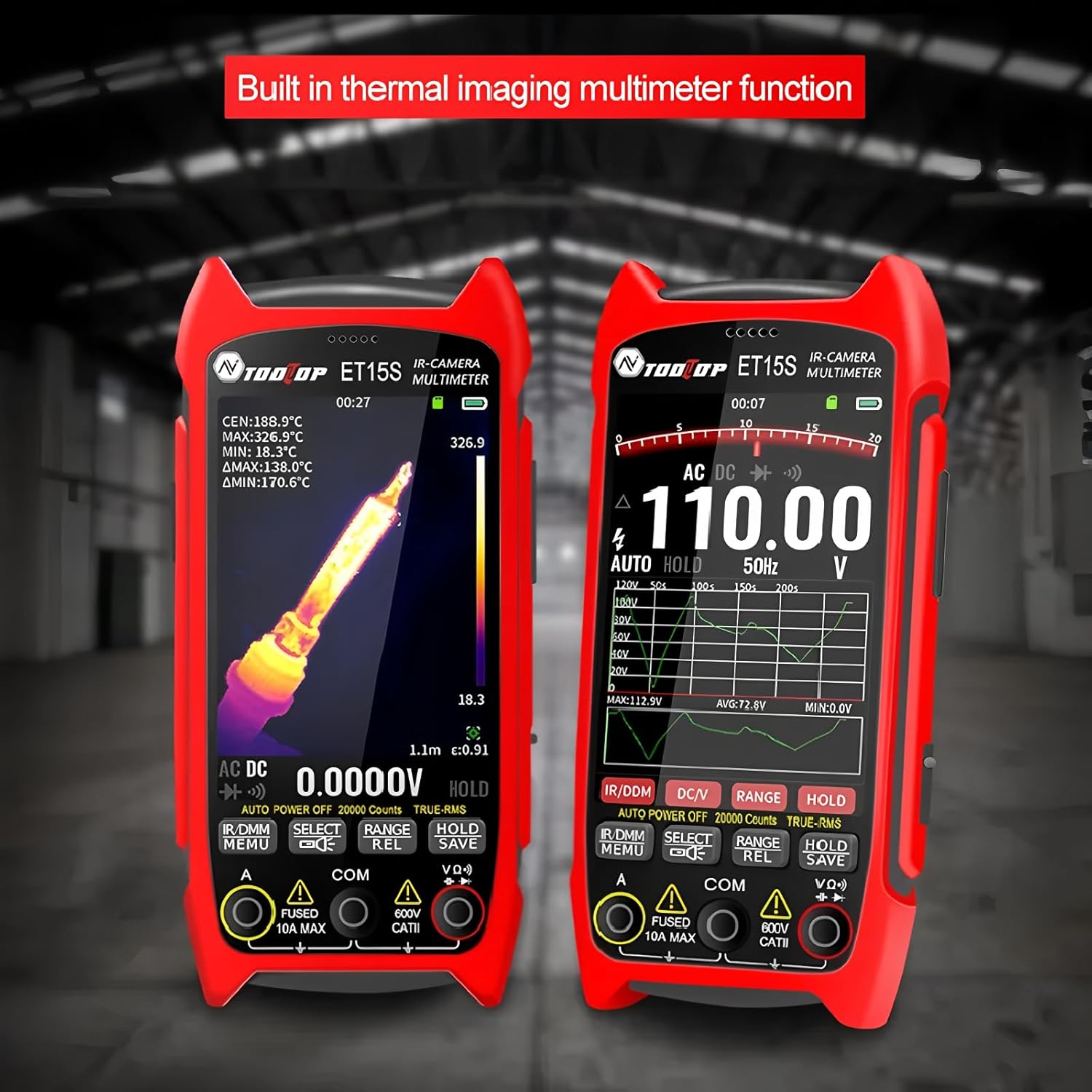
A alaye view of the ET15S, highlighting its integrated thermal imaging and multimeter capabilities. The device's interface clearly shows both thermal data and electrical measurements simultaneously.
3.1 Thermal Imaging Mode
The thermal imaging mode utilizes a 256x192 resolution, 25Hz thermal imaging sensor to visualize temperature differences. This mode is ideal for identifying hot spots, cold spots, and thermal patterns in various environments.
- Ipinnu: 256x192 awọn piksẹli
- Iwọn fireemu: 25Hz
- Iwọn otutu: -20 ℃ si + 550 ℃
- Ijadelọ: Adjustable from 0.1 to 0.99 (0.95 by default)
- Awọn paleti awọ: White Heat, Black Heat, Fusion 1, Rainbow, Fusion 2, Iron Red 1, Iron Red 2, Dark Brown, Color 1, Color 2, Ice Fire, Rain, Green Heat, Red Heat, Deep Blue

An industrial-grade thermal imager, the ET15S features a 256x192 pixel sensor. The image shows the device capturing thermal data from electrical panels, demonstrating its capability for professional industrial applications.
3.2 Ipò Onímílítà Díjítàlì
The integrated digital multimeter provides high-precision measurements with 19,999 counts. It supports both manual and automatic range options and includes an analog needle display for quick reference.
- Awọn iwọn: Voltage (DC/AC), Current, Resistance, Capacitance, Diode, Frequency, NCV (Non-Contact Voltage), Temperature
- DC Voltage: Titi di 1000V
- AC Voltage: Titi di 750V
- Lọwọlọwọ: Titi di 10A
- Atako: Títí dé 99.99MΩ

The ET15S features a 3.5-inch high-definition large screen, ideal for detailed inspection. The image shows the screen displaying a thermal view of a circuit board, emphasizing its clarity for identifying minor faults and hidden dangers.
3.3 Data Visualization and PC Software Support
The multimeter measurement results can be visualized as waveform graphs directly on the device's display, aiding in understanding data trends and simplifying fault diagnosis. The ET15S also supports PC software, allowing users to transfer and analyze multimeter data charts and thermal images on a computer.

The ET15S supports PC software for data transfer and analysis. This image shows the device connected to a laptop, illustrating how stored images and multimeter data waveforms can be reproduced and analyzed on a computer, along with USB charging.
3.4 Optional Macro Lens
An optional macro lens is available for the ET15S, enabling the capture of extremely small details (as clear as 1mm x 1mm). This feature is particularly useful for intricate tasks such as smartphone repairs and PCB mainboard inspections.

The ET15S offers an optional macro lens, shown attached to the device's rear. This lens allows for capturing small details as clear as 1mm x 1mm, making it ideal for smartphone repairs, PCB mainboard inspections, and electronic R&D.
4. Itọju
4.1 Ninu ẹrọ naa
To maintain optimal performance, keep the ET15S clean. Use a soft, dry cloth to wipe the exterior. For stubborn dirt, a slightly damp A le lo aṣọ pẹlu ọṣẹ kekere, ki o rii daju pe omi ko wọ inu ẹrọ naa. Maṣe lo awọn ohun elo fifọ tabi awọn ohun elo olomi.
4.2 batiri Itọju
To prolong battery life, avoid fully discharging the battery frequently. If the device will not be used for an extended period, charge the battery to approximately 50% and store it in a cool, dry place. Recharge every few months to prevent deep discharge.
4.3 Ibi ipamọ
Store the ET15S in its protective case when not in use to prevent damage from dust, moisture, and impacts. Avoid storing in extreme temperatures or direct sunlight.
5. Laasigbotitusita
This section addresses common issues you might encounter with your ET15S. If the problem persists, please contact customer support.
- Ẹrọ ko ni agbara lori:
- Ensure the battery is fully charged. Connect the device to a charger and wait for a few minutes before attempting to power on again.
- Check if the battery is correctly inserted. - Iboju ti ṣofo tabi didi:
- Perform a soft reset by pressing and holding the power button for 10-15 seconds until the device restarts.
- If the issue persists, ensure the battery is charged. - Àwọn Ìkà Mọ́mítà Tí Kò Péye:
- Ensure the test leads are properly connected to the correct input jacks.
- Verify that the measurement range is appropriate for the value being measured (if not in auto-range mode).
- Check the condition of the test leads for any damage. - Thermal Image is Unclear:
- Ensure the lens is clean and free from smudges or dust.
- Adjust the emissivity setting to match the material being inspected for more accurate temperature readings.
- Ensure the target is within the optimal measurement distance. - Ko le sopọ si PC:
- Ensure the USB cable is securely connected to both the device and the computer.
- Gbiyanju ibudo USB ti o yatọ lori kọnputa rẹ.
- Install the necessary PC software and drivers from the manufacturer's webojula.
6. Awọn pato
6.1 Àwọn Ìlànà Àwòrán Gbóná
| Paramita | Iye |
|---|---|
| Sensọ | Vanadium oxide (VOx) |
| Iyaworan Yaworan Aworan | 25Hz |
| Awọn piksẹli Aworan Gbona | 256x192 |
| Display Image Resolution | 427 x 320 |
| Aaye ti View (FOV) | 50.0°(H) × 37.2°(V) |
| Emissivity | 0.1 – 0.99 adjustable (0.95 by default) |
| Iwọn otutu | -20 ℃ ~ +550 ℃ |
| Yiye | ± 2℃ tabi ± 2% |
| Ipinnu Iwọnwọn | 0.1 ℃ / 0.1 ℉ |
| Ipo Ere | Ere Aifọwọyi |
| Makiro lẹnsi | Optional, working distance: about 5cm |
6.2 Multimeter paramita
| Paramita | Iye |
|---|---|
| Ifihan | 19999 counts, Updates 3/sec |
| DC Maximum Input Voltage | 1000V |
| AC Maximum Input Voltage | 750V |
| Maximum Current Measurement | 10A |
| O pọju Resistance | 99.99MΩ |
6.3 Gbogbogbo Awọn alaye
| Paramita | Iye |
|---|---|
| Nọmba Awoṣe Nkan | TT-ET15S |
| Package Mefa | 7.87 x 5.91 x 3.94 inches |
| Iwọn Nkan | 1 kilogram (2.2 poun) |
| Orisun agbara | Battery Powered (detachable 18650 lithium battery) |
| Batiri Runtime | Titi di wakati 8 |
| Awọn ede Atilẹyin | Chinese, English, German, Russian, French, Spanish, Portuguese, Korean, Japanese, Italian, Polish |
| Awọn iwe-ẹri | CE, RoHS |
7. Ohun ti o wa ninu Apoti
The standard package for the TOOLTOP ET15S includes the following items:
- ET15S Device
- Ọja Afowoyi
- Apoti apoti
- Instrument Storage Bag
- Multimeter Probes
- Data Line (USB cable)
Note: The optional macro lens is sold separately and is not included in the standard package.
8. Atilẹyin ọja ati Support
8.1 atilẹyin ọja Alaye
TOOLTOP products are manufactured to high quality standards. This product comes with a limited warranty against defects in materials and workmanship. Please refer to the warranty card included in your package or visit the official TOOLTOP webAaye fun alaye atilẹyin ọja ofin ati ipo.
8.2 Onibara Support
For technical assistance, troubleshooting, or any inquiries regarding your TOOLTOP ET15S, please contact our customer support team. Contact information can typically be found on the official TOOLTOP webaaye tabi ni apoti ọja.
When contacting support, please have your product model number (TT-ET15S) and purchase information ready to expedite the process.