
1. Ifihan
Thank you for choosing the TELESIN C03 Magnetic Phone Selfie Light. This device is designed to enhance your photography and videography with adjustable lighting and convenient features. Please read this manual carefully to ensure proper use and maintenance.
2. Package Awọn akoonu
- TELESIN C03 Magnetic Phone Selfie Light
- USB Iru-C Ngba agbara USB
- Metal Ring Adhesive Adapter (for non-MagSafe devices)
- Itọsọna olumulo
3. Ọja Ipariview
The TELESIN C03 features a compact, foldable design with a magnetic attachment for easy use. It includes a built-in mirror and offers multiple lighting modes.
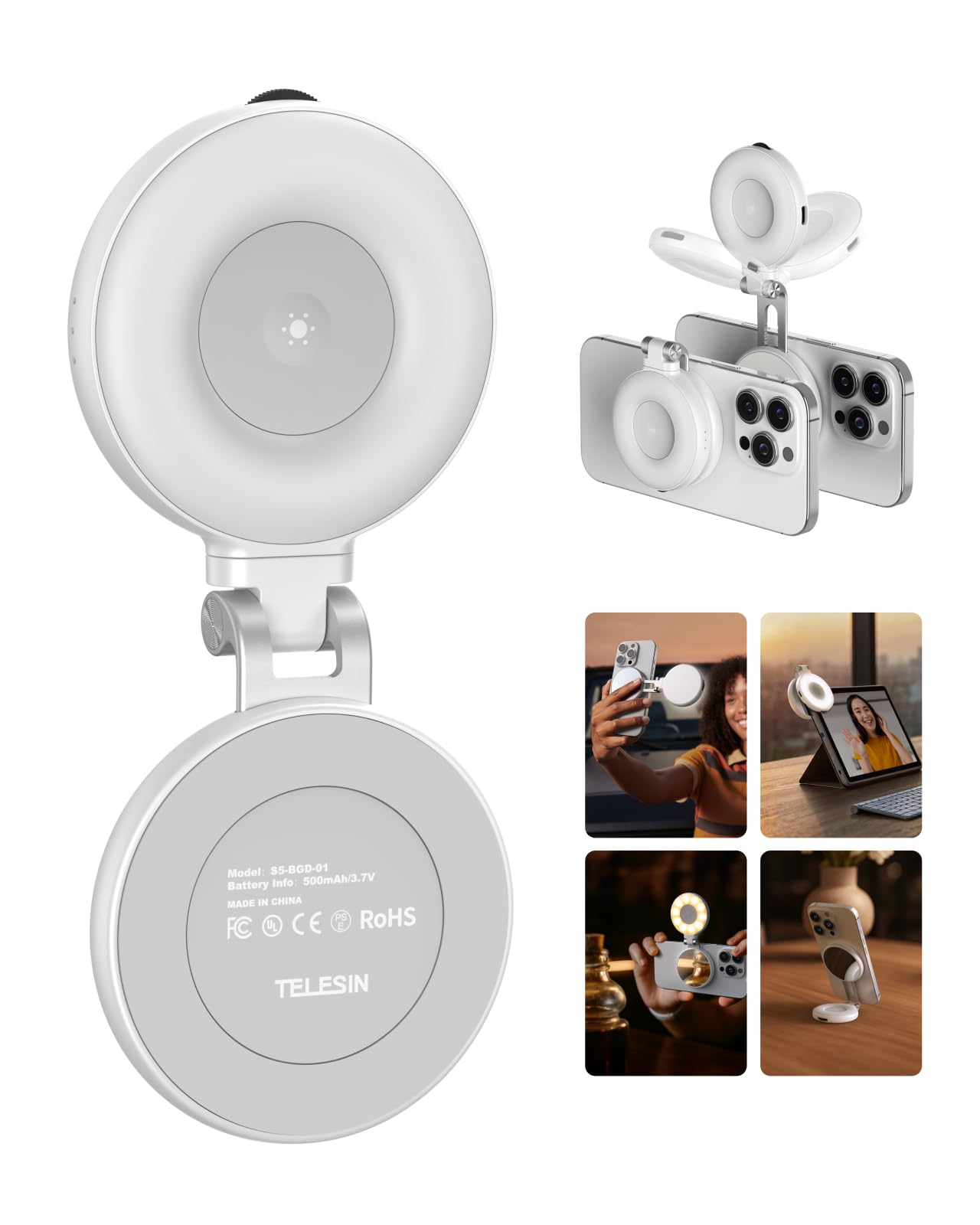
Figure 1: TELESIN C03 Magnetic Phone Selfie Light (folded)
4. Eto ati fifi sori
4.1 Ngba agbara si Ẹrọ
Before first use, fully charge the selfie light. Connect the provided USB Type-C cable to the charging port on the device and to a compatible USB power source. The indicator light will show charging status.

Figure 2: Charging the Selfie Light
4.2 Attaching to Your Phone
The TELESIN C03 is designed for magnetic attachment. For MagSafe compatible iPhones (iPhone 12 series and newer), simply align the selfie light with the MagSafe area on the back of your phone until it snaps into place securely.

Àwòrán 3: Àsopọ̀ mágnẹ́ẹ̀tì
For non-MagSafe phones, laptops, or other devices, use the included metal ring adhesive adapter. Peel off the protective film from the adhesive side of the metal ring and firmly attach it to the desired location on your device. Ensure the surface is clean and dry for optimal adhesion. Once the ring is attached, the selfie light can be magnetically connected to it.
5. Awọn ilana Iṣiṣẹ
5.1 Agbara Titan / Pa ati Atunṣe Imọlẹ
Press and hold the power button to turn the light on or off. Once on, rotate the wave wheel on the side of the device to adjust the brightness from 10% to 100% steplessly.
5.2 Awọ otutu Yiyan
Short press the power button to cycle through the three available color temperatures:
- Imọlẹ Gbona (2700K): Fún àyíká tí ó rọrùn.
- Imọlẹ Adayeba (5600K): For a balanced, natural glow.
- Imọlẹ tutu (7500K): For a chic, bright illumination.

Figure 4: Light Modes and Brightness Control
5.3 360° Rotation and 180° Flip
The selfie light features a hinge that allows for 360° rotation and a 180° flip. This enables you to direct the light from various angles, whether for front-facing selfies, rear-camera photography, or as a small desktop stand.

Figure 5: Rotatable and Flippable Design
5.4 Using the Built-in Mirror
The device includes a 56mm high-definition makeup mirror. This mirror can be used for quick touch-ups or to assist with framing shots when using your phone's rear camera.
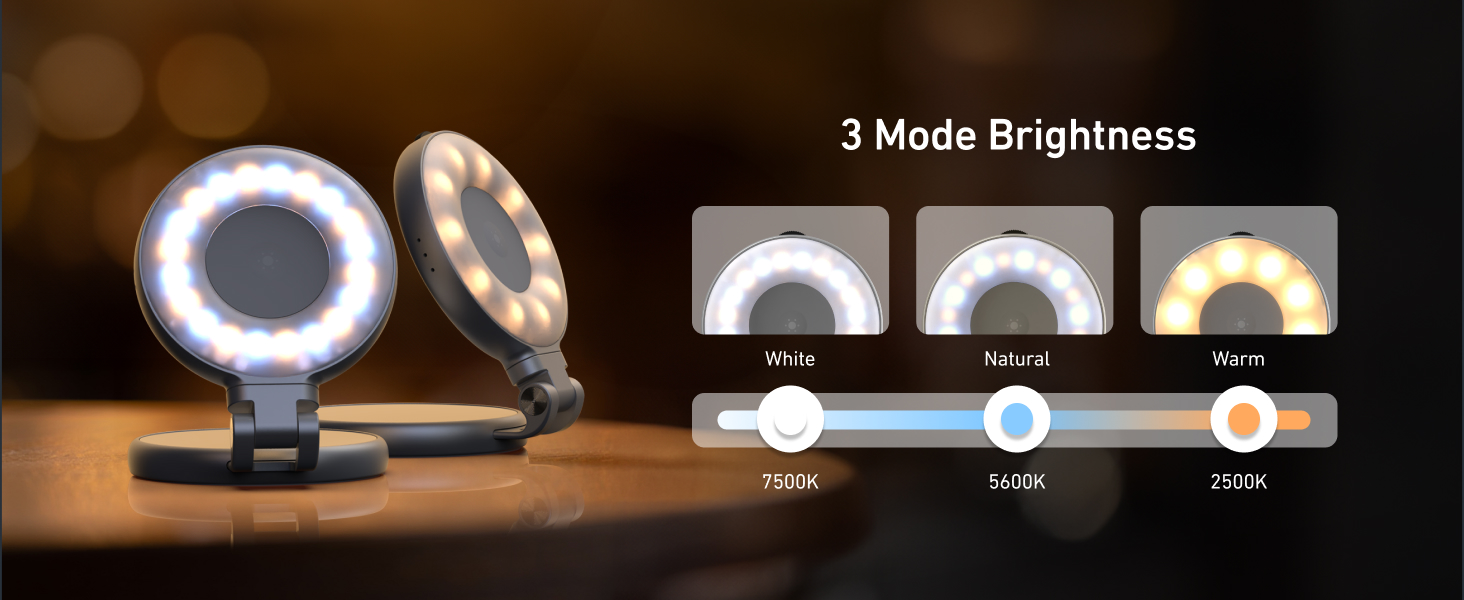
Figure 6: Built-in Makeup Mirror
6. Awọn ẹya ara ẹrọ
- Asomọ oofa: Compatible with MagSafe iPhones and other devices via adhesive metal ring.
- Imọlẹ adijositabulu: 3 color temperatures (2700K, 5600K, 7500K) and 10-100% stepless brightness adjustment.
- 360° Rotation & 180° Flip: Flexible positioning for various shooting angles and use as a stand.
- Built-in Mirror: 56mm high-definition mirror for convenience.
- Gbigba agbara & Gbigbe: Compact pocket size with a built-in 500mAh battery, charged via USB Type-C.
7. Itọju
- Jeki ẹrọ naa di mimọ nipa fifẹ rẹ pẹlu asọ ti o gbẹ.
- Yago fun ṣiṣafihan ẹrọ naa si awọn iwọn otutu to gaju, ọrinrin, tabi oorun taara.
- Do not attempt to disassemble or repair the device yourself, as this may void the warranty.
- Tọju ni itura, ibi gbigbẹ nigbati ko si ni lilo.
8. Laasigbotitusita
- Imọlẹ ko tan: Ensure the device is fully charged. Connect it to a power source using the USB Type-C cable.
- Fífẹ́ẹ́ tàbí dídín díẹ̀: Recharge the device. If the issue persists, contact customer support.
- Àsopọ̀ oofa náà kò lágbára: Ensure the device is properly aligned with the MagSafe area or the metal ring adapter. Clean the surfaces to remove any debris.
- Ẹrọ ti ko dahun: Try resetting the device by fully discharging and then recharging it.
9. Awọn pato
| Iwa | Ẹ̀kúnrẹ́rẹ́ |
|---|---|
| Brand | TELESIN |
| Orukọ awoṣe | TELESIN-SL-MAG-WHT-001 |
| Iwọn Nkan | 80 giramu |
| Asopọmọra Technology | USB |
| Ni wiwo Hardware | USB Iru C |
| Batiri Apapọ Life | 272.5 iṣẹju |
| Awọn ipo Flash Apejuwe | Adjustable brightness and color temperature (cold, natural, warm) for constant illumination |
| Omi Resistance Ipele | Ko Omi Resistant |
| Awọn ẹrọ ibaramu | iPhone, Android phones, laptops, magnetic selfie stick tripod |
10. Awọn fidio ọja osise
TELESIN C03 Magnetic Selfie Light Overview
Yi fidio pese kan finifini loriview of the TELESIN C03 Magnetic Selfie Light, demonstrating its magnetic attachment and basic lighting functions.
TELESIN C03 Mirror Selfie Light Demonstration
This video showcases the mirror feature of the TELESIN C03 Selfie Light, highlighting its utility for self-monitoring during content creation.
TELESIN C03 Magnetic Phone Light Features
This video demonstrates various features of the TELESIN C03 Magnetic Phone Light, including its magnetic attachment and adjustable lighting.
11. Atilẹyin ọja ati Support
The TELESIN C03 Magnetic Phone Selfie Light comes with a 2-year warranty. For warranty claims, technical support, or any product-related inquiries, please contact TELESIN customer service through their official webaaye tabi alagbata ti o ti ra ọja naa.
Fun iranlọwọ siwaju sii, jọwọ ṣabẹwo si TELESIN Store on Amazon.