
1. Ifihan
Thank you for choosing the WORKPRO Mini Cordless Heat Gun. This manual provides essential information for the safe and efficient operation, maintenance, and troubleshooting of your new tool. Please read these instructions carefully before use and keep them for future reference.
2. Awọn ilana aabo
Nigbagbogbo ṣe akiyesi awọn iṣọra aabo ipilẹ lati dinku eewu ina, mọnamọna, ati ipalara ti ara ẹni.
- Ka Gbogbo Awọn Ilana: Mọ ararẹ pẹlu iṣẹ ṣiṣe irinṣẹ ati awọn itọnisọna ailewu.
- Agbegbe Iṣẹ: Jeki agbegbe iṣẹ rẹ mọ ki o si tan daradara. Awọn agbegbe idamu tabi awọn agbegbe dudu n pe awọn ijamba.
- Aabo Itanna: Do not expose the heat gun to rain or wet conditions. Avoid using the tool in damp tabi awọn ipo tutu.
- Aabo ti ara ẹni: Stay alert, watch what you are doing, and use common sense when operating a power tool. Do not use while tired or under the influence of drugs, alcohol, or medication.
- Ewu Ooru: The nozzle and accessories become very hot during use. Allow them to cool completely before handling or storing. Do not touch hot surfaces.
- Afẹfẹ: Ensure adequate ventilation in the work area to prevent the buildup of fumes, especially when working with plastics, paints, or adhesives.
- Awọn ọmọde ati Awọn Oluduro: Keep children and bystanders away while operating the heat gun.
- Ibi ipamọ to tọ: Store the heat gun out of reach of children when not in use.
3. Ọja Ipariview
The WORKPRO Mini Cordless Heat Gun is designed for versatility and ease of use in various DIY and repair tasks. Below are its key components:

- Bọtini Iṣakoso iwọn otutu: Allows switching between three temperature modes.
- Nozzle Reflector: Concentrates heat for precise applications.
- Awọn atẹgun atẹgun: Designed for internal heat dissipation, protecting against overheating.
- Iduro Yipada: Provides stable support for hands-free operation.
- TPE Non-slip Handle: Ensures a comfortable and secure grip.

4. Eto
4.1 Ngba agbara si Batiri naa
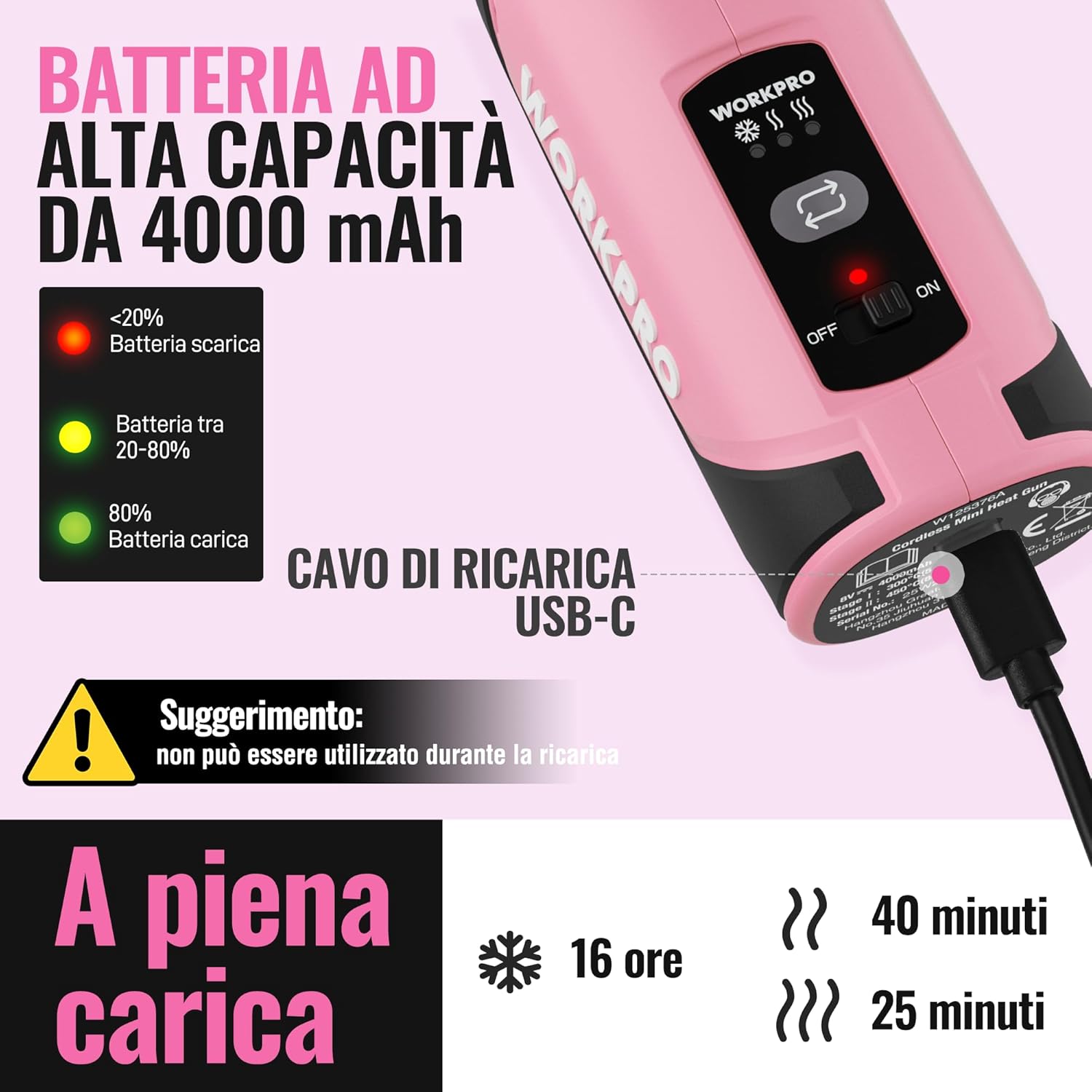
The heat gun is equipped with a 4000 mAh battery. Ensure the battery is fully charged before first use for optimal performance.
- Connect the included USB-C cable to the charging port on the heat gun.
- Plug the other end of the USB-C cable into a compatible USB power source (e.g., laptop, power bank, 5V USB charger).
- The battery indicator lights will show the charging status:
- Red: Battery charge <20%
- Yellow: Battery charge 20-80%
- Green: Battery charge >80%
- A full charge can provide up to 25 minutes of operation at the highest temperature.
Note: The heat gun cannot be used while charging.
4.2 Attaching the Reflector Nozzle
The reflector nozzle helps concentrate heat for specific tasks like heat shrinking or precision soldering.
- Ensure the heat gun is off and cool before attaching any accessories.
- Align the reflector nozzle with the heat gun's output.
- Gently push the nozzle onto the heat gun until it is securely in place.

5. Awọn ilana Iṣiṣẹ
5.1 Titan / Pa a
To power on the heat gun, slide the ON/OFF switch to the 'ON' position. To power off, slide the switch to the 'OFF' position.
5.2 Awọn ipo iwọn otutu
The heat gun offers three temperature modes for various applications. Press the temperature control button to cycle through the modes:
- Cold Mode (Ambient Temperature): Ideal for cooling down materials or gentle drying.
- Low Temperature (300℃): Suitable for tasks like drying artistic works or warming candles.
- High Temperature (450℃): For more demanding tasks such as shaping plastic materials, heat shrinking, or precision soldering.
The device heats up rapidly, reaching 300℃ in approximately 30 seconds, with an airflow of 20 L/min, ensuring stable and uniform heat distribution.

5.3 Heat Distribution
The temperature of the airflow decreases with distance. For optimal heating performance, position objects as close as possible to the air outlet.

5.4 Awọn ohun elo
The WORKPRO Mini Cordless Heat Gun is suitable for a wide range of tasks:
- Ìdínkù Ooru: Use the reflector nozzle and included heat shrink tubes to insulate, secure, and protect cables.
- Removing Labels: Gently heat adhesive labels to soften the glue for easy removal.
- Melting and Softening Materials: Ideal for shaping plastics or softening materials for various crafts and repairs.
- Repairing Circuit Boards: Provides precise heat for delicate electronic repairs.
- Gbigbe: Accelerate drying of paints, glues, or artistic projects.

6. Itọju
Proper maintenance ensures the longevity and optimal performance of your heat gun.
- Ninu: Regularly clean the air intake and output vents to prevent dust and debris buildup, which can affect performance and cause overheating. Use a soft, dry cloth.
- Fara bale: Always allow the heat gun to cool down completely before storing. Use the retractable stand for safe cooling.
- Ibi ipamọ: Store the tool in a dry, secure place, away from direct sunlight and extreme temperatures.
- Itọju Batiri: For long-term storage, charge the battery to approximately 50% and store in a cool, dry place. Recharge periodically if not used for extended periods.
7. Laasigbotitusita
If you encounter issues with your WORKPRO Mini Cordless Heat Gun, refer to the table below for common problems and solutions.
| Isoro | Owun to le Fa | Ojutu |
|---|---|---|
| Heat gun does not turn on | Batiri ti bajẹ | Gba agbara si batiri ni kikun. |
| Heat output is low | Awọn atẹgun atẹgun ti dina | Clean the air intake and output vents. |
| Ọpa overheats | Blocked air vents or prolonged use at high temperature | Clean vents. Allow the tool to cool down. Use for shorter intervals. |
| Aye batiri kuru ju ti a ti reti lọ | Batiri naa ko gba agbara ni kikun tabi batiri ti o ti dagba | Ensure full charge. If battery is old, consider replacement. |
8. Awọn pato
Technical specifications for the WORKPRO Mini Cordless Heat Gun W125376A:
| Ẹya ara ẹrọ | Sipesifikesonu |
|---|---|
| Olupese | Hang Zhou Great Star Industrial Co.,LTD |
| Ọja Mefa | 22 x 7.5 x 7.3 cm |
| Iwọn | 410 giramu |
| Nọmba awoṣe | W125376A |
| Àwọ̀ | Pink and Black |
| Ohun elo | Ṣiṣu |
| Orisun agbara | Agbara Batiri |
| Voltage | 8 Volts |
| Batiri Iru | Litiumu Iwon |
| Agbara Batiri | 4000 mAh |
| Awọn ipo iwọn otutu | Cold (Ambient), 300℃, 450℃ |
| Alapapo Time | 30 seconds to 300℃ |
| Fife ategun | 20 L/min |
9. Atilẹyin ọja ati Support
WORKPRO products are manufactured to high-quality standards and are subject to stringent quality controls. This product comes with a standard manufacturer's warranty against defects in materials and workmanship. For specific warranty details, claims, or technical support, please refer to the warranty card included with your product or visit the official WORKPRO webojula. Jeki ẹri rira rẹ fun eyikeyi awọn ibeere atilẹyin ọja.
For further assistance, please contact WORKPRO customer service through the contact information provided on the product packaging or the official brand store.