
DOOGEE A9PRO+-V
DOOGEE Tab A9 Pro+ (2025) User Manual
Model: A9PRO+-V GRAY
1. Ifihan
This manual provides detailed instructions for the proper use and maintenance of your DOOGEE Tab A9 Pro+ (2025) 11-inch Tablet. Please read this manual thoroughly before operating the device to ensure optimal performance and longevity. The DOOGEE Tab A9 Pro+ is designed for versatile use, from productivity tasks to entertainment, featuring the latest Android 15 OS and a powerful octa-core processor.
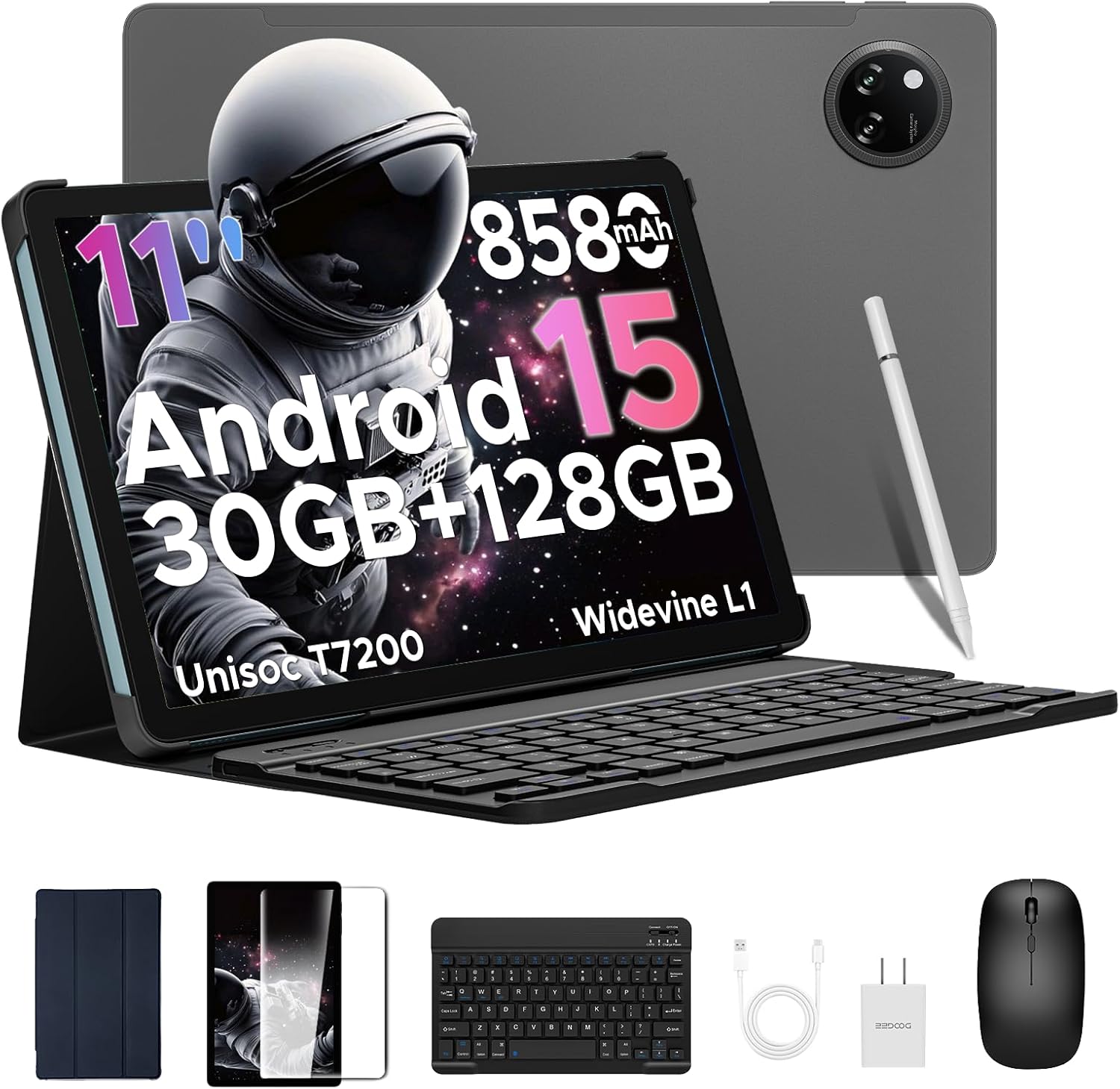
Image: The DOOGEE Tab A9 Pro+ tablet shown with its included accessories: a Bluetooth keyboard, mouse, stylus, and protective case.
2. Eto
2.1 Package Awọn akoonu
Jẹrisi pe gbogbo awọn ohun kan wa ninu package:
- DOOGEE Tab A9 Pro+ Tablet
- Keyboard Bluetooth
- Asin Bluetooth
- Stylus Pen
- Screen Protector (pre-applied or separate)
- Ọran Idaabobo
- USB Iru-C USB
- Adapter agbara
- Afowoyi Olumulo (iwe-ipamọ yii)

Image: A visual representation of the DOOGEE Tab A9 Pro+ package contents, including the tablet, keyboard, mouse, stylus, charger, and cables.
2.2 Gbigba agbara akọkọ
Before first use, fully charge the tablet using the provided USB Type-C cable and power adapter. The charging indicator will show progress. A full charge ensures optimal battery calibration.
2.3 Titan / Pa a
- Agbara Tan: Press and hold the Power button (located on the side) until the DOOGEE logo appears.
- Agbara Pa: Tẹ bọtini agbara ki o si dimu, lẹhinna yan 'Pa agbara kuro' lati awọn aṣayan ti o wa lori iboju.
- Tun bẹrẹ: Tẹ bọtini agbara ki o si dimu, lẹhinna yan 'Tun bẹrẹ' lati awọn aṣayan.
2.4 Nsopọ Awọn ẹya ẹrọ
The DOOGEE Tab A9 Pro+ comes with a Bluetooth keyboard, mouse, and stylus for enhanced productivity.
- Bluetooth Keyboard/Mouse:
- Tan keyboard/mauku.
- Lori tabulẹti, lọ si Eto > Awọn ẹrọ ti a ti sopọ > Bluetooth.
- Mu Bluetooth ṣiṣẹ ki o wa awọn ẹrọ to wa.
- Select the keyboard/mouse from the list and follow on-screen pairing instructions.
- Stylus Pen: The stylus typically connects automatically or requires no pairing for basic functions. Refer to specific stylus instructions if advanced features require pairing.

Image: A diagram illustrating the various accessories that come with the tablet, including a tempered film, leather protective cover, Bluetooth mouse, and Bluetooth keyboard.
2.5 Initial Android 15 Setup
Lori agbara akọkọ, tẹle awọn itọnisọna loju iboju lati pari iṣeto akọkọ:
- Yan ede ati agbegbe rẹ.
- Sopọ si nẹtiwọki Wi-Fi kan.
- Wọle pẹlu akọọlẹ Google rẹ tabi ṣẹda tuntun kan.
- Review ati ki o gba ofin ati ipo.
- Ṣeto titiipa iboju (PIN, apẹrẹ, ọrọ igbaniwọle, tabi ID Oju).

Image: The Android 15 system logo displayed on the tablet screen, highlighting the device's operating system.
3. Ṣiṣẹ rẹ tabulẹti
3.1 Ifihan Awọn ẹya ara ẹrọ
The DOOGEE Tab A9 Pro+ features an 11-inch Full HD 90Hz display with a resolution of 1280x800 pixels, providing a smooth and vivid visual experience. It supports Widevine L1 for high-definition streaming content.

Image: The tablet's 11-inch IPS HD Ultra-Clear Display, showcasing its 1280x800 resolution and 90Hz refresh rate for an enchanting visual experience.
3.2 Išẹ ati Ibi ipamọ
Powered by the Unisoc T7200 Octa-Core processor, the tablet offers robust performance for multitasking and gaming. It comes with 30GB of RAM (6GB physical + 24GB virtual) and 128GB of internal storage, expandable up to 2TB via microSD/TF card (sold separately).

Aworan: A alaye view of the Unisoc T7200 Octa-Core Processor, emphasizing its role in boosting speed and efficiency.

Image: A visual representation of the tablet's memory and storage capabilities, highlighting 30GB RAM and 128GB ROM for massive storage and less lag.
3.3 kamẹra Lilo
The tablet is equipped with a 13MP main camera and a 5MP front camera, suitable for capturing photos, video calls, and online meetings.
- Mu Awọn fọto: Ṣii ohun elo kamẹra, ṣe fireemu ibọn rẹ, ki o tẹ bọtini titiipa ni kia kia.
- Gbigbasilẹ fidio: Switch to video mode in the Camera app and tap to start/stop recording.
- Selfies & Video Calls: Use the 5MP front camera for clear self-portraits and engaging video chats.

Image: The 13MP Main Camera, designed to capture every detail with clarity, shown with exampawọn fọto.

Image: The Ultra-Clear 5MP Front Camera, ideal for perfect selfies and video calls, depicted with a group video call in progress.
3.4 Audio Awọn ẹya ara ẹrọ
Experience immersive sound with high-fidelity dual speakers. A standard 3.5mm audio jack is also available for wired headphones.

Image: The Premium 1217 BOX Dual Speakers, providing a crystal-clear sound experience, illustrated with sound waves emanating from the tablet.

Image: The standard 3.5mm Audio Jack, ensuring stable and distortion-free audio transmission, shown with a user listening to music.
3.5 Asopọmọra
The tablet supports 2.4G/5G dual-band WiFi for stable internet connection and Bluetooth 5.0 for wireless accessories. Built-in GPS, Glonass, Galileo, and Beidou ensure precise navigation.

Image: Faster WiFi 5 capabilities, providing seamless connectivity across 2.4G/5G bands, depicted with a speed-line background.

Image: The Precise Navigation System, featuring GPS, Glonass, Galileo, and Beidou, shown with a user navigating in a car.
3.6 Awọn ẹya Aabo
The tablet supports Face Unlock for effortless and secure access.

Image: Facial Recognition Unlock in action, providing effortless access to the tablet.
3.7 Productivity and Display Modes
Enhance your productivity with built-in PC-level WPS Office and efficient split-screen multitasking. The tablet also offers Eye-Caring Mode, Dark Mode, and Anti-Flicker Mode for comfortable viewing.

Image: Built-in PC-level WPS Office, enabling seamless productivity on the go, shown with various office applications.

Image: Efficient Split-Screen Multitasking, transforming complexity into simplicity, demonstrated with two applications open side-by-side.

Image: Eye-Caring Mode and Dark Mode features, designed to protect eyes and soften light for night use, respectively.

Image: Anti-Flicker Mode, providing enhanced visual comfort by reducing screen flickering.
4. Itọju
4.1 batiri Itọju
The tablet is equipped with an 8580mAh high-capacity battery, supporting 10W fast charging and 5W reverse charging.
- Yago fun awọn iwọn otutu to gaju (gbona tabi tutu) nitori wọn le ba igbesi aye batiri jẹ.
- Má ṣe jẹ́ kí bátírì náà máa gbẹ pátápátá nígbà gbogbo.
- Lo awọn ṣaja ti a pese tabi awọn ṣaja ti o baamu ti a fọwọsi nikan.
- For long-term storage, charge the tablet to about 50-60% and power it off.

Image: The 8580mAh High-Capacity Battery, illustrating its long battery life and lasting enjoyment, along with charging specifications.
4.2 Ninu ẹrọ naa
- Lo asọ ti ko ni lint lati nu iboju ati ara.
- Fun agidi smudges, die-die dampen awọn asọ pẹlu omi tabi a iboju regede.
- Yẹra fun lilo awọn kẹmika lile, awọn ohun elo abrasive, tabi awọn ohun elo aerosol.
4.3 Software imudojuiwọn
Ṣayẹwo nigbagbogbo fun ati fi awọn imudojuiwọn sọfitiwia sori ẹrọ lati rii daju pe tabulẹti rẹ ni awọn ẹya tuntun, awọn abulẹ aabo, ati awọn ilọsiwaju iṣẹ. Lọ si Eto> Eto> Imudojuiwọn eto.
4.4 Ibi Management
The built-in Memory Manager helps you keep your tablet running smoothly by allowing you to delete junk files, duplicate items, and large downloads to free up space.
- Nigbagbogbo ko kaṣe kuro ati ko wulo files.
- Yọ awọn ohun elo ti a ko lo kuro.
- Lo ibi ipamọ awọsanma fun awọn nla files to free up local space.
5. Laasigbotitusita
| Isoro | Owun to le Solusan |
|---|---|
| Tabulẹti ko ni tan-an. | Rii daju pe batiri ti gba agbara. So ṣaja pọ ki o duro fun iṣẹju diẹ ṣaaju igbiyanju lati tan-an lẹẹkansi. |
| Iboju ko dahun. | Ṣe àtúnṣe tí a fipá mú nípa dídi bọtini Agbára mú fún ìṣẹ́jú-àáyá 10-15. |
| Awọn oran asopọ Wi-Fi. | Tun tabulẹti ati olulana Wi-Fi rẹ bẹrẹ. Gbagbe nẹtiwọọki ninu awọn eto ki o tun so pọ mọ. |
| Awọn ohun elo n ṣubu tabi nṣiṣẹ laiyara. | Close background apps. Clear app cache (Settings > Apps > [App Name] > Storage > Clear cache). Ensure sufficient storage space. |
| Accessories (keyboard/mouse) not connecting. | Ensure accessories are charged and in pairing mode. Re-pair them via Bluetooth settings. |
6. Awọn pato
| Ẹya ara ẹrọ | Ẹ̀kúnrẹ́rẹ́ |
|---|---|
| Awoṣe | TABA9PRO+ |
| Eto isesise | Android 15 |
| isise | Unisoc T7200 Octa-Core (1.6 GHz) |
| Iwọn Ifihan | 11 inches |
| Ipinnu Iboju ti o pọju | 1280*800 Pixels (90Hz) |
| Àgbo | 30GB (Ipilẹ 6GB + Ti gbooro sii 24GB) |
| Ibi ipamọ inu | 128 GB Flash Memory |
| Expandable Ibi ipamọ | Up to 2TB (microSD/TF card) |
| Agbara Batiri | 8580mAh |
| Kamẹra iwaju | 5MP |
| Kamẹra ẹhin | 13MP |
| Asopọmọra | 2.4G/5G WiFi, Bluetooth 5.0, GPS |
| Awọn iwọn (LxWxH) | 10.1 x 6.64 x 0.31 inches |
| Iwọn Nkan | 1.41 iwon (664g) |
7. Official ọja Video
Wo fidio ọja osise fun wiwo loriview of the DOOGEE Tab A9 Pro+ (2025) tablet's features and capabilities.
Video: DOOGEE Tab A9 Pro+ (2025) 11 inch Tablet with Keyboard --The Latest Android 15 OS. This video provides a comprehensive look at the tablet's design, features, and user experience.
8. Atilẹyin ọja ati Support
DOOGEE offers comprehensive support for your Tab A9 Pro+ (2025) tablet:
- Atilẹyin ọja: Ọja naa wa pẹlu atilẹyin ọja to lopin ọdun mẹta.
- Ilana Pada: Enjoy a 30-day money-back guarantee and free returns.
- Iṣẹ onibara: Online support is available 24/7. If you have any questions, please reach out to the seller for assistance. Responses are typically provided within 24 hours.
Ask a question about this manual
Ask about setup, troubleshooting, compatibility, parts, safety, or missing instructions. Manuals+ will review the question and use this page’s manual context to help answer it.