
1. Ifihan
Thank you for choosing the KLIM KLCD-0582 CD Cassette Boombox. This versatile audio system combines classic and modern features, allowing you to enjoy music from various sources including CDs, cassette tapes, AM/FM radio, Bluetooth-enabled devices, USB drives, and auxiliary input. This manual provides detailed instructions for safe operation, setup, and maintenance of your device. Please read it thoroughly before use and retain it for future reference.
2. Awọn Ilana Aabo pataki
- Ka awọn itọnisọna wọnyi ni pẹkipẹki ṣaaju ṣiṣe ẹrọ naa.
- Pa awọn ilana wọnyi fun itọkasi ọjọ iwaju.
- Tẹtisi gbogbo awọn ikilọ lori ọja ati ninu awọn ilana iṣẹ.
- Tẹle gbogbo awọn ilana.
- Maṣe lo ohun elo yii nitosi omi.
- Mọ pẹlu asọ gbigbẹ nikan.
- Ma ṣe dina eyikeyi awọn ṣiṣi atẹgun. Fi sori ẹrọ ni ibamu pẹlu awọn ilana ti olupese.
- Maṣe fi sori ẹrọ nitosi awọn orisun ooru gẹgẹbi awọn imooru, awọn iforukọsilẹ ooru, awọn adiro, tabi awọn ohun elo miiran (pẹlu ampliifiers) ti o gbe ooru jade.
- Dabobo okun agbara lati ma rin lori tabi pin, ni pataki ni awọn pilogi, awọn ohun elo irọrun, ati aaye nibiti wọn ti jade kuro ninu ohun elo naa.
- Lo awọn asomọ/awọn ẹya ara ẹrọ ti olupese pato.
- Yọọ ohun elo yi nigba iji manamana tabi nigba lilo fun igba pipẹ.
- Tọkasi gbogbo iṣẹ si awọn oṣiṣẹ iṣẹ ti o peye. Iṣẹ nilo nigbati ohun elo ba ti bajẹ ni ọna eyikeyi, gẹgẹbi okun ipese agbara tabi plug ti bajẹ, omi ti ta silẹ tabi awọn nkan ti ṣubu sinu ẹrọ, ohun elo naa ti farahan si ojo tabi ọrinrin, ko ṣiṣẹ deede. , tabi ti lọ silẹ.
3. Package Awọn akoonu
Jọwọ ṣayẹwo package fun awọn nkan wọnyi:
- KLIM CD Cassette Player (KLCD-0582)
- Okun agbara (okun AC)
- AAA alkaline batteries * 2 (for remote control)
- KLIM envelope
- Ilana itọnisọna (iwe yii)
4. Ọja Ipariview
Familiarize yourself with the main components and controls of your KLIM KLCD-0582 boombox.
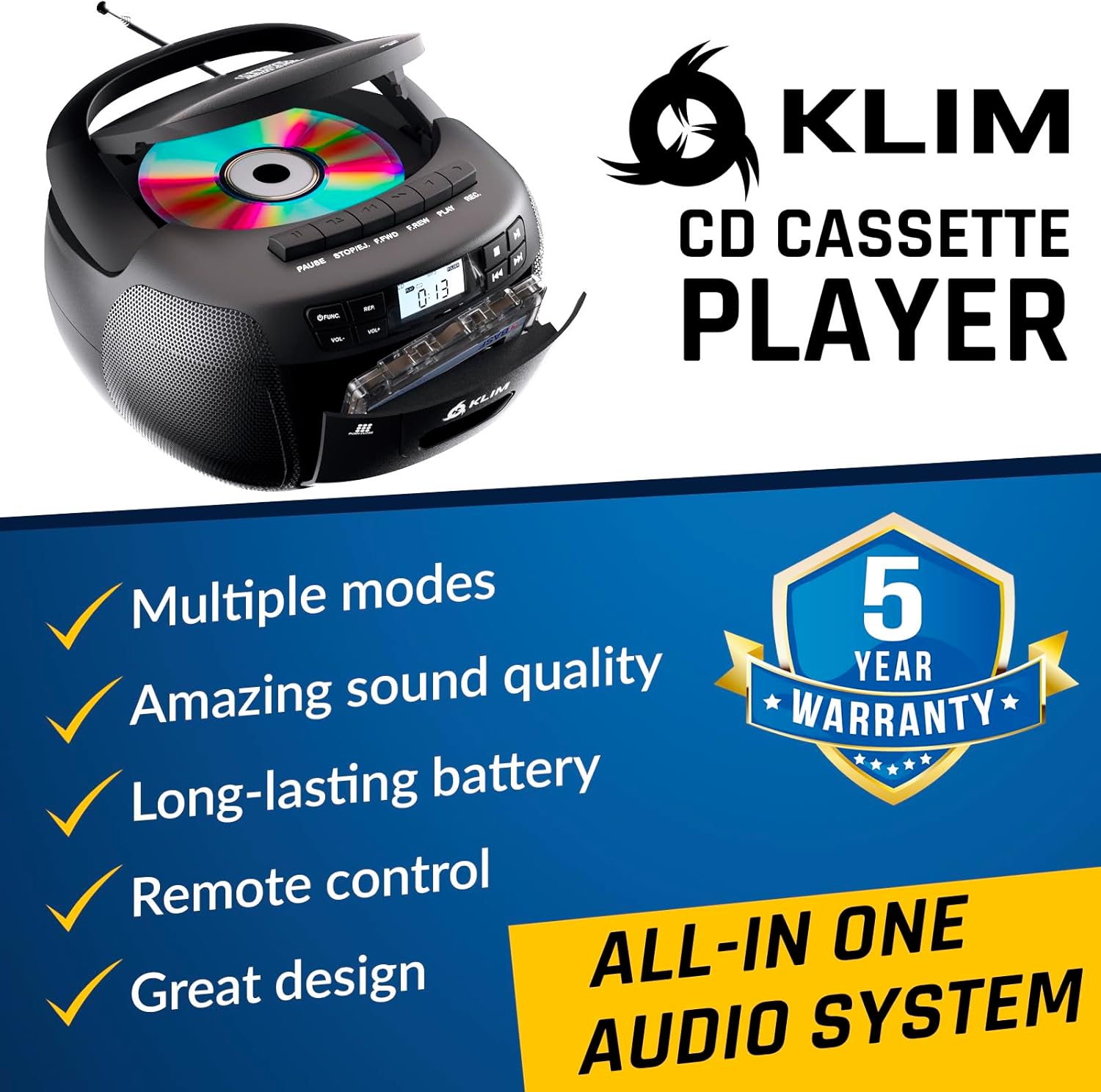
olusin 4.1: Iwaju view of the KLIM KLCD-0582 CD Cassette Boombox, showing the CD lid, cassette deck, and control buttons.
Awọn iṣakoso Igbimọ iwaju:
- Bọtini agbara: Yipada ẹyọ naa tan tabi pa.
- Bọtini iṣẹ/Ipo: Switches between CD, Cassette, Radio, Bluetooth, USB, and AUX modes.
- Volume Control (VOL+/-): Ṣe atunṣe iwọn didun ṣiṣiṣẹsẹhin.
- Play/Pause Button (CD/USB): Ó bẹ̀rẹ̀ tàbí ó dá ìṣiṣẹ́ CD/USB dúró.
- Stop Button (CD/USB/Cassette): Duro ṣiṣiṣẹsẹhin.
- Skip/Search Buttons (<< / >>): Skips tracks or searches within a track (CD/USB). Tunes radio stations.
- Repeat Button (CD/USB): Ó tún orin lọwọlọwọ tabi gbogbo awọn orin ṣe.
- Program Button (CD/USB): Programs track order for CD/USB playback.
- Record Button (Cassette): Initiates recording to cassette tape.
- Eject Button (Cassette): Opens the cassette deck.
- Ifihan LCD: Ó ń fi ipò ìsinsìnyí, nọ́mbà orin, ìgbóhùnsáfẹ́fẹ́ rédíò, àti bẹ́ẹ̀ bẹ́ẹ̀ lọ hàn.

Nọmba 4.2: Alaye view of the LCD display and speaker area, highlighting the digital interface.
Side/Rear Panel Connections:
- Input Agbara AC: So okun agbara AC pọ.
- Abala Batiri: Holds 6 C-size batteries for portable use.
- Ibudo USB: Fun ohun afetigbọ files lati a USB drive.
- Iṣawọle AUX (3.5mm): So awọn ẹrọ ohun afetigbọ ita.
- Jack agbekọri (3.5mm): Fun ikọkọ gbigbọ.
- Eriali telescopic: For AM/FM radio reception.

Figure 4.3: Product label on the bottom of the unit, indicating model number and electrical ratings.
5. Eto
5.1 Agbara Unit
Agbara AC tabi batiri le gba agbara boombox rẹ.
Agbara AC (Lilo ninu ile):
- Rii daju pe ẹrọ naa wa ni pipa.
- Connect the supplied AC power cord to the AC power input on the rear of the boombox.
- Plug the other end of the AC power cord into a standard wall outlet (110-120V, 60Hz).
DC Power (Battery Operation - Portable Use):
- Rí i dájú pé ẹ̀rọ náà ti pa àti pé a ti ge ẹ̀rọ náà kúrò nínú agbára AC.
- Ṣii ideri iyẹwu batiri ni isalẹ ẹyọ.
- Insert 6 C-size (UM-2) batteries, ensuring correct polarity (+/-) as indicated inside the compartment.
- Pa ideri batiri naa ni aabo.
Akiyesi: Yọ awọn batiri kuro ti a ko ba lo ẹrọ naa fun igba pipẹ lati dena jijo ati ibajẹ.
5.2 Latọna jijin Iṣakoso batiri sori
- Ṣii yara batiri ni ẹhin isakoṣo latọna jijin.
- Insert 2 AAA alkaline batteries, observing the correct polarity.
- Pa ideri iyẹwu batiri naa.

Figure 5.1: The boombox shown with its remote control, which requires AAA batteries.
5.3 Eriali Oṣo
Fun gbigba redio FM to dara julọ, fa eriali telescopic ni kikun. Fun gbigba AM, yi ẹyọ naa pada fun ifihan agbara to dara julọ.
6. Isẹ
6.1 Ipilẹ idari
- Titan/Apapa: Tẹ awọn AGBARA bọtini.
- Yan Ipo: Tẹ awọn IṢẸ or MODE button repeatedly to cycle through CD, Cassette, Radio (AM/FM), Bluetooth, USB, and AUX modes.
- Ṣatunṣe Iwọn didun: Lo awọn VOL+ ati VOL- awọn bọtini.
6.2 CD Sisisẹsẹhin
- Tẹ awọn IṢẸ bọtini lati yan ipo CD.
- Ṣii ideri iyẹwu CD.
- Place a CD (audio CD or MP3/WMA CD) with the label side facing up.
- Close the CD compartment lid. The unit will read the disc and begin playback automatically or display the total number of tracks.
- Tẹ ERE/SINMI lati bẹrẹ tabi da idaduro ṣiṣiṣẹsẹhin.
- Tẹ DURO lati da ṣiṣiṣẹsẹhin duro.
- Lo SKIP (<< / >>) buttons to skip tracks. Hold to fast forward/rewind within a track.
- Ṣiṣẹ eto: Ni ipo iduro, tẹ ETO. Lo SILE to select desired tracks, then press ETO again to confirm each track. Press ERE láti bẹ̀rẹ̀ sí í ṣe eré tí a ti ṣètò.
- Tun ṣe ṣiṣiṣẹsẹhin: Tẹ Tun once for single track repeat, twice for all tracks repeat.
6.3 Sisisẹsẹhin kasẹti ati Gbigbasilẹ
- Tẹ awọn IṢẸ bọtini lati yan ipo TAPE.
- Tẹ awọn JADE button to open the cassette deck.
- Insert a cassette tape and close the deck.
- Tẹ ERE lati bẹrẹ ṣiṣiṣẹsẹhin.
- Lo FAST FORWARD (FFWD) or PADA(REW) awọn bọtini lati lilö kiri ni teepu.
- Tẹ DURO lati da ṣiṣiṣẹsẹhin duro.
Gbigbasilẹ si Kasẹti:
- Insert a blank, recordable cassette tape.
- Select the desired source (CD, Radio, AUX, Bluetooth, USB).
- Start playback on the source (e.g., play a CD track, tune to a radio station).
- Tẹ awọn Igbasilẹ button on the boombox. The ERE Bọ́tìnì náà yóò tún ṣiṣẹ́. Ìgbàsílẹ̀ yóò bẹ̀rẹ̀.
- Tẹ DURO lati pari gbigbasilẹ.
Pataki: Ensure the cassette tape has its record-protection tabs intact for recording.
Rédíò 6.4 AM/FM
- Tẹ awọn IṢẸ button to select RADIO mode.
- Extend the telescopic antenna for FM reception. For AM, rotate the unit.
- Lo awọn TUNTUN koko tabi SKIP (<< / >>) buttons to tune to your desired station. The frequency will be displayed on the LCD.
6.5 Bluetooth Asopọ
- Tẹ awọn IṢẸ button to select BLUETOOTH mode. The LCD will display "BT" and the unit will enter pairing mode, indicated by a flashing Bluetooth icon.
- Lori ẹrọ Bluetooth ti o ṣiṣẹ (fun apẹẹrẹ, foonuiyara, tabulẹti), mu Bluetooth ṣiṣẹ ki o wa awọn ẹrọ to wa.
- Select "KLIM Boombox" from the list of devices.
- Once paired, the Bluetooth icon on the boombox's LCD will stop flashing. You can now play audio from your device through the boombox.
- Control playback (play/pause, skip tracks) either from your connected device or using the boombox's controls.
6.6 USB Sisisẹsẹhin
- Fi kọnputa filasi USB sinu ibudo USB.
- Tẹ awọn IṢẸ button to select USB mode. The unit will automatically detect and begin playing compatible audio files (MP3/WMA).
- Lo ERE/SINMI, DURO, ati SKIP (<< / >>) buttons to control playback, similar to CD mode.
- Ṣiṣẹ eto: Ni ipo iduro, tẹ ETO. Lo SILE to select desired tracks, then press ETO again to confirm each track. Press ERE láti bẹ̀rẹ̀ sí í ṣe eré tí a ti ṣètò.
6.7 Iṣawọle AUX
- Connect an external audio device (e.g., MP3 player, smartphone) to the AUX input jack using a 3.5mm audio cable (not included).
- Tẹ awọn IṢẸ button to select AUX mode. The LCD will display "AUX".
- Bẹ̀rẹ̀ sí í ṣeré lórí ẹ̀rọ ìta rẹ. A ó máa fi àwọn agbọ́hùnsí boombox gbé ohùn náà.
- Volume can be adjusted on both the boombox and the external device. Playback controls are managed on the external device.
6.8 Lilo isakoṣo latọna jijin
The included remote control allows convenient operation from a distance of up to 20 feet. Ensure line of sight to the boombox's front panel.
- Agbara (Bọtini pupa): Tan/pa a kuro.
- Pa ẹnu mọ́: Mutes/mu ohun silẹ.
- VOL +/-: Ṣatunṣe iwọn didun.
- FUNC: Cycles through modes (CD, TAPE, FM, AM, BT, USB, AUX).
- Aṣoju: Repeat function for CD/USB.
- OGUN: Program function for CD/USB.
- PLAY/PAUSE, STOP, FFWD, REW: Playback controls for CD/USB/Cassette.
- Number Buttons (0-9, -10, +10): Direct track selection for CD/USB.
7. Itọju
7.1 Ninu Unit
- Yọọ kuro nigbagbogbo lati orisun agbara ṣaaju ṣiṣe mimọ.
- Lo asọ ti o rọ, ti o gbẹ lati nu awọn ita ita.
- Ma ṣe lo abrasive Cleaners, waxes, tabi epo bi wọn ṣe le ba ipari jẹ.
- Fun awọn lẹnsi CD, lo disiki mimọ lẹnsi CD pataki kan.
- Fún àwo kasẹti náà, máa fọ àwọn orí téèpù náà lẹ́ẹ̀kọ̀ọ̀kan pẹ̀lú owú díẹ̀díẹ̀.ampened pẹlu isopropyl oti.
7.2 Ibi ipamọ
When not in use for extended periods, store the unit in a cool, dry place away from direct sunlight and extreme temperatures. Remove batteries from both the main unit and the remote control to prevent leakage.
8. Laasigbotitusita
If you encounter issues with your boombox, please refer to the following common problems and solutions before contacting support.
| Isoro | Owun to le Fa | Ojutu |
|---|---|---|
| Ko si agbara | Okun AC ko ni asopọ; Awọn batiri ti dinku tabi fi sii lọna ti ko tọ. | Ṣayẹwo asopọ okun AC; Rọpo awọn batiri tabi rii daju polarity ti o pe. |
| Ko si ohun | Volume too low; Mute function active; Incorrect mode selected; Headphones connected. | Increase volume; Press MUTE on remote; Select correct mode; Disconnect headphones. |
| CD ko dun / "KO DISC" aṣiṣe | Fi CD tí a fi sí ibi tí kò tọ́; CD ti dọ̀tí tàbí ó ti bàjẹ́; Àpò CD kò ti pa; Ẹ̀rọ náà wà ní ipò tí kò tọ́. | Insert CD label side up; Clean or replace CD; Close CD lid securely; Select CD mode. |
| Teepu kasẹti ko dun/gbigbasilẹ | Tape inserted incorrectly; Tape damaged; Record-protection tab missing (for recording); Unit in wrong mode. | Insert tape correctly; Use a new tape; Cover record-protection tab with tape; Select TAPE mode. |
| Gbigba redio ti ko dara | Eriali ko tesiwaju; Unit ipo. | Fully extend FM antenna; Rotate unit for better AM reception. |
| Ikuna sisopọ Bluetooth | Boombox kò sí ní ipò ìsopọ̀; Bluetooth ẹ̀rọ ti pa; Ẹ̀rọ náà ti jìnnà jù. | Ensure boombox is in BT mode and flashing; Enable Bluetooth on device; Move device closer (within 30 ft). |
| Isakoṣo latọna jijin ko ṣiṣẹ | Batteries depleted or incorrectly inserted; Obstruction between remote and unit. | Replace batteries; Ensure clear line of sight to the unit's front panel. |
9. Awọn pato
| Ẹya ara ẹrọ | Ẹ̀kúnrẹ́rẹ́ |
|---|---|
| Nọmba awoṣe | KLCD-0582 |
| Brand | KLIM |
| Asopọmọra Technology | Olùrànlọ́wọ́, Bluetooth 5.1, USB |
| Àwọ̀ | Dudu |
| Awọn Iwọn Nkan (L x W x H) | 8.5 x 8.39 x 4.92 inches |
| Iwọn Nkan | 1.5 kilo |
| Orisun agbara | Corded Electric (AC 110-120V/60Hz), 6 x C-size batteries (DC 9V) |
| Awọn ẹrọ ibaramu | Ẹrọ orin MP3, awọn ẹrọ ti o ṣiṣẹ pẹlu Bluetooth |
| Awọn Ilana atilẹyin | CD, MP3, WMA |
| Atilẹyin Audio kika | CD-DA, MP3, WMA |
| Awọn agbọrọsọ | 3W Dual Speakers |
| Awọn ẹgbẹ redio | AM/FM |
10. Atilẹyin ọja ati Support
10.1 atilẹyin ọja Alaye
The KLIM KLCD-0582 CD Cassette Boombox comes with a 5-odun atilẹyin ọja. This warranty covers manufacturing defects and ensures the product meets its specified performance. Please retain your proof of purchase for warranty claims.
10.2 Onibara Support
For any questions, technical assistance, or warranty claims, please contact KLIM customer support. You can typically find contact information on the manufacturer's website or through the retailer where you purchased the product. KLIM offers 24/7 customer support to assist you.
For more information, visit the official KLIM webaaye tabi tọka si awọn alaye olubasọrọ ti a pese ninu apoti ọja rẹ.