
Awọn Itọsọna Aabo pataki
Before using the JOROTO JV60 4D Vibration Plate, please read and understand all safety instructions. Improper use can lead to injury or damage to the device.
- Kan si alagbawo kan ṣaaju ki o to bẹrẹ eyikeyi eto idaraya tuntun, paapaa ti o ba ni awọn ipo iṣoogun ti tẹlẹ.
- Ensure the vibration plate is placed on a stable, level surface.
- Pa awọn ọmọde ati awọn ohun ọsin kuro lati ẹrọ lakoko iṣẹ.
- Iwọn iwuwo olumulo ti o pọ julọ fun ẹrọ yii jẹ 158 KG (350 LBS). Maṣe kọja opin yii.
- Yọ ẹ̀rọ náà kúrò nínú ihò agbára nígbà tí kò bá sí ní lílò tàbí kí o tó sọ ọ́ di mímọ́.
- Ma ṣe lo ẹrọ ti okun tabi plug ba bajẹ.
- Avoid placing hands or feet under the device during operation.
- Use only the accessories provided by JOROTO.

The JOROTO JV60 4D Vibration Plate is designed for home use and supports a maximum weight of 158 kg, making it suitable for various users.
Package Awọn akoonu
Please check the box to ensure all components are present:
- 1 x JOROTO JV60 4D Vibration Plate
- 2 x Awọn ẹgbẹ Resistance
- 1 x Okun Agbara
- 1 x Isakoṣo latọna jijin
- 1 x Itọsọna olumulo
- 1 x Ohun èlò ìdènà ìyọ́kúrò

This image displays all items you should find inside the product packaging, including the main unit and accessories.
Ọja Pariview
The JOROTO JV60 is an advanced 4D vibration plate designed for comprehensive home workouts. It features three powerful, silent motors, offering a more intense and varied vibration experience compared to standard models. With 10 programs and 30 speed levels, it caters to various fitness needs, from relaxation to intense muscle toning.

This diagram highlights the superior 4D vibration technology and triple motor system of the JOROTO JV60, providing a powerful yet quiet workout.

Key design elements of the JV60 are shown, emphasizing its robust build, user-friendly remote, stability features, and quiet performance.
Ṣeto
Follow these steps to set up your JOROTO JV60 4D Vibration Plate:
- Yọọ kuro: Ni ifarabalẹ yọ gbogbo awọn paati kuro ninu apoti.
- Ipo: Place the anti-slip mat on a flat, stable floor where you intend to use the device. Then, place the vibration plate on top of the mat.
- So agbara: Insert the power cable into the power port on the side of the vibration plate and then into a suitable wall outlet.
- So awọn ẹgbẹ resistance pọ mọ: Hook the resistance bands to the designated attachment points on the sides of the vibration plate.
- Agbara Tan: Flip the main power switch located on the side of the unit to the 'ON' position. The display panel should light up.
This video demonstrates the unboxing process, connecting the power cable, and attaching the resistance bands to the JOROTO JV60 4D Vibration Plate.
Awọn ilana Iṣiṣẹ
The JOROTO JV60 can be operated using the control panel on the unit or the included remote control.
Ipo Aifọwọyi
The device offers 3 automatic programs (Relaxation, Toning, Energy) that combine different vibration types, times, and speeds for a varied workout.
- Rii daju pe ẹrọ ti wa ni titan.
- Press the 'Mode' button on the remote control or control panel to cycle through the automatic programs (P1, P2, P3).
- Press 'Start/Stop' to begin the selected program.
Ipo Afowoyi
In manual mode, you can customize the vibration type, time, and speed.
- Rii daju pe ẹrọ ti wa ni titan.
- Press the 'Mode' button until 'Manual Mode' is selected (indicated by 'L' on the display).
- Select Vibration Type: Use the dedicated buttons on the remote control (e.g., Swing, Vibration, Translation, or combinations) to choose your desired vibration pattern. The JV60 offers 7 manual modes.
- Ṣatunṣe Akoko: Use the 'Time Up/Down' buttons to set the workout duration from 1 to 10 minutes.
- Ṣatunṣe Iyara: Use the 'Speed Up/Down' buttons to select a speed level from 1 to 30.
- Press 'Start/Stop' to begin your customized workout.

This image highlights the various vibration modes and the remote control for easy selection and adjustment.
This video demonstrates how to select and operate the JOROTO JV60 in both automatic and manual modes, including adjusting time and speed settings using the remote control.
Exercise Poses and Benefits
The JOROTO JV60 4D Vibration Plate can be used for a variety of exercises to target different muscle groups and achieve various fitness goals. The high-frequency vibrations help to activate muscles, improve circulation, and promote relaxation.
Benefits of Vibration Training:
- Joint Relief
- Improved Blood Flow
- Metabolic Boost
- Muscle Relaxation and Toning

This image shows a user performing a squat on the vibration plate, highlighting the wellness benefits.

This composite image illustrates several common exercise positions that can be performed on the vibration plate to engage different muscle groups.
Itoju
Proper maintenance ensures the longevity and optimal performance of your JOROTO JV60 4D Vibration Plate.
Ninu:
- Yọọ ẹrọ naa nigbagbogbo ṣaaju ṣiṣe mimọ.
- Wipe the surface of the vibration plate with a soft, damp asọ. Ma ṣe lo abrasive ose tabi epo.
- Rí i dájú pé omi kò wọ inú àwọn èròjà inú.
Ibi ipamọ:
- Tọju ẹrọ naa ni itura, aye gbigbẹ kuro lati orun taara ati ọrinrin.
- Its compact design (17.1 cm height) allows for convenient storage under beds, sofas, or in cupboards.
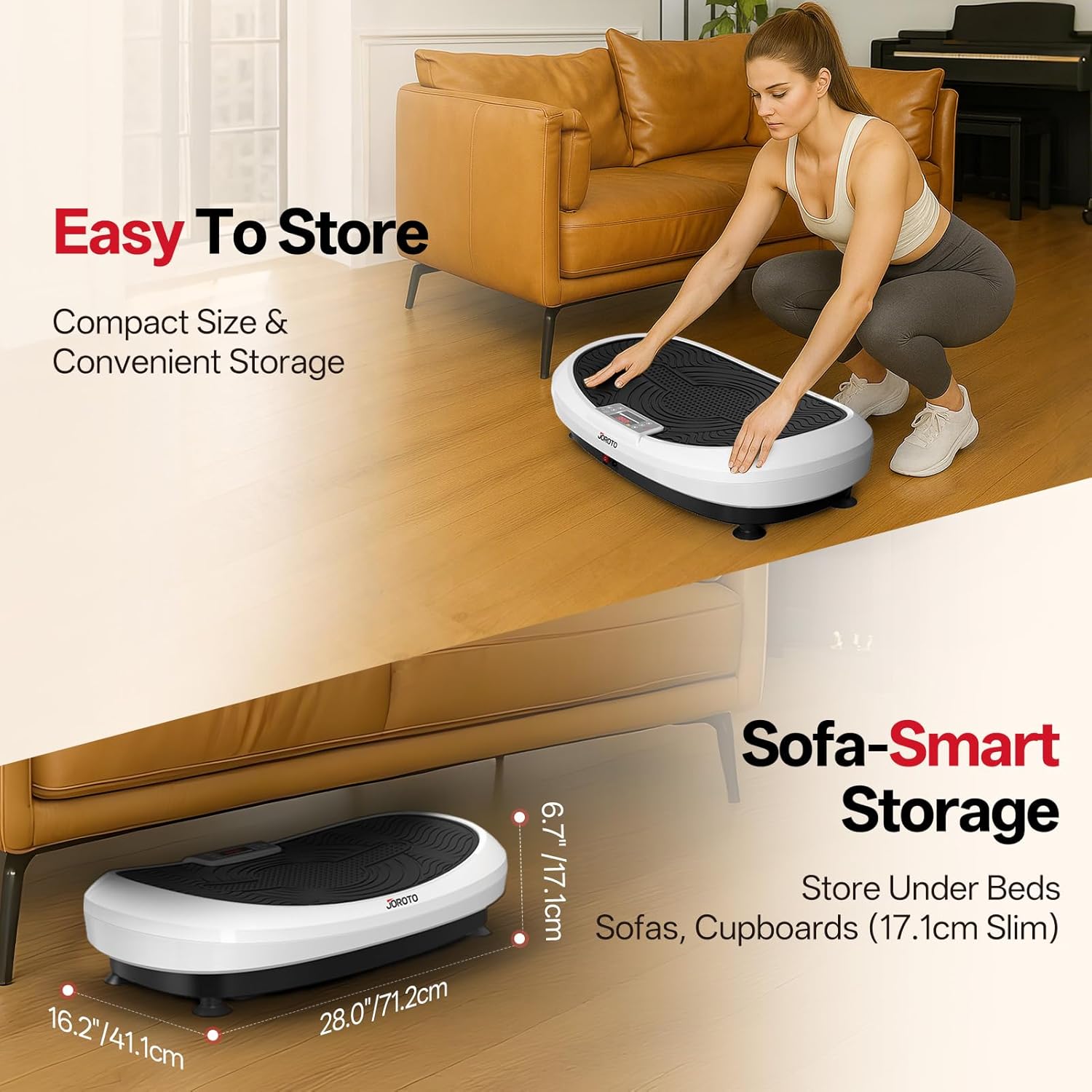
The image illustrates how easily the vibration plate can be stored in small spaces due to its slim profile.
Laasigbotitusita
If you encounter any issues with your JOROTO JV60, please refer to the following common problems and solutions:
| Isoro | Owun to le Fa | Ojutu |
|---|---|---|
| Ẹrọ naa ko ṣiṣẹ. | Power cable not connected properly; Main power switch is off; Power outlet malfunction. | Ensure power cable is securely plugged into the device and outlet. Check if the main power switch is in the 'ON' position. Test the outlet with another device. |
| Kò sí ìgbọ̀n tàbí ìgbọ̀n tí kò lágbára. | Incorrect mode selected; Speed level too low; Device overloaded. | Select an appropriate mode (automatic or manual). Increase the speed level. Ensure user weight does not exceed 158 KG. |
| Isakoṣo latọna jijin ko ṣiṣẹ. | Batteries are dead or incorrectly inserted; Obstruction between remote and device. | Replace batteries in the remote control. Ensure there are no obstacles blocking the signal. Point the remote directly at the device's receiver. |
| Ariwo dani nigbati isẹ. | Device not on a level surface; Loose components. | Ensure the device is on a flat, stable surface. Check for any loose parts. If the noise persists, contact customer support. |
Awọn pato
| Ẹya ara ẹrọ | Ẹ̀kúnrẹ́rẹ́ |
|---|---|
| Nọmba awoṣe | JV60 |
| Awọn iwọn Ọja (L x W x H) | 71.2 x 71.2 x 17.1 cm (28.0 x 28.0 x 6.7 inches) |
| Iwọn Nkan | 16 kilo |
| Ohun elo | Alloy Irin |
| Max Recommended Load | 158 Kilograms (350 LBS) |
| Agbara Wattage | 440 Wattis |
| Nọmba ti Awọn eto | 10 (3 Automatic, 7 Manual) |
| Nọmba awọn ipele Resistance | 30 |
| Iṣakoso Iru | Isakoṣo latọna jijin |
| Ipo Isẹ | Laifọwọyi |
| Orisun agbara | Okun Itanna |
| Ilu isenbale | China |
Atilẹyin ọja ati Support
The JOROTO JV60 4D Vibration Plate comes with a 1-odun olupese ká atilẹyin ọja.
For any questions, technical assistance, or warranty claims, please contact JOROTO Sport & Fitness customer service. Refer to your user manual for specific contact details or visit the official JOROTO webojula.
Iṣẹ onibara: JOROTO Sport & Fitness