
1. Ifihan
This manual provides essential information for the safe installation, operation, and maintenance of your TOMZN TOB9-VAP 63A 1P+N WiFi Smart Switch Energy Meter. This device is a miniature circuit breaker (MCB) with integrated energy metering (Kwh, Voltage, Ampigba, Wattage), monitoring, and timer relay functions, compatible with TUYA Smartlife applications. It is designed to protect electrical circuits from overloads and short circuits while offering smart control and energy consumption insights.
2. Alaye Aabo
IKILO: Ewu ti Electric mọnamọna.
- Fifi sori ẹrọ ati itọju gbọdọ jẹ nipasẹ oṣiṣẹ ti o peye nikan.
- Always disconnect power at the main circuit breaker before installing or servicing the device.
- Rii daju pe gbogbo awọn asopọ onirin wa ni aabo ati ni ibamu pẹlu awọn koodu itanna agbegbe.
- Ma ṣe ṣiṣẹ ẹrọ ti o ba han pe o bajẹ.
- This device is designed for indoor use in dry environments unless otherwise specified for specific outdoor enclosures.
- The device is rated for 1P+N (Single Phase + Neutral) systems. Ensure correct polarity during installation.
3. Ọja Ipariview
The TOMZN TOB9-VAP is a versatile smart circuit breaker offering protection and advanced monitoring capabilities.
3.1. Key Awọn ẹya ara ẹrọ
- Overload and Short Circuit Protection: Prevents damage caused by excessive current.
- Energy Metering (Kwh, V, A, W): Monitors real-time and historical energy consumption.
- Asopọmọra WiFi: Remote control and monitoring via smartphone app.
- Timer Relay Function: Schedule on/off times for connected loads.
- VA Protection: Adijositabulu Voltage ati Amperage protection settings.
- TUYA Smartlife Compatible: Integrates with popular smart home platforms.
- Ikole ti o tọ: Made with high-quality insulating, flame-retardant, and UV-resistant materials.
- Awọn isopọ to ni aabo: Screw-type terminals for stable electrical connections.
3.2. Àwọn Ẹ̀yà àti Àwọn Àmì

Figure 1: TOMZN TOB9-VAP WiFi Smart Switch Energy Meter (Metering VA Protection, 1-63A Adjustable). This image shows the device with its input (Power) and output (Load) terminals, WiFi indicator, CE mark, signal light, and the main power button. The display indicates 'Metering VA protection In: 1-63A'.

Figure 2: TOMZN TOB9-63M WiFi Smart Switch Energy Meter (Metering). This variant includes energy metering capabilities (kW·h, W, V, A) but may not have the adjustable VA protection of the TOB9-VAP.
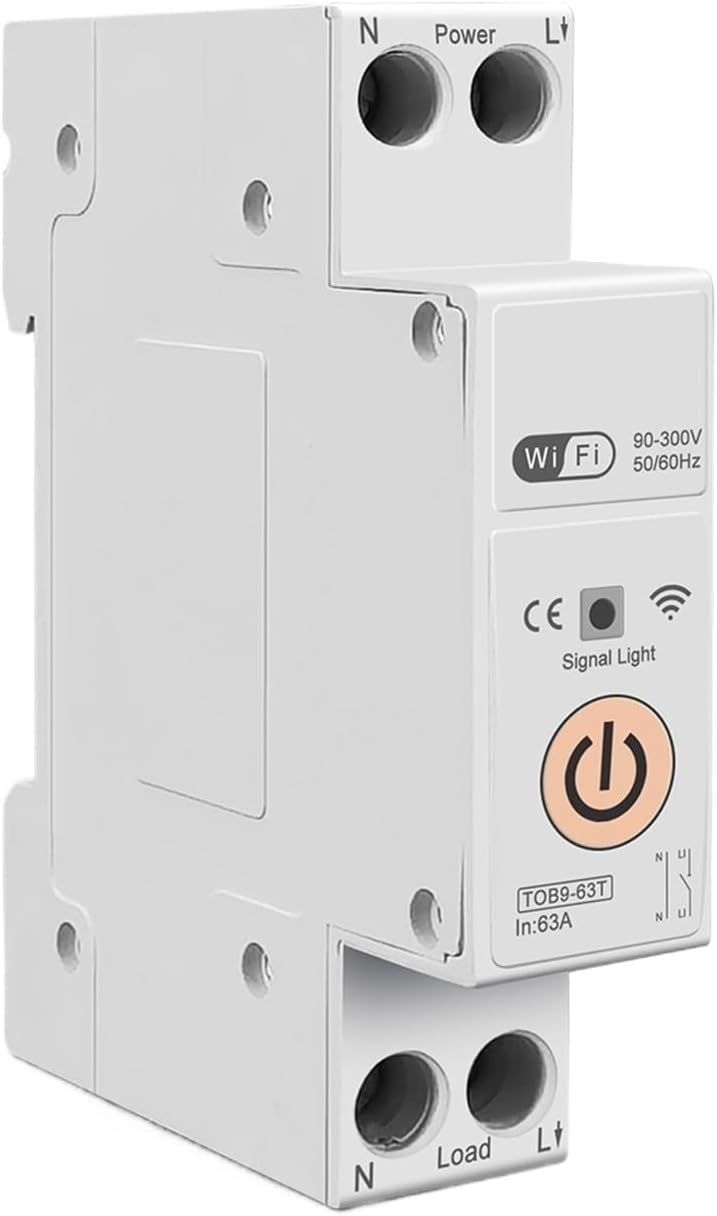
Figure 3: TOMZN TOB9-63T WiFi Smart Switch (No Metering). This basic variant provides WiFi control and circuit protection without energy metering functions.
- Power Terminals (N, L): Input connections for neutral and live wires.
- Load Terminals (N, L): Output connections for neutral and live wires to the load.
- Atọka WiFi: Shows the status of the WiFi connection.
- Imọlẹ ifihan agbara: Tọkasi ipo ẹrọ.
- Bọtini agbara akọkọ: Manual ON/OFF control for the circuit breaker.
- Display (TOB9-VAP/TOB9-63M): Shows real-time energy data (Kwh, W, V, A) and protection settings.
4. Eto
4.1. Fifi sori ẹrọ ati Wiring
- Ge asopọ agbara: Before starting, ensure the main power supply to the installation area is completely disconnected.
- Iṣagbesori: Mount the TOB9-VAP on a standard DIN rail within an appropriate electrical enclosure.
- Asopọmọra Waya: Connect the incoming neutral wire to the 'N' terminal under 'Power' and the incoming live wire to the 'L' terminal under 'Power'. Ensure secure screw-type connections.
- Asopọmọra Ijade: Connect the neutral wire to your load to the 'N' terminal under 'Load' and the live wire to your load to the 'L' terminal under 'Load'.
- Ìmúdájú: Ṣàyẹ̀wò gbogbo àwọn ìsopọ̀ lẹ́ẹ̀mejì fún wíwà ní ìdúró àti ìdúró tó tọ́.
- Pada Agbara pada: Once installation is complete and verified, restore power to the main circuit.
4.2. App Pairing (TUYA Smartlife)
- Ṣe igbasilẹ Ohun elo: Download the 'TUYA Smart' or 'Smart Life' app from your smartphone's app store.
- Forukọsilẹ/Wọle: Ṣẹda akọọlẹ kan tabi wọle si akọọlẹ ti o wa tẹlẹ.
- Fi ẹrọ kun: In the app, tap '+' to add a new device. Select 'Electrical' > 'Circuit Breaker (Wi-Fi)'.
- Ipo sisopọ: Ensure the TOB9-VAP's WiFi indicator is blinking rapidly. If not, press and hold the main power button for 5-10 seconds until it blinks rapidly to enter pairing mode.
- Sopọ si WiFi: Follow the in-app instructions to connect the device to your 2.4GHz WiFi network. (5GHz networks are not supported).
- Àtúnsọ orúkọ ẹ̀rọ: Once paired, you can rename the device for easy identification in the app.
5. Awọn ilana Iṣiṣẹ
5.1. Isẹ Afowoyi
- Tan/PA: Press the main power button on the device to manually switch the circuit breaker ON or OFF.
5.2. App Control and Monitoring
- Tan/PA Latọna jijin: Use the TUYA Smartlife app to remotely switch the circuit breaker ON or OFF.
- Abojuto Agbara: View real-time and historical data for Kwh consumption, current (A), voltage (V), and power (W) directly in the app.
- Aago/Ìṣètò: Set up schedules or countdown timers for automatic ON/OFF operations.
- VA Protection Settings: Ṣe àtúnṣe overvoltage, labẹ-voltage, over-current, and over-power protection thresholds within the app. The device will automatically trip if these thresholds are exceeded.
- Adaaṣe Iwoye: Integrate the device into smart scenes with other TUYA-compatible devices.
6. Itọju
- Ayẹwo igbagbogbo: Periodically inspect the device and its wiring for any signs of damage, loose connections, or overheating.
- Ninu: Clean the exterior of the device with a dry, soft cloth. Do not use liquid cleaners or solvents.
- Awọn imudojuiwọn famuwia: Check the TUYA Smartlife app for any available firmware updates to ensure optimal performance and security.
- Ṣayẹwo Ọjọgbọn: For any internal issues or complex repairs, consult a qualified electrician.
7. Laasigbotitusita
| Isoro | Owun to le Fa | Ojutu |
|---|---|---|
| Ẹrọ naa ko ṣiṣẹ. | Kò sí ìpèsè agbára; àwọn wáyà tí kò ní agbára; àṣìṣe inú. | Check main power supply. Verify all wiring connections. If problem persists, contact support. |
| WiFi indicator not blinking/connecting. | Incorrect pairing mode; weak WiFi signal; 5GHz network. | Ensure device is in rapid blinking pairing mode. Move device closer to router. Ensure router is 2.4GHz. |
| Awọn ẹrọ n lọ nigbagbogbo. | Overload/short circuit; incorrect VA protection settings. | Reduce load on the circuit. Check for short circuits. Adjust VA protection thresholds in the app if necessary. |
| Inaccurate energy readings. | Incorrect wiring; device malfunction. | Verify wiring connections. If problem persists, contact support. |
8. Awọn pato
| Ẹya ara ẹrọ | Ẹ̀kúnrẹ́rẹ́ |
|---|---|
| Awoṣe | TOB9-VAP |
| Ti won won Lọwọlọwọ | 1-63A (A le ṣatunṣe) |
| Oṣuwọn Voltage | 90-300V AC |
| Igbohunsafẹfẹ | 50/60Hz |
| Awọn ọpá | 1P+N |
| Asopọmọra | WiFi (2.4GHz only) |
| Ibamu App | TUYA Smart / Smart Life |
| Idaabobo Awọn ẹya ara ẹrọ | Overload, Short Circuit, Over-Voltage, Labẹ-Voltage, Over-Current, Over-Power |
| Package Mefa | 0.39 x 0.39 x 0.39 inches |
| Iwọn Nkan | 3.53 iwon |
| Olupese | Generic (TOMZN) |
| Nọmba Awoṣe Nkan | JCZWUUZZB-DFE767306BB9FC909ED20C115B9 |
9. Atilẹyin ọja ati Support
Fún ìwífún nípa àtìlẹ́yìn, ìrànlọ́wọ́ ìmọ̀-ẹ̀rọ, tàbí ìbéèrè iṣẹ́, jọ̀wọ́ wo àwọn ìwé tí a pèsè pẹ̀lú ohun tí o rà tàbí kí o kàn sí olùtajà náà tààrà. Pa ìwé ẹ̀rí ìrajà rẹ mọ́ gẹ́gẹ́ bí ẹ̀rí ìrajà náà.