
1. Ifihan
Thank you for choosing the SnapFresh 4V Cordless Electric Scissors. This tool is designed for efficient cutting of various materials such as cardboard, fabric, carpet, and leather. Please read this manual thoroughly before operation to ensure safe and effective use. Keep this manual for future reference.
2. Awọn ilana aabo
Always prioritize safety when operating any power tool. Failure to follow these instructions may result in electric shock, fire, and/or serious injury.
2.1 Gbogbogbo Abo
- Jẹ ki agbegbe iṣẹ jẹ mimọ ati itanna daradara. Awọn agbegbe idamu tabi awọn agbegbe dudu n pe awọn ijamba.
- Ma ṣe ṣiṣẹ awọn irinṣẹ agbara ni awọn bugbamu bugbamu, gẹgẹbi niwaju awọn olomi ina, gaasi, tabi eruku. Awọn irinṣẹ agbara ṣẹda awọn ina ti o le tan eruku tabi eefin.
- Pa awọn ọmọde ati awọn alafojusi kuro lakoko ti o nṣiṣẹ ohun elo agbara kan. Awọn idamu le fa ki o padanu iṣakoso.
- Always wear appropriate personal protective equipment, including safety glasses, gloves, and hearing protection if necessary.
2.2 Itanna Abo
- Yago fun olubasọrọ ara pẹlu ilẹ tabi ilẹ roboto bi paipu, imooru, awọn sakani, ati firiji. Ewu ti o pọ si ti mọnamọna ina mọnamọna ti ara rẹ ba wa ni ilẹ tabi ti ilẹ.
- Ma ṣe fi awọn irinṣẹ agbara han si ojo tabi awọn ipo tutu. Omi ti nwọle ọpa agbara yoo mu eewu ti mọnamọna mọnamọna pọ si.
- Maṣe ṣe ilokulo okun naa. Maṣe lo okun fun gbigbe, fifa tabi yọọ ohun elo agbara. Jeki okun kuro lati ooru, epo, eti to mu, tabi awọn ẹya gbigbe. Awọn okun ti o bajẹ tabi dipọ pọ si eewu ina mọnamọna.
2.3 Ààbò Abẹ́
- Ensure the safety lock is engaged when the tool is not in use or when changing blades.
- Always use sharp, undamaged blades. Dull blades can bind and cause kickback.
- Keep hands and fingers away from the rotating blade during operation.
- Do not attempt to cut materials thicker than 1/4 inch (6.35 mm).
3. Package Awọn akoonu
Daju pe gbogbo awọn nkan wa ati ni ipo ti o dara nigbati ṣiṣi silẹ.
- 1 x Cordless Electric Scissors (SP5091)
- 1 x Extra SKS7 Alloy Blade
- 1 x USB Iru-C Okun Ngba agbara
- 1 x Itọsọna olumulo
- 1 x Apo Ibi ipamọ

Image: The complete kit, showing the electric scissors, an extra blade, a USB charging cable, the user manual, and a storage bag.
4. Ọja Ipariview
Familiarize yourself with the components of your SnapFresh Electric Scissors.

Aworan: A alaye view of the electric scissors, pointing out the SKS7 alloy blade, safety switch, LED status indicator, Type-C charging port, and built-in LED light.
- SKS7 Alloy Blade: Durable and self-sharpening for precise cuts.
- Yipada Aabo: Idilọwọ iṣẹ-ṣiṣe lairotẹlẹ.
- Ipo Ifihan LED: Ṣe afihan ipele idiyele batiri.
- Ibudo Ngba agbara Iru-C: Fun gbigba agbara ti o rọrun.
- Imọlẹ LED ti a ṣe sinu: Ṣe itanna agbegbe gige fun ilọsiwaju hihan.
5. Eto
5.1 Ngba agbara si Batiri naa
The tool is powered by a 4V 2.0Ah rechargeable battery. Ensure the battery is fully charged before first use.
- Locate the Type-C charging port on the tool.
- Connect the provided USB Type-C charging cable to the tool and a compatible USB power adapter (not included).
- The LED status indicator will show the charging progress. A full charge is indicated when all LED lights are solid green.
- Ge asopọ ṣaja ni kete ti gbigba agbara ti pari.

Image: The electric scissors being charged via its Type-C USB port.
5.2 Installing/Replacing the Blade
Always ensure the tool is turned off and the safety lock is engaged before handling the blade.
- Press the safety lock to prevent accidental activation.
- Using a screwdriver, unscrew the screw holding the blade in place.
- Carefully remove the old blade, holding it with pliers if necessary.
- Place the new SKS7 alloy blade onto the spindle, ensuring it aligns correctly.
- Mu dabaru ni aabo.

Image: Visual instructions for replacing the cutting blade, detailing how to hold the blade, unscrew, remove, prepare, install, and tighten the new blade.
6. Awọn ilana Iṣiṣẹ
6.1 Titan / Pa a
- To turn on: Press and hold the safety lock button, then pull the trigger. The blade will begin rotating.
- To turn off: Release the trigger. The blade will stop rotating.
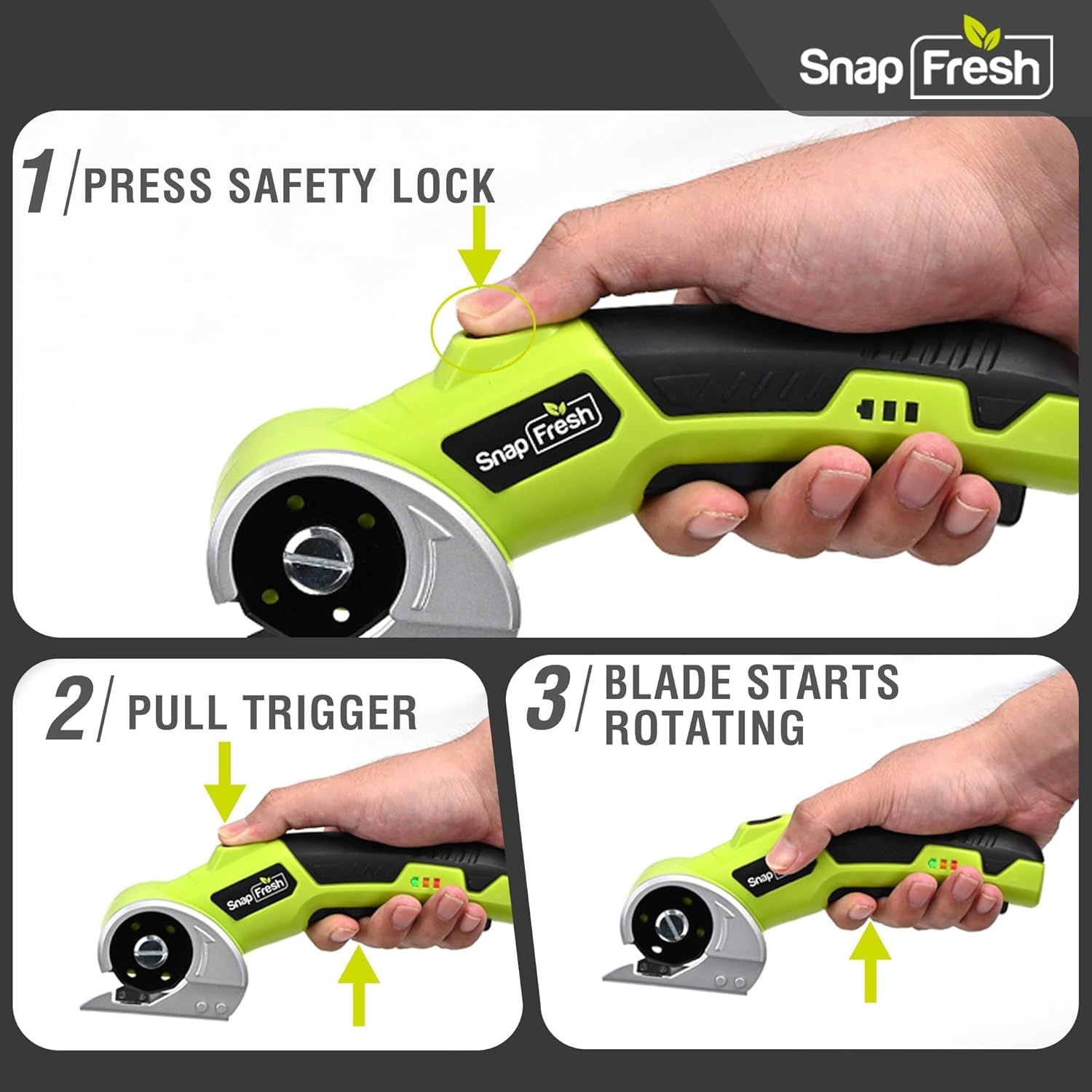
Image: A three-step visual guide demonstrating how to activate the electric scissors by pressing the safety lock and pulling the trigger.
6.2 Gígé Onírúurú Ohun Èlò
The SnapFresh Electric Scissors are suitable for cutting materials up to 1/4 inch thick, including:
- Paali
- Aṣọ
- capeti
- Alawọ
- Iwe
- Ribbon
- Koriko Oríkĕ
For best results, ensure the material is laid flat and stable. Guide the tool smoothly along the desired cutting line. The built-in LED light will illuminate your path.
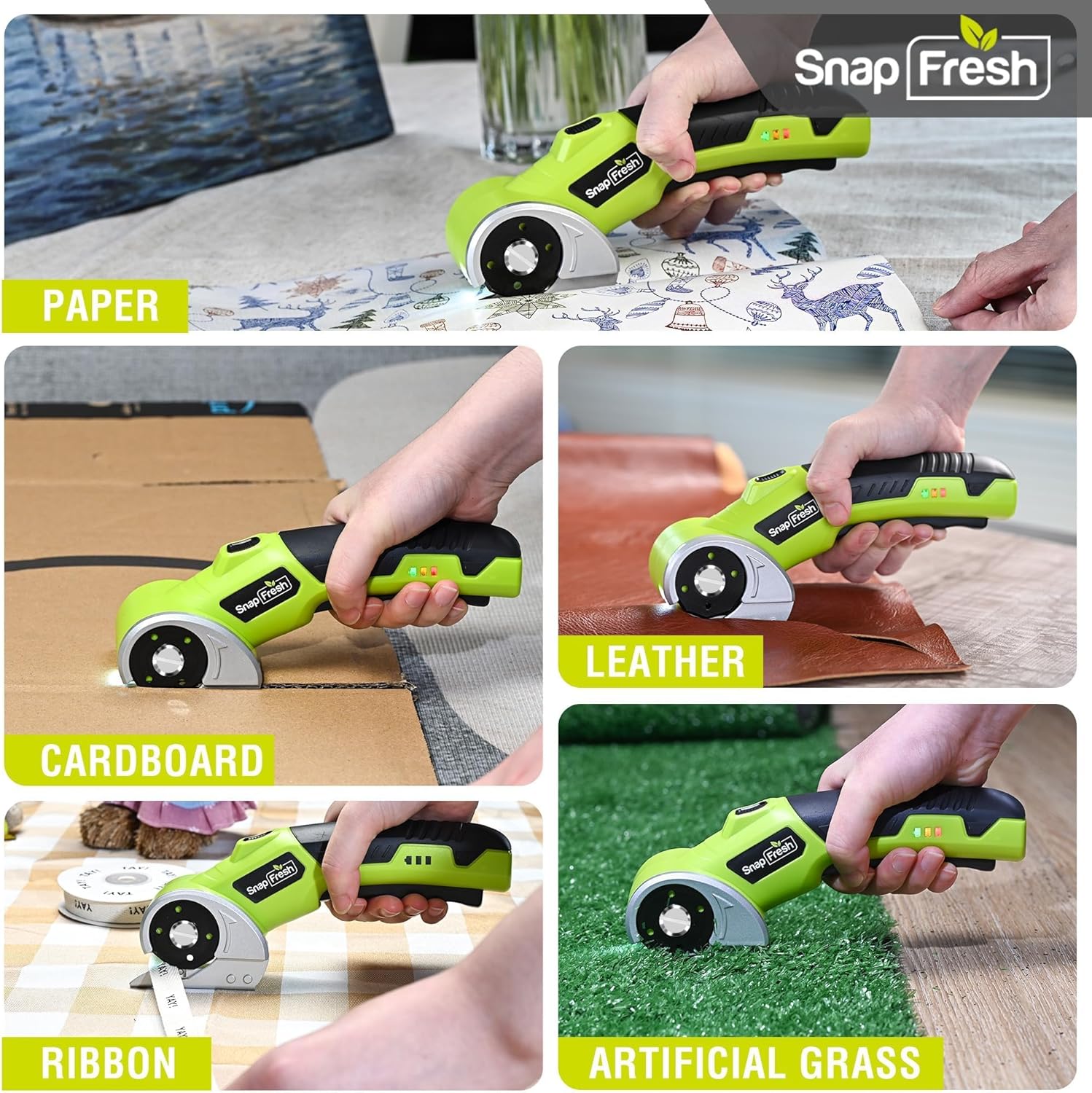
Image: The electric scissors demonstrating its capability to cut through various materials like paper, leather, cardboard, ribbon, and artificial grass.

Image: The electric scissors making both straight and curved cuts on a piece of leather, highlighting its precision.
Video: An official product video demonstrating the SnapFresh Electric Scissors cutting various materials like burlap, kraft paper, ribbon, and newspaper, showcasing its versatility for crafting and DIY projects.
7. Itọju
7.1 Ninu
- After each use, ensure the tool is off and the safety lock is engaged.
- Use a dry cloth to wipe away any dust or debris from the blade and tool body.
- Maṣe lo awọn kemikali lile tabi awọn afọmọ abrasive.
7.2 batiri Itọju
- Store the tool with a partially charged battery (around 50%) if not used for extended periods.
- Yago fun gbigba agbara si batiri ni kikun nigbagbogbo, nitori eyi le dinku igbesi aye rẹ.
- Ma ṣe fi batiri han si awọn iwọn otutu to gaju.
7.3 Ibi ipamọ
Store the electric scissors and its accessories in the provided storage bag in a dry, secure place, out of reach of children.
8. Laasigbotitusita
| Isoro | Owun to le Fa | Ojutu |
|---|---|---|
| Irinṣẹ ko ni tan-an | Batiri naa kere tabi ti dinku Safety lock not disengaged | Gba agbara si batiri ni kikun Ensure both safety lock and trigger are pressed simultaneously |
| Blade ko gige fe ni | Blade is dull or damaged Ohun elo ti nipọn pupọ | Rọpo abẹfẹlẹ Do not attempt to cut materials thicker than 1/4 inch |
| Ọpa ma duro lakoko iṣẹ | Batiri ti bajẹ Idaabobo apọju ti mu ṣiṣẹ | Saji si batiri Reduce pressure or cut thinner material |
9. Awọn pato
| Ẹya ara ẹrọ | Sipesifikesonu |
|---|---|
| Nọmba awoṣe | SP5091 |
| Voltage | 4V |
| Agbara Batiri | 2.0Ah Lithium Ion |
| Ko si-Fifuye Iyara | 285 RPM |
| Max Ige Sisanra | 1/4 inch (6.35 mm) |
| Blade elo | SKS7 Alloy Steel |
| Gbigba agbara Port | USB Iru-C |
| Iwọn Nkan | 0.81 lbs (370 Giramu) |
| Ọja Mefa | 7.9 x 2 x 3 inches |
10. Atilẹyin ọja ati Support
SnapFresh products are designed and manufactured to high-quality standards. This product comes with a standard manufacturer's warranty against defects in materials and workmanship. Please refer to the warranty card included in your package for specific terms and conditions.
For technical support, troubleshooting assistance, or to inquire about replacement parts, please contact SnapFresh customer service through the official webaaye tabi alaye olubasọrọ ti a pese lori kaadi atilẹyin ọja rẹ.
Webojula: Visit the SnapFresh Store