
Ọrọ Iṣaaju
Thank you for choosing the LEEMC S12 Wireless Sports Earbuds. These earbuds are designed to provide a high-quality audio experience with features tailored for active lifestyles, including secure fit, noise cancellation, and water resistance. This manual will guide you through the setup, operation, and maintenance of your new earbuds.
Ohun ti o wa ninu Apoti
Jọwọ ṣayẹwo awọn akoonu package lati rii daju pe gbogbo awọn ohun kan wa:
- LEEMC S12 Wireless Sports Earbuds (Left and Right)
- Ngba agbara Case
- Okun Ngba agbara USB
- Eartips (S/M/L sizes, M pre-installed)
- Itọsọna olumulo
Ọja Pariview
The LEEMC S12 earbuds feature an ergonomic design with ear hooks for a secure fit during physical activity. The charging case includes an LED power display to show battery status.

Image: LEEMC S12 Earbuds in their charging case, displaying battery levels on the LED screen.
Eto ati Lilo akọkọ
1. Activate Earbuds Battery
Before first use, ensure the earbuds' battery is activated. If the earbuds have some charge upon arrival, use them until they shut off automatically, then fully charge to 100%. If they arrive with an empty battery, charge them to 100% before using.

Image: Visual guide for activating and fully charging the earbuds' battery before initial use.
2. Remove Protective Film
Remove any protective film from the charging contacts on the earbuds before placing them in the charging case. Failure to do so will prevent the earbuds from charging.

Image: Illustration demonstrating the removal of the protective film from the earbud charging contacts.
Sopọ Awọn Agbekọri Rẹ
The LEEMC S12 earbuds offer quick and stable Bluetooth 5.4 connectivity.
- Ṣii apoti gbigba agbara. Awọn agbekọri yoo tẹ ipo isọpọ sii laifọwọyi.
- Lori ẹrọ rẹ (foonuiyara, tabulẹti, kọǹpútà alágbèéká), mu Bluetooth ṣiṣẹ.
- Wa fun available Bluetooth devices and select "S12" from the list.
- Ni kete ti o ba ti sopọ, iwọ yoo gbọ ohun orin idaniloju, ati awọn agbekọri yoo ṣetan fun lilo.
Video: This video demonstrates the quick one-step pairing process of the LEEMC S12 Wireless Sports Earbuds with a mobile device, highlighting the Bluetooth 5.4 stable connection and Hi-Fi audio capabilities. It also shows the IPX7 water resistance and 50-hour battery life.

Image: The LEEMC S12 earbuds are compatible with a wide range of devices including phones, laptops, tablets, computers, TVs, and smartwatches.
Wọ awọn Earbuds
Fún dídára ohùn tó dára jùlọ àti bí ó ṣe lè dúró dáadáa, yan ìwọ̀n etí tó tọ́ kí o sì ṣe àtúnṣe sí àwọn ìkọ́ etí.
- Yan Àwọn Àfikún Eartips: The earbuds come with three sizes (S/M/L). Try different sizes to find the most comfortable and secure fit. The medium size is pre-installed.
- Position Ear Hook: Place the ear hook over your ear.
- Fi Etí Àfikún sí i: Fi rọra fi agbekọri sinu odo eti rẹ.
- Rotate for Comfort: Rotate the earbud slightly to achieve a comfortable and stable angle.
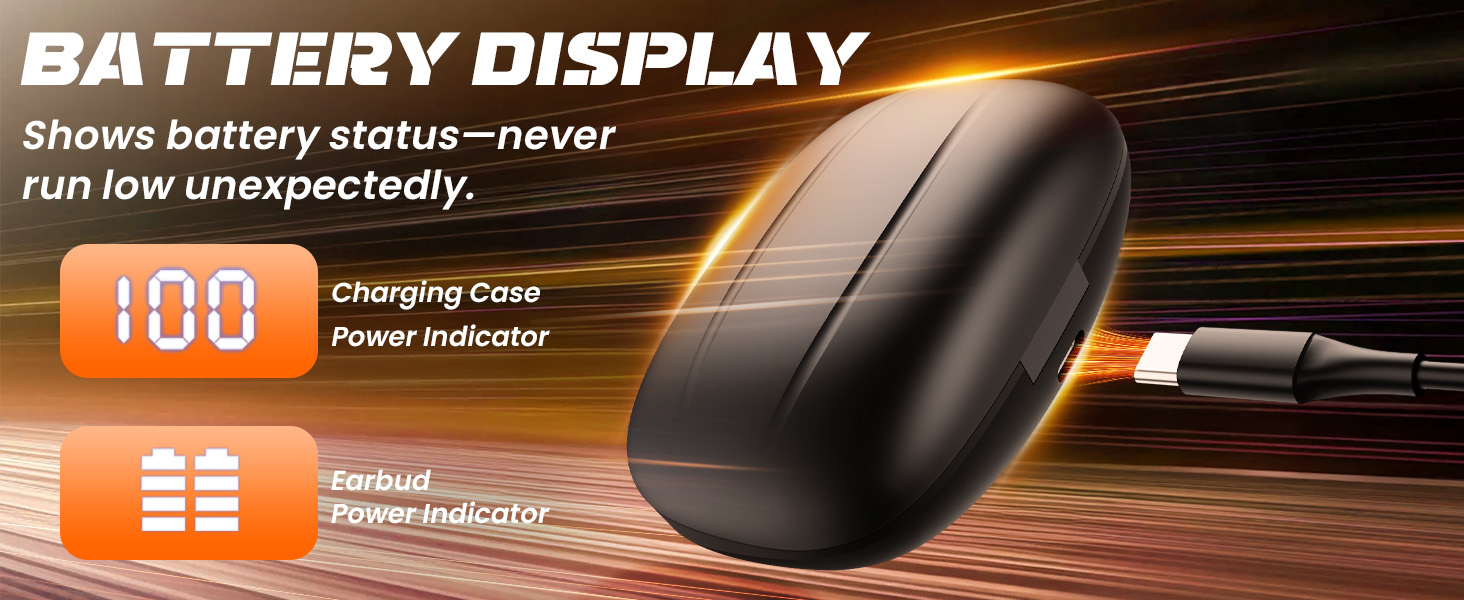
Image: This image illustrates the three included ear tip sizes (S, M, L) and shows various individuals wearing the LEEMC S12 earbuds securely during different activities, demonstrating their universal fit.

Image: Step-by-step diagram illustrating how to properly put on the LEEMC S12 earbuds for a comfortable and stable fit: 1. Put the ear hook on the ear. 2. Insert the earbud into the ear. 3. Rotate the earbud for a comfortable and stable angle.
Awọn iṣakoso iṣẹ
The LEEMC S12 earbuds feature intuitive button controls for easy management of your audio and calls.

Image: Detailed diagram of the single-touch gesture controls for the LEEMC S12 earbuds, including functions for play/pause, next/previous song, answer/hang up calls, reject incoming calls, and voice assistant activation.

Image: Diagram illustrating the physical button controls on the LEEMC S12 earbuds for managing media playback, calls, voice assistant, and volume adjustments.
Function Button (R/L Earbud)
- Fọwọ ba ẹyọkan: Play/Pause music, Answer/Hang up call.
- Fọwọ́bà lẹ́ẹ̀mejì: Next Song, Reject incoming calls.
- Tẹ ni kia kia meteta: Orin ti tẹlẹ.
- Press and hold 3 seconds: Mu Oluranlọwọ Ohun ṣiṣẹ.
Bọtini iwọn didun
- '+' Bọtini: Iwọn didun Up.
- '-' Bọtini: Iwọn didun isalẹ.
Gbigba agbara
The LEEMC S12 earbuds provide up to 50 hours of total playtime with the charging case. The case features an LED display to indicate battery status.
Ngba agbara si Earbuds
Place the earbuds into the charging case. They will automatically begin charging. The LED display on the case will show the charging status.
Gbigba agbara si ọran naa
Connect the charging case to a power source using the provided USB charging cable. The LED display will show the charging progress. A full charge provides multiple recharges for the earbuds.
Image: The charging case features a digital display showing the battery percentage of the case and individual indicators for each earbud's power status.
Atako Omi (IPX7)
The LEEMC S12 earbuds are IPX7 waterproof, making them resistant to sweat and rain. This makes them suitable for workouts and outdoor activities.
Akiyesi pataki:
- IPX7 rating means the earbuds can withstand immersion in water up to 1 meter for 30 minutes.
- Wọn jẹ kii ṣe suitable for showering, swimming, or prolonged submersion in water.
- Ensure the earbuds are completely dry before placing them back in the charging case to prevent damage.
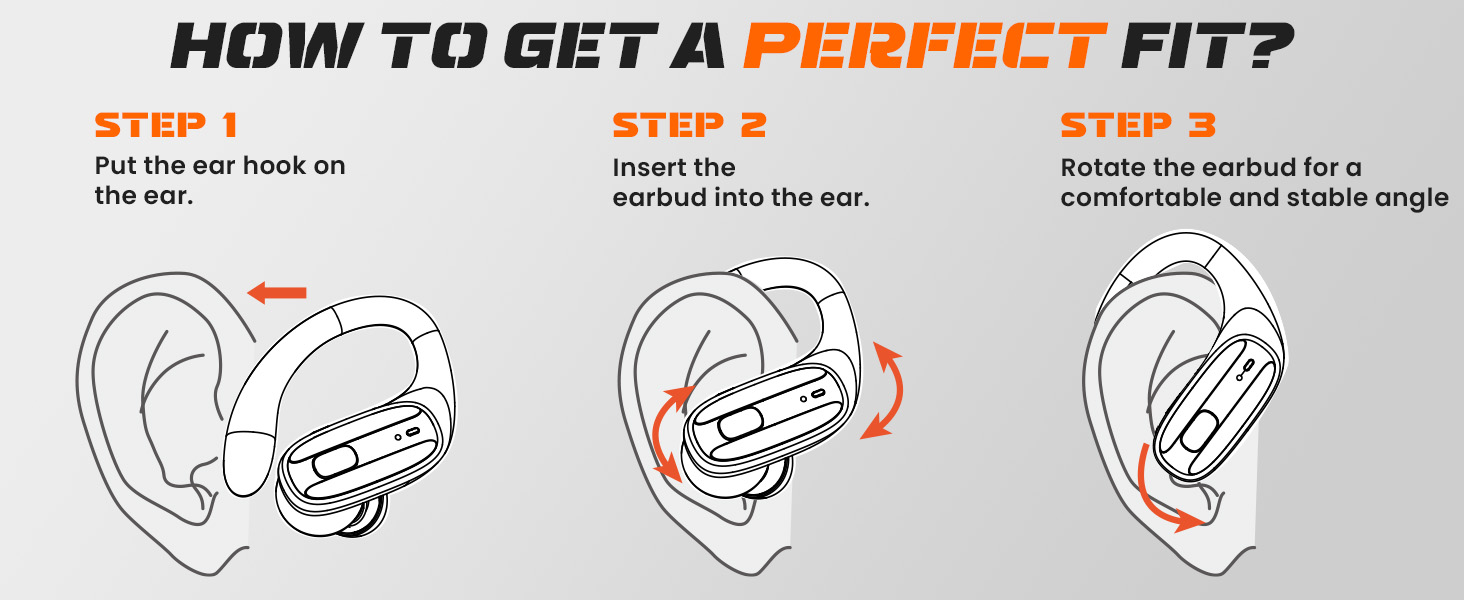
Image: The LEEMC S12 earbuds are shown with an IPX7 rating, indicating heavy sweat resistance. A warning icon clarifies they are not suitable for showering or swimming.
Laasigbotitusita
If you encounter any issues with your LEEMC S12 earbuds, please refer to the following common solutions:
| Isoro | Owun to le Solusan |
|---|---|
| Earbuds ko so pọ |
|
| Agbekọri agbekọri kan ṣoṣo ti n ṣiṣẹ |
|
| Earbuds ko gba agbara |
|
| Dídára ohùn tí kò dára / Básì tí kò lágbára |
|
| Background noise during calls |
|
Awọn pato
| Ẹya ara ẹrọ | Ẹ̀kúnrẹ́rẹ́ |
|---|---|
| Orukọ awoṣe | S12 |
| Asopọmọra Technology | Ailokun (Bluetooth 5.4) |
| Bluetooth Ibiti | Titi de awọn mita 11 (39 ẹsẹ) |
| Igbesi aye batiri (Earbuds) | Titi di wakati 15 (agbara ẹyọkan) |
| Lapapọ akoko ere (pẹlu Ọran) | Titi di wakati 50 |
| Omi Resistance | IPX7 (Lan ati Atako ojo) |
| Ifagile Ariwo | ENC (Ìfagilé Ariwo Ayika) fún àwọn ìpè |
| Ohun elo | Silikoni (awọn ìkọ etí) |
| Awọn irinše to wa | Earbuds, Charging Case, USB Cable, Eartips (S/M/L), User Manual |
Alaye Aabo
- Ma ṣe fi awọn agbekọri han si awọn iwọn otutu to gaju tabi imọlẹ orun taara.
- Avoid dropping or applying excessive force to the earbuds or charging case.
- Jeki kuro ni arọwọto awọn ọmọde ati awọn ohun ọsin.
- Ma ṣe gbiyanju lati ṣaito tabi tun ọja naa pada.
- Clean earbuds and charging contacts regularly with a soft, dry cloth.
- Yago fun lilo awọn agbekọri ni iwọn giga fun awọn akoko gigun lati ṣe idiwọ ibajẹ igbọran.
Atilẹyin ọja ati Support
LEEMC products come with a standard manufacturer's warranty. For specific warranty details, please refer to the warranty card included in your package or contact LEEMC customer support.
If you have any questions or require assistance with your LEEMC S12 Wireless Sports Earbuds, please contact our customer support team through the retailer where you purchased the product or visit the official LEEMC webojula fun alaye olubasọrọ.


