
1. Ọja Ipariview
The MAIMEIMI Universal Motorcycle Digital Speedometer Gauge is a multi-functional instrument designed for motorcycles. It provides real-time data including speed, engine RPM, gear indication, odometer readings, oil level, and steering indicators. This gauge cluster offers integrated data monitoring for various riding conditions.
Aworan 1.1: Iwaju view of the MAIMEIMI Universal Motorcycle Digital Speedometer Gauge.
Awọn ẹya pataki:
- Iṣafihan Iṣọkan: Shows speed, tachometer (RPM), 1-6 gear indicator, odometer (ODO/TRIP), oil level, and steering indicators.
- Adjustable Tire Size: Compatible with various tire sizes, adjustable from 40" to 118".
- Wide Speed Range: Speed display range of 0-199 MPH.
- Iwọn Tachometer: 0-12 (x1000r/min).
- Mileage Tracking: Cumulative mileage (ODO) 0-999999 KM/MILES, subtotal mileage (TRIP) 0.0-999.9 KM/MILES.
- Itaniji Epo Kekere: Flashing outer frame and indicator light when oil level is below the alarm value.
- Apẹrẹ ti ko ni omi: Constructed from high-quality ABS material with an epoxy resin sealed LCD screen for clear visibility in various weather conditions.
- Ibamu Agbaye: Suitable for most 1/2 cylinder motorcycle engines with a 12V DC voltage eto.

Image 1.2: The speedometer installed on a motorcycle, showing its integration.
2. Package Awọn akoonu
Daju pe gbogbo awọn nkan ti a ṣe akojọ rẹ si isalẹ wa ninu package rẹ:
- 1 x Motorcycle Speedometer
- 1 x Speed Sensor
- 1 x Atọka iṣagbesori
- 1 x Installation Instruction (Electronic version available upon request)
3. Imọ ni pato
| Sipesifikesonu | Iye |
|---|---|
| Awọn iwọn Ọja (L x W x H) | 7.08 x 3.74 x 3.34 inches (180 x 95 x 85 mm) |
| Iwọn Nkan | 14.4 iwon (0.9 lbs) |
| Ohun elo | ABS ṣiṣu, Irin |
| Voltage ibamu | DC 12V |
| Speed Display Range | 0-199 MPH (or KM/H) |
| Tachometer Display Range | 0-12 x1000r/min |
| Odometer (ODO) Range | 0-999999 KM/MILES |
| Trip Meter (TRIP) Range | 0.0-999.9 KM/MILES |
| Adjustable Tire Circumference | 40"-118" |

Image 3.1: Detailed dimensions of the speedometer gauge.
4. Eto ati fifi sori
Installation of the speedometer requires basic electrical knowledge. If you are unsure, consult a professional motorcycle mechanic.
4.1 Wiring aworan atọka
Refer to the following diagram for proper wiring connections. Ensure all connections are secure and insulated to prevent short circuits.
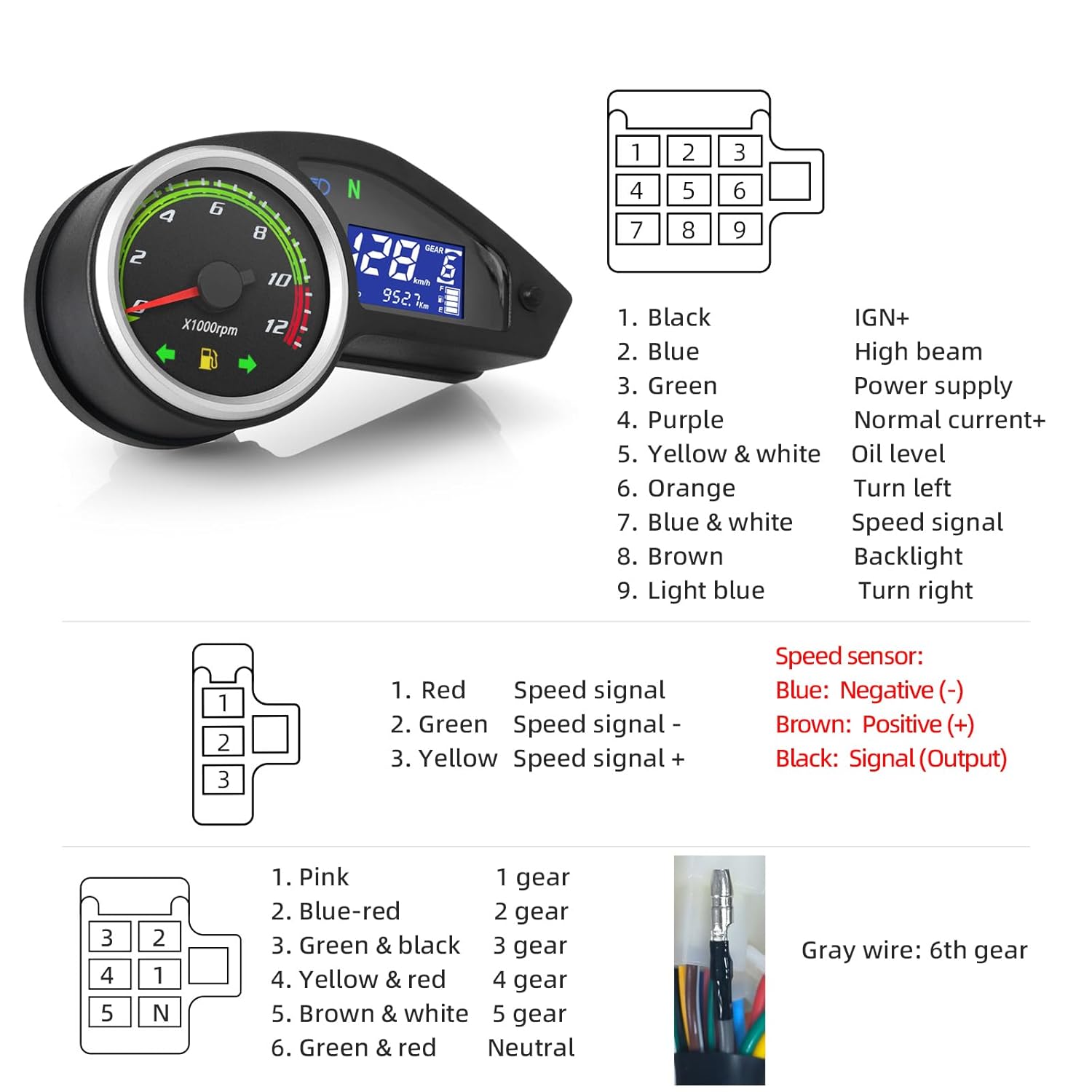
Image 4.1: Wiring connections for the speedometer and speed sensor.
Main Connector (9-pin):
- Dudu: IGN+ (Ignition Positive)
- Buluu: Itan giga
- Alawọ ewe: Power supply (Ground)
- eleyi ti: Normal current+
- Yellow & White: Epo ipele
- Ọsan: Turn left signal
- Blue & White: Iyara ifihan agbara
- Brown: Imọlẹ ẹhin
- Buluu Imọlẹ: Turn right signal
Speed Sensor Connector (3-pin):
- Pupa: Speed signal +
- Alawọ ewe: Speed signal -
- Yellow: Speed signal +
- Dudu: Signal (Output)
Gear Indicator Connector (6-pin):
- Pink: 1st jia
- Buluu-pupa: 2nd jia
- Green & Black: 3rd jia
- Yellow & Red: 4th jia
- Brown & White: 5th jia
- Green & Red: Àdánù
- Grẹy waya: 6th jia
4.2 Tire Circumference Adjustment
The speedometer's accuracy depends on correct tire circumference settings. The adjustable range is 40"-118". Consult your motorcycle's manual for the exact tire circumference or measure it accurately. The adjustment procedure is typically performed during initial setup via the button on the gauge.
5. Awọn ilana Iṣiṣẹ
5.1 ifihan Awọn iṣẹ
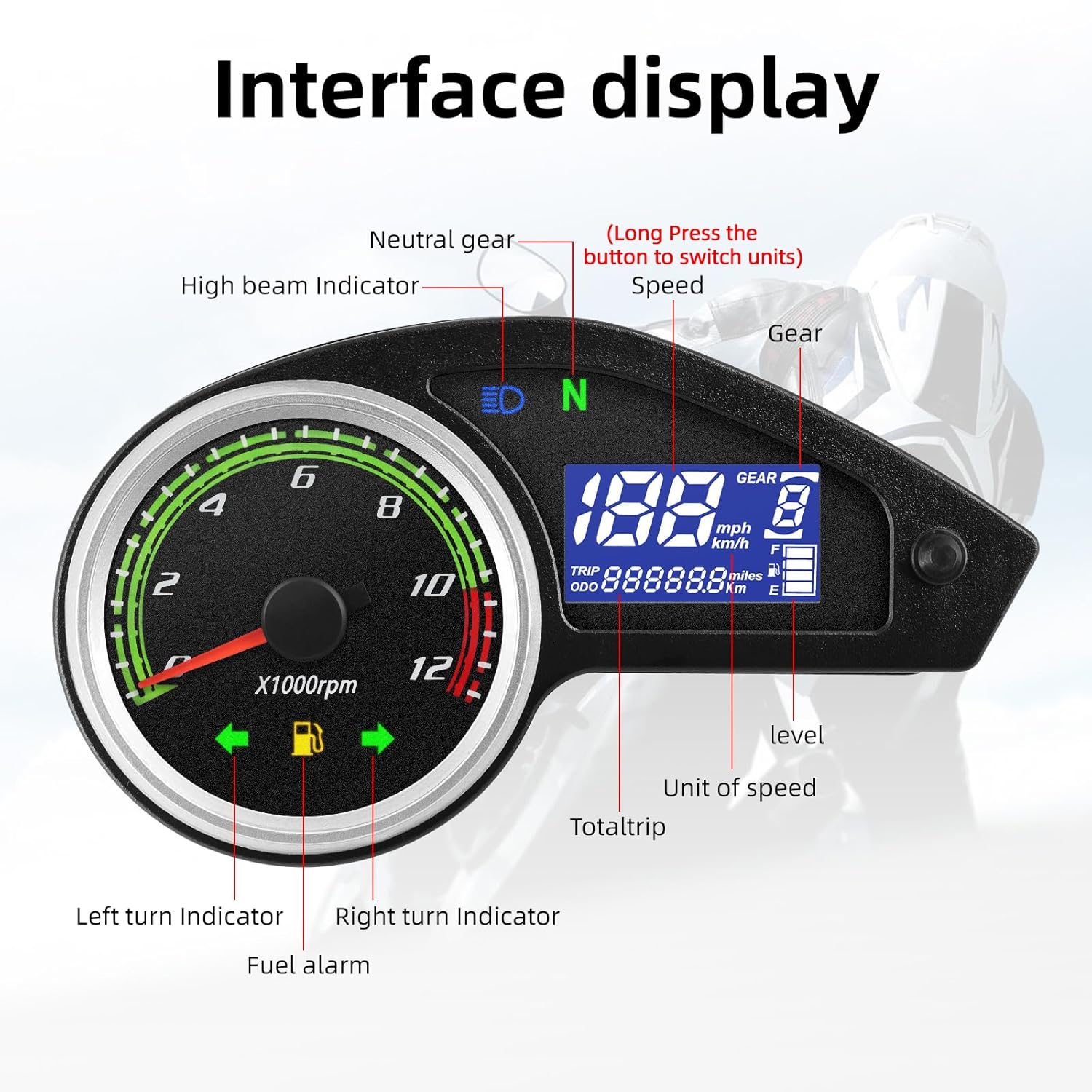
The digital display provides comprehensive information at a glance:

Image 5.1: Labeled interface display showing various indicators and readings.
- Iyara: Digital display in MPH or KM/H.
- Tachometer: Analog dial (x1000 RPM) and digital display.
- Atọka jia: Displays current gear (1-6) or Neutral (N).
- Odometer (ODO): Total accumulated mileage.
- Trip Meter (TRIP): Resettable mileage for individual trips.
- Ipele Epo: Bar graph indicator.
- Turn Indicators: Left and Right arrows illuminate.
- High Beam Indicator: Symbol illuminates when high beams are active.
- Neutral Gear Indicator: 'N' symbol illuminates when in neutral.
- Fuel Alarm: Flashing icon when fuel level is low.
5.2 Unit Switching and Display Modes
The single button on the gauge allows for switching between different display modes and units.

Image 5.2: Visual representation of unit and display mode switching.
- Switching Speed Units (MPH/KM/H): After the instrument panel is activated, press and hold the button for 3-5 seconds. The speed unit will automatically switch.
- Toggling Odometer/Trip Meter: A short press of the button will toggle between the ODO (cumulative mileage) and TRIP (subtotal mileage) readings.
5.3 Low Oil Alarm Function
The speedometer is equipped with a low oil alarm. If the oil level falls below a predetermined threshold, the outer frame of the digital display will flash, and the dedicated empty oil indicator light will illuminate to alert the rider.

Image 5.3: Display clarity in both daytime and nighttime conditions.
6. Itọju ati Itọju
6.1 Iṣẹ́ omi tí kò ní omi
The MAIMEIMI motorcycle speedometer is designed with good waterproof performance. The high-quality ABS material and epoxy resin sealed LCD screen allow for normal operation even in rainy weather. However, avoid prolonged submersion or high-pressure water jets directly on the unit.

Image 6.1: The speedometer demonstrating its waterproof capabilities.
6.2 Itọju Gbogbogbo
- Clean the display and housing with a soft, damp asọ.
- Do not use abrasive cleaners, solvents, or harsh chemicals, as these can damage the display or housing.
- Rii daju pe gbogbo awọn asopọ wa ṣinṣin ati ofe lati ipata.
- Periodically check the mounting bracket for security.
7. Laasigbotitusita
If you encounter issues with your speedometer, consider the following common troubleshooting steps:
- Ko si Agbara/Ifihan: Check all wiring connections, especially the power supply (Green wire for ground, Black wire for IGN+). Ensure the motorcycle's battery is charged and providing 12V DC.
- Incorrect Speed Reading: Verify the tire circumference setting is correct. Check the speed sensor wiring (Blue & White wire) and ensure the sensor is properly installed and functioning.
- Tachometer Not Working: Ensure the tachometer signal wire (if applicable and connected) is correctly wired.
- Gear Indicator Issues: Check the wiring for each gear signal. Ensure the gear sensor on your motorcycle is functioning correctly.
- Oil Level Indicator Malfunction: Check the Yellow & White wire connection to the oil level sensor. Ensure the oil level sensor itself is working.
- Indicators (Turn/High Beam) Not Working: Verify the Orange (Left Turn), Light Blue (Right Turn), and Blue (High Beam) wires are correctly connected to their respective motorcycle circuits.
If these steps do not resolve the issue, it is recommended to seek assistance from a qualified motorcycle technician or contact MAIMEIMI customer support.
8. Àtìlẹ́yìn àti Ìrànlọ́wọ́
For further assistance or if you have questions regarding the installation or operation of your MAIMEIMI Universal Motorcycle Digital Speedometer Gauge, please refer to the following:
- Ilana itanna: If a physical user manual was not included in your package, an electronic version can be requested from MAIMEIMI customer support.
- Iranlọwọ Ọjọgbọn: For complex installation or troubleshooting, it is advisable to consult with experienced maintenance personnel or a certified motorcycle mechanic.
- Contact MAIMEIMI: For direct support, please reach out to MAIMEIMI customer service through the platform where the product was purchased.