
Ọrọ Iṣaaju
Thank you for choosing the JOOAN W3-Dual Lens Outdoor Security Camera. This camera features a unique dual-lens design, providing comprehensive surveillance with 2K HD resolution. It supports both 2.4Ghz and 5Ghz dual-band WiFi, wired connectivity, PTZ rotation, two-way audio, and advanced motion detection with various alert options. This manual provides detailed instructions for installation, operation, and maintenance to ensure optimal performance and security.
Alaye Aabo
- Ensure the camera is powered by the provided adapter and power cord. This device is not battery-powered.
- Install the camera in a location with stable WiFi signal for optimal performance.
- Yẹra fún gbígbé kámẹ́rà sí ẹ̀gbẹ́ àwọn orísun ìdènà oníná mànàmáná tó lágbára.
- Má ṣe gbìyànjú láti tú ká tàbí yí kámẹ́rà padà, nítorí èyí yóò sọ àtìlẹ́yìn náà di òfo, ó sì lè fa ìbàjẹ́.
- Ensure all cables are properly secured and protected from environmental elements.
- For outdoor installation, ensure the camera is securely mounted to prevent accidental falls.
Package Awọn akoonu
Daju pe gbogbo awọn nkan wa ninu apo rẹ:
- JOOAN W3-Dual Lens Security Camera (x1)
- Ohun ti nmu badọgba agbara (x1)
- Okun agbara (x1)
- Screws Bag (x1)
- Itọsọna olumulo (x1)

Image: Contents of the JOOAN W3-Dual Lens Security Camera package, including the camera, power adapter, power cord, mounting screws, and user manual.
Ọja Pariview
The JOOAN W3-Dual Lens camera features two independent lenses for comprehensive coverage. The upper lens is fixed, while the lower lens offers Pan-Tilt-Zoom (PTZ) functionality. It is designed for outdoor use with IP66 weather resistance.
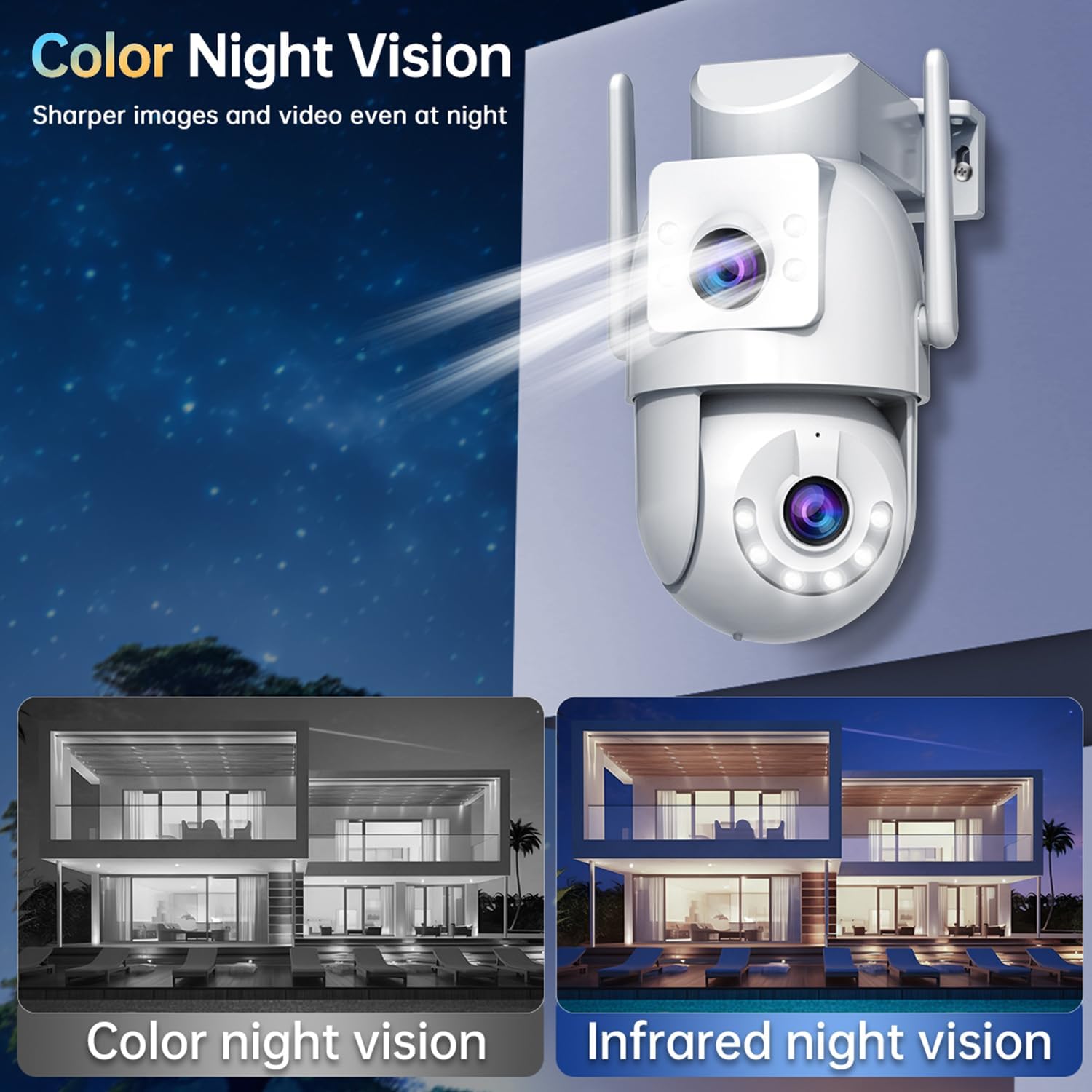
Aworan: Iwaju view of the JOOAN W3-Dual Lens Security Camera, showing both lenses, LED lights, and antennas.

Aworan: Isunmọ view highlighting the MicroSD card slot and the reset button on the camera body.
Ṣeto
1. Iṣagbesori Kamẹra
The camera supports both ceiling and wall mounting. Choose a location that provides the desired viewing angle and has a stable WiFi signal. The camera is IP66 weatherproof, suitable for outdoor installation.
- Use the included screws to securely attach the mounting bracket to your chosen surface.
- So kamẹra pọ si akọmọ iṣagbesori.
- For ceiling mounting, the image can be flipped in the app settings if needed.

Aworan: Examples of the camera installed on a wall and mounted on a ceiling, demonstrating its versatility.
2. Asopọ agbara
Connect the provided power adapter to the camera's power input and plug it into a standard electrical outlet. The camera requires a continuous power supply and is not battery-operated.

Image: The camera connected to a power outlet via its power cable and adapter.
3. Asopọ nẹtiwọki
The camera supports dual-band WiFi (2.4Ghz and 5Ghz) and wired Ethernet connection. Follow the in-app instructions to connect your camera to your home network.
- Asopọ WiFi: Open the app, select 'Add Device', and follow the prompts to connect to your WiFi network. Ensure your phone is connected to the same WiFi network during setup.
- Asopọ onirin: Connect an Ethernet cable from your router to the camera's Ethernet port. The camera will automatically attempt to connect to the network.
- Ipo AP: If direct connection fails, the camera may enter AP (Access Point) mode, allowing you to connect directly to its WiFi hotspot for initial configuration.

Image: Illustrates the camera's support for 5G/2.4G WiFi, Bluetooth, and Wired connectivity.
4. App sori
Download the official JOOAN camera app from your smartphone's app store (iOS App Store or Google Play Store). Register an account and log in to begin adding your device.

Àwòrán: Fóònù alágbéka kan tó ń fi ìgbé ayé hàn view from the JOOAN camera app, showing two camera feeds simultaneously.
5. MicroSD Kaadi fifi sori
The camera supports MicroSD cards from 8GB to 256GB for local storage. Power off the camera before inserting or removing the MicroSD card.
- Locate the MicroSD card slot on the camera body.
- Fi kaadi MicroSD sinu iho naa pẹlu ọwọ titi yoo fi tẹ sinu ibi ti o wa.
- Format the MicroSD card through the camera app settings after installation for proper functionality.
Awọn ilana Iṣiṣẹ
1. Gbe View & Dual Lens Monitoring
Access the live feed from both lenses simultaneously through the app. The dual-lens design allows you to monitor two different areas at once, eliminating blind spots.
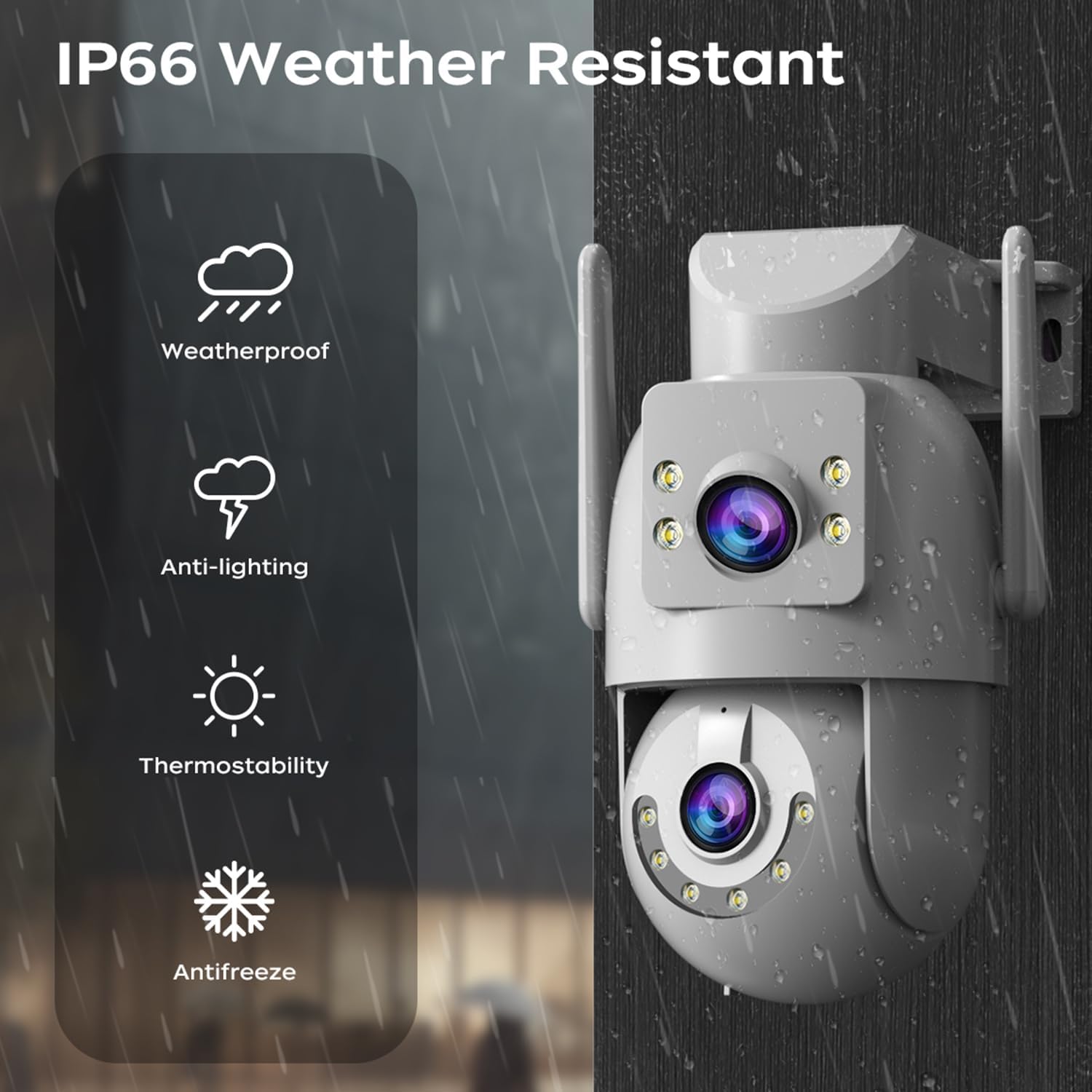
Image: A visual representation of the dual-lens camera monitoring two distinct areas simultaneously, displayed on a smartphone screen.
2. PTZ Iṣakoso
The lower lens offers Pan-Tilt-Zoom (PTZ) capabilities. Use the controls within the app to remotely adjust the camera's viewigun igun.
- Akara: Yi kamẹra naa pada ni apa ila titi de iwọn 355.
- Tẹ: Adjust the camera vertically up to 90 degrees.
- Sun-un oni-nọmba: Fọwọ́ mú láti sunmọ́ ojú ìkànnì ayélujára fún àyẹ̀wò tó wúni lórí.

Image: A smartphone screen showing PTZ controls, with arrows indicating the camera's pan and tilt movement.
3. Audio-Ona Meji
Utilize the built-in microphone and speaker for two-way communication. This allows you to speak to visitors or deter intruders directly through the camera.
- Tap the microphone icon in the app to speak.
- Adjust audio volume as needed within the app.

Image: A person speaking into a smartphone, with a delivery person at the door, illustrating the two-way audio communication feature.
4. Night Iran Awọn ọna
Káàmẹ́rà náà ní àwọn ọ̀nà ìran mẹ́ta ní alẹ́ láti bá àwọn ipò ìmọ́lẹ̀ ọ̀tọ̀ọ̀tọ̀ mu:
- Infrared Night Vision (B/W): Ó ń pèsè àwọn àwòrán dúdú àti funfun tí ó mọ́ kedere nínú òkùnkùn pátápátá nípa lílo àwọn LED infurarẹẹdi.
- Kikun Awọ Iran Iran: Utilizes white LEDs to provide full-color images at night.
- Wiwo Awọ Smart: The camera automatically switches from infrared to full-color vision when motion is detected, providing detailed color footage nígbà tí ó bá yẹ.
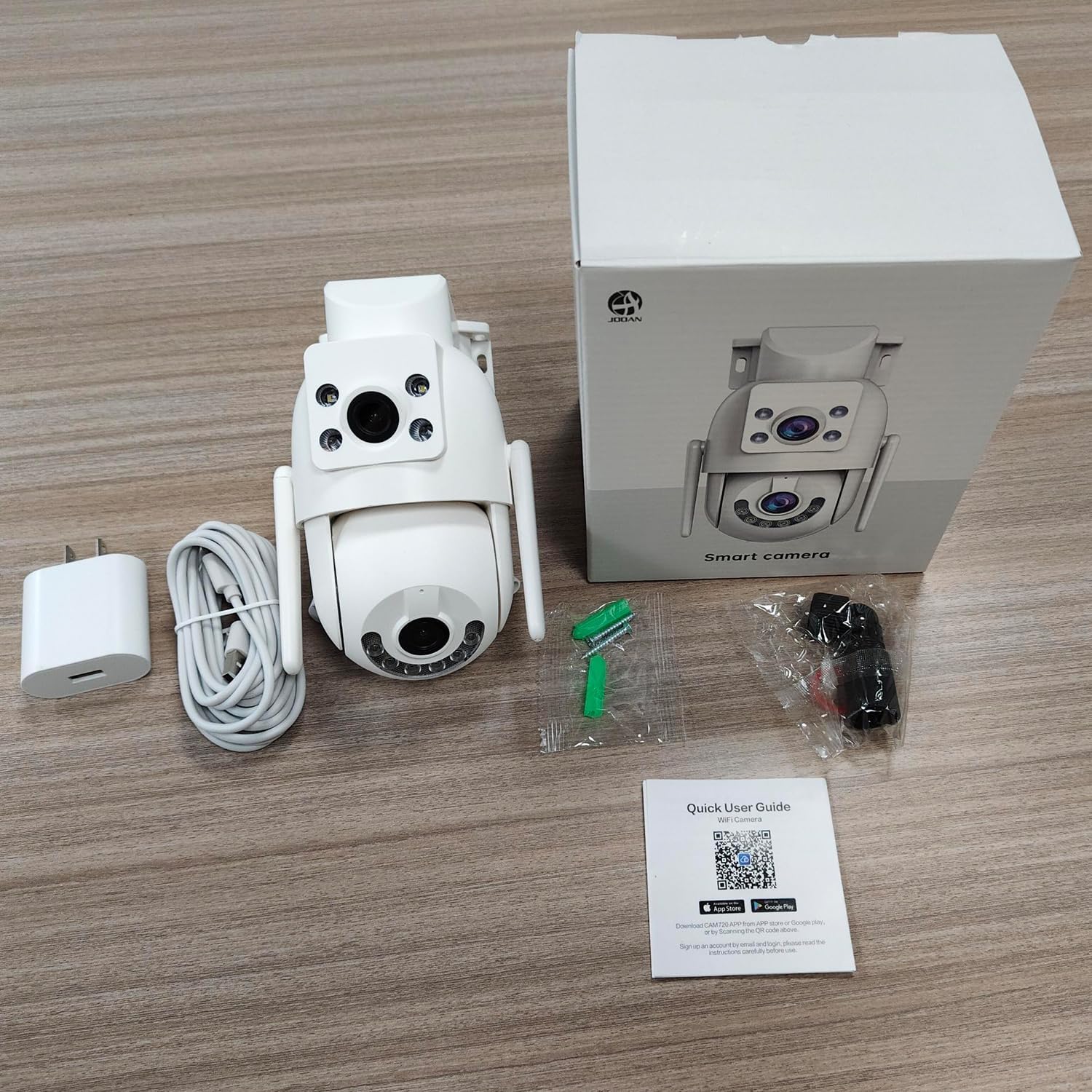
Image: Comparison of color night vision and infrared night vision, showing sharper and more detailed images in color at night.

Aworan: Visual examples of Infrared Night Vision, Full Color Night Vision, and Smart Color Night Vision modes.
5. Wiwa Iṣipopada ati Awọn itaniji
The camera features advanced motion and sound detection capabilities. Customize detection zones, sensitivity, and alert types within the app.
- Iwari išipopada: Receive instant push notifications to your phone when motion is detected.
- Iwari igbe: Alerts you to unusual sounds, such as crying, in the monitored area.
- Light & Sound Alarm: Configure the camera to activate a floodlight and/or siren upon detection to deter intruders.
- Customized Setup: Adjust detection methods, sensitivity levels, specific detection areas, and alert schedules.

Image: An illustration showing motion detection in action, with an alert notification on a smartphone.

Image: Depicts the camera's motion detection triggering a floodlight and siren, with a notification appearing on a phone.
6. Auto Àtòjọ
Enable auto-tracking for the PTZ lens. When motion is detected, the camera will automatically pan to follow the moving object within its field of view.

Image: A visual demonstration of the auto-tracking feature, showing the camera panning to follow a moving person.
7. Awọn aṣayan ipamọ
The camera supports two primary storage methods for recorded footage:
- Ibi ipamọ kaadi MicroSD: Records continuously or based on events to a locally installed MicroSD card (8-256GB, not included).
- Ibi ipamọ awọsanma: Offers secure cloud storage for alarm records. This allows you to access footage even if the camera is lost or damaged. Cloud storage typically requires a subscription.

Image: Icons representing cloud storage and MicroSD card storage, with a visual of the MicroSD card slot on the camera.

Image: Illustrates MicroSD card storage and cloud storage options for recording and playback.
8. Pínpín ìwọlé
You can share camera access with family members or trusted individuals through the app, allowing multiple users to view ifunni laaye ati gba awọn itaniji.

Image: Multiple individuals viewing the camera feed on their smartphones, demonstrating the sharing feature.
9. Smart Home Integration
The JOOAN W3-Dual Lens camera is compatible with smart home platforms like Amazon Alexa, allowing for voice control and integration into your smart home ecosystem.
- Follow the instructions in the app to link your camera with your Alexa account.
- Lo awọn pipaṣẹ ohun si view ifunni kamẹra lori awọn ifihan smati ti o baamu.

Image: A person interacting with an Alexa-enabled device to view the camera feed, indicating smart home compatibility.
Itoju
- Ninu: Regularly wipe the camera lenses with a soft, dry cloth to ensure clear image quality. Do not use harsh chemicals.
- Awọn imudojuiwọn famuwia: Check the app periodically for firmware updates. Keeping your camera's firmware up-to-date ensures optimal performance, security, and access to new features.
- Ibi ti ina elekitiriki ti nwa: Rí i dájú pé asopọ agbara naa wa ni aabo ati pe ko ni ibajẹ.
Laasigbotitusita
| Oro | Owun to le Solusan |
|---|---|
| Kamẹra aisinipo | Check WiFi signal strength, ensure power supply is connected, restart camera and router. |
| Ko le sopọ si WiFi | Ensure correct WiFi password, try 2.4Ghz network if 5Ghz fails, move camera closer to router, reset camera. |
| Didara aworan ti ko dara | Clean the camera lenses, check network bandwidth, ensure adequate lighting for night vision. |
| Ko si awọn itaniji wiwa išipopada | Verify motion detection is enabled in app settings, adjust sensitivity, check alert schedule. |
| Kaadi MicroSD kii ṣe igbasilẹ | Ensure card is inserted correctly, format card in app, check card capacity and health. |
Awọn pato
| Ẹya ara ẹrọ | Ẹ̀kúnrẹ́rẹ́ |
|---|---|
| Nọmba awoṣe | W3-U |
| Ipinnu Yaworan fidio | 3 MP (2K*2) |
| Asopọmọra Technology | Wi-Fi (2.4Ghz/5Ghz), Wired (Powerline) |
| Orisun agbara | Itanna Okun (5V, 7.5W) |
| Iṣagbesori Iru | Oke Oke, Odi Oke |
| Viewigun igun | 360 Degrees (PTZ) |
| Pataki Awọn ẹya ara ẹrọ | Dual Lens, 2-Way Audio, Motion Detection, Auto Tracking, Color Night Vision, IP66 Weatherproof |
| Ibi ipamọ | MicroSD Card (8-256GB), Cloud Storage |
| Awọn ẹrọ ibaramu | Smartphone (Android/iOS) |
| Iwọn Nkan | 1.15 iwon |
| Awọn iwọn | 6.93 x 5.79 x 4.29 inches |
Atilẹyin ọja ati Support
JOOAN products come with a standard manufacturer's warranty. For specific warranty details, please refer to the warranty card included in your package or contact JOOAN customer support.
If you encounter any issues or have questions regarding your JOOAN W3-Dual Lens Security Camera, please contact our customer support team. Contact information can typically be found on our official website or within the camera app's 'About Us' section.