
YU Xiang 8530JJ5PW4N01335Q8Y8
Ìwé Ìtọ́sọ́nà Olùlò Helikopter Flywolf RC YU Xiang F02S
Awoṣe: F02S
Ọrọ Iṣaaju
This manual provides detailed instructions for the operation, maintenance, and troubleshooting of your YU Xiang F02S Flywolf RC Helicopter. Please read this manual thoroughly before operating the helicopter to ensure safe and optimal performance.
The F02S Airwolf GPS Smart 6G Flybarless Simulation Helicopter is a high-performance remote-controlled aircraft featuring advanced GPS and optical flow positioning for stable flight, 6G/3D flight modes, and an 8-channel high-precision remote control. Its robust design incorporates high-strength composite engineering material and dual brushless motors for durability and power.

Figure 1: The YU Xiang F02S Flywolf RC Helicopter, its remote control, and smart battery.

Figure 2: The F02S Flywolf helicopter, a 1:34 scale reproduction of the Airwolf armed helicopter.
Awọn iṣọra Aabo
Operating an RC helicopter requires caution. Please adhere to the following safety guidelines:
- Ka iwe afọwọkọ naa: Always read the entire instruction manual before first use.
- Iṣeduro ọjọ ori: This product is recommended for users aged 15 months and up. Adult supervision is advised for younger users.
- Ayika ofurufu: Fly in open, clear areas away from people, animals, buildings, and power lines. Avoid flying in strong winds or adverse weather conditions.
- Aabo Batiri: Use only the provided smart battery and charging cable. Do not overcharge or short-circuit the battery. Discontinue use if the battery shows signs of damage or swelling.
- Rotor Blades: Keep hands, face, and loose clothing away from rotating blades. The blades can cause serious injury.
- Ṣiṣayẹwo Ọkọ ofurufu-ṣaaju: Before each flight, ensure all parts are securely attached, the battery is fully charged, and the remote control is functioning correctly.
- Iduro Pajawiri: Familiarize yourself with the emergency stop function on the remote control.
Package Awọn akoonu
Jẹrisi pe gbogbo awọn paati wa ninu package:
- Ọkọ ofurufu ×1
- Iṣakoso latọna jijin × 1
- Ilana Itọsọna × 1
- Dedicated USB Charging Cable ×1
- Main Blades ×2
- Tail Blade ×1
- Smart Battery ×1
Ṣeto
1. Charging the Smart Battery
The F02S comes with a 7.4V 1200mAh 25C LI-POLY smart battery. Ensure the battery is fully charged before first use.
- Connect the dedicated USB charging cable to a compatible USB power source (e.g., computer USB port, USB wall adapter).
- Connect the smart battery to the charging cable.
- The charging indicator on the cable or battery will show the charging status. Charging typically takes about 60 minutes.
- Ni kete ti o ti gba agbara ni kikun, ge asopọ batiri kuro lati ṣaja.
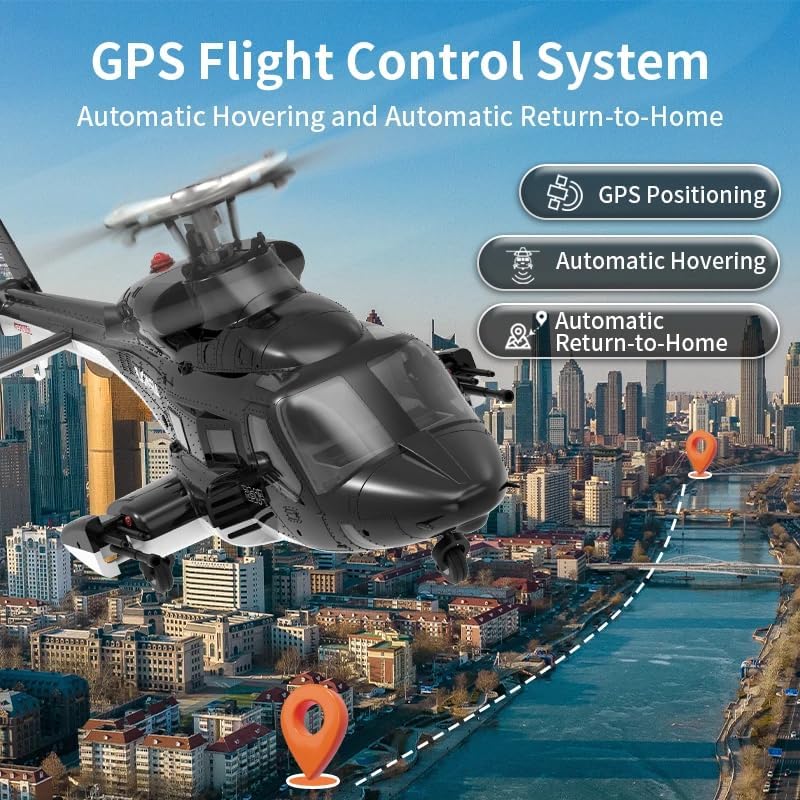
Figure 3: The 7.4V 1200mAh Li-Po smart battery, designed for high discharge rates and extended flight time.
2. Igbaradi Iṣakoso Latọna jijin
The 2.4GHz remote control requires batteries (not specified in package contents, assume user provides or it's internal rechargeable). Ensure it is powered on and ready for binding.
- Agbara lori isakoṣo latọna jijin.
- Familiarize yourself with the controls and switches. The remote provides 1024-level operation precision and real-time telemetry.
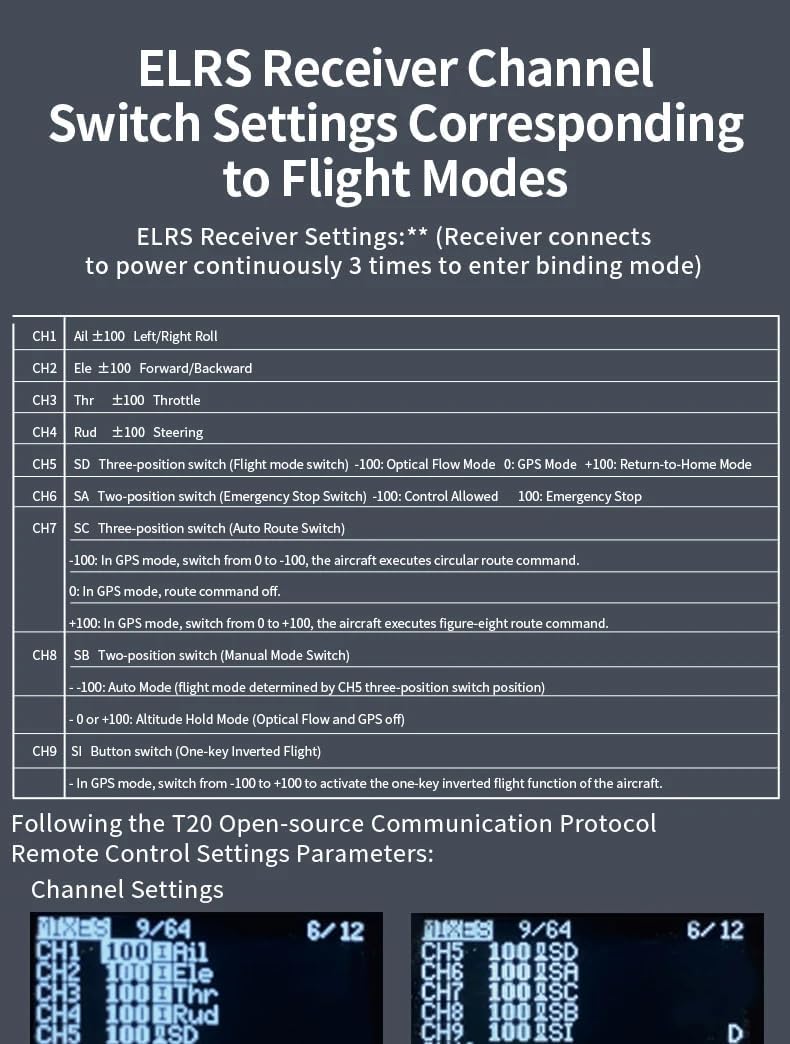
Figure 4: Remote control display showing communication frequency and mode settings. These settings are based on the T20 open-source protocol.
3. Binding the Helicopter to the Remote Control
To establish communication between the helicopter and the remote control, they must be bound. The ELRS Receiver enters binding mode by connecting power continuously 3 times.
- Ensure both the helicopter and remote control are powered off.
- Power on the remote control first.
- Connect the helicopter's battery. Power the helicopter on and off three times consecutively to activate binding mode.
- Observe the indicator lights on both devices. A solid light typically indicates a successful bind.
- Once bound, perform a quick check of the controls (e.g., throttle, rudder) to ensure responsiveness before flight.
Awọn ilana Iṣiṣẹ
Awọn ọna ofurufu
The F02S supports two primary flight modes, switchable via the remote control:
- 6G Mode (Stability Mode): Ideal for beginners, this mode provides stable flight with automatic stabilization, making it easier to control the helicopter. It utilizes GPS and optical flow for precise altitude hold and hovering.
- 3D Mode (Aerobatic Mode): For experienced pilots, this mode allows for advanced aerobatic maneuvers. The helicopter's flight characteristics become more agile and responsive.
Advanced Positioning Systems
The F02S integrates multiple positioning technologies for enhanced flight stability and safety:
- GPS Satellite Positioning: Provides precise outdoor positioning, enabling features like one-button return-to-home, low battery return, loss of control return, and straight-line return.
- Optical Flow + LIDAR TOF Altitude Hold: For indoor or low-altitude flight, optical flow and LIDAR Time-of-Flight (TOF) sensors provide breakthrough altitude hold technology, ensuring precise position and balance maintenance.

Figure 5: GPS Satellite Positioning enables intelligent flight operations such as Low Battery Return, Loss of Control Return, Straight-Line Return, and One-Button Return-to-Home.

Figure 6: Optical Flow and LIDAR TOF provide precise altitude hold and balance maintenance, offering high precision and strong anti-interference capabilities.
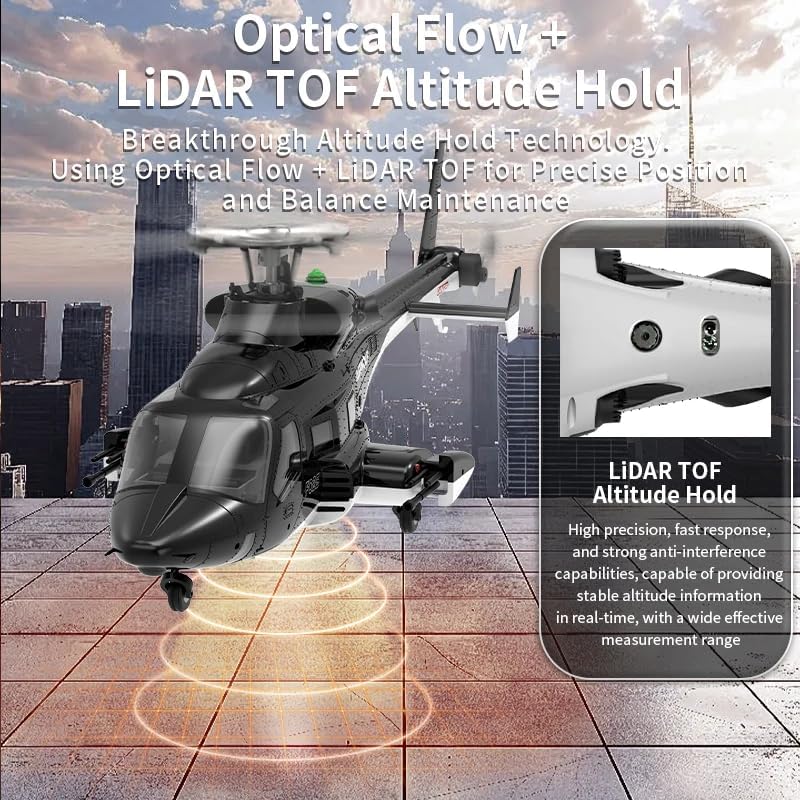
Figure 7: The GPS Flight Control System enables automatic hovering and automatic return-to-home functions.
Remote Control Channel Switch Settings (ELRS Receiver)
The following table details the ELRS Receiver channel switch settings corresponding to various flight modes and functions. These settings are based on the T20 open-source communication protocol. For specific interface and parameter differences, refer to your remote control's instruction manual.
| ikanni | Išẹ | Switch Position / Value | Apejuwe |
|---|---|---|---|
| CH1 | Ail | ±100 | Left/Right Roll |
| CH2 | Ele | ±100 | Siwaju/Sẹhin |
| CH3 | Thr | ±100 | Fifun |
| CH4 | Rud | ±100 | Itọnisọna |
| CH5 | SD (Three-position switch) | -100 / 0 / +100 | Flight mode switch: -100: Optical Flow Mode, 0: GPS Mode, +100: Return-to-Home Mode |
| CH6 | SA (Two-position switch) | -100 / +100 | Emergency Stop switch: -100: Control Allowed, +100: Emergency Stop |
| CH7 | SC (Three-position switch) | -100 / 0 / +100 | Auto Route Switch: -100: In GPS mode, from 0 to -100, the aircraft executes circular route command. 0: In GPS mode, route command off. +100: In GPS mode, from 0 to +100, the aircraft executes figure-eight route command. |
| CH8 | SB (Two-position switch) | -100 / 0 or +100 | Manual Mode Switch: -100: Auto Mode (flight mode determined by CH5 three-position switch position). 0 or +100: Altitude Hold Mode (Optical Flow and GPS off). |
| CH9 | SI (Button switch) | N/A | One-Key Inverted Flight: In GPS mode, switch from -100 to +100 to activate the one-key inverted flight function of the aircraft. |

Figure 8: Detailed ELRS Receiver channel switch settings for various flight modes and functions.
Itoju
Regular maintenance ensures the longevity and optimal performance of your F02S helicopter.
- Ninu: Gently wipe the helicopter's body with a soft, dry cloth after each use to remove dust and debris. Avoid using harsh chemicals or solvents.
- Ayẹwo abẹfẹlẹ: Regularly inspect the main and tail blades for any cracks, chips, or damage. Replace damaged blades immediately using the provided spares or genuine replacement parts.
- Ṣayẹwo mọto: Ensure the brushless motors are free from obstructions and spin smoothly.
- Itọju Batiri: Store the smart battery in a cool, dry place away from direct sunlight. Do not store fully charged or completely depleted for extended periods. Charge to approximately 50% for long-term storage.
- Ibi ipamọ: When not in use, store the helicopter and remote control in a safe place, away from extreme temperatures and moisture.
Laasigbotitusita
This section addresses common issues you might encounter with your F02S helicopter.
| Isoro | Owun to le Fa | Ojutu |
|---|---|---|
| Helikopta kò dáhùn sí ìṣàkóso latọna jijin. | Not bound; low battery in remote or helicopter; interference. | Re-bind the helicopter and remote control. Charge both batteries. Move to an area with less interference. |
| Kukuru flight akoko. | Batiri kò gba agbara ni kikun; batiri ti o ti dagba; fifa lile. | Ensure battery is fully charged. Consider replacing the battery if it's old. Fly more conservatively. |
| Helicopter drifts or is unstable. | Uncalibrated sensors; damaged blades; strong wind. | Perform sensor calibration (refer to remote control manual). Check and replace damaged blades. Fly in calmer conditions. |
| Blades not spinning. | Motor obstruction; loose wiring; motor failure. | Check for obstructions. Inspect wiring connections. If motors are faulty, contact support. |
| Return-to-Home function not working. | Weak GPS signal; not enough satellites locked. | Ensure flight is in an open area with clear sky view for strong GPS signal. Wait for sufficient satellite lock before takeoff. |
Awọn pato
Detailed technical specifications for the YU Xiang F02S Flywolf RC Helicopter:
- Nọmba Nkan: F02S
- Orukọ: F02S Airwolf GPS Smart 6G Flybarless Simulation Helicopter
- Awọn iwọn ọja: Rotor diameter 375mm, fuselage length 415mm, height 118mm
- Ipo Iṣakoso Latọna jijin: 2.4G isakoṣo latọna jijin
- Ijinna Iṣakoso Latọna jijin: Diẹ ẹ sii ju awọn mita 120 lọ
- Ohun elo ọja: High-strength composite engineering material
- Single Unit Weight: 310g (pẹlu batiri)
- Batiri Ara: 7.4V (1200MAH) 25C LI-POLY smart battery
- Akoko gbigba agbara: O fẹrẹ to iṣẹju 60
- Akoko Lilo: 10 - 12 iṣẹju
- ASIN: B0F9P635ZK
- Nọmba Awoṣe Nkan: 8530JJ5PW4N01335Q8Y8
- Ọjọ ori Ti a ṣeduro Olupese: 15 osu ati si oke
- Olupese: Gbogboogbo

Figure 9: Key dimensions of the F02S helicopter, showing a fuselage length of 415mm and height of 118mm.
Atilẹyin ọja ati Support
For warranty information, technical support, or replacement parts, please contact the retailer or manufacturer directly. Keep your purchase receipt as proof of purchase.
For further assistance, refer to the official YU Xiang website or contact their customer service department. Contact details are typically found on the product packaging or the manufacturer's official webojula.
Ask a question about this manual
Ask about setup, troubleshooting, compatibility, parts, safety, or missing instructions. Manuals+ will review the question and use this page’s manual context to help answer it.