
Ọrọ Iṣaaju
This manual provides detailed instructions for the installation, operation, and maintenance of the SENSORWORX SWX-852-2-WH Wireless Remote Light Switch. This device is designed to provide manual control of wirelessly controlled lighting systems, acting as a companion switch to compatible SENSORWORX wireless load controllers.
The SWX-852-2-WH is a line-powered wall station that simplifies multi-way switching configurations by reducing wiring complexity and installation time. It communicates wirelessly using an encrypted 915 MHz proprietary protocol, offering reliable operation within specified ranges.
Alaye Aabo
WARNING: Risk of Electric Shock. Improper installation can lead to serious injury or death.
- Always turn off power at the circuit breaker or fuse box before installing, servicing, or removing the device.
- Fifi sori ẹrọ gbọdọ jẹ nipasẹ oṣiṣẹ ina mọnamọna ti o pe ni ibamu pẹlu gbogbo awọn koodu itanna ti orilẹ-ede ati agbegbe.
- Do not use this device with loads exceeding its specified ratings.
- Rii daju pe gbogbo awọn asopọ waya wa ni aabo ati idabobo daradara.
- Ẹrọ yii jẹ ipinnu fun lilo inu ile nikan.
Package Awọn akoonu
Daju pe gbogbo awọn paati wa ṣaaju ki o to bẹrẹ fifi sori:
- SENSORWORX SWX-852-2-WH Wall Switch Sensor
- Waya nyorisi
- Iṣagbesori skru
- Awọn eso Waya
- Ilana Afowoyi (iwe yii)
Awọn pato
| Ẹya ara ẹrọ | Sipesifikesonu |
|---|---|
| Awoṣe | SWX-852-2-WH |
| Ipo Isẹ | TAN, PAA |
| Ti isiyi Rating | 1 Amps |
| Awọn ọna Voltage | 120-277V (Line Powered) |
| Olubasọrọ Iru | Single Pole Single Throw (SPST) |
| Asopọmọra Iru | Crimp |
| Yipada Iru | Sensor (Remote) |
| Ebute | Waya nyorisi |
| Ohun elo | Plastic (Housing), Silver (Contact) |
| Awọn iwọn (L x W x H) | 1.39 x 1.68 x 2.74 inches |
| Iṣagbesori Iru | Surface Mount (in standard wallbox) |
| Circuit Iru | 1-way, 3-way, 4-way (with compatible controllers) |
| Awọn iwọn otutu ti nṣiṣẹ | 32°F si 122°F (0°C si 50°C) |
| Ọriniinitutu | 0-95% ti kii-condensing |
| Ilana Alailowaya | Encrypted 915 MHz Proprietary |
| Alailowaya Ibiti | ~80 feet line of sight, ~40 feet through obstructions |
| Awọn iwe-ẹri | UL Listed, RoHS Compliant, BAA Compliant, BABA Compliant, TAA Compliant |
| Iwọn Nkan | 3.88 iwon |
Eto ati fifi sori
The SENSORWORX SWX-852-2-WH is designed for straightforward installation in a standard single-gang wallbox, requiring less than 1 inch of mounting depth.
1. Awọn gbigbe
- Pa agbara: Before starting, ensure power to the circuit is OFF at the circuit breaker.
- Ṣe idanimọ awọn okun waya: The SWX-852-2-WH is line-powered and requires connection to line (hot) and neutral wires. It does not directly switch the load.
- So awọn onirin: Use the provided wire nuts to connect the switch's wire leads to the corresponding building wiring (Line, Neutral). Consult local electrical codes for proper wiring practices.
- Gbe awọn yipada: Carefully place the switch into the wallbox, ensuring wires are not pinched. Secure the switch to the wallbox using the provided mounting screws.
- Install wallplate: Attach a standard decorative wallplate (not included) over the switch.
- Mu agbara pada: Tan agbara pada si ina ni fifọ iyipo.
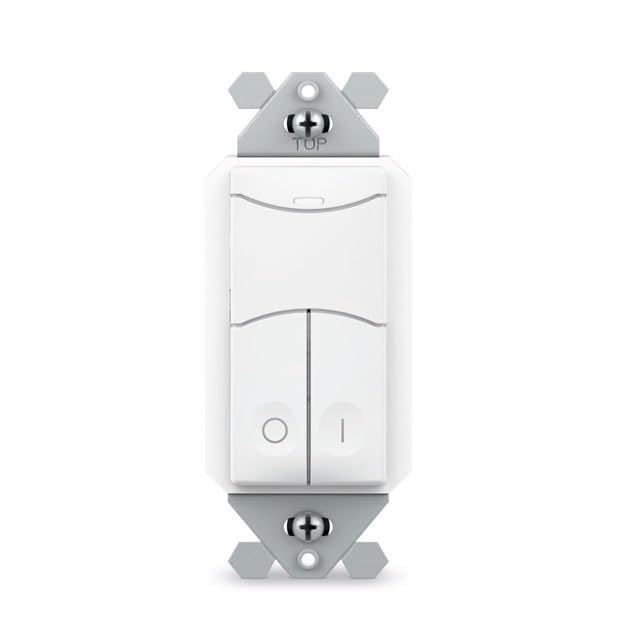
Image: SENSORWORX SWX-852-2-WH Wireless Remote Light Switch. This image shows the front view of the white wall switch, illustrating its compact design for easy installation.
2. Pairing with Wireless Controller
The SWX-852-2-WH must be paired with a compatible SENSORWORX wireless load controller (e.g., SWX-950 series power pack, SWX-851 wireless wall switch, or SWX-874-ELV dimmer) to function. The pairing process is quick and typically takes approximately 3 seconds per device.
- Rii daju pe agbara wa ni titan for both the SWX-852-2-WH and the target wireless load controller.
- Bẹrẹ ipo sisopọ on the wireless load controller according to its specific instructions. This usually involves pressing and holding a button on the controller.
- Activate pairing on SWX-852-2-WH: Press and hold the designated button on the SWX-852-2-WH (refer to the specific button layout on your device) until an indicator light confirms pairing mode.
- Jẹrisi isọdọkan: Both devices should provide visual feedback (e.g., LED flashes) to indicate successful pairing. Refer to the controller's manual for specific confirmation signals.
For multi-way switching, additional SWX-852-2-WH units can be paired to the same wireless load controller.
Awọn ilana Iṣiṣẹ
Once installed and paired, the SWX-852-2-WH operates as a remote control for the linked SENSORWORX wireless load controller.
- TAN/PA Iṣakoso: Press the top button to turn the connected lights ON. Press the bottom button to turn the connected lights OFF.
- Dimming Control (if paired with a dimmer): If paired with a compatible SENSORWORX wireless dimmer (e.g., SWX-874-ELV), the buttons may also provide dimming functionality. Typically, holding the ON button will brighten lights, and holding the OFF button will dim lights. Refer to the dimmer's manual for specific dimming operations.
- Iṣakoso Opopona: In multi-way setups, any paired SWX-852-2-WH switch can control the same lighting load.
Itoju
The SENSORWORX SWX-852-2-WH is designed for long-term, maintenance-free operation. Follow these guidelines for optimal performance:
- Ninu: To clean the surface of the switch, use a soft, damp asọ. Ma ṣe lo awọn afọmọ abrasive, awọn nkanmimu, tabi awọn kẹmika lile, nitori iwọnyi le ba ipari jẹ.
- Ko si Awọn apakan Iṣẹ Olumulo: There are no user-serviceable parts inside the switch. Do not attempt to open or repair the device.
- Awọn ipo Ayika: Rí i dájú pé àyíká iṣẹ́ náà wà láàrín ìwọ̀n otutu àti ọriniinitutu tí a sọ tẹ́lẹ̀ láti dènà ìbàjẹ́.
Laasigbotitusita
If you experience issues with your SENSORWORX SWX-852-2-WH, consult the following troubleshooting guide:
| Isoro | Owun to le Fa | Ojutu |
|---|---|---|
| Switch does not respond to presses. | Ko si agbara si iyipada naa. Not properly paired with a controller. Controller is out of range or powered off. | Verify power at the circuit breaker and wiring connections. Re-attempt the pairing process with the wireless load controller. Ensure the wireless load controller is powered on and within range (~40 feet through obstructions). |
| Lights do not turn ON/OFF or dim correctly. | Ìsopọ̀ tí kò tọ́. Incompatible controller. kikọlu. | Confirm successful pairing with the correct SENSORWORX wireless load controller. Ensure the controller is compatible with the SWX-852-2-WH and supports the desired functionality (e.g., dimming). Minimize sources of wireless interference (e.g., large metal objects, other 900 MHz devices). |
| Išišẹ ti o lemọlemọ. | Alailowaya ifihan agbara. Àwọn ohun tó ń fa àyíká. | Relocate the wireless load controller or the SWX-852-2-WH to improve signal strength. Ensure no new obstructions have been introduced. Check for extreme temperatures or humidity outside of specified operating conditions. |
If troubleshooting steps do not resolve the issue, please contact SENSORWORX customer support.
Atilẹyin ọja ati Support
The SENSORWORX SWX-852-2-WH Wireless Remote Light Switch comes with a 5-odun atilẹyin ọja from the date of purchase, covering defects in materials and workmanship under normal use. This warranty is valid only for products purchased from authorized SENSORWORX distributors.
For technical support, warranty claims, or further assistance, please visit the official SENSORWORX website or contact their customer service department. Please have your product model number (SWX-852-2-WH) and proof of purchase available when contacting support.
SENSORWORX products are proudly Made in the USA and comply with UL, RoHS, BAA, BABA, and TAA standards, ensuring high quality and reliability.