
1. Ifihan
Thank you for choosing the DEPSTECH DS650-DL Dual-Lens Articulating Industrial Endoscope. This device is designed for detailed visual inspection in hard-to-reach areas, featuring a dual-lens system with 210° bidirectional rotation, a 4.5-inch IPS monitor, and 1080P high-definition imaging. It is an essential tool for home maintenance, vehicle inspection, and machinery checks.
Please read this manual thoroughly before use to ensure proper operation and to maximize the product's lifespan.
2. Alaye Aabo
- Do not use the endoscope in environments with flammable or explosive gases.
- The probe is IP67 waterproof, but the main unit is not. Avoid exposing the main unit to water or excessive moisture.
- Ma ṣe gbiyanju lati tunto tabi yi ẹrọ naa pada. Eyi yoo sọ atilẹyin ọja di ofo ati pe o le fa ibajẹ.
- Jeki ẹrọ naa kuro ni arọwọto awọn ọmọde.
- Yẹra fun fifi oju taara si awọn imọlẹ LED.
- The device features overheat protection. If the temperature exceeds 70°C, a warning will display. If it exceeds 80°C, the device will automatically shut down to prevent damage. Allow the device to cool down before resuming operation.
3. Package Awọn akoonu
Daju pe gbogbo awọn nkan wa ati ni ipo ti o dara nigbati ṣiṣi package naa.
- DEPSTECH DS650-DL Endoscope Unit
- Ọran ipamọ
- Itọsọna olumulo
- Iru-C Ngba agbara USB
- 32GB Memory Card (pre-installed or included separately)

Image: Contents of the DEPSTECH DS650-DL package.
4. Eto
4.1 Ngba agbara si Ẹrọ
Before first use, fully charge the endoscope unit. Connect the provided Type-C charging cable to the charging port on the device and to a suitable USB power adapter (not included).
4.2 Fi kaadi iranti sii
If the 32GB memory card is not pre-installed, locate the TF card slot on the side of the monitor unit. Insert the memory card with the contacts facing down until it clicks into place.
4.3 Titan / Pa a
Press and hold the power button (usually located near the monitor) for a few seconds to turn the device on or off. The IPS monitor will display the startup screen.
5. Isẹ
5.1 Agbọye Awọn iṣakoso

Aworan: Pariview of the endoscope controls and ports.
- O dara/Bọtini Jẹrisi: Jẹrisi awọn aṣayan ninu awọn akojọ aṣayan.
- Up/Zoom In Button: Navigates up in menus or zooms in on the image.
- Down/Zoom Out Button: Navigates down in menus or zooms out on the image.
- 180° Rotation Button: Rotates the real-time image on the screen by 180 degrees.
- Lens Switch Button: Toggles between front camera, side camera, and dual-view mode.
- Bọtini Fọto/Fidio: Short press to take a photo, long press to start/stop video recording.
- Power Button/LED Adjustment: Short press to adjust LED brightness (3 levels), long press to power on/off.
- Articulating Angle Dial: Controls the 210° bidirectional rotation of the probe tip.
- Iho Kaadi TF: Fun fifi kaadi iranti sii.
- Iru Ibudo-C: Fun gbigba agbara ati gbigbe data.
- Bọtini atunto: Resets the device (use a pin to press).
5.2 Using the Dual-Lens and Articulation
The DS650-DL features both a front camera and a side camera, allowing for a wider inspection range. The probe tip can be articulated up to 210° in two directions for comprehensive viewing.
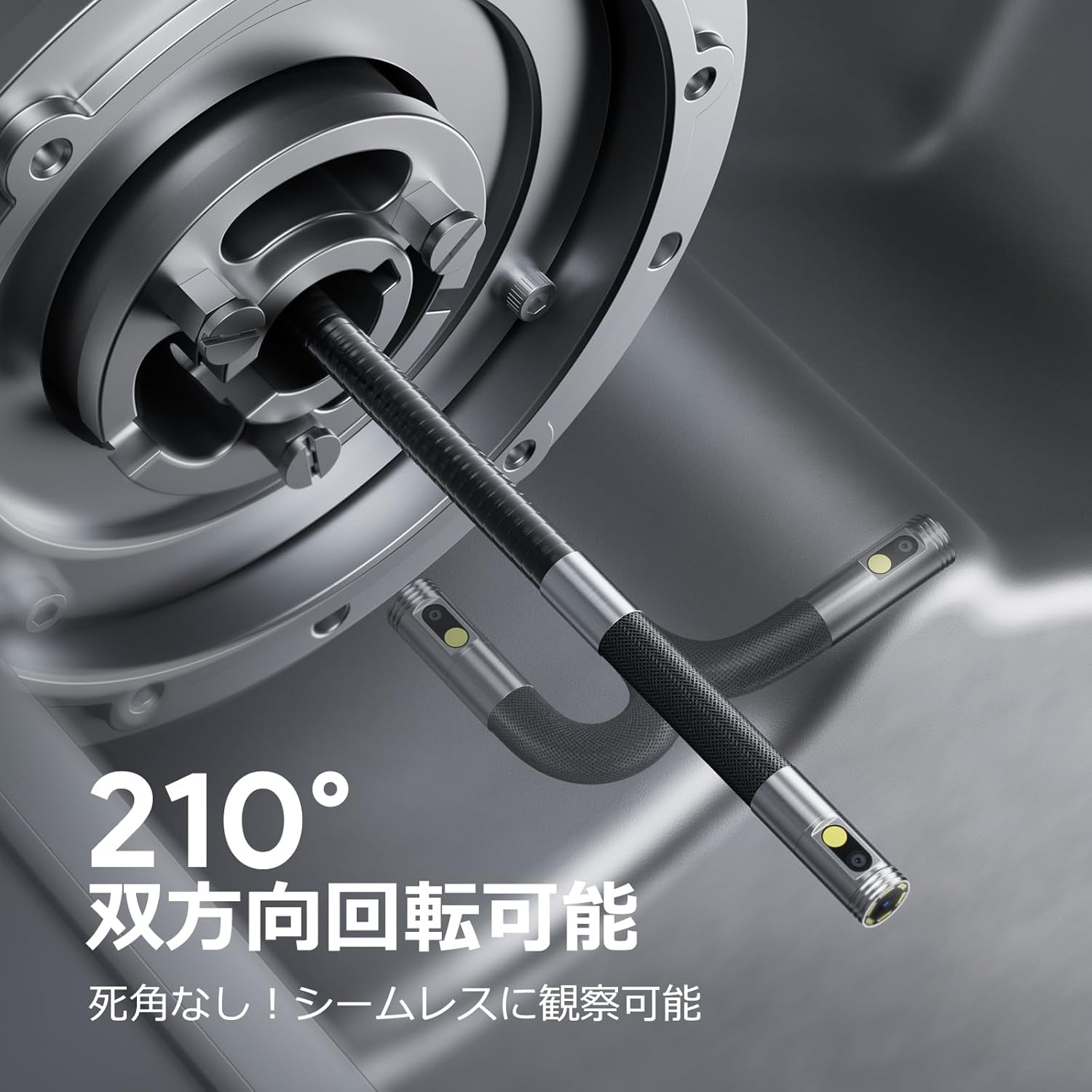
Image: Endoscope probe demonstrating 210° bidirectional articulation.
- Lo awọn Bọtini Yipada lẹnsi to cycle between the front camera, side camera, or a split-screen dual-view mode.
- Yiyi awọn Articulating Angle Dial to precisely adjust the direction of the probe tip. This allows you to navigate around obstacles and view areas from multiple angles without repositioning the entire cable.
5.3 Yiya Awọn aworan ati Awọn fidio
The device supports capturing both still images and video recordings directly to the inserted 32GB memory card.

Image: Monitor display showing photo and video capture features.
- Lati ya fọto: Kukuru tẹ awọn Fọto/Bọtini Fidio.
- Lati ṣe igbasilẹ fidio: Gun tẹ awọn Fọto/Bọtini Fidio to start recording. Long press again to stop recording.
- Ti mu files are saved to the 32GB memory card. You can store approximately 10,000 images or 50 videos.
5.4 Siṣàtúnṣe iwọn LED Imọlẹ
The probe is equipped with high-brightness LED lights to illuminate dark inspection areas. Short press the Power Button/LED Adjustment button to cycle through 3 levels of LED brightness.

Image: IP67 waterproof probe with adjustable LED illumination.
5.5 Data Gbigbe
You can transfer captured images and videos to a computer via the Type-C cable or by directly accessing the memory card.

Image: High-speed data transfer from endoscope to PC.
6. Itọju
- Ṣiṣe ayẹwo naa: After use, especially in dirty or wet environments, gently wipe the probe with a soft, damp cloth. Ensure no debris remains on the camera lenses.
- Ninu Atẹle naa: Use a soft, dry cloth to clean the IPS monitor. Avoid abrasive cleaners or solvents.
- Ibi ipamọ: Store the endoscope in its provided storage case in a cool, dry place, away from direct sunlight and extreme temperatures. This prevents damage from improper storage and moisture.
- Itọju Batiri: Lati pẹ aye batiri, yago fun gbigba agbara ni kikun ẹrọ nigbagbogbo. Gba agbara rẹ nigbagbogbo, paapaa ti kii ba lo fun awọn akoko gigun.
7. Laasigbotitusita
| Isoro | Owun to le Fa | Ojutu |
|---|---|---|
| Ẹrọ naa ko ṣiṣẹ. | Batiri kekere; iṣẹ ṣiṣe ẹrọ naa ko dara. | Gba agbara si ẹrọ ni kikun. Ti iṣoro ba wa sibẹ, kan si atilẹyin. |
| Ko si aworan lori iboju. | Cable not connected properly; camera lens obstructed. | Ensure the probe cable is securely connected. Check for obstructions on the lens. |
| Aworan jẹ blurry tabi koyewa. | Lens is dirty; focus distance incorrect. | Clean the camera lens. Ensure the object is within the optimal focal range (3-10cm). |
| Ko le ṣe igbasilẹ awọn fọto/fidio. | Kaadi iranti ti kun tabi ko fi sii ni deede. | Check if the 32GB memory card is inserted correctly. Delete old filetabi ropo kaadi naa ti o ba kun. |
| Device shuts down automatically. | Idaabobo igbona ti mu ṣiṣẹ. | Allow the device to cool down. Avoid using in excessively hot environments. |
8. Awọn pato
| Ẹya ara ẹrọ | Ẹ̀kúnrẹ́rẹ́ |
|---|---|
| Brand | DEPSTECH |
| Nọmba awoṣe | DS650DJ |
| Ifihan | 4.5-inch IPS LCD Monitor |
| Ipinnu kamẹra | 1080P |
| Ibere Iwadii | 8.5mm |
| Igun Isopopo | Ìtọ́sọ́nà méjì 210° |
| USB Iru | 1.5M Semi-rigid |
| Mabomire Rating | IP67 (Iwadi nikan) |
| Itanna | Awọn imọlẹ LED adijositabulu |
| Ibi ipamọ | 32GB Micro SD Kaadi (pẹlu) |
| Batiri To wa | Bẹẹni |
| Package Mefa | 43.1 x 21.4 x 7.4 cm |
| Package iwuwo | 1.33 kg |
9. Atilẹyin ọja & Atilẹyin
9.1 Olupese ká atilẹyin ọja
This DEPSTECH product comes with a Atilẹyin ọja olupilẹṣẹ oṣu mejila. Your order number serves as your proof of purchase for warranty claims. Please retain it.
9.2 Onibara Support
For any questions, technical assistance, or warranty inquiries, please contact our professional support team:
Imeeli: support.jp@depstech.com
We aim to respond to all inquiries within 24 hours (excluding weekends and public holidays, where responses will be provided on the next business day).

Image: DEPSTECH customer support and warranty information.