
1. Ifihan
Thank you for choosing the Devoko Electric Height-Adjustable Standing Desk. This manual provides detailed instructions for the assembly, operation, and maintenance of your new desk. Please read this manual thoroughly before use to ensure proper function and safety. Keep this manual for future reference.
2. Aabo ikilo
- Opin iwuwo: Do not overload the desk. The maximum load capacity is 70 kg. Exceeding this limit may cause damage to the desk or personal injury.
- Aabo Itanna: Use the integrated USB-A charging port with caution to avoid electrical hazards. Ensure cables are properly managed to prevent tripping or damage.
- Awọn ọmọde ati awọn ohun ọsin: Pa awọn ọmọde ati awọn ẹranko mọ kuro ni tabili lakoko iṣẹ-ṣiṣe lati yago fun ijamba.
- Iyọkuro: Rí i dájú pé kò sí ìdènà kankan lókè tàbí ní ìsàlẹ̀ tábìlì nígbà tí o bá ń ṣe àtúnṣe gíga rẹ̀.
- Orisun Agbara: Connect the desk only to a grounded power outlet.
- Itọju: Má ṣe gbìyànjú láti tú tàbí tún mọ́tò tàbí ètò ìṣàkóso náà ṣe fúnra rẹ. Kan sí olùrànlọ́wọ́ oníbàárà fún ìrànlọ́wọ́.
3. Package Awọn akoonu
Please verify that all components are present before beginning assembly. If any parts are missing or damaged, contact Devoko customer support.
- Desktop sections (4 parts, 15mm high-quality particle board)
- Desk frame (2 steel beams, 2 T-shaped legs)
- Control panel with LED display and USB-A port
- Motor and power supply
- Fabric drawer (35x22x10.5 cm)
- Agbekọri agbekọri
- Cable isakoso atẹ
- Cable grommet
- Apejọ hardware ati irinṣẹ
- Itọsọna olumulo
4. Eto ati Apejọ
The desktop is divided into 4 sections of 15mm high-quality particle board, which simplifies the assembly process. Follow the included graphical instructions for a smooth setup.
- Yọ awọn ohun elo kuro: Fi iṣọra yọ gbogbo awọn ẹya kuro ninu apoti ki o si gbe wọn si ori mimọ, dada rirọ lati ṣe idiwọ awọn itọ.
- Ṣe akojọpọ fireemu naa: Attach the two T-shaped legs to the steel beams. Ensure all screws are tightened securely. The frame features a robust double-beam construction (65x45 mm cold-rolled steel alloy) for enhanced stability.
- Attach Desktop Sections: Connect the four desktop sections together and then secure them to the assembled frame using the provided hardware.
- Fi sori ẹrọ Igbimọ Iṣakoso: Mount the control panel to the underside of the desk in an easily accessible location.
- Connect Motor and Power: Connect the motor to the control panel and then plug the power supply into the control panel.
- Fi Awọn ẹya ẹrọ miiran sori ẹrọ: Attach the fabric drawer, headphone hook, cable management tray, and cable grommet as desired.


5. Awọn ilana Iṣiṣẹ
5.1 Iṣakoso igbimo Loriview
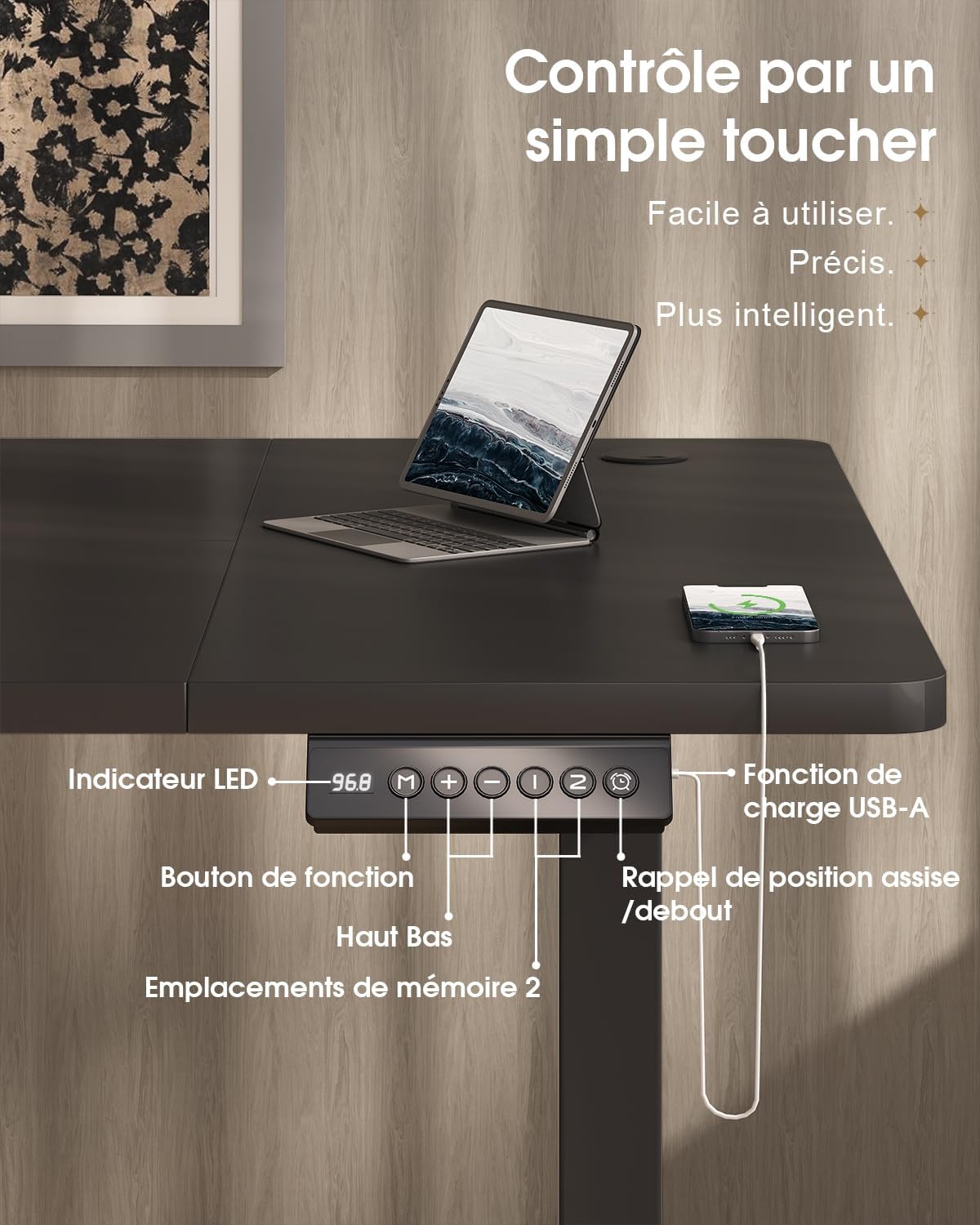
The desk features an intuitive control panel with an LED display for easy height adjustment and memory functions.

5.2 Giga tolesese
- Awọn bọtini oke/isalẹ: Press and hold the 'Up' or 'Down' arrow buttons on the control panel to raise or lower the desk to your desired height. The LED display will show the current height.
- Ibi giga: The desk can be adjusted smoothly and quietly between 73 cm (sitting height) and 118 cm (standing height).
5.3 Memory tito
The control panel allows you to save two preferred height settings for quick adjustments.
- Ṣètò Ipò Ìrántí: Adjust the desk to your desired height using the 'Up' or 'Down' buttons.
- Press the 'M' (Memory) button. The LED display will flash.
- Within 3 seconds, press either '1' or '2' to save the current height to that memory position. The LED display will confirm the setting.
- Rántí Ipò Ìrántí kan: Simply press the '1' or '2' button to automatically move the desk to the saved height.
5.4 USB-A Port gbigba agbara
A convenient USB-A charging port is integrated into the control panel. Connect your compatible devices, such as smartphones or tablets, for charging. Ensure your device's charging cable is compatible with a USB-A port.
6. Awọn ẹya ara ẹrọ
The Devoko Electric Height-Adjustable Standing Desk is designed with several ergonomic and functional features to enhance your workspace.
- Atunse Giga Itanna: Smooth and quiet (less than 50 dB) motor allows for effortless transitions between sitting and standing positions.
- Ikole ti o lagbara: Features a double-beam frame made of 65x45 mm cold-rolled steel alloy, providing exceptional stability and a load capacity of up to 70 kg. All metal parts are powder-coated for durability.
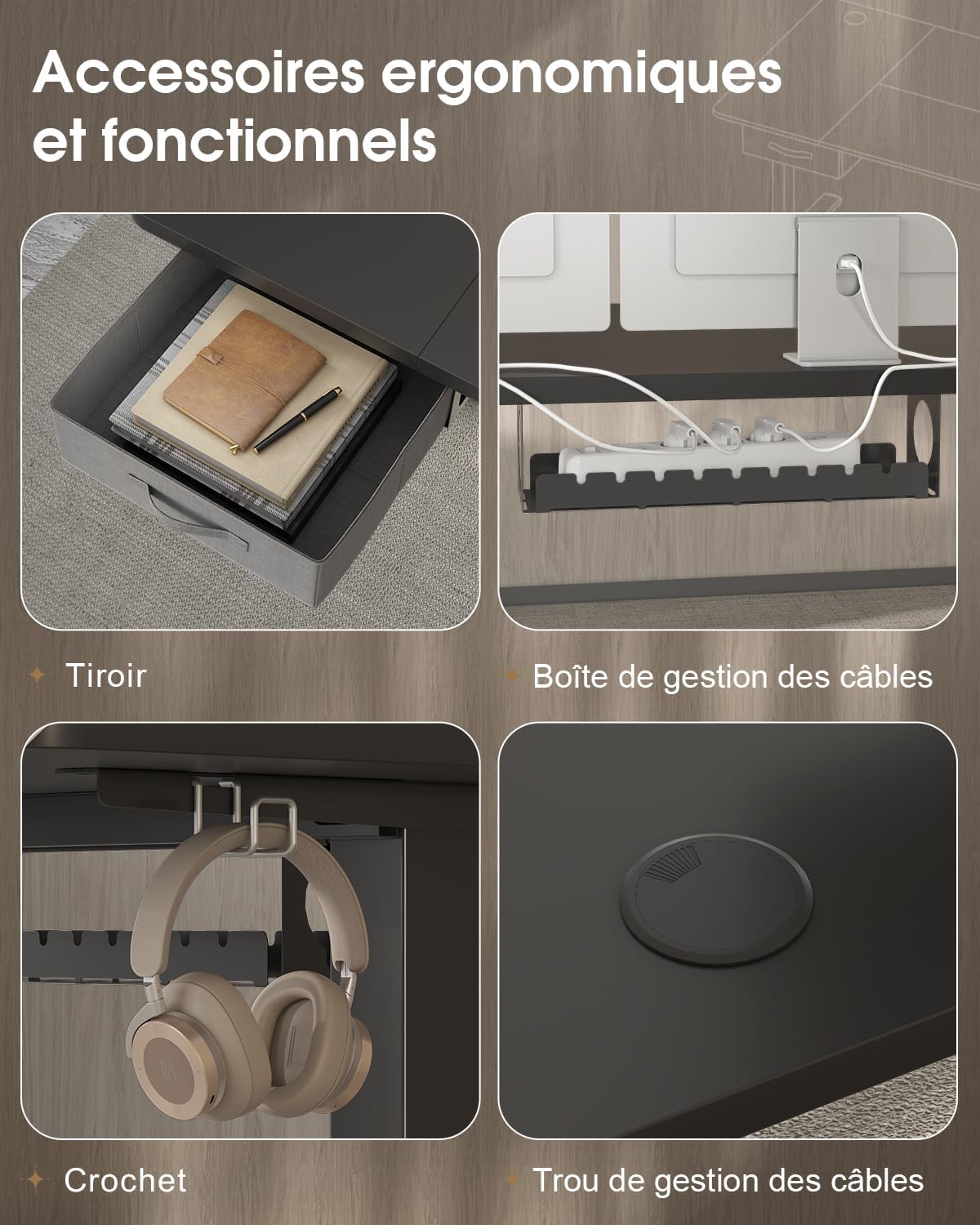
- Integrated Drawer: A fabric drawer (35x22x10.5 cm) is included for convenient storage of office supplies, helping to keep your desktop clutter-free.
- Kọkọ agbekọri: A side-mounted hook provides a dedicated spot for your headphones, keeping them within reach and off the desk surface.
- Eto Isakoso okun: Includes a cable management tray and a cable grommet to organize and conceal power cords and other cables, maintaining a tidy and safe workspace.
- Ibudo Ngba agbara USB-A: Built-in port on the control panel for easy charging of your electronic devices.

7. Itọju
Regular maintenance will help prolong the life and performance of your Devoko standing desk.
- Ninu: Nu oju tabili ati fireemu pẹlu asọ, damp asọ. Yẹra fun lilo awọn kẹmika lile tabi awọn afọmọ abrasive ti o le ba ipari jẹ.
- Ṣayẹwo Awọn isopọ: Lorekore ṣayẹwo gbogbo awọn skru ati awọn boluti lati rii daju pe wọn ṣinṣin. Retighten ti o ba wulo.
- Iṣakoso USB: Ensure cables are neatly organized and not pinched or strained, especially during height adjustments.
- Itọju mọto: Avoid spilling liquids on the motor or control panel. If the desk is not used for an extended period, unplug it from the power outlet.
8. Laasigbotitusita
If you encounter any issues with your desk, refer to the following common problems and solutions. If the problem persists, contact customer support.
| Isoro | Owun to le Fa | Ojutu |
|---|---|---|
| Iduro ko gbe tabi dahun si awọn idari. | Power cable disconnected; motor cable disconnected; overload. | Check if the power cable is securely plugged into the wall outlet and the desk. Ensure the motor cable is connected. Reduce the load on the desk if it exceeds 70 kg. |
| Iduro n gbe lainidi tabi ṣe awọn ariwo dani. | Loose connections; uneven weight distribution. | Check and tighten all assembly screws. Redistribute weight evenly on the desktop. |
| LED àpapọ fihan ohun aṣiṣe koodu. | System malfunction; sensor error. | Unplug the desk from the power outlet for 10 minutes, then plug it back in to reset the system. If the error persists, contact customer support. |
| USB-A charging port not working. | Cable issue; device incompatibility. | Try a different USB cable or device. Ensure the desk is powered on. |
9. Awọn pato
| Ẹya ara ẹrọ | Sipesifikesonu |
|---|---|
| Brand | Devoko |
| Nọmba awoṣe | 0790 |
| Àwọ̀ | Dudu |
| Ohun elo Ojú-iṣẹ | Patiku ọkọ |
| Ohun elo fireemu | Steel alloy (65x45 mm cold-rolled steel) |
| Awọn iwọn Ọja (L x W x H) | 180 cm x 80 cm x (73-118 cm) |
| Giga tolesese Range | 73 cm si 118 cm |
| Agbara fifuye | 70 kg |
| Ariwo Ipele | Kere ju 50 dB |
| Pataki Awọn ẹya ara ẹrọ | Electric height adjustment, Integrated USB-A port, Cable management, Ergonomic design, 2 Memory presets, Drawer, Headphone hook |
| Iwọn Nkan | 30.8 kg |
| Ilu isenbale | China |
10. Atilẹyin ọja ati Support
For warranty information or technical support, please refer to the purchase documentation or contact Devoko customer service. Keep your proof of purchase for any warranty claims.
You can visit the official Devoko store for more information: Devoko Store