
1. Ifihan
Thank you for choosing the Devoko Electric Height Adjustable Desk. This manual provides detailed instructions for assembly, operation, and maintenance to ensure optimal performance and longevity of your desk. Please read this manual thoroughly before use and retain it for future reference.

Image 1.1: Devoko Electric Height Adjustable Desk (White, 160x80 cm) in a home office environment.
2. Alaye Aabo
- Rii daju pe gbogbo awọn paati ti wa ni ṣinṣin ni aabo ṣaaju lilo.
- Pa awọn ọmọde ati awọn ohun ọsin kuro ni tabili lakoko iṣẹ.
- Má ṣe gbé omi sí orí pánẹ́ẹ̀lì ìṣàkóso tàbí nítòsí àwọn ohun èlò iná mànàmáná.
- Avoid overloading the desk. The maximum load capacity is 70 kg.
- Ge asopọ agbara ṣaaju ṣiṣe mimọ tabi ṣiṣe itọju eyikeyi.
- Lo oluyipada agbara ti a pese nikan.
3. Package Awọn akoonu
Verify that all parts are present and undamaged. If any parts are missing or damaged, please contact customer support.
- Desk tabletop (160x80 cm, white)
- Electric lifting frame (double beam support)
- Control panel with LED display and USB-A port
- Adaparọ agbara ati awọn kebulu
- Fabric drawer (removable, 35x22x10.5 cm)
- Cable management box
- Agbekọri agbekọri
- Apejọ hardware ati irinṣẹ
- Itọsọna olumulo
4. Eto ati Apejọ
Assembly is designed to be straightforward with pre-drilled holes. It typically takes approximately 35 minutes.
- Yọ awọn ohun elo kuro: Fara yọ gbogbo awọn ẹya kuro ninu apoti.
- Apejọ fireemu: Attach the electric lifting frame components according to the included diagram. Ensure the double beam support is correctly installed for maximum stability.
- So Tabili: Secure the tabletop to the assembled frame using the provided screws and pre-drilled holes.
- Fi Awọn ẹya ẹrọ miiran sori ẹrọ:
- Attach the control panel to your preferred side (left or right).
- Install the fabric drawer underneath the tabletop.
- Mount the headphone hook.
- Position the cable management box as desired.
- So agbara: Plug the power adapter into the desk and then into a wall outlet.

Image 4.1: Simple assembly process with pre-drilled holes, estimated at 35 minutes.

Image 4.2: The desk offers two mounting options for the control panel and accessories, allowing for left or right-hand setup.
5. Awọn ilana Iṣiṣẹ
5.1 Iṣakoso igbimo Loriview

Image 5.1: The intuitive control panel features an LED display, up/down buttons, two memory presets, a function button, a USB-A charging port, and a sit/stand reminder.
- Ifihan LED: Shows the current desk height in centimeters.
- Awọn bọtini oke/isalẹ: Press and hold to adjust the desk height upwards or downwards.
- Àwọn Àkójọpọ̀ Ìrántí (1, 2):
- To save a height: Adjust the desk to your desired height, then press the 'M' button followed by '1' or '2'. The display will confirm the setting.
- To recall a height: Press the '1' or '2' button to automatically move the desk to the saved position.
- Ibudo Ngba agbara USB-A: Provides convenient charging for your devices.
- Sit/Stand Reminder: The desk can be programmed to remind you to change positions. Refer to the full manual for detailed programming instructions.
5.2 Height Adjustment Demonstration
Video 5.2: Demonstration of the electric height adjustment feature, showcasing smooth and quiet operation from sitting to standing positions.
The desk features a powerful motor with a lifting speed of 13 mm/s and a noise level of ≤ 50dB, ensuring smooth and quiet transitions between heights.

Image 5.3: Smooth and fluid lifting mechanism with a powerful motor.
6. Awọn ẹya ara ẹrọ ati awọn anfani
- Iṣakoso Iṣakoso: 6 functional buttons, 2 height presets, USB port, and postural reminder for easy and intuitive use.
- Professional Structure: Extra-large 65mm lifting frame with reinforced metal guides, tested for 50,000 cycles. 15mm thick tabletop with a maximum load of 70kg.
- AmpÀàyè Iṣẹ́: 160x80 cm desk with a removable fabric drawer (35x22x10.5 cm), cable organizer, and hook, ideal for a tidy workspace.
- Isẹ idakẹjẹ: Optimized motor with noise below 55dB, suitable for quiet environments.
- Apẹrẹ Onipọ: Can be used as a standing desk, folding table, or PC desk, adapting to work, study, and entertainment needs.

Image 6.1: The desk boasts a robust load capacity of up to 70 kg.

Image 6.2: Integrated features like a fabric drawer and headphone hook enhance functionality.

Image 6.3: Ergonomic and functional accessories for an organized workspace.

Image 6.4: Double beam support for enhanced stability and durability.

Image 6.5: Effective cable management system helps maintain a clean and tidy workspace.
7. Itọju
- Ninu: Pa dada tabili nu pẹlu asọ, damp asọ. Yago fun abrasive ose tabi simi kemikali.
- Ayewo: Lorekore ṣayẹwo gbogbo awọn skru ati awọn asopọ lati rii daju pe wọn ṣinṣin.
- Iṣakoso USB: Ensure cables are neatly organized and not pinched by moving parts.
- Itọju mọto: The electric motor is maintenance-free. Do not attempt to open or lubricate it.
8. Laasigbotitusita
| Isoro | Owun to le Fa | Ojutu |
|---|---|---|
| Iduro ko gbe. | Power cable disconnected; overload; motor error. | Ṣàyẹ̀wò àwọn ìsopọ̀ agbára. Dín ìwúwo kù lórí tábìlì. Yọ ìsopọ̀ náà kúrò fún ọgbọ̀n ìṣẹ́jú-àáyá kí o sì tún so mọ́ ọn láti tún un ṣe. |
| Iduro n gbe lainidi tabi ṣe ariwo dani. | Loose connections; obstruction; uneven weight distribution. | Check all screws and connections. Remove any obstructions. Redistribute weight evenly. |
| Awọn tito iranti ko ṣiṣẹ. | Awọn tito tẹlẹ ko ni ipamọ daradara. | Re-save the desired height by pressing 'M' then '1' or '2'. |
| Ibudo USB ko gba agbara. | Device not compatible; cable issue; power issue. | Ensure device is compatible. Try a different USB cable. Check if desk has power. |
9. Awọn pato
| Ẹya ara ẹrọ | Ẹ̀kúnrẹ́rẹ́ |
|---|---|
| Brand | Devoko |
| Awoṣe | 0790 |
| Àwọ̀ | Funfun |
| Ọja Mefa | 160 x 80 x 73-118 cm (Length x Width x Height) |
| Ohun elo | Wood (Tabletop), Metal (Frame) |
| Pataki Awọn ẹya ara ẹrọ | Height Adjustable, Multifunction, Memory Presets, USB Port, Cable Management |
| Iwọn Nkan | 24.7 kg |
| O pọju fifuye Agbara | 70 kg |
| Gbigbe Iyara | 13 mm / s |
| Ariwo Ipele | ≤ 50dB |
| Nọmba ti Drawers | 1 (fabric, removable) |
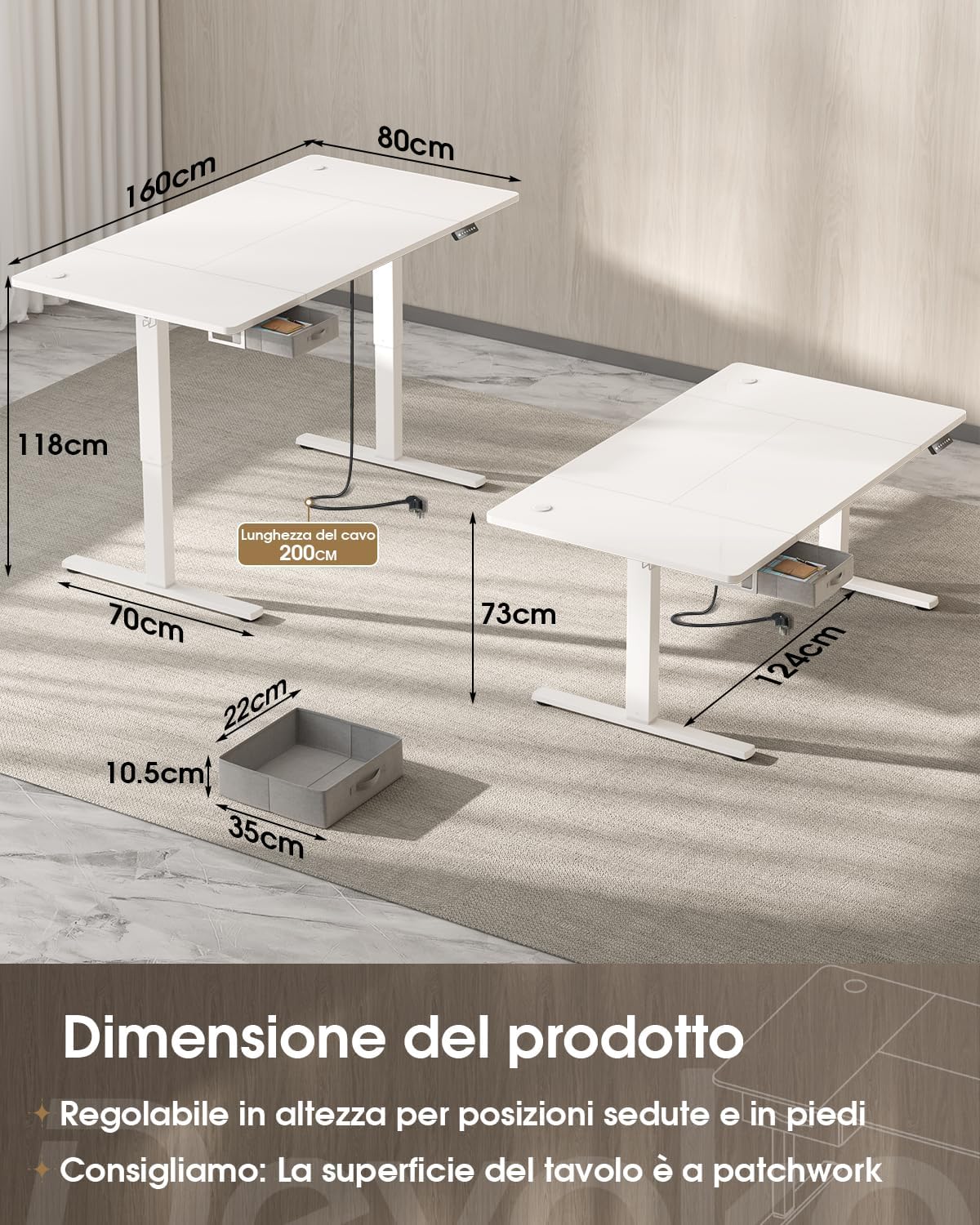
Image 9.1: Product dimensions and height adjustment range.

Image 9.2: Drawer dimensions and load capacity details.
10. Atilẹyin ọja ati Support
10.1 atilẹyin ọja Alaye
This Devoko product is covered by a standard manufacturer's warranty. Please refer to the warranty card included in your package for specific terms and conditions, or visit the official Devoko website for more details. Keep your proof of purchase for warranty claims.
10.2 Onibara Support
For any questions, technical assistance, or warranty claims, please contact Devoko customer support through the retailer where you purchased the product or visit the official Devoko webojula:
- Atilẹyin Ayelujara: Visit the Devoko Store on Amazon
- Imeeli: Tọkasi apoti ọja rẹ tabi osise naa website for the latest contact email.