
1. Ifihan
Thank you for choosing the IMGadgets Go 3-piece luggage set. This set includes a 20-inch carry-on, a 24-inch medium suitcase, and a 28-inch large suitcase, all crafted from durable ABS polycarbonate. Designed for modern travelers, this luggage features 360° spinner wheels, a retractable handle, a TSA-approved lock, and integrated GPS World Smart Tags for enhanced security and convenience. This manual provides essential information for the setup, operation, maintenance, and troubleshooting of your new luggage set.
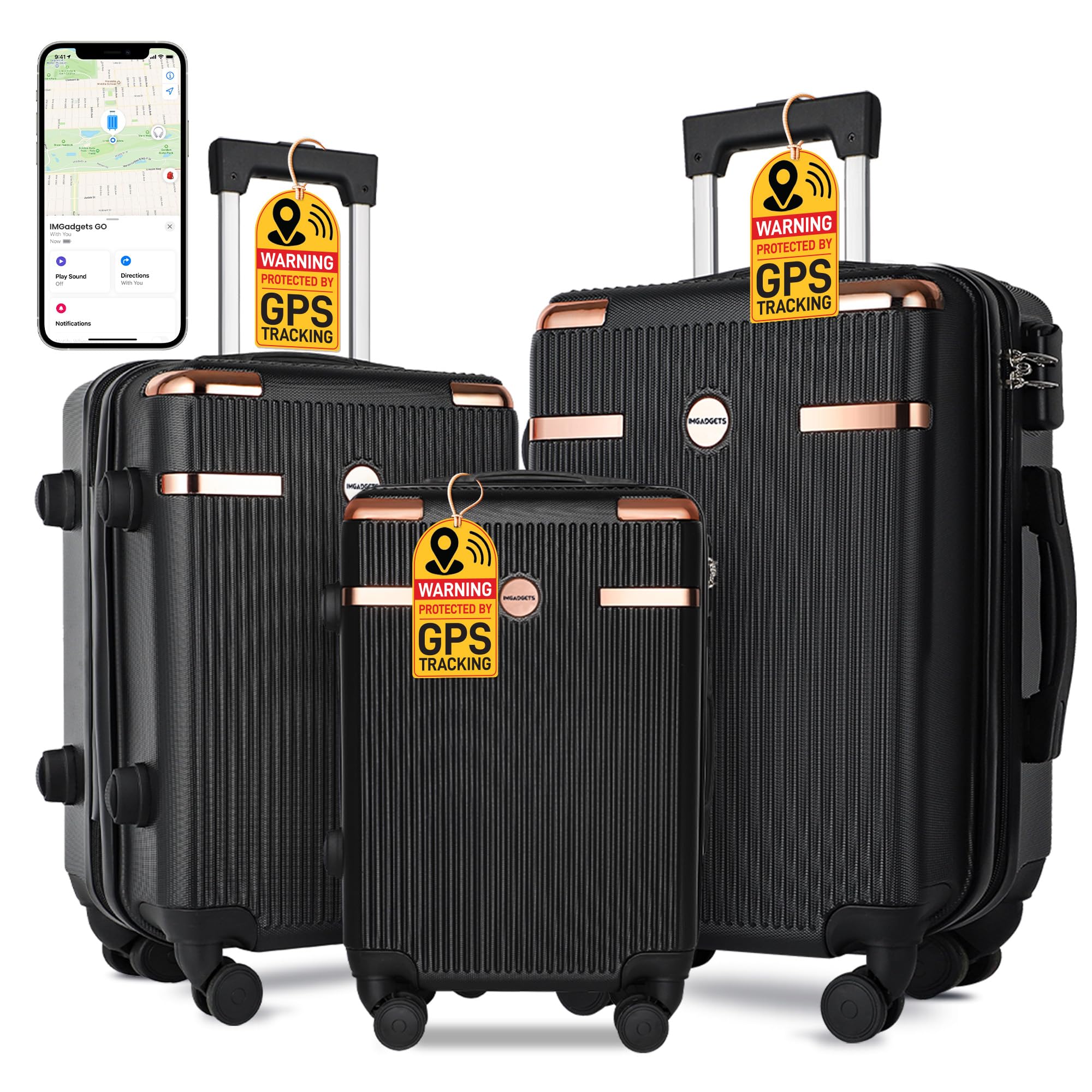
This image displays the complete IMGadgets Go 3-piece luggage set in black, featuring a 20-inch carry-on, a 24-inch medium checked suitcase, and a 28-inch large checked suitcase, suitable for various travel needs.
2. Eto
2.1 Ṣiṣii silẹ
Carefully remove all luggage pieces from their packaging. Inspect each piece for any signs of damage. The smaller suitcases are nested inside the larger ones for efficient storage and shipping. Separate them before use.
2.2 Setting the TSA-Approved Combination Lock
- A ti ṣeto titiipa naa si 0-0-0.
- Locate the reset button (a small, recessed button, usually on the side of the lock). Use a pen or a pointed object to press and hold this button.
- Nígbà tí o bá di bọ́tìnì ìtúntò mú, ṣètò àpapọ̀ nọ́mbà mẹ́ta tí o fẹ́ nípa yíyí àwọn dial náà.
- Tu bọtini atunto naa silẹ. Apapọ tuntun rẹ ti ṣeto bayi.
- Test the new combination to ensure it opens the lock. Scramble the dials to lock it again.
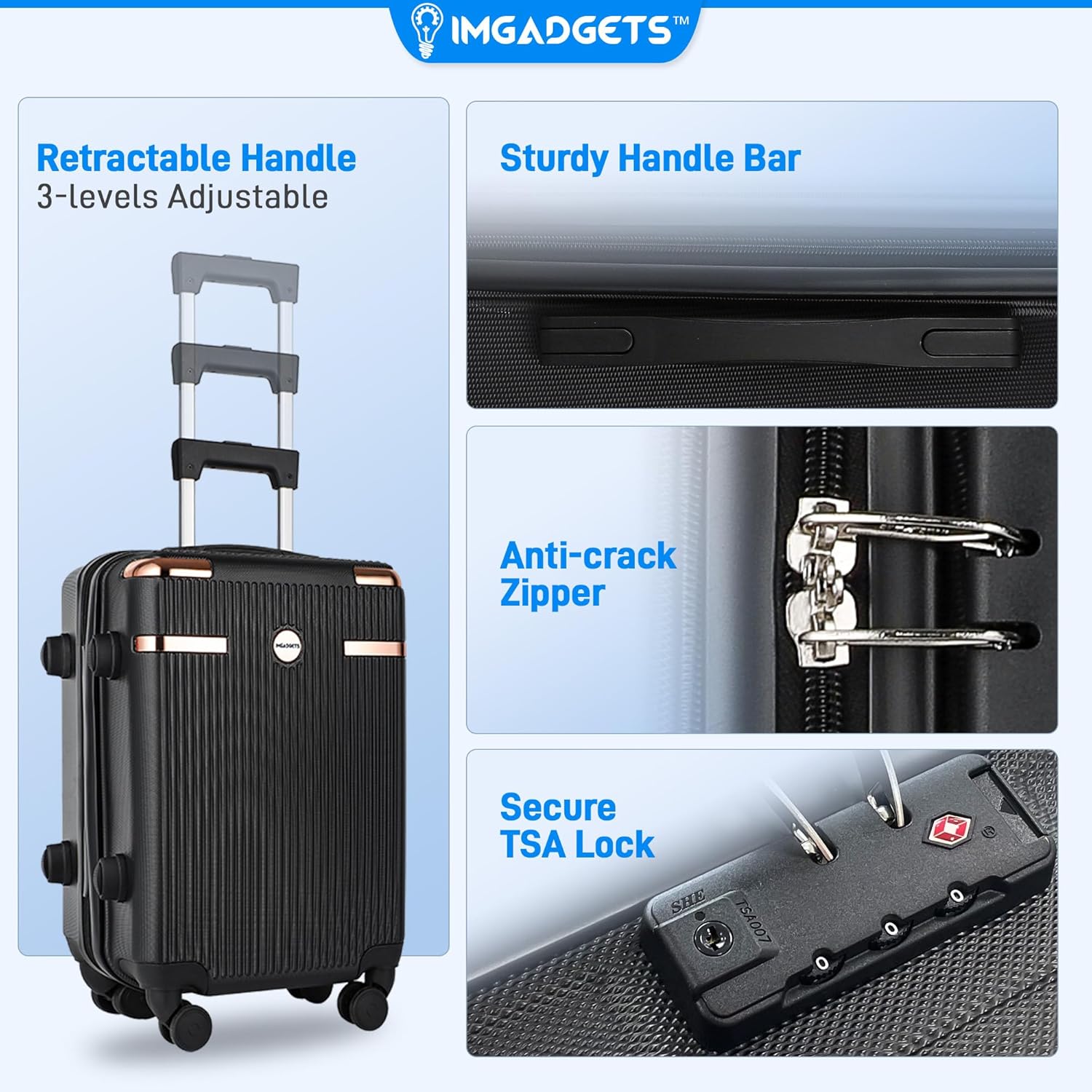
This image showcases three essential features: the retractable handle with 3-level adjustment for comfortable grip and control, the reinforced anti-crack zipper for enhanced security, and the integrated TSA-approved coded lock for secure travel.
2.3 Activating GPS World Smart Tags
Your luggage set includes three GPS World Smart Tags, one for each piece. These tags work exclusively with iOS devices via the Apple Find My network.
- Ensure your iOS device (iPhone, iPad, or Apple Watch) is updated to the latest software version.
- Open the Apple Find My app on your iOS device.
- Navigate to the 'Items' tab and tap 'Add Item'.
- Follow the on-screen instructions to pair each IMGadgets Go Smart Tag pẹlu ẹrọ rẹ.
- Once paired, you can name each tag (e.g., 'Carry-on Tag', 'Medium Suitcase Tag') for easy identification.
Awọn ọlọgbọn tags feature a replaceable battery that lasts up to 1 year, a 'Left Behind Reminder', and a built-in speaker for locating items nearby.

The image details the versatility of the IMGadgets Go World Smart Tags. Awọn wọnyi tags work with the Apple Find My network, offer built-in privacy, have a replaceable battery lasting up to 1 year, and include a 'Left Behind Reminder' and built-in speaker. They can be used for tracking luggage, keys, pets, and e-bikes.
This video demonstrates the key features of the IMGadgets Go 3-piece luggage set, including its durable construction, smooth-rolling spinner wheels, and the integrated GPS tracking functionality for enhanced security and peace of mind.
3. Awọn ilana Iṣiṣẹ
3.1 Using the 360° Spinner Wheels
The luggage is equipped with multi-directional 360° spinner wheels for effortless movement. To operate, simply push or pull the luggage in any direction. The wheels are designed for smooth, silent, and sturdy performance across various surfaces.

The image illustrates the advanced 360° dual spinner wheels, engineered for effortless maneuverability. These wheels are designed to be sturdy, silent, and smooth, performing well on diverse terrains including flat surfaces, grass, and even sand.
3.2 Adjusting the Retractable Handle
Each suitcase features a strong, retractable iron handle with adjustable height settings. To extend the handle, press the button located on the top of the handle and pull upwards. To retract, press the button again and push downwards until it locks into place. Adjust to a comfortable height for easy maneuvering.
3.3 Àkójọ ẹrù rẹ
The IMGadgets Go luggage offers a lightweight and spacious design. Utilize the internal cross straps to secure your clothing and prevent shifting during transit. An extra zippered mesh compartment is available for organizing smaller items, electronics, or toiletries. The interior is lined with durable polyester fabric.

The interior of the luggage is designed for optimal organization, featuring adjustable cross straps to secure belongings, an extra zippered mesh compartment for smaller items, and a durable polyester fabric lining.
3.4 Tracking Your Luggage with GPS Smart Tags
Once your GPS World Smart Tags are activated and paired with your iOS device, you can track the real-time location of your luggage using the Apple Find My app. This feature provides an extra layer of security and peace of mind, allowing you to monitor your bags anytime, anywhere.

This image illustrates the advanced anti-theft tracking capability provided by the three integrated GPS World Smart Tags. Users can track their luggage anytime and anywhere using a smartphone application, ensuring peace of mind during travel.
Ifihan fidio kanasing the IMGadgets Go luggage set in various travel scenarios, highlighting its ease of use, maneuverability, and robust design for a seamless travel experience.
4. Itọju
4.1 Fífọ ikarahun lile naa
To clean the ABS polycarbonate hardshell, wipe with a soft cloth dampened with mild soap and water. Avoid abrasive cleaners or solvents, as these can damage the surface. Dry thoroughly after cleaning.

The image highlights the robust construction of the luggage, featuring an ultra-tough ABS polycarbonate hardshell designed to be strong, durable, anti-scratch, and lightweight. An internal diagram shows the 3-layer thickened shell with wear-resistant, cushioning, and eco-friendly layers.
4.2 Ìtọ́jú Kẹ̀kẹ́ àti Sípà
Periodically check the spinner wheels for any debris or hair that might impede smooth rolling. Clean as necessary. For zippers, apply a silicone-based lubricant occasionally to ensure smooth operation, especially if they become stiff.
4.3 GPS Smart Tag Batiri Rirọpo
The GPS Smart Tags use a replaceable coin-cell battery (e.g., CR2032). When the battery level is low, your iOS device will notify you. To replace, carefully open the tag casing, remove the old battery, and insert a new one with the correct polarity. Close the casing ni aabo.
5. Laasigbotitusita
5.1 Lock Not Opening
- Àkópọ̀ tí kò tọ́: Ensure you are entering the correct 3-digit combination. If forgotten, you may need to contact customer support for assistance, as there is no universal override for TSA locks.
- Reset Button Stuck: Rí i dájú pé bọ́tìnì ìtúntò náà ti tú jáde pátápátá lẹ́yìn tí o bá ti ṣètò àpapọ̀ tuntun kan.
5.2 Awọn kẹkẹ Ko sẹsẹ larọwọto
- Idoti: Check for and remove any hair, lint, or debris caught in the wheel axles.
- Bibajẹ: Inspect wheels for physical damage. If a wheel is broken, contact customer support for replacement options.
5.3 GPS Smart Tag Not Tracking
- Batiri: Check the battery level of the smart tag in the Apple Find My app. Replace if low.
- Bluetooth/Network: Ensure Bluetooth is enabled on your iOS device and that the tag is within range of other Apple devices on the Find My network.
- Pipọpọ: Verify that the smart tag is correctly paired with your iOS device. If not, re-pair it following the setup instructions.
6. Awọn pato

This graphic provides a detailed size reference for each luggage piece: 20-inch (39L, 5.7 lbs), 24-inch (64L, 6.8 lbs), and 28-inch (97L, 7.9 lbs). It also lists key features like 360° spinner wheels, anti-crack zippers, and TSA coded locks.
| Ẹya ara ẹrọ | Ẹ̀kúnrẹ́rẹ́ |
|---|---|
| Nọmba awoṣe | LG3PC |
| Ohun elo Iru | Acrylonitrile Butadiene Styrene (ABS) |
| Ikarahun Iru | Lile |
| Kẹkẹ Iru | 360° Spinner (4 wheels per suitcase) |
| Titiipa Iru | TSA-Approved Combination Lock |
| Pataki Awọn ẹya ara ẹrọ | 3 GPS World Smart Tags (iOS Find My compatible), Retractable Iron Handle, Anti-crack Zippers |
| Omi Resistance Ipele | Omi sooro |
| 20" Carry-on Dimensions (L x W x H) | 13.8" x 9.1" x 19.3" (35cm x 23cm x 49cm) |
| 20" Carry-on Capacity / Weight | 39 L / 5.7 lbs (2.6 kg) |
| 24" Medium Suitcase Dimensions (L x W x H) | 16.1" x 10.6" x 23.2" (41cm x 27cm x 59cm) |
| 24" Medium Suitcase Capacity / Weight | 64 L / 6.8 lbs (3 kg) |
| 28" Large Suitcase Dimensions (L x W x H) | 18.5" x 11.8" x 27.2" (47cm x 30cm x 69cm) |
| 28" Large Suitcase Capacity / Weight | 97 L / 7.9 lbs (3.6 kg) |
| Àwọ̀ | Midnight Black |
7. atilẹyin ọja Information
IMGadgets products are manufactured to high-quality standards. For specific warranty details regarding your luggage set, please refer to the warranty card included with your purchase or visit the official IMGadgets webojula. Jeki ẹri rira rẹ fun eyikeyi awọn ibeere atilẹyin ọja.
8. Onibara Support
Should you have any questions, concerns, or require assistance with your IMGadgets Go Luggage Set, please contact our customer support team:
- Foonu: +1 647-797-3804
- Imeeli: clientcare@imgadgets.com
Our team is available to help you with product inquiries, technical support, and warranty services.
This video provides an in-depth look at the IMGadgets Go luggage set, focusing on its durability, spacious interior, and the advanced GPS tracking system that allows users to monitor their luggage location globally.